Audit Readiness Pipeline Template
Make audit readiness visible and predictable
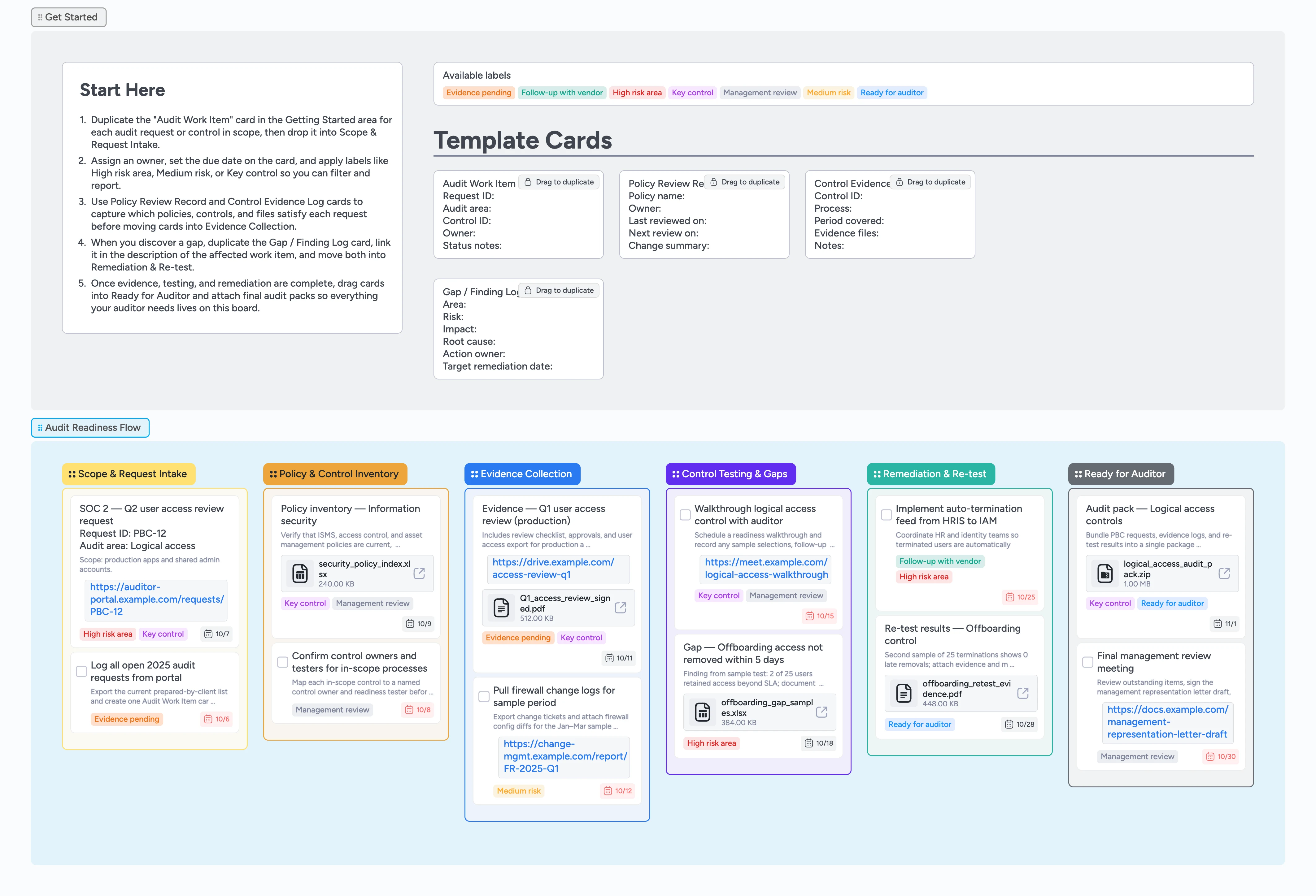
Compliance and finance teams often prep for external audits in email threads, spreadsheets, and portals, so it’s hard to see what’s truly ready. This pre-audit readiness pipeline pulls requests, controls, and evidence onto one canvas so you know what is ready before fieldwork starts. Start by duplicating the Audit Work Item micro-template, drop each card into Scope & Request Intake, and assign owners and due dates. As you attach policies, exports, and sign-offs, cards move through Policy & Control Inventory, Evidence Collection, Control Testing & Gaps, Remediation & Re-test, and Ready for Auditor. The result is a living Instaboard pipeline that replaces scattered spreadsheets with a walkthrough-ready audit readiness checklist.
- Centralize audit requests, controls, and evidence on one board
- Assign owners and due dates to every work item card
- Track gaps and remediation before the auditor arrives
- Attach policies, exports, and sign-offs to the right card
- Use labels to filter high-risk areas and key controls in one click
Capture each audit work item
Open the Getting Started section and duplicate the locked "Audit Work Item" card for every request on your audit PBC list. Drag each copy into the Scope & Request Intake list. Fill in Request ID, audit area, control ID, owner, and status notes so each card becomes the single place you track that request end to end. Assign an owner and set a due date from the card header. Apply labels like High risk area, Medium risk, or Key control so you can filter and sort by priority as the audit approaches.
Inventory policies and controls
In the Policy & Control Inventory column, duplicate the "Policy Review Record" card whenever you need to confirm a policy or control is audit-ready. Link each card back to the relevant Audit Work Item in the description so ownership stays obvious. Attach your current policy PDF, control narrative, or mapping spreadsheet to the card so auditors can open evidence from one place. Assign control owners and testers and adjust due dates as review timelines evolve. Move the related work items forward only when policies are current, approved, and stored where auditors can reach them.
Pro tip: Use the Management review label on cards that need leadership sign-off before the audit starts.
Collect and attach audit evidence
When you start pulling exports and reports, move cards into Evidence Collection and duplicate the "Control Evidence Log" template as needed. Use one card per control or request so you can attach user access exports, system logs, screenshots, and signed checklists without losing context. Add links to your audit portal or document repository in the card attachments instead of tracking URLs in a spreadsheet. Make sure every card has an assignee, due date, and at least one attachment so you can quickly spot gaps. As evidence lands, update status notes and adjust labels, for example flipping Evidence pending to Ready for auditor.
Pro tip: Mark cards Evidence pending or Ready for auditor so you can filter the column by readiness in one click.
Test controls and log gaps
As you run walkthroughs and sample tests, drag the relevant cards into Control Testing & Gaps. Capture what you tested, sample sizes, and results in the card description so auditors can see exactly what you did. When a test fails, duplicate the "Gap / Finding Log" micro-template, link it from the affected work item, and tag both cards High risk area. Assign remediation owners and due dates directly on the gap card so nothing gets lost between meetings. Keep testing tasks as task-type cards so you can check them off when re-tests pass.
Pro tip: Use comments on gap cards to keep auditor questions and internal discussion in one thread.
Remediate, re-test, and finalize the audit pack
Move gap cards into Remediation & Re-test as owners implement fixes and schedule follow-up testing. Attach new evidence exports or approvals to the same cards so the full history stays together. Once re-tests pass, update status notes and move the underlying work items into Ready for Auditor. Create a final "Audit pack" card per major area, attach zipped evidence bundles, and tag them Ready for auditor and Key control. Open the board in pre-audit meetings and filter on Ready for auditor or High risk area so the column becomes your live audit readiness checklist.
What’s inside
Start-Here audit lane
A Getting Started section with a Start-Here card and locked Audit Work Item micro-template so you can turn your PBC list into trackable cards in a few clicks.
Audit Readiness Flow
Six pipeline stages from Scope & Request Intake through Policy & Control Inventory, Evidence Collection, Control Testing & Gaps, Remediation & Re-test, and Ready for Auditor where you drag cards left to right as readiness improves.
Micro-templates for controls and evidence
Reusable cards for Audit Work Item, Policy Review Record, Control Evidence Log, and Gap / Finding Log that you duplicate whenever you capture a new control, policy review, evidence set, or gap.
Labels for risk and readiness
Built-in labels like High risk area, Key control, Evidence pending, Ready for auditor, Follow-up with vendor, and Management review so you can slice the board by priority or filter to just critical controls.
Filled example board
Realistic demo cards with assignees, due dates, labels, and attached evidence files so you can see how to attach evidence, apply labels, and move cards for SOC 2, ISO 27001, or other external audits.
Why this works
- Turns your audit readiness checklist into a visual pipeline you can walk column by column
- Keeps ownership, due dates, and evidence for each request in one card
- Surfaces high-risk controls and open gaps with labels and stages you can filter in one click
- Captures remediation history so you can show before-and-after evidence to auditors from a single card
- Reduces last-minute scramble by making a live, shared board the place everyone updates audit readiness long before fieldwork starts
FAQ
Can this template work for different audit frameworks?
Yes. The stages and micro-templates are framework-agnostic, so you can use the same board for SOC 2, ISO 27001, HIPAA, or internal audits by adjusting labels and card text.
What if our auditor uses their own portal?
Keep using the auditor’s portal for uploads, but track each request as an Audit Work Item card and attach links back to the portal so you can see status and ownership without juggling spreadsheets.
How do we handle recurring audits or multiple entities?
Create separate sections or boards per entity or year, and use labels like High risk area or Ready for auditor to filter within each cycle.
Who should own this board day to day?
Typically the compliance, risk, or finance lead owns the board, but control owners, IT, and process owners should all collaborate here by updating evidence cards, completing task cards, and commenting in real time as they provide evidence and remediation.