GDPR DPIA Tracker Pipeline Template
Make every GDPR DPIA trackable and repeatable
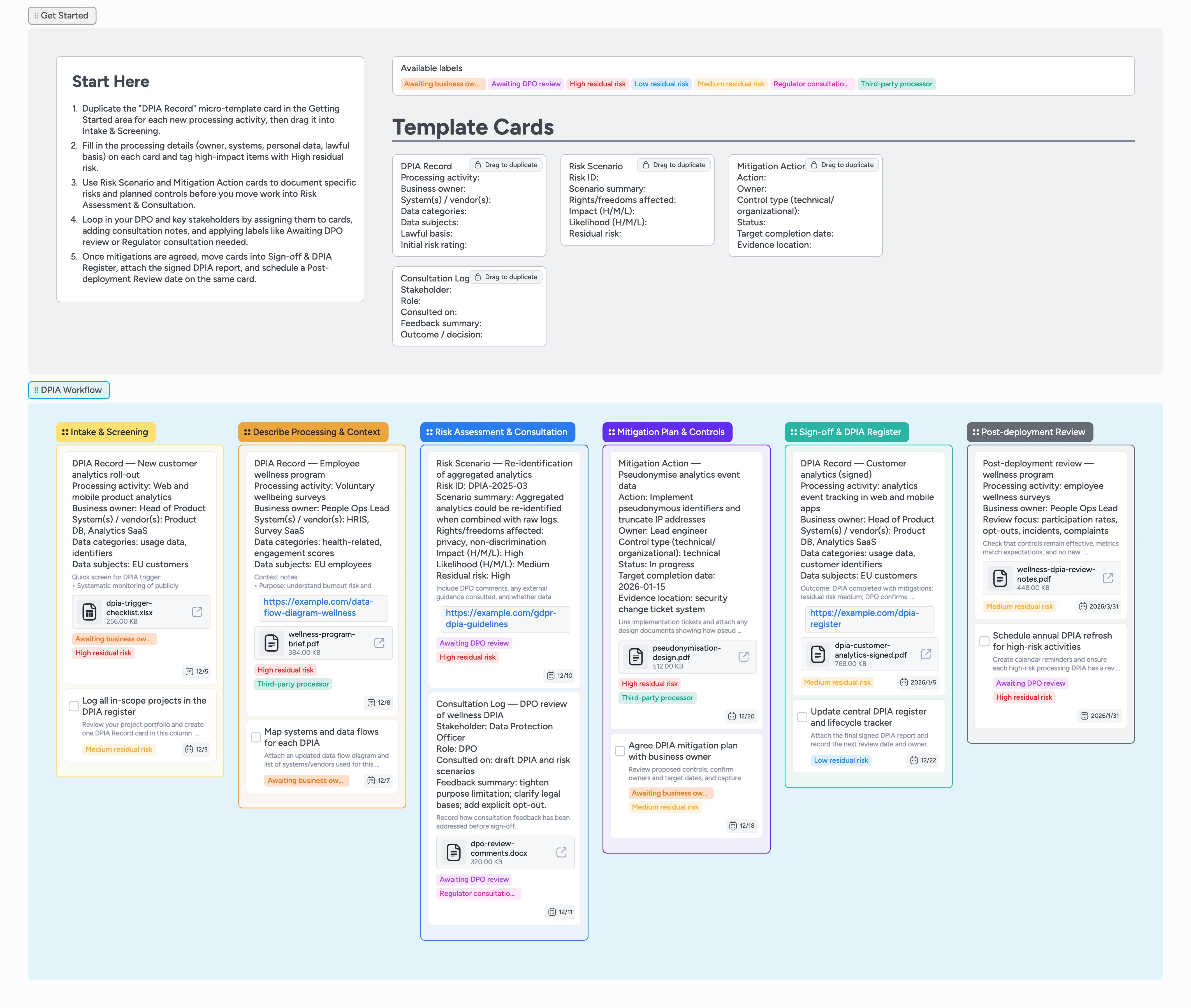
Small teams often run DPIAs in scattered documents and email threads, so it is hard to see which processing activities are assessed, signed off, or overdue. This GDPR DPIA Tracker Pipeline pulls intake, context, risks, mitigations, and sign-offs onto one canvas you can walk column by column. Start by duplicating the DPIA Record micro-template, drop each card into Intake & Screening, and assign owners, due dates, and risk labels. As you describe processing, document risk scenarios, and agree mitigations, cards move through Describe Processing & Context, Risk Assessment & Consultation, Mitigation Plan & Controls, Sign-off & DPIA Register, and Post-deployment Review. The result is a living Instaboard pipeline that replaces static checklists with a repeatable GDPR DPIA workflow.
- Centralize all GDPR DPIA work items on one visual pipeline
- Standardize how you capture processing context, risks, and mitigations
- Assign owners, due dates, and labels to every DPIA record
- Attach DPIA reports, risk registers, and design docs to the right cards
- Reuse micro-templates instead of rewriting DPIA fields from scratch
Capture each processing activity and screen for DPIA
Start in the Getting Started section at the top of the board and duplicate the locked "DPIA Record" micro-template card for every processing activity you want to assess. Drag each copy into the Intake & Screening column so you have one card per activity. Fill in processing activity, business owner, systems or vendors, data categories, data subjects, and lawful basis so each card becomes a complete DPIA record. Assign an owner and set a due date on every card to make timelines visible. Apply labels like High residual risk, Medium residual risk, or Third-party processor so you can quickly filter to higher-risk items when you review the pipeline.
Describe processing context and data flows
Move cards into Describe Processing & Context once you have confirmed a DPIA is needed. For each card, open it and expand the description field to capture purposes, data flows, and any special category data involved, using the example DPIA Record cards as a guide. Use the card’s attachment panel to add project briefs, architecture diagrams, or vendor contracts so all context lives on the card instead of in a separate folder. When you rely on processors or sub-processors, tag cards with Third-party processor and link to their data processing agreements from the same card. Keep assignees and due dates up to date in the card header so business owners and privacy teams stay aligned as the project evolves.
Pro tip: Use card comments to note where guidance from your DPO or legal team changes how you frame the processing activity.
Document risk scenarios and stakeholder consultation
As you identify potential impacts on data subjects, duplicate the Risk Scenario micro-template and attach each new card to the relevant DPIA Record in the description. In each Risk Scenario card, fill in the fields for scenario summary, affected rights and freedoms, and initial impact and likelihood ratings so risk levels are easy to compare at a glance. When you consult stakeholders such as your DPO, security lead, or works council, duplicate a Consultation Log card and record who you spoke with, when, and what they recommended directly in its fields and comments. Assign consultation cards to the right people and set due dates so reviews do not stall. Apply labels like Awaiting DPO review or Regulator consultation needed to surface items that require extra scrutiny.
Pro tip: Filter the board by Awaiting DPO review to prepare for dedicated review sessions with your data protection officer.
Agree mitigations and move to sign-off
When you are ready to propose controls, duplicate the Mitigation Action micro-template under each DPIA Record and move those cards into Mitigation Plan & Controls. For each action, capture the control description, owner, control type, and target completion date, then assign the card to the person responsible. Attach implementation tickets, design documents, or policy updates so you can prove how risks are reduced. As mitigations are delivered, update card status and change risk labels from High residual risk to Medium or Low residual risk. Once mitigations and reviews are agreed, move the main DPIA Record cards into Sign-off & DPIA Register and attach the signed DPIA report file and any final risk register export.
Pro tip: Keep one DPIA Record card per processing activity as the single source of truth and link related Risk Scenario and Mitigation Action cards to it.
Track ongoing reviews and refresh high-risk DPIAs
Use the Post-deployment Review column to plan and record periodic reviews for high-risk processing activities. Drag signed-off DPIA Record cards here when you schedule a follow-up, then open each card and add review notes to the description as you check incidents, complaints, or unexpected use of data. Attach updated metrics, incident logs, or monitoring reports so you can demonstrate how controls perform over time from the same card. For each high-risk activity, assign a review owner and set a future due date in the card header to trigger the next assessment. As reviews uncover new risks or required mitigations, create new Risk Scenario and Mitigation Action cards and move the DPIA Record back through the pipeline so the lifecycle stays auditable.
What’s inside
Start-Here DPIA lane
A Getting Started section with a Start-Here card and locked DPIA Record micro-template so you can turn each processing activity into a trackable card in a few clicks.
DPIA Workflow pipeline
Six stages from Intake & Screening through Describe Processing & Context, Risk Assessment & Consultation, Mitigation Plan & Controls, Sign-off & DPIA Register, and Post-deployment Review so you can see where every DPIA sits.
Micro-templates for DPIA records
Reusable cards for DPIA Record, Risk Scenario, Mitigation Action, and Consultation Log that you duplicate whenever you capture a new processing activity, risk scenario, control, or stakeholder review.
Labels for risk and review status
Built-in labels like High residual risk, Awaiting DPO review, Regulator consultation needed, and Third-party processor so you can filter by risk level and workflow status.
Filled DPIA example board
Realistic demo cards with assignees, due dates, labels, and attached DPIA-related files so your team can see how to structure records, link evidence, and move work left to right.
Why this works
- Turns abstract GDPR DPIA guidance into a concrete, stage-based workflow
- Keeps context, risks, mitigations, and sign-offs for each processing activity in a single card-centric trail
- Makes high-risk processing and stalled reviews visible with labels and columns you can filter
- Encourages collaboration between business owners, DPOs, and engineers through shared cards, comments, and attachments
- Supports DPIA lifecycle management by giving you a clear place to plan and record post-deployment reviews
FAQ
Who is this GDPR DPIA board for?
This template is designed for data protection officers, privacy leads, and operational owners who need a practical way to track GDPR DPIAs across multiple projects in a small team.
Can we adapt this for non-EU privacy laws?
Yes. The stages, micro-templates, and labels follow GDPR DPIA concepts but can be adapted for similar assessments under other privacy laws by adjusting card text and labels.
Where should we store the final DPIA reports?
Attach final DPIA reports, risk registers, and key decisions directly to the DPIA Record cards in Sign-off & DPIA Register, and link to any external document repository if you also keep files there.
How many DPIAs should live on one board?
Most teams track a quarter or a year of DPIAs on one board and then open a new board when the pipeline feels crowded, keeping high-risk or ongoing activities in Post-deployment Review.