SOX Control Testing Cycle Pipeline Template
Make your SOX testing cycle visible
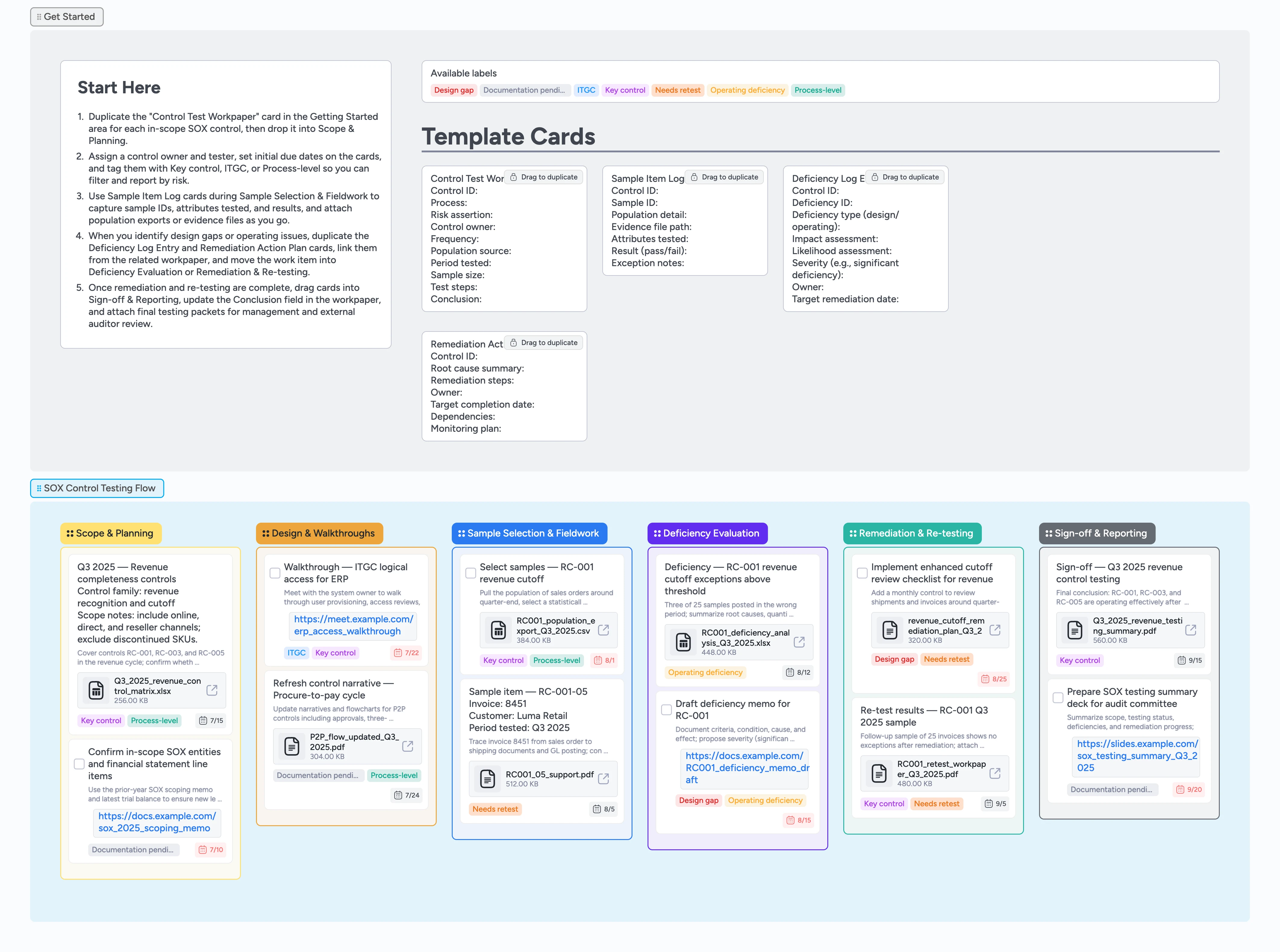
SOX managers and internal audit leads often juggle control testing in spreadsheets, ticketing tools, and email, which makes it hard to see what is truly tested, deficient, or ready for sign-off. This Instaboard pipeline pulls every in-scope SOX control into one canvas so you can see status from planning through remediation. Start by duplicating the Control Test Workpaper micro-template and dropping one card per control into Scope & Planning, then tag each with Key control, ITGC, or Process-level. As you move cards through Design & Walkthroughs, Sample Selection & Fieldwork, Deficiency Evaluation, Remediation & Re-testing, and Sign-off & Reporting, attached workpapers and labels make the entire SOX testing cycle easy to review with management and auditors.
- See every in-scope SOX control from planning through sign-off on one board
- Duplicate Control Test Workpaper, Sample Item Log, Deficiency Log Entry, and Remediation Action Plan cards so every test follows the same structure
- Attach populations, samples, evidence files, and deficiency memos directly to the correct control card
- Use labels like Key control, ITGC, Process-level, Design gap, and Operating deficiency to filter reviews before audit committee or close-the-books meetings
- Move cards left to right so management and auditors can visually walk the SOX testing cycle
Start in Scope & Planning with one control
Open the Getting Started section and read the Start-Here card so the workflow is clear. Duplicate the Control Test Workpaper micro-template for each in-scope SOX control and drop those cards into the Scope & Planning column. Fill in Control ID, process, risk assertion, and population source directly on the card so it becomes the canonical workpaper shell. Assign a control owner and tester from the card header, set an initial due date, and apply labels like Key control, ITGC, or Process-level so you can later filter by risk and control type.
Document design and walkthroughs
As you perform design reviews and walkthroughs, drag the relevant control cards into Design & Walkthroughs so the board visually signals that design testing has started. Use the description field on the Control Test Workpaper card to summarize the control design, key steps, and evidence locations. Attach updated narratives, flowcharts, and meeting recordings so anyone reviewing the card can reconstruct the walkthrough without hunting through folders. Where a design issue emerges, duplicate a Deficiency Log Entry card, link it from the workpaper, and tag the workpaper Design gap so the issue is obvious in later reviews.
Pro tip: Keep one Deficiency Log Entry card per control deficiency so remediation and sign-off are easy to track.
Select samples and log fieldwork
When you are ready to test operating effectiveness, move cards into Sample Selection & Fieldwork. Attach population exports, query results, or system reports to the control card, then duplicate Sample Item Log cards for each sample you select. On each sample card, capture sample ID, population detail, attributes tested, and results, and link or attach the specific evidence files you reviewed. Use task-type cards for to-dos like "Pull population for RC-001" or "Review Q3 user access removals" so you can check them off as you finish execution.
Evaluate deficiencies and plan remediation
As exceptions surface, drag the workpaper into Deficiency Evaluation and update the related Deficiency Log Entry card. Document impact, likelihood, and proposed severity directly on the deficiency card so management can weigh in by commenting inline instead of sending separate emails. Apply labels like Operating deficiency and Design gap to flag the nature of the issue. When remediation is needed, duplicate a Remediation Action Plan card, assign an owner, and set a target completion date. Link the remediation card back from the workpaper so the control, deficiency, and fix stay connected.
Pro tip: Use Needs retest on cards that require follow-up testing so retest scope is easy to filter at quarter-end.
Re-test controls and finalize sign-off
Once remediation steps are implemented, move affected controls into Remediation & Re-testing and update both the Remediation Action Plan and Sample Item Log cards with your follow-up results. Attach new evidence exports or sign-offs so the before-and-after story is fully documented. When you conclude that a control is operating effectively, drag the main workpaper card into Sign-off & Reporting, update the Conclusion field, and attach the final testing summary PDF. During management and auditor meetings, filter the board by labels like Key control or Operating deficiency and walk left to right on the board so everyone can see which controls are in scope, remediated, or awaiting retest.
What’s inside
Start-Here testing lane
A Getting Started section with a Start-Here card and locked micro-templates so you can turn your SOX control list into structured workpaper cards in a few minutes.
SOX Control Testing Flow
Six columns — Scope & Planning, Design & Walkthroughs, Sample Selection & Fieldwork, Deficiency Evaluation, Remediation & Re-testing, and Sign-off & Reporting — that mirror the full SOX control testing cycle.
Workpaper and sample micro-templates
Reusable cards for Control Test Workpaper and Sample Item Log so every control and sample uses the same fields for population source, sample size, attributes tested, and conclusion instead of reinventing Excel tabs each quarter.
Deficiency and remediation trackers
Deficiency Log Entry and Remediation Action Plan micro-templates that capture severity, owners, remediation steps, and target dates without inventing a new format every quarter.
Labels tuned for SOX risk
Built-in labels like Key control, ITGC, Process-level, Design gap, Operating deficiency, Needs retest, and Documentation pending so you can slice the board by risk and remediation status.
Filled example testing cycle
Review a filled revenue completeness control card to see how owners, dates, and attached workpapers flow from scoping through sample selection, deficiency evaluation, remediation, re-testing, and final sign-off, then duplicate the pattern for your own controls.
Why this works
- Keeps every SOX control test, sample, deficiency, and remediation step in one visual pipeline
- Makes ownership, due dates, and risk level obvious with assigned cards, labels, and stages
- Encodes your SOX testing methodology into repeatable micro-templates so new team members ramp quickly
- Surfaces design and operating issues early so remediation and re-testing stay on track before year-end sign-off
- Gives management and auditors a board they can literally walk left to right to understand testing status
FAQ
Who should own this SOX testing board?
Typically the SOX program manager or internal audit lead owns the board, while control owners, IT, and process owners collaborate by updating workpaper cards, completing tasks, and attaching evidence as they finish testing.
Can we use this template for quarterly and annual SOX cycles?
Yes. You can duplicate the board per year or quarter, or add sections by period within a single board. The same stages and micro-templates work for interim, rollforward, and year-end testing.
Does this align with how external auditors test controls?
The stages mirror common SOX testing phases — scoping, design evaluation, walkthroughs, sample testing, deficiency evaluation, remediation, and sign-off — while leaving room to adapt labels and card text to your firm’s methodology.
How should we handle many controls across processes?
Use one Control Test Workpaper card per control and apply labels like Process-level, ITGC, or Key control. You can also group related controls with tags or by using separate sections per process while keeping the same pipeline stages.