ML Model Release Pipeline Template
Ship ML models safely, on one shared board
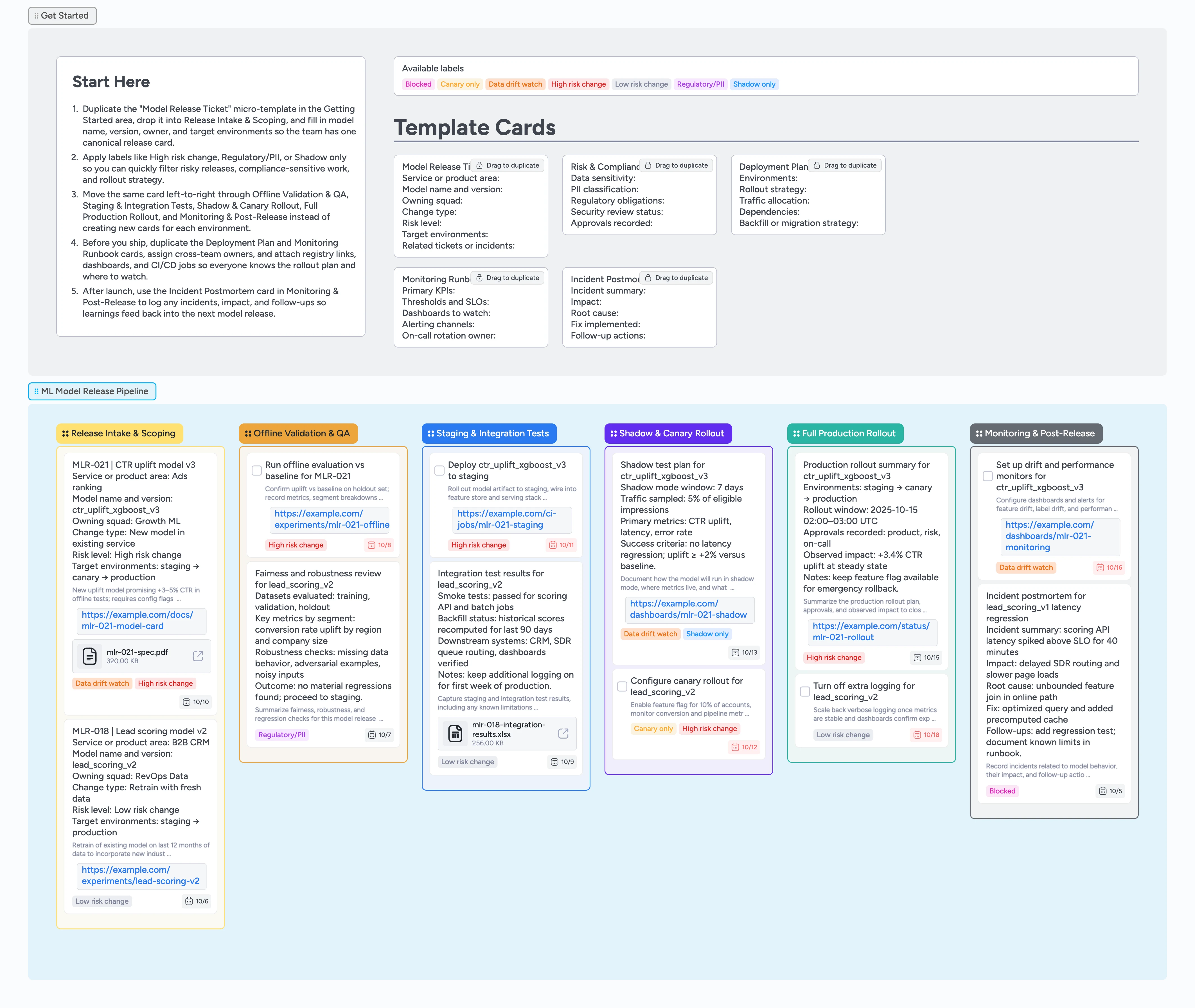
Model launches often live in half-finished docs, Slack threads, and CI logs that only a few people understand. This Instaboard template turns your ML model release process into a clear, six-stage pipeline that every data scientist, ML engineer, and platform owner can see at a glance. Start with a duplicate-locked Model Release Ticket, then move that same card from Release Intake & Scoping through Offline Validation & QA, Staging & Integration Tests, Shadow & Canary Rollout, Full Production Rollout, and Monitoring & Post-Release. Along the way you’ll capture risk and compliance details, deployment plans, monitoring runbooks, and incident postmortems directly on the cards so nothing gets lost between versions.
- Run every model release through the same gated stages, from intake to post-release monitoring
- Turn scattered docs and Slack threads into duplicate-locked release tickets, checklists, and runbooks
- Tag releases by risk level, data sensitivity, and rollout strategy so you can filter production changes in seconds
- Attach model cards, experiment dashboards, CI/CD jobs, and registry links directly to each release
- Give on-call teams a clear rollback and incident trail tied to the exact model version in production
Create your first release ticket
Start in the Get Started section, duplicate the Model Release Ticket card, drop it into Release Intake & Scoping, and fill in model name, version, owner, change type, and target environments so the team has one canonical card for this release.
Capture risk, approvals, and offline validation
Apply High risk change, Low risk change, Regulatory/PII, or other labels to the release card so its risk profile is obvious in every stage. Duplicate the Risk & Compliance Checklist card, attach your model card, fairness report, and security notes, and assign stakeholders for sign-off. As you complete offline experiments, add links to evaluation notebooks or dashboards, and update the card description or attached checklist so the baseline vs candidate comparison is easy to audit later.
Prove the model in staging and shadow modes
When you move the card into Offline Validation & QA and then Staging & Integration Tests, spin up Deployment Plan cards to outline environments, rollout strategy, and dependencies for this model. Attach CI job runs, integration test results, and sample logs to those cards, and keep owners and due dates current. Once staging looks clean, drag the release card into Shadow & Canary Rollout, document traffic splits and thresholds in the Deployment Plan, and link the relevant dashboards so everyone can watch metrics without hunting through tools.
Roll out to production with a clear plan
After shadow/canary metrics pass your thresholds, move the release card into Full Production Rollout and confirm approvals on the Risk & Compliance Checklist. Update the Deployment Plan card with the final go-live window, attach any rollout checklists, and @mention on-call owners so they are ready. As production traffic ramps, note observed impact and keep the card tags and description updated so you can later search for all High risk changes that shipped in a given week.
Monitor, respond, and learn from incidents
Once the model is live, keep the card in Monitoring & Post-Release and duplicate the Monitoring Runbook card to list KPIs, SLOs, dashboards, and alerting channels for this model. Attach links to drift and performance dashboards, and add Data drift watch tags where appropriate. If an issue occurs, duplicate the Incident Postmortem card, log impact and root cause, attach logs or dashboards, and assign follow-up tasks so future releases benefit from what you learned.
What’s inside
Start-Here release strip
Duplicate-locked Model Release Ticket, Risk & Compliance Checklist, Deployment Plan, Monitoring Runbook, and Incident Postmortem cards sit in the Getting Started area so every model follows the same fields and release hygiene.
Six-stage model release pipeline
Columns cover Release Intake & Scoping, Offline Validation & QA, Staging & Integration Tests, Shadow & Canary Rollout, Full Production Rollout, and Monitoring & Post-Release so the whole team sees exactly where each model version sits.
Risk and rollout labels
High risk change, Low risk change, Regulatory/PII, Shadow only, Canary only, Data drift watch, and Blocked labels help you filter the board by risk profile, compliance needs, and rollout strategy in one click.
Deployment and monitoring runbooks
Dedicated Deployment Plan and Monitoring Runbook micro-templates capture environments, rollout steps, dependencies, KPIs, SLOs, dashboards, and alerting channels so launches stay predictable and debuggable.
Realistic demo releases
Sample cards for an ads CTR uplift model and a B2B lead scoring model show how to attach experiment reports, integration test results, dashboards, and incident summaries with owners and due dates.
Why this works
- Enforces a consistent release path for every model version without heavy process overhead
- Keeps risk, approvals, rollout steps, and monitoring details attached to the exact release card instead of scattered across tools
- Makes it easy to filter for sensitive or high-risk changes by labels like Regulatory/PII or High risk change
- Gives on-call engineers an immediately usable view of what shipped, how it was validated, and where to roll back if needed
- Builds an institutional memory of incidents and postmortems tied directly to the models that caused them
FAQ
Who is this template for?
This template is built for small ML teams—data scientists, ML engineers, and MLOps or platform owners—who need a lightweight but structured way to move models from notebooks into production without losing context or approvals.
Can we customize the stages or labels?
Yes. Rename stages to match your own release phases, add or remove columns, and edit the label set so it reflects your risk taxonomy, compliance categories, and rollout patterns while keeping the core Start-Here strip and micro-templates intact.
How does this work with our existing CI/CD or model registry?
Continue using your preferred CI/CD system and model registry, but link runs, artifacts, and registry entries to each Model Release Ticket or Deployment Plan card. The board becomes the human-readable control panel that ties together jobs, approvals, and monitoring views across tools.
What if we release many small model updates?
Duplicate the Model Release Ticket for each meaningful change—a new architecture, major retrain, or risk level change—and group smaller tweaks on a single card when they share the same rollout and monitoring plan. You can filter by tags like High risk change or Regulatory/PII to quickly find the releases that matter most.