Data Warehouse Change Requests Template
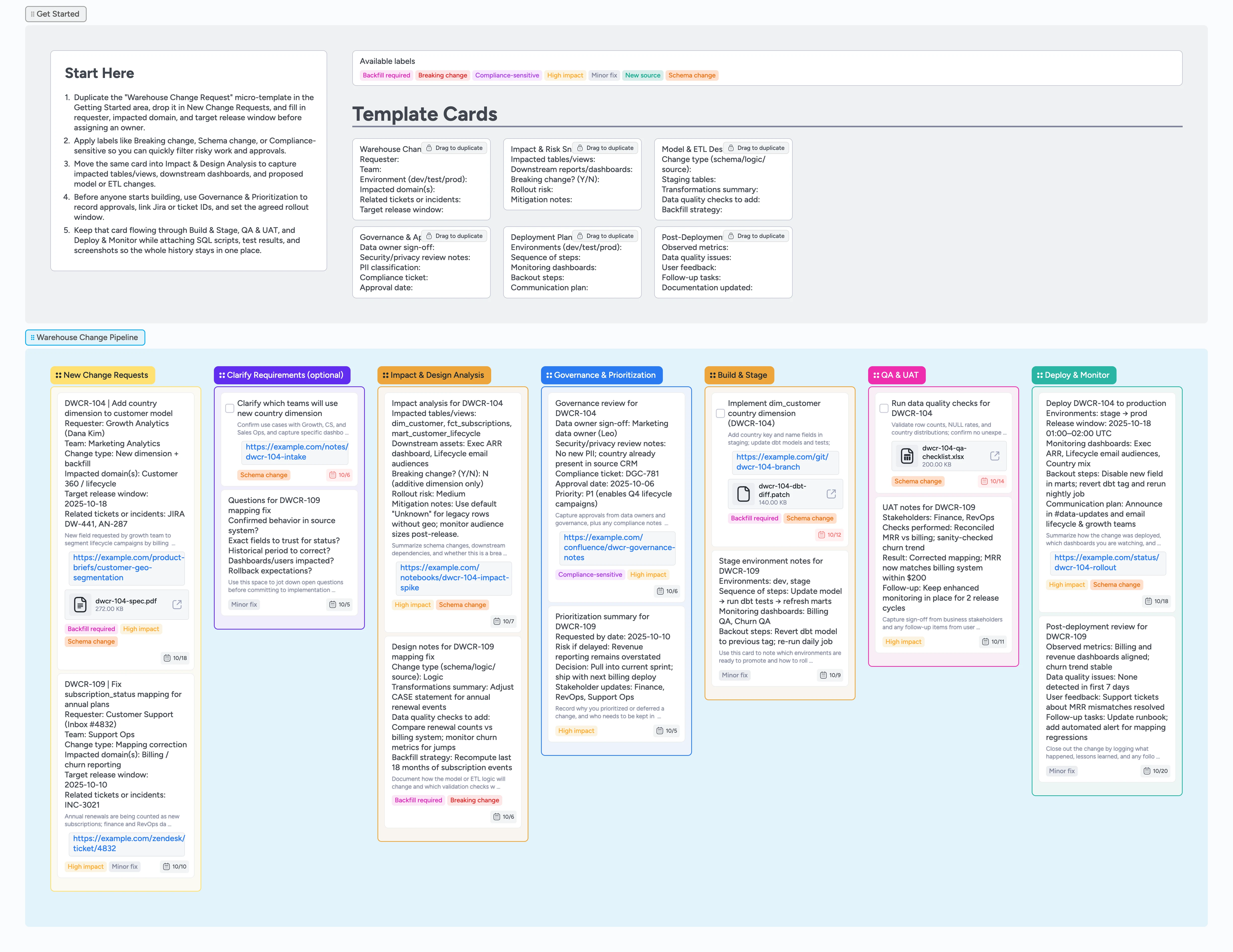
Run data warehouse changes without surprises
When schema tweaks, new sources, and emergency fixes all hit the data team at once, it is easy for risky changes to slip through with little context or review. This template turns data warehouse change control into a single Instaboard pipeline: every request starts from a structured Warehouse Change Request card, picks up impact and risk analysis, and moves through governance, build, QA, and deployment on one board. Labels highlight breaking changes and compliance-sensitive work, while attachments keep specs, SQL diffs, and QA evidence on the same card. The result is a living change log that keeps analytics engineers, data governance, and business stakeholders aligned.
- Standardize change intake with duplicate-locked Warehouse Change Request cards
- See every change move left-to-right from intake through deployment
- Keep impact analysis, governance approvals, and build notes on the same card
- Attach specs, SQL scripts, and QA files directly to each request
Start in New Change Requests
Begin by duplicating the Warehouse Change Request card in the Getting Started area and dropping it into the New Change Requests list. Fill in the requester, team, environment, impacted domains, related tickets, and target release window so the card tells the full story. Assign the analytics engineer or data platform owner who will shepherd the change and set a due date that matches the agreed rollout window. Apply labels like Breaking change, Schema change, or Compliance-sensitive so risky work can be filtered quickly. Attach any specs, screenshots, or incident links so reviewers are not hunting through email.
Capture impact and design before building
Once a request is logged, move the card into Impact & Design Analysis and duplicate the Impact & Risk Snapshot and Model & ETL Design Notes micro-templates. Use them to list impacted tables and views, downstream dashboards, change type, and the data quality checks you plan to add. Note whether the change is breaking or additive and record any backfill strategy, including how much history you will recompute. Tag Backfill required or High impact when the blast radius is large so the team can schedule carefully. Keep links to notebooks, diagrams, or dbt diffs attached directly on the card.
Run governance and prioritize work
When the design feels solid, drag the card into Governance & Prioritization and duplicate the Governance & Approval template. Record data owner sign-off, privacy and security review notes, PII classification, and any compliance tickets. Update the card description with a short prioritization summary that explains risk if delayed and which teams depend on the change. Set or adjust the due date to the committed release window and ensure the right owners are assigned. Use labels like Compliance-sensitive and High impact so governance reviews and sprint planning can filter for the work that matters most.
Pro tip: If a change does not need formal governance, you can still use this lane to document why it was fast-tracked.
Build in stage and prove it in QA
Move the card to Build & Stage once implementation begins and duplicate the Deployment Plan template to outline environments, steps, monitoring dashboards, backout steps, and communication plans. Attach Git branches, dbt diffs, or migration scripts so reviewers see exactly what is shipping. When staging is ready, drag the card into QA & UAT and create data quality and UAT cards that assign checks to specific teammates. Upload QA checklists, exports, or comparison files so evidence stays on the board. Keep the due date aligned with the release window and update tags if the change turns into a Breaking change or requires extended backfill.
Pro tip: Indent smaller QA tasks under a main QA card to show hierarchy without cluttering the list.
Deploy, monitor, and close the loop
As you roll out to production, move the card into Deploy & Monitor and update the Deployment Plan body with the actual release window and any deviations. Attach monitoring dashboards or status pages so the team can quickly inspect metrics after deployment. After the first checks pass, duplicate the Post-Deployment Review template to log observed metrics, data quality issues, user feedback, and follow-up tasks. Assign owners to any follow-up cards and adjust due dates so they do not get lost. When the change is stable and follow-ups are scheduled, you can archive subtasks while keeping the main request card as a clean audit trail.
What’s inside
Warehouse Change Request micro-template
A duplicate-locked card that captures requester, impacted domains, environment, related tickets, and target release window so every change enters the pipeline with the same structure.
Impact & Design Analysis stage
A lane dedicated to summarizing impacted tables and views, downstream dashboards, breaking vs additive changes, and ETL design notes before work starts.
Governance & Prioritization lane
Cards for data owner sign-off, security and privacy review notes, compliance tickets, and priority decisions to keep risk, approvals, and timing in one place.
Build, QA & UAT, Deploy lists
Clear lists that walk each change through build and staging, data quality checks, UAT feedback, production rollout, and post-deployment review without spawning new tickets.
Risk and scope labels
Reusable labels like Breaking change, Schema change, New source, Backfill required, and Compliance-sensitive to filter the board by risk and effort.
Why this works
- Reduces change risk by forcing impact, design, and governance conversations before implementation begins
- Keeps every change visible from intake through deployment so stakeholders can see status without digging through tickets
- Pairs technical details, QA evidence, and approvals on a single card so audit trails are easy to review
- Allows small teams to manage many concurrent changes by moving cards left-to-right and filtering by risk labels
FAQ
Who is this template for?
This template is designed for data platform and analytics teams that manage schema changes, new data sources, and warehouse fixes, along with the product, finance, or marketing partners who depend on them.
Can it handle both small fixes and large projects?
Yes. Use labels like Minor fix and High impact plus clear due dates to distinguish quick mapping fixes from multi-step model changes, while still running both through the same pipeline.
How does this template help with audit and compliance?
Cards keep impact analysis, approvals, and deployment notes attached in one place, while labels like Compliance-sensitive and Breaking change make it easy to surface changes that may need extra documentation.
Do we have to mirror our ticketing system here?
No. Continue using your existing ticketing tool for IDs if you like—just reference the ticket in the card and treat this Instaboard pipeline as the shared visual map and change log.