Event Run‑of‑Show Pipeline Template
Run every event from one live board
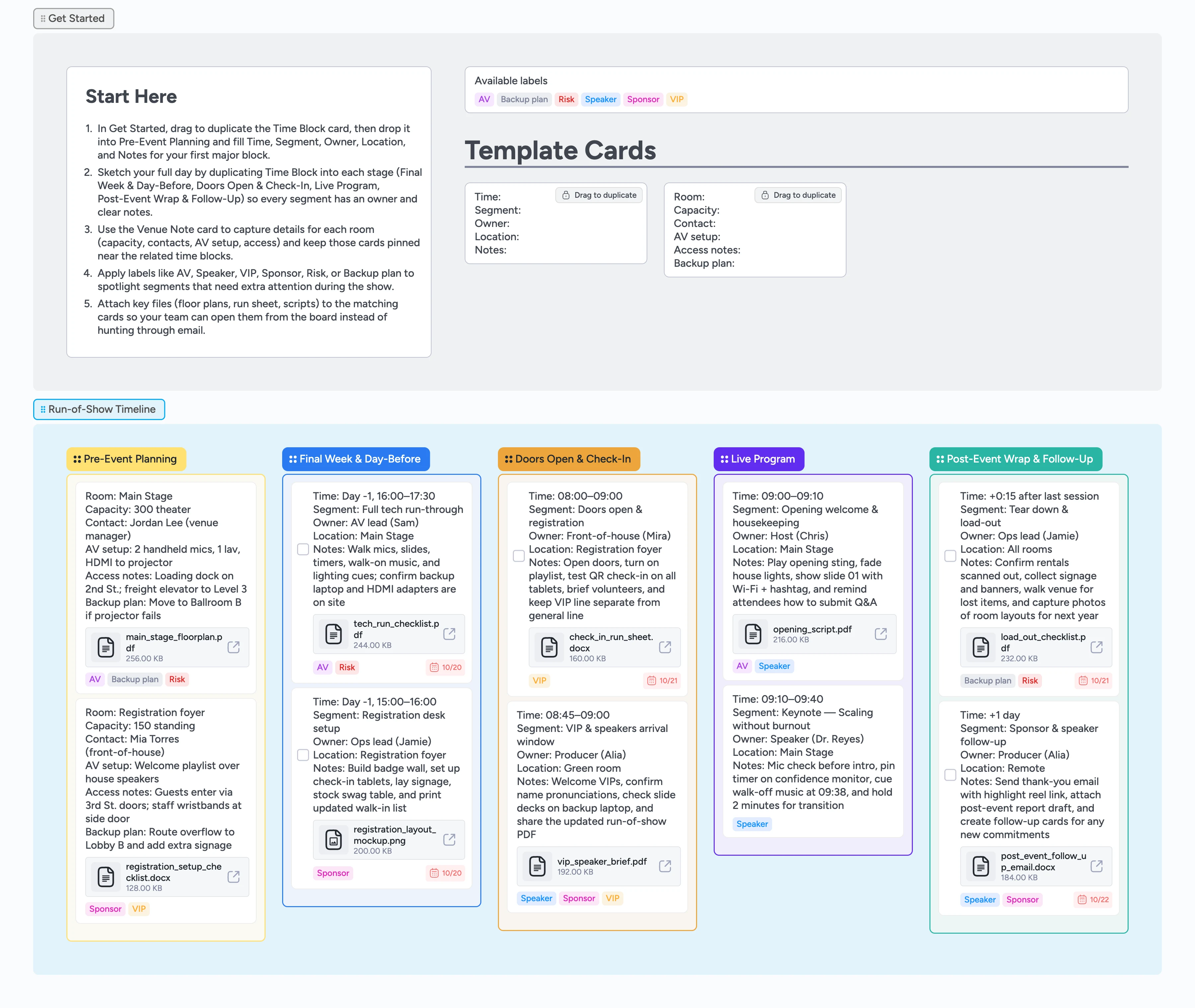
This template turns your event run‑of‑show into a single, shared pipeline instead of a fragile document or static timeline. It is built for producers and ops leads who juggle vendors, speakers, AV, and volunteers on tight schedules. Use the Time Block micro‑template to map every segment with time, owner, and location, and the Venue Note card to keep room details and backup plans close by. Labels highlight AV, VIP, Sponsor, Risk, and Backup plan items at a glance. Attach scripts, floor plans, and checklists to their cards so that as you drag segments across the pipeline, everyone sees the current plan in real time.
- See and drag every segment, owner, and cue across one board
- Reuse Time Block and Venue Note micro‑templates for each event
- Attach floor plans, scripts, and checklists to the same cards the team opens during go‑time
- Filter AV, Speaker, VIP, Sponsor, Risk labels in seconds
Start in Get Started
Open the Get Started section and skim the Start‑Here card so you know how the board flows. Then drag to duplicate the Time Block card and drop it into Pre‑Event Planning, filling in Time, Segment, Owner, Location, and Notes for your first anchor segment.
Pro tip: Copy times directly from your agenda so the board matches your calendar.
Map prep and tech checkpoints
Work left‑to‑right through Pre‑Event Planning and Final Week & Day‑Before, duplicating Time Block for vendor load‑in, tech run‑through, registration setup, and rehearsals. For each room you are using, duplicate the Venue Note card and fill capacity, contacts, AV setup, access notes, and backup plan, then drag it into the same stage as its Time Blocks and pin it near the top of that column. Assign each card to the person running that segment, set due dates where it helps, and apply AV or Sponsor labels so you can filter those later. Attach your tech run checklist, registration layout mockup, or vendor contracts to the matching cards so the details live where work happens. As pieces lock, drag cards right so everyone sees what is ready versus still in motion—and the pipeline becomes your live control‑room view, not just a planning doc.
Pro tip: Start with rough time blocks and tighten them after your first rehearsal.
Keep doors open and arrivals smooth
In Doors Open & Check‑In, duplicate Time Block cards for registration, badge pickup, walk‑ins, and VIP or speaker arrivals. Assign front‑of‑house leads, add due times, and tag cards with VIP, Speaker, or Sponsor so the team can focus on the right guests. Attach your check‑in run sheet and VIP arrival brief to the relevant cards. During the event, have someone drag cards as segments start and finish so the board mirrors reality.
Pro tip: Give one teammate ownership of updating the board so everyone else can glance instead of asking for status.
Run the live program from the board
Switch to the Live Program column and make one Time Block card per segment—opening, keynotes, panels, breaks, and transitions. Attach scripts, slide decks, or cue sheets to each card and tag AV‑heavy moments with AV or Risk so they stand out. During the show, your control room can open the current card, read Notes aloud, and tick off task checkboxes inside the card as cues fire. If timing slips, drag cards to adjust order and update Notes so the whole team stays in sync.
Close the event and capture learnings
Use Post‑Event Wrap & Follow‑Up for tear‑down, rental returns, thank‑you emails, and debriefs. Convert key cards to tasks with checkboxes for steps like equipment check‑in or post‑event survey sends. Attach your follow‑up email draft, highlight reel link, and post‑event report to the matching cards. Tag anything that did not go to plan with Risk or Backup plan and add a short note so your next event inherits today’s lessons.
What’s inside
Run‑of‑show pipeline
Five stages—Pre‑Event Planning, Final Week & Day‑Before, Doors Open & Check‑In, Live Program, and Post‑Event Wrap & Follow‑Up—so prep tasks and day‑of moments live in one view, and you can drag cards left‑to‑right as each segment locks or goes live.
Time Block micro‑template
A duplicate‑locked card with Time, Segment, Owner, Location, and Notes fields you can reuse for every segment, from vendor load‑in to last call.
Venue Note micro‑template
Capture room capacity, contacts, AV setup, access notes, and backup plans so the control room never scrambles for venue details.
AV and risk labels
Labels like AV, Speaker, VIP, Sponsor, Risk, and Backup plan make it easy to filter high‑stakes segments when timing slips.
Demo cards with files
Sample Time Block and Venue Note cards include attached floor plans, scripts, and checklists so you can see how real teams store assets.
Why this works
- Turns a fragile run‑of‑show document into a live, shared board
- Keeps owners, timing, and venue details tied to the same cards
- Makes last‑minute changes as simple as dragging cards on a timeline
- Surfaces AV, VIP, Sponsor, and risk segments with reusable labels
- Captures day‑of notes so every event builds on the last
FAQ
Is this template for in‑person, virtual, or hybrid events?
It works for all three—rename stages, labels, or fields to match your format, and use Time Block cards for segments whether they happen on‑site, online, or both.
How detailed should my run‑of‑show be?
Most teams map 5–15 minute blocks for the live program and broader blocks for prep. If you find yourself guessing, add a Time Block and refine the times after your first rehearsal.
Can I reuse this board for recurring events?
Yes—duplicate the board for each event or create a new section per show, then reuse the Time Block and Venue Note micro‑templates so your structure stays consistent.
Where do scripts, decks, and floor plans live?
Attach them directly to the cards they support—speaker cards hold scripts and decks, venue cards hold floor plans and load‑in notes—so the team never digs through email threads.