Sponsor Fulfillment Pipeline Template
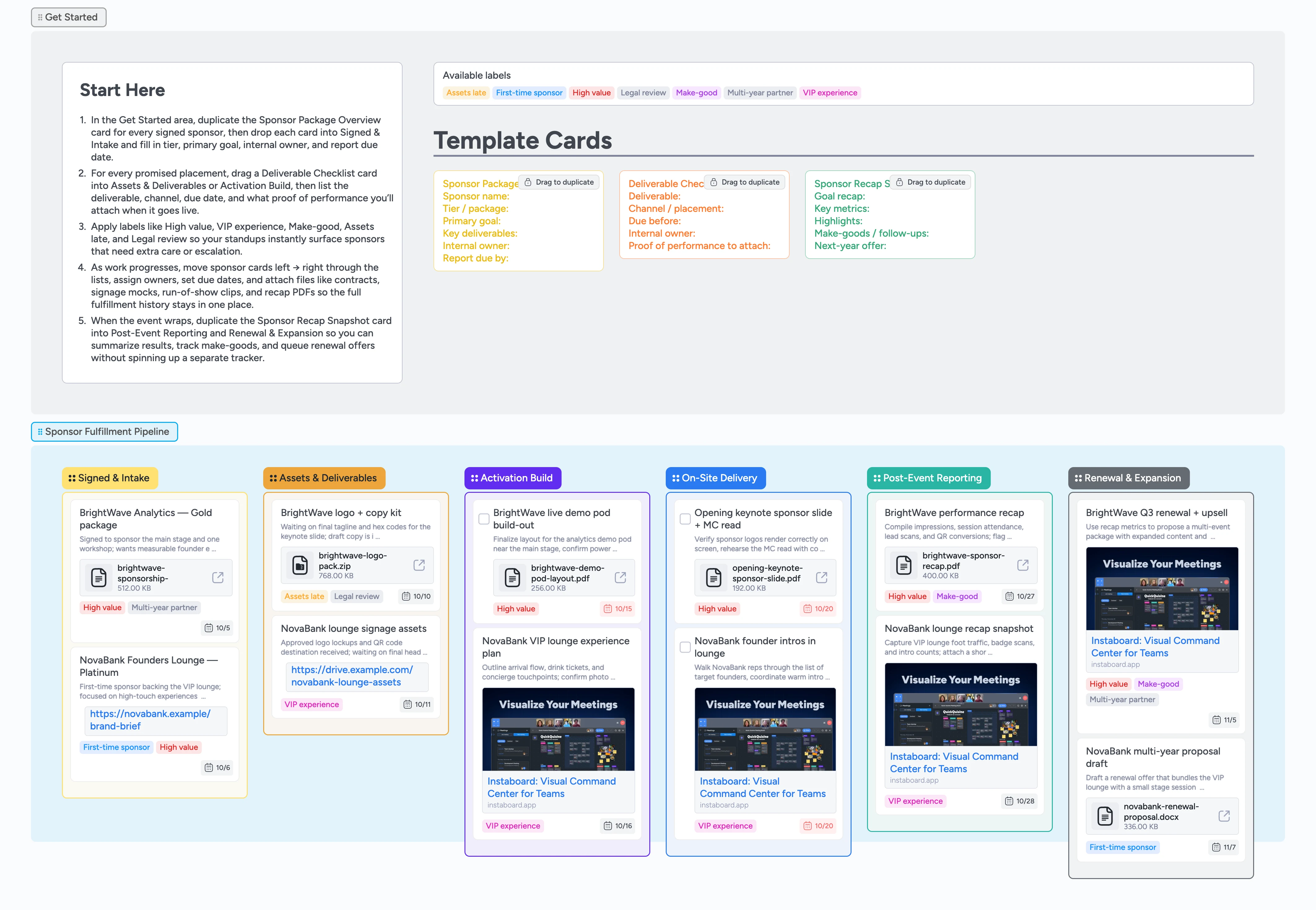
Deliver every sponsor promise with confidence
When sponsorships close, the real work begins—keeping every logo, shout-out, VIP perk, and recap delivered exactly as promised. On Instaboard, you drag each sponsor card left-to-right through six stages, so fulfillment becomes a visible pipeline instead of a scattered spreadsheet and inbox search. Track each sponsor’s package, break work into individual deliverables, and assign owners, dates, and labels that surface risk before it becomes a fire drill. Attach contracts, creative assets, and proof-of-performance files directly to cards so anyone on the team can open the full history in seconds, whether they are prepping the show or sending renewal offers.
- See every sponsor, package, and deliverable in one pipeline
- Assign owners, due dates, and labels on sponsor cards so nothing slips as you drag them across the board
- Attach contracts, assets, and recap files to the right cards
- Track proof of performance and make-goods in context
- Prepare renewal pitches faster with a live fulfillment history
Start in Signed & Intake
Open the Get Started section and skim the Start-Here guidance, then duplicate the Sponsor Package Overview micro-template for every sponsor you have signed. Drag each new card into the Signed & Intake list and fill in the sponsor name, tier, primary goal, key deliverables, internal owner, and report due date. Apply labels like High value, First-time sponsor, or Multi-year partner so the most important relationships stand out immediately. Assign the teammate who owns each sponsor and confirm their first internal check-in date so everyone knows when fulfillment work needs to kick off.
Pro tip: If you are backfilling an event that is already underway, start with your highest-value sponsors and work down.
Break work into deliverables
Move a sponsor card into Assets & Deliverables and, inside that card, duplicate the Deliverable Checklist template for each promised placement—logos, stage mentions, VIP passes, lounges, content pieces, and more. For every deliverable, capture the channel or placement, due date, internal owner, and what proof of performance you will attach when it is live. Use labels like Assets late and Legal review to flag anything blocked by missing files or approvals. Attach contracts, logo packs, copy docs, and layout PDFs directly to the sponsor card so your design and production teams never hunt through email threads.
Pro tip: Keep each Deliverable Checklist focused on one promise so you can drag or reassign it easily if plans change.
Run activations and on-site delivery
As you move into Activation Build, convert action-heavy cards into tasks with checkboxes and assign owners for demo pods, MC reads, signage installations, and VIP experiences. Drag cards into On-Site Delivery once work is scheduled for event days, then set due dates that match the actual show schedule so the pipeline becomes a real-time control panel. Apply the VIP experience label to high-touch moments like lounges or private dinners and use High value to spotlight sponsors you never want to disappoint. Capture quick notes and attach photos or run-of-show clips to cards so you have proof of performance ready for the recap.
Pro tip: Ask one team member to keep the board updated during the event so everyone else can glance at the pipeline instead of asking for status.
Close fulfillment and prepare renewals
After the event, drag cards into Post-Event Reporting and duplicate the Sponsor Recap Snapshot micro-template to summarize goals, metrics, highlights, and any make-goods owed. Attach recap decks, highlight reels, and exported metric reports directly to the card, then switch labels to Make-good or Multi-year partner where appropriate. Use Renewal & Expansion for sponsors who could continue into future events, capturing next-year offers and internal to-dos for sales or partnerships. When you sit down to send recaps or renewal proposals, filter by High value or Make-good and work straight from the board, confident that every promise and proof is in one place.
What’s inside
Sponsor fulfillment pipeline
Six stages—Signed & Intake, Assets & Deliverables, Activation Build, On-Site Delivery, Post-Event Reporting, and Renewal & Expansion—so you can see each sponsor move from contract to recap on a single board.
Sponsor package micro-template
A reusable Sponsor Package Overview card with fields for sponsor name, tier, primary goal, key deliverables, internal owner, and report due date so every package starts consistent.
Deliverable checklist cards
Duplicate-ready Deliverable Checklist cards that you drag into the sponsor card to capture the deliverable, channel or placement, due date, internal owner, and what proof of performance you will attach when it goes live.
Recap snapshot micro-template
A Sponsor Recap Snapshot card you can drop into Post-Event Reporting and Renewal & Expansion to summarize goals, key metrics, highlights, make-goods, and next-year offers.
Labels that highlight risk and value
Color-coded labels like High value, First-time sponsor, VIP experience, Assets late, Legal review, and Make-good that you apply during intake and filter mid-event to surface blocked deliverables.
Realistic demo cards with files
Sample sponsors such as BrightWave Analytics and NovaBank with assignees, due dates, tags, and attached contracts, layouts, and recap PDFs to show how a real team uses the board.
Why this works
- Keeps sponsor promises visible from contract through renewal on one board
- Ties every deliverable to a clear owner, due date, and attached proof of performance
- Surfaces high-value sponsors, VIP experiences, and risky gaps with simple labels
- Replaces scattered sheets and email threads with a live fulfillment pipeline
- Makes sponsor recaps and renewal proposals faster because your history is already organized
FAQ
Who is this template for?
This board is built for event producers, partnerships managers, and operations leads who are responsible for delivering sponsorship benefits—not just selling them—and need a simple way to track every promise through fulfillment.
Can I adapt this for virtual or hybrid events?
Yes. You can rename stages, update labels, or tweak the fields inside the micro-templates so they match your channels, whether deliverables are on-site, virtual, or a mix of both.
How do I track proof of performance for sponsors?
Use the Deliverable Checklist and Sponsor Recap Snapshot cards to note which metrics you will capture, then attach files like recap decks, screenshots, highlight reels, and exports from your event platform directly to the sponsor cards.
What if a deliverable is missed or needs a make-good?
Tag the card with Make-good, add a short note describing the gap, and create a new Deliverable Checklist card with the agreed follow-up. Keeping make-goods on the same board as the original sponsorship makes renewal conversations smoother and more transparent.