Patient Referral Intake Pipeline Template
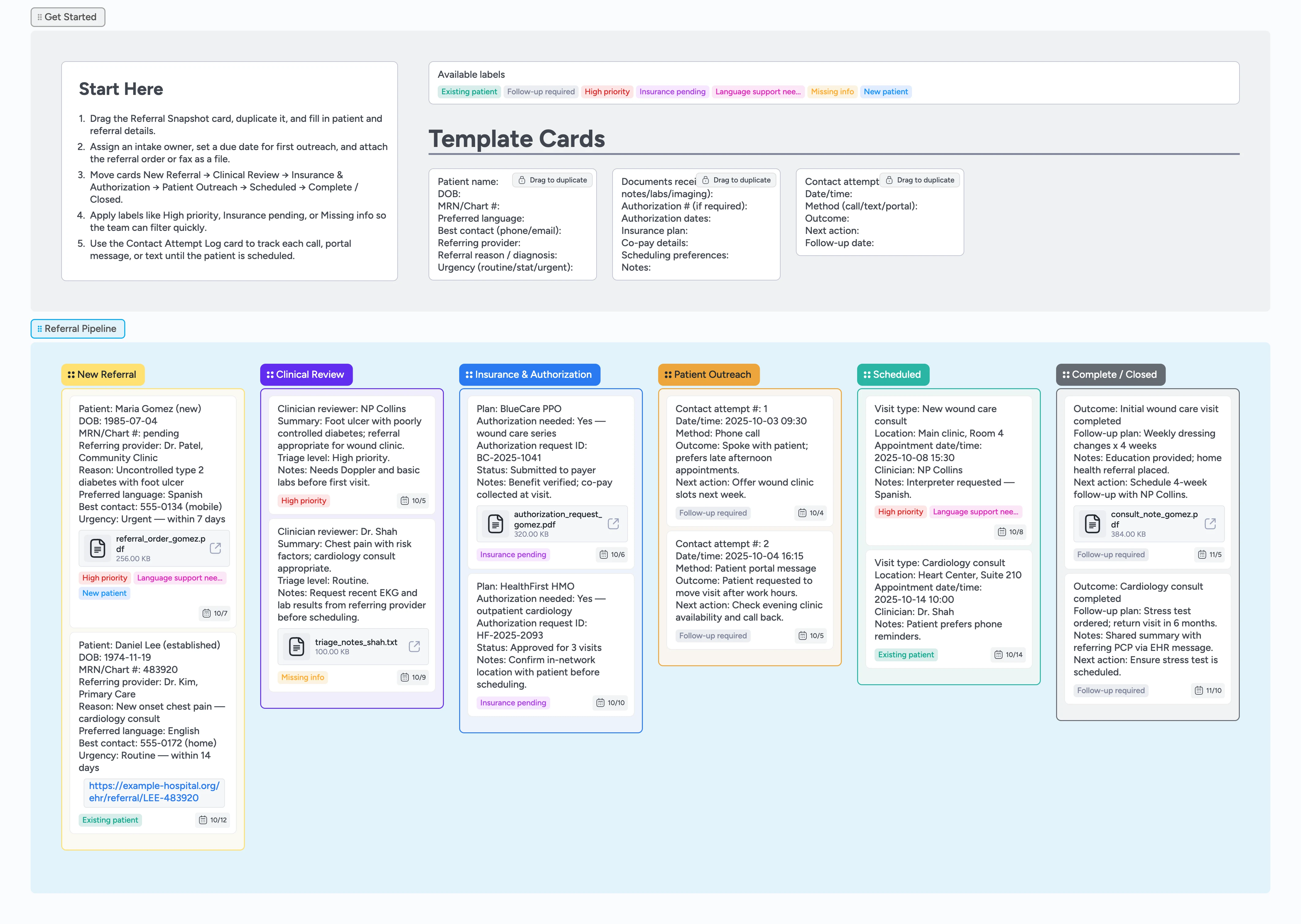
Make every referral easy to track
This template turns your patient referral inbox into a simple, left‑to‑right intake pipeline. Instead of chasing faxes, voicemails, and EHR messages, you keep one card per referral with clinical notes, insurance checks, and outreach all in one place. Intake staff, clinicians, and schedulers see the same board, move work between stages, and never wonder where a referral stands or who owns the next action.
- Centralize every incoming referral on one board
- Give clinicians and intake staff a shared status view
- Track insurance checks and outreach without spreadsheets
- Spot high‑priority or stuck referrals with labels
- Capture a clear audit trail in card attachments and contact‑log fields
Start in Getting Started
On the left, open the Getting Started section and skim the Start Here card so you know how the board flows. Find the duplicate‑locked Referral Snapshot card, drag to duplicate it, and drop the copy into the New Referral column of the Referral Pipeline section. Fill in patient, referring provider, language, and urgency fields using one line per field so the team can scan quickly. Assign the intake owner on the card and set a due date for first outreach. Leave one clean Referral Snapshot card in Getting Started as your reusable template for future referrals.
Triage clinically and request missing pieces
When a clinician reviews the referral, move the card to Clinical Review and add a short triage summary in the card description. Apply labels like High priority or Missing info so the team sees which referrals need faster attention. If labs, imaging, or notes are missing, note exactly what is needed and attach any triage files to the card so everything stays together. Set a due date for when the referring provider or patient should respond, then drag the card forward once requirements are met.
Handle insurance and authorization cleanly
Move referrals that need benefit checks or prior auth into Insurance & Authorization. Duplicate the documents and authorization micro‑template card from Getting Started into that column and fill in payer, plan, authorization IDs, and any limits. Attach PDFs or forms as files on the card instead of burying them in email. Tag cards with Insurance pending or Follow‑up required so intake staff can filter by referrals blocked on payers. Assign your authorization specialist on each card and update status as approvals arrive before you schedule.
Log outreach and schedule the visit
Once a referral is ready for outreach, drag the card to Patient Outreach and duplicate the Contact Attempt Log card into that column. For each call, text, or portal message, fill in the log fields so anyone can see attempts, outcomes, and the next action at a glance. Use the Follow‑up required label when a patient has not responded and set the next contact date on the card due date field. When you secure a time, move the card into Scheduled and add appointment details, clinician, and location in the title or description.
Close the loop and review weekly
After the visit occurs or a referral is closed, drag the card to Complete / Closed and summarize the outcome in one or two lines. Attach consult notes or completed reports as files so the history is easy to retrieve later. At the end of each week, use the label filter to show only cards with High priority, Insurance pending, or Follow‑up required across all stages. Adjust owners and due dates from that filtered view so no referral stays stuck and your team shares a clear picture of throughput.
What’s inside
Referral Pipeline section
Six clear stages — New Referral, Clinical Review, Insurance & Authorization, Patient Outreach, Scheduled, Complete / Closed — so every referral has an obvious home.
Referral Snapshot micro‑template
A duplicate‑locked card with fields for patient details, referring provider, reason for referral, language, and urgency that you duplicate for every new referral.
Contact Attempt Log micro‑template
A reusable pattern for documenting each call, message, or portal outreach with date, method, outcome, and next action.
Insurance and authorization notes
Demo cards that show how to capture plan details, authorization IDs, and payer status alongside each referral, plus a micro‑template for documents and authorization notes.
Labels for risk and blockers
High priority, Insurance pending, Missing info, Language support needed, and more to make filtering and triage fast.
Why this works
- Prevents referrals from getting lost across inboxes, faxes, and sticky notes
- Keeps clinical review, insurance status, and outreach history on the same card
- Surfaces high‑risk patients and blockers quickly with consistent labels
- Creates a repeatable intake process new staff can follow from day one
FAQ
Who is this template for?
Referral coordinators, clinic administrators, and small specialty practices managing dozens of referrals per month who need a simple way to track incoming referrals from request to scheduled visit.
Can we change the stages to match our clinic?
Yes. You can rename columns, add or remove stages, and adjust labels so the pipeline reflects how your team already works, then save your customized version.
Can I store PHI in these cards?
This template is designed for workflow and coordination, not legal guidance. If you plan to capture protected health information, follow your organization’s policies and consult your compliance or security lead.
Is this medical advice?
No. This template organizes referral tasks and communication. For decisions about diagnosis, treatment, or clinical standards of care, rely on your clinicians and local guidelines.