Compensation Review Cycle Pipeline Template
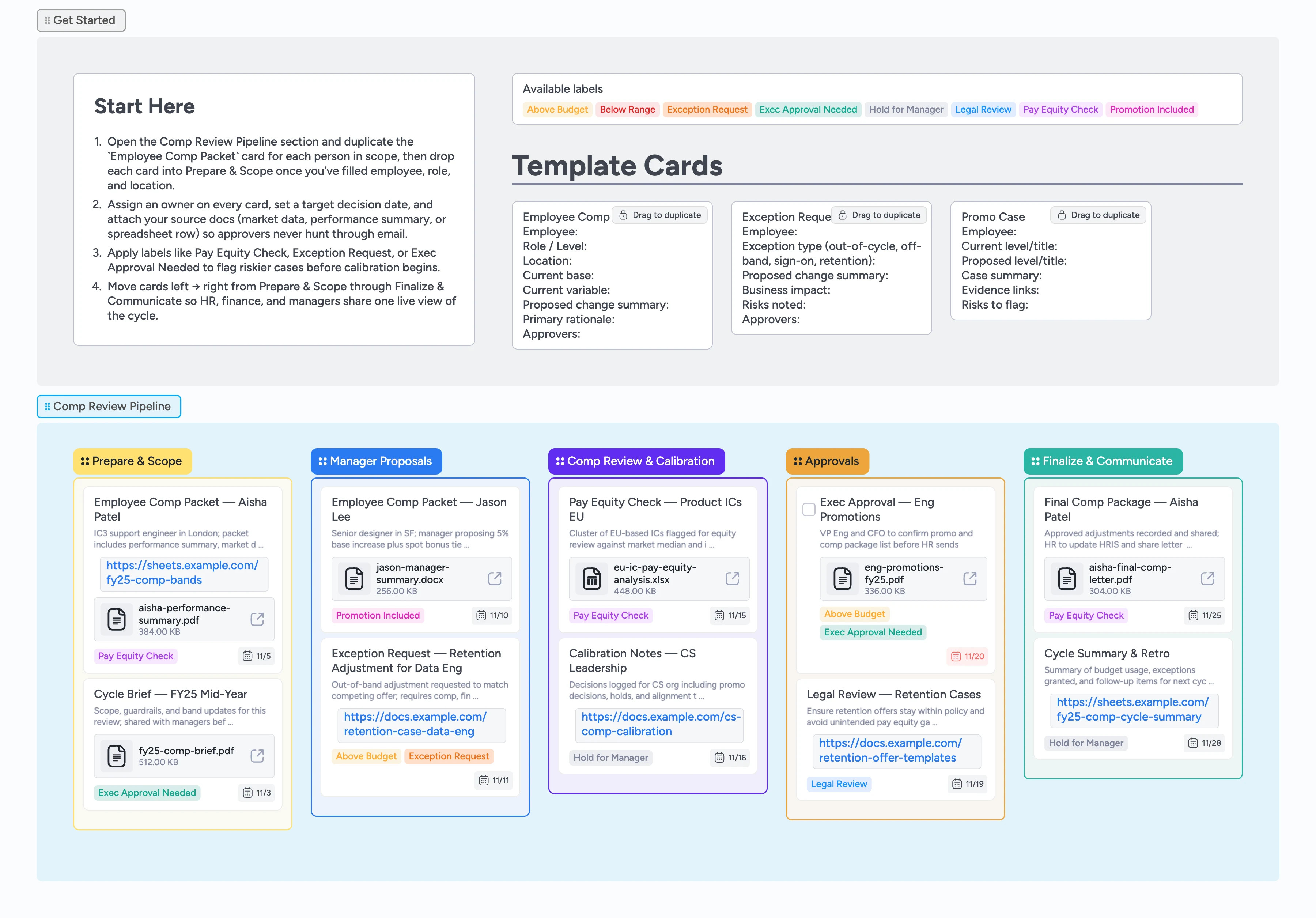
Run compensation reviews in one shared pipeline
This template gives HR, finance, and managers a single place to plan, discuss, and approve every compensation change. Without a shared source of truth, approvers chase stale spreadsheets, buried email threads, and equity risks that surface too late. Here, each employee lives on a structured card that carries their packet, labels, and decision history. The pipeline mirrors a typical compensation review cycle, from guidelines and manager proposals through pay equity checks, approvals, and final communication. Because every card can be assigned, labeled, and given a due date, your team always sees which cases are ready, which are stuck, and where budget or equity risks need attention.
- Centralize guidelines, packets, and approvals
- Track equity and budget risks visually
- Attach market data and review evidence
- Filter tricky cases with labels
- Keep HR, finance, and managers aligned
Kick off in Prepare & Scope
Open the Comp Review Pipeline section and find the Prepare & Scope column to start. Duplicate the `Employee Comp Packet` micro-template for every employee in scope, then fill in role, location, current pay, and a short rationale for any change. Assign an owner on each card and set a target decision date so HR and finance know who is driving the case. Attach your cycle brief, comp band sheet, or performance summary as files directly on the card. Once a packet is ready for manager input, drag it into the Manager Proposals column so everyone can see the live roster.
Collect manager proposals in one place
Invite managers to the board and ask them to work only inside the Manager Proposals column so proposals stay centralized. Have them update the Employee Comp Packet cards with proposed adjustments and rationale instead of creating new docs, then apply labels like Promotion Included, Above Budget, or Exec Approval Needed on any card that may need extra review time. When a proposal is outside normal guardrails, duplicate the `Exception Request` card and link it to the employee’s packet so approvers see context at a glance. As proposals solidify, move cards into Comp Review & Calibration so the comp team can start their analysis and filter to only the packets they need.
Run comp reviews and equity checks
In the Comp Review & Calibration column, use labels and filters to group related packets by team or location and work through them during calibration sessions. Apply the Pay Equity Check label on clusters that need closer analysis, and attach your equity spreadsheets or dashboards as files or links instead of keeping them in separate docs. Capture key decisions in the card description so anyone can click into a packet later and see why a package was adjusted or held without hunting through meeting notes. For tricky cases, keep the Hold for Manager label until follow-up conversations happen and notes are updated. Once decisions are clear and within budget, drag cards into Approvals.
Drive approvals with clear tasks
Treat the Approvals column as your decision gate. Convert critical approval cards like Exec Approval — Eng Promotions into tasks, assign the right leaders, and treat the card checkbox as the final sign-off before anything moves forward. Use labels such as Exec Approval Needed, Legal Review, and Above Budget so stakeholders can filter to only the items they care about. Attach final compensation decks or summary PDFs to the cards instead of emailing new versions so everyone opens the latest file from the board. When approvals are finished and numbers are locked, move each card into Finalize & Communicate.
Finalize packages and communicate changes
In the Finalize & Communicate column, duplicate the `Promo Case` card where needed to summarize promotion-specific narratives alongside the final Employee Comp Packet. Upload the signed comp letter or HRIS screenshot as a card attachment so you have a single record of what was approved without searching email. Set due dates for employee conversations and use labels like Pay Equity Check or Hold for Manager to flag any follow-up monitoring. As letters go out and systems are updated, update card descriptions with completion notes and leave the column as your historical record for the cycle.
What’s inside
Comp review control panel
A Start-Here card with cycle setup instructions plus micro-templates for Employee Comp Packet, Exception Request, and Promo Case cards so you can duplicate structured packets instead of starting from scratch.
Five-stage compensation pipeline
Aligned lists for Prepare & Scope, Manager Proposals, Comp Review & Calibration, Approvals, and Finalize & Communicate that mirror how compensation decisions actually flow.
Risk and exception labels
Labels like Pay Equity Check, Below Range, Above Budget, Exception Request, Legal Review, Exec Approval Needed, and Hold for Manager make risky cases easy to spot and filter.
Demo packets that show "good"
Filled example cards for real-world situations like retention cases, equity reviews, and promotion packages show how to use attachments, assignees, dates, and labels together.
Export-ready assets
Pre-generated scaffold, filled board, hero image, and OG graphic make it simple to drop this process into your HR wiki, enablement docs, or leadership deck.
Why this works
- Keeps every compensation decision tied to a single structured packet
- Makes risky or out-of-band cases visible with clear labels
- Connects calibration notes, approvals, and final letters in one place
- Lets HR, finance, and managers work from a live, filterable pipeline
- Leaves a clean historical record for audits and future cycles
FAQ
Can I use this for both annual and off-cycle reviews?
Yes—duplicate the board for each cycle, adjust stage names or labels if needed, and use the Exception Request card to track out-of-band or mid-cycle changes. Because each employee’s history stays on their card, you can see how compensation evolved across cycles without rebuilding context.
How do we track budget and headcount constraints?
Attach your budget or headcount spreadsheets to a control card in Prepare & Scope, then use Above Budget and Exec Approval Needed labels on individual packets that may exceed those limits. During reviews you can filter to only Above Budget cards to see at-risk packets in one view.
Where should we document pay equity or legal review?
Keep equity analyses and legal feedback attached directly to the relevant cards using the Pay Equity Check and Legal Review labels so your audit trail lives in one place, and filter for those labels when you need to revisit past analyses.
Can managers have their own view without losing the rollup?
Managers can filter by assignee or label to focus on their team while HR and finance keep the full pipeline visible; everyone still works from the same underlying board.