IP Infringement Response Template
Bring every IP notice into one pipeline
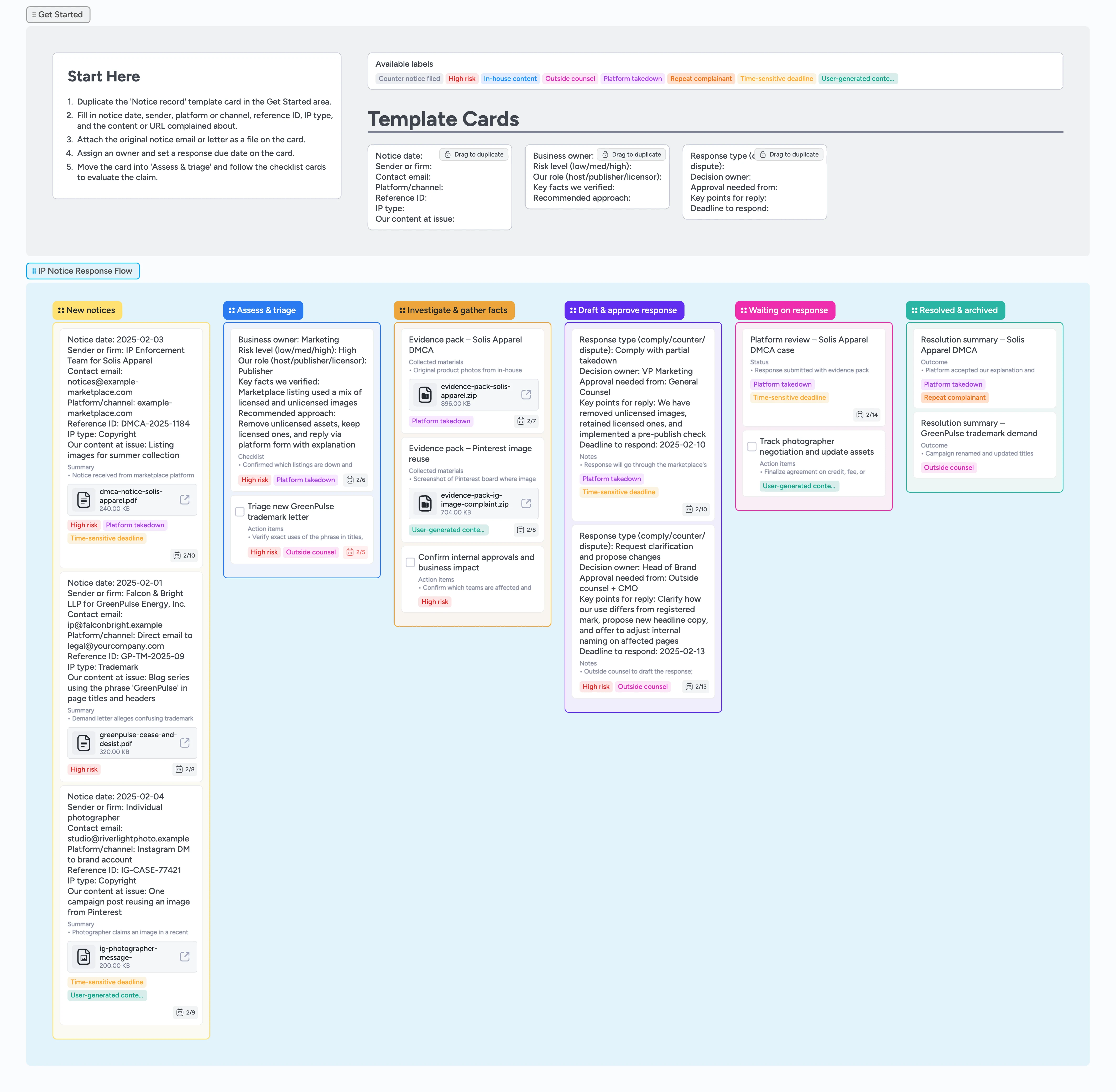
If your team loses track of IP notices in email threads or misses platform deadlines because no one knows who owns what, this board fixes that. This template turns each complaint into a single card that carries the facts, owners, evidence, and deadlines from intake through resolution. It does not replace legal advice—it organizes the work you and your counsel need to do to choose a defensible response. Duplicate the locked Notice record card, assign an owner, attach the original letter or platform email, and drag the card from New notices → Assess & triage → Investigate & gather facts → Draft & approve response as you complete each stage.
- Stop hunting through email threads for the original DMCA or trademark notice
- See upcoming response deadlines for every IP matter in one view
- Keep evidence, drafts, and decisions attached to the same card
- Tag legal, marketing, and product on each matter instead of scattering context across tools
- Create a searchable archive of closed IP cases you can reuse as precedent
Capture every new notice on one card
Start in the Get Started section, duplicate the locked "Notice record" template card, and drag your copy into the New notices column. Fill in the notice date, sender or firm, contact details, platform or channel, reference ID, IP type, and the content or URL complained about so nothing important lives only in an email. Attach the original notice email, PDF letter, or platform ticket to the card so your team never has to hunt for it again. Assign an owner from legal, marketing, or product and set a response due date that reflects the deadline in the notice. Apply labels like High risk, Platform takedown, or Time-sensitive deadline to make the matter easy to filter and prioritize.
Pro tip: If the notice mentions multiple deadlines, enter the earliest one as the due date and note the others in the card description.
Assess risk and decide who needs to be involved
Drag the card into Assess & triage once the basics are captured, then duplicate the assessment micro-template on the board. Record the business owner, your role (host, publisher, or licensor), risk level, and early read on options such as comply, counter, or seek clarification. Tag the card with Outside counsel if an external firm should review, and add labels for User-generated content or In-house content so you can see which matters touch which teams. Use the card description to log what you know, what is unclear, and where you need input before drafting a response. Leave a comment tagging stakeholders so they can add context directly on the card instead of in scattered threads.
Pro tip: Use High risk sparingly so that filtered views quickly show the few matters that truly need leadership attention.
Gather evidence and context with your team
Drag the card into Investigate & gather facts and start building an evidence pack. Attach screenshots of the allegedly infringing content, relevant contracts or licenses, prior versions of the content, and any internal tickets or emails that explain how it was created. Add a checklist on the card for investigation tasks, assign owners, and use due dates to make sure research completes before response windows close. Add a short summary at the top of the card describing what you confirmed, what remains open, and which risks you are watching. When the facts feel solid and evidence is attached, you are ready to move the card forward to response planning.
Pro tip: Attach at least one file to every matter so you always have a minimum evidence pack if you need to revisit the case later.
Draft, approve, and send your response
Move ready cards into Draft & approve response and duplicate the response plan micro-template. Choose a response type such as comply, counter, or request clarification, then record the decision owner, approvers, key points to cover, and the deadline to send. Draft the response text in an attached document or in the card description, tagging reviewers for comments so changes stay linked to the matter instead of scattered in email. Track approval by assigning approvers as card members or adding a checklist of names you check off as they sign off. Once everyone approves, note how and where you will send the reply—platform form, email, or portal—attach the final version, and move the card into Waiting on response.
Pro tip: If you are working with outside counsel, keep their draft and your internal summary in the same card so the history is easy to audit.
Track outcomes and strengthen your playbook
In Waiting on response, log platform decisions, counterparty replies, and any new deadlines, updating labels when a counter notice is filed or the matter becomes lower risk. Use comments to track follow-ups and set new due dates for checkpoints so you never lose sight of open threads. Once a matter is fully resolved, drag the card into Resolved & archived and add a resolution summary to the card description capturing what was alleged, what you did, and how it ended. Keep attachments and labels intact so you can filter past cases by risk level, platform, or complainant, and use Instaboard’s filter bar to surface all High risk or Platform takedown matters in one view. Over time, this archive becomes your playbook for responding faster and more consistently to future IP notices.
Pro tip: Add a short "What we learned" line to each resolved card so future matters benefit from previous decisions.
What’s inside
Notice intake lane
Start every matter in New notices by duplicating the Notice record micro-template so you capture sender, channel, reference ID, IP type, and content at issue on one card before it moves anywhere—no blank cards, no forgotten deadlines, no inconsistent intake.
Risk and triage section
Use Assess & triage to duplicate an assessment micro-template, summarize risk level, your role, and recommended approach, and tag cards with labels like High risk, Platform takedown, or Outside counsel so the most urgent work surfaces first.
Investigation workspace
Investigate & gather facts is where you attach screenshots, contracts, prior versions, and internal notes directly to the card so anyone joining the matter can see what was checked, by whom, and when without digging through folders.
Response planning lane
Draft & approve response includes micro-templates for response plans so you log response type, approvers, key points, and deadlines, then use comments and checklists for sign-off before sending anything externally.
Waiting and archive stage
Waiting on response and Resolved & archived keep platform decisions, negotiation outcomes, and follow-up tasks visible while also building a searchable trail of past cases.
Why this works
- Centralizes scattered IP complaints into one structured pipeline
- Reduces missed response windows by pairing owners, labels, and due dates on each matter
- Keeps evidence, drafts, and decisions together so handoffs are faster and less error-prone
- Builds a reusable archive of resolved cases you can quickly filter by complainant, platform, or resolution type during future negotiations or audits
FAQ
Is this template a substitute for legal advice?
No. This board is designed to organize work, evidence, and deadlines so you and your counsel can respond consistently. Always consult a qualified attorney about your specific circumstances.
Can we use this for copyright, trademark, and other IP notices?
Yes. The lists and micro-templates are flexible enough to track complaints about copyright, trademarks, user-generated content, and other IP issues by adjusting the fields and labels to match your stack.
How does this help with platform or DMCA deadlines?
Each notice becomes a card with a clear due date, labels for Time-sensitive deadline or Platform takedown, and linked evidence. Filter cards by those labels or sort by due date so you can see which matters are at risk and move them first.
What if outside counsel runs our IP matters?
You can still use the board internally to intake, triage, and collect evidence, then attach counsel’s drafts and decisions so your team has a single view of the matter history. Optionally assign outside counsel as a card member (if they are on the board) or note their involvement with a label so everyone sees who is driving the response.