Sales Contract Redlines Tracker Template
Keep every contract redline moving to signature
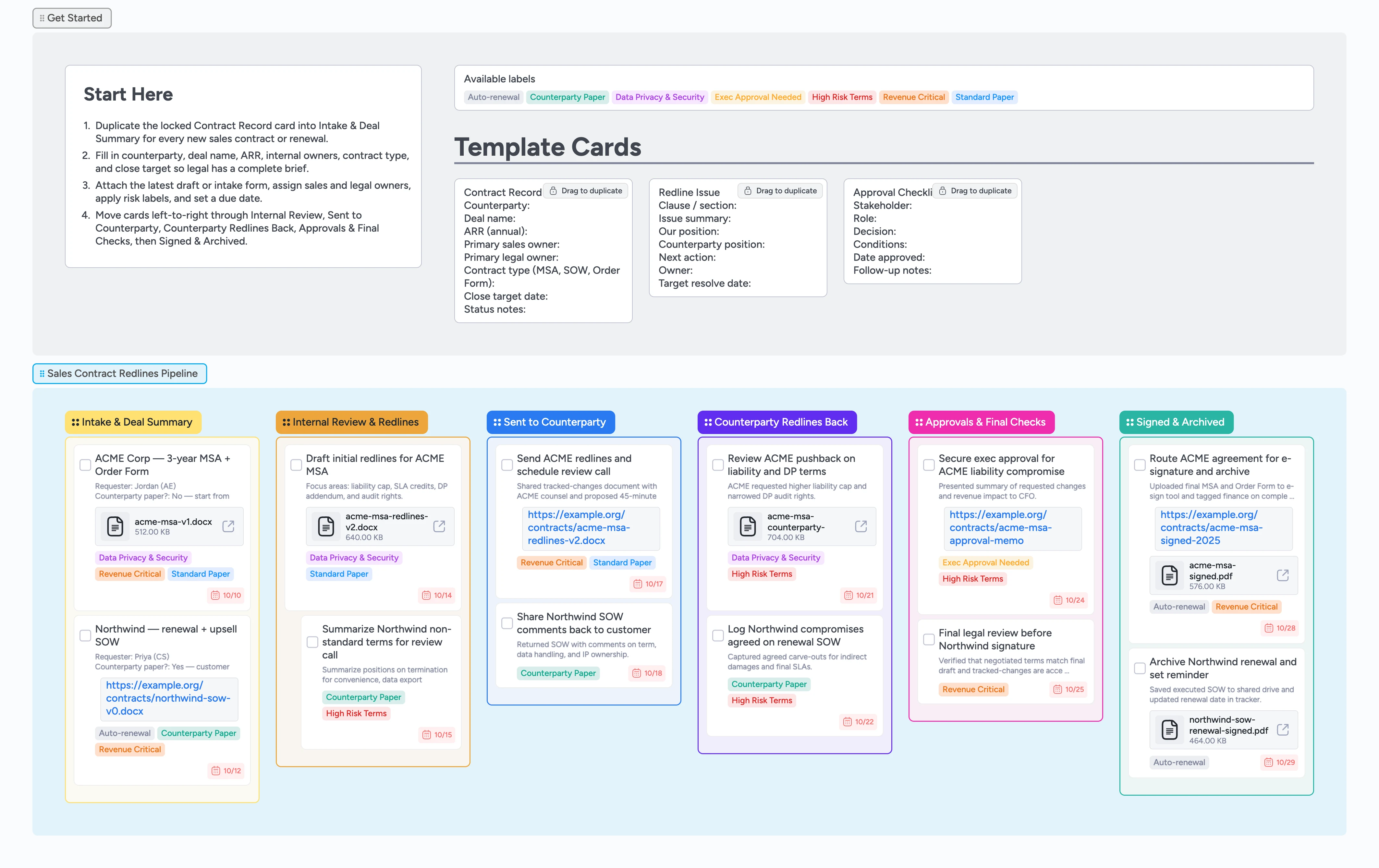
Sales deals slow down when contract versions scatter across email threads, Word files, and spreadsheets that nobody updates. This Instaboard template gives sales and legal one shared pipeline for every contract redline cycle, from first intake through signature. Start by duplicating the locked Contract Record card into Intake & Deal Summary, fill the deal basics, attach the latest draft, and assign owners. Labels like High Risk Terms, Counterparty Paper, Data Privacy & Security, and Exec Approval Needed make it clear where to focus. Demo cards show how to track redline issues, approvals, and signed PDFs directly on the board instead of juggling separate trackers.
- Centralize every sales contract and redline cycle in one visual pipeline
- Keep owners, due dates, and risk labels visible for each deal
- Attach drafts, redline docs, approval memos, and signed PDFs to contract cards
- Spot stalled negotiations quickly by watching cards move left to right
- Reuse micro-templates so every new deal follows the same checklist
Capture each deal in Intake & Deal Summary
Start in the Sales Contract Redlines Pipeline section. Duplicate the locked "Contract Record" micro-template card, drop your copy into Intake & Deal Summary, and rename it for the customer and contract type. Fill in counterparty, deal name, ARR, internal owners, contract type, close target date, and status notes so legal sees the full picture. Attach the latest draft, order form, or intake form as a file or link on the card. Assign sales and legal owners, set a due date that matches your target close, and apply labels like Revenue Critical, Counterparty Paper, or Auto-renewal. Leave cards here until intake details, owners, attachments, and labels are complete.
Run internal legal review and log redlines
When a deal is ready for legal, drag the card into Internal Review & Redlines. Duplicate the Redline Issue micro-template for each clause or topic that needs negotiation and nest those cards under the main contract card by indenting them. Record the clause, your position, the counterparty position, owner, and target resolve date so everyone understands the trade-offs. Attach tracked-changes docs or comparison reports to the relevant cards so reviewers always open the latest version. Use labels like High Risk Terms or Data Privacy & Security to flag items that might require escalation and update due dates as negotiation timelines shift.
Manage counterparty redlines without losing context
Once internal redlines are ready, move the card into Sent to Counterparty and attach the outgoing redline document or e-sign link. Add a short summary of key changes in the card description and set a follow-up due date so sales knows when to check back. When the counterparty responds, drag the card into Counterparty Redlines Back, attach their version, and update Redline Issue cards with their positions and comments. Use labels to distinguish standard compromises from high-risk concessions and adjust owners when legal or sales takes the next turn. Keep every new round on the same card so history and attachments stay in one place.
Secure approvals before you sign
When only a few questions remain, drag the contract into Approvals & Final Checks. Duplicate the Approval Checklist micro-template to list each stakeholder who needs to sign off—CFO, legal lead, sales leader, or security owner—with their decision and conditions. Assign the card to the current approver, update the due date for their review window, and apply the Exec Approval Needed label so the team can filter those deals. Note any exceptions to standard terms in the card description or checklist so they are easy to find later. Move the card onward only after approvals are recorded and communicated back to the deal team.
Sign, archive, and prepare for renewal
After approvals, move the card into Signed & Archived. Attach the fully executed contract PDF, paste the repository path or CLM record link, and confirm that CRM and billing systems match the final commercial terms. Set or update the due date to a renewal or review checkpoint so future reminders surface on the board. Apply the Auto-renewal label where needed and add any follow-up tasks—like onboarding or customer communication—as subtasks or new cards linked from the contract. Leave closed deals in this column as a searchable audit trail and duplicate the Contract Record template when the next opportunity reaches redlines.
What’s inside
Start-here Contract Record
A duplicate-locked Contract Record micro-template captures counterparty, deal name, ARR, internal owners, contract type, target close date, and status notes before the work enters the pipeline.
Intake & Deal Summary lane
Use Intake & Deal Summary to collect the initial brief for each contract, attach the latest draft or intake form, and tag Revenue Critical or Counterparty Paper so legal can triage quickly.
Internal redlines workspace
Internal Review & Redlines is where legal drafts tracked changes, logs key issues with the Redline Issue micro-template, and aligns with sales on fallback positions before sending anything externally.
External negotiation stages
Sent to Counterparty and Counterparty Redlines Back keep round-trips organized, with attachments for each redline version and labels like High Risk Terms or Data Privacy & Security to highlight sensitive points.
Approvals and archive stage
Approvals & Final Checks and Signed & Archived track executive approvals, e-sign status, repository paths, and renewal reminders using the Approval Checklist template and demo cards.
Why this works
- Aligns sales, legal, and finance around one shared view of every contract
- Keeps redline issues, approvals, and signed files tied to a single card history
- Makes the next legal or commercial action obvious so deals do not stall in email
- Surfaces high-risk terms and counterparty paper quickly with labels and stages
- Helps renewals and renegotiations start from accurate precedent instead of guesswork
FAQ
Does this replace our CLM or Word redlining tools?
No—the board organizes the workflow around those tools. You still draft and redline in Word, Google Docs, or a CLM platform, then attach the key files and links to cards so sales, legal, and finance share one view of status and decisions.
How do we track multiple contracts for the same customer?
Create one Contract Record card per agreement—MSA, SOW, renewal, or amendment—and include the contract type and year in the title. Use labels, assignees, and due dates to separate owners and timelines, and keep related Redline Issue and Approval Checklist cards indented under the right parent.
Can we use this for NDAs and simpler agreements?
Yes. Lightweight contracts can still move through the same stages, but you may only need a single Redline Issue card or even skip internal review when the NDA is fully standard. Labels and due dates still make it clear which agreements are safe to fast-track.
Who should own this board day to day?
Most teams give revenue operations or legal operations ownership of the board. They maintain the template cards, watch for stuck deals, and help enforce that every contract has a Contract Record card, clear owner, and visible next step.