Subpoena Response Pipeline Template
Make every subpoena follow the same playbook
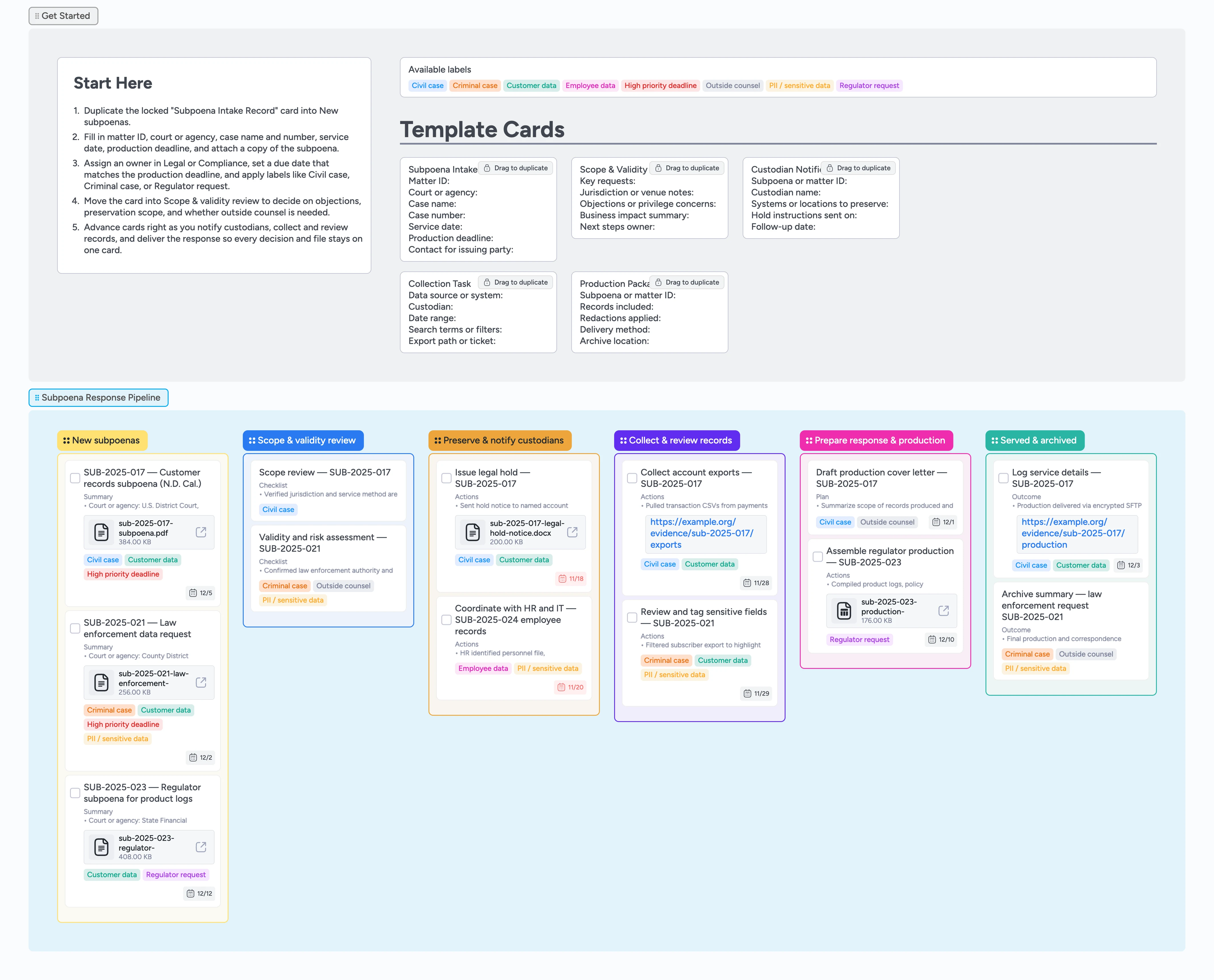
Subpoenas should not live in scattered email threads and ad hoc spreadsheets. This template turns each subpoena into a single card that carries the matter ID, court, deadline, owners, and evidence from intake through production and archive. Duplicate the locked Subpoena Intake Record card, drop it into the New subpoenas column, attach a copy of the subpoena, and assign an owner with a due date that matches the production deadline. As you move cards through scope review, preservation, collection, and service, custodian notices, exports, cover letters, and index files stay attached to the same card. The result is a repeatable response pipeline you can refine over time so that when someone questions your timeline, you can open one card and show service, holds, exports, and production at a glance.
- Centralize every subpoena from intake to archive on one board
- Prevent missed deadlines by pairing visible due dates and High priority labels on each subpoena card
- Keep legal holds, collections, and productions tied to one card per matter
- Standardize intake, scope review, and custodian notices with reusable micro-templates
- Give legal and operations teams a shared, filterable view of subpoena work by filtering cards by label, owner, or due date
Log the subpoena and set the clock
Start in the New subpoenas column on the Subpoena Response Pipeline board and duplicate the locked "Subpoena Intake Record" template card. Drag your copy into New subpoenas, then fill in the court or agency, case name and number, service date, production deadline, and a short scope headline so everyone sees what is being asked. Attach a PDF or scan of the subpoena to the card so legal, compliance, and operations can reference the original language without hunting in inboxes. Assign the card to the owner who will coordinate the response, and set the due date to match the production deadline or the earliest response date mentioned. Apply labels such as Civil case, Criminal case, Regulator request, Customer data, or Employee data so you can later filter and sort matters by type and sensitivity.
Pro tip: If the subpoena lists multiple deadlines, use the earliest one as the due date and note the others in the card description.
Review scope, risk, and response strategy
Once intake is complete, drag the card into Scope & validity review and open it alongside your assessment micro-template. Use the card’s checklist to list each numbered request and tick items off as you map them to the systems that hold the data, noting any jurisdiction issues or privileges you need to protect. Capture proposed objections, narrowing language, or questions in the card description or a dedicated "Objections" field so they stay searchable instead of buried in a document. Tag the card with High priority deadline when response windows are tight and Outside counsel if external lawyers need to review the plan, then @ mention reviewers in a comment to record sign-off on the card. Attach draft scoping emails or notes so decisions about what to produce and what to withhold live in one place instead of scattered across documents.
Pro tip: Keep one card per subpoena so scope, objections, and approvals stay linked as the matter evolves.
Issue holds and coordinate custodians
Move cards into Preserve & notify custodians as soon as you know which teams and systems may hold responsive data. Duplicate the Custodian Notification micro-template to log the subpoena or matter ID, each custodian’s name, the systems or locations they use, and the date you sent hold instructions. Attach your legal hold notice template, sign-off receipts, or screenshots showing retention rules were paused where needed. Assign each card to the person responsible for tracking acknowledgements and follow-ups, and set short due dates so untouched holds are easy to spot. Use labels like Customer data, Employee data, or PII / sensitive data to highlight where tighter access controls or extra review are required before production.
Pro tip: When a custodian leaves the company, reassign the card to their manager and add a short note in the description so it is clear who now owns each system under hold.
Collect, review, and tag responsive records
In the Collect & review records column, duplicate the Collection Task template for every data source you need—payments database, CRM, ticketing system, HR system, or shared drive—and assign each card to the system owner. Use the fields to record the date range, search terms, and export path or ticket ID, then attach exports or secure folder links so reviewers can open evidence directly from the card. As legal or compliance reviews the data, add a small checklist such as "Responsive", "Redact", and "Out of scope" and tick items off instead of burying decisions in prose. Apply PII / sensitive data or Outside counsel labels when a collection contains especially sensitive material so it can be handled with extra care. Indent follow-up tasks—like vendor confirmations or additional export requests—or create sub-cards under the main collection card to keep related work visually grouped while still showing one primary record per source. Adjust due dates as exports land so you can quickly see which collections are still pending before you assemble the final production.
Pro tip: Use filters on labels and assignees to spin up quick views, like all collections owned by IT or all cards tagged PII / sensitive data for a focused review session.
Assemble production, serve, and archive the matter
When records are ready, drag the card to Prepare response & production and use the Production Package Summary micro-template to summarize what you will produce, redactions applied, delivery method, and archive location. Attach a draft cover letter or regulator response, index spreadsheet, and the final encrypted export so everything you send externally is tied to the matter card. Tag approvers and outside counsel in comments to capture sign-off inside the board instead of depending on email threads. After you serve the subpoena response, move the card into Served & archived, update the description with delivery details and any follow-up obligations, and set a reminder for future reviews if the matter will stay active. Over time, this lane becomes a searchable archive of how you handled past subpoenas, making future responses faster and more consistent.
Pro tip: Add a short "What we would do differently next time" note on each archived card to turn experience from one case into policy for the next.
What’s inside
Intake lane with locked record
Use the New subpoenas column and the Subpoena Intake Record micro-template to capture court or agency, case name and number, service date, and production deadline the moment a subpoena arrives, then attach the PDF so the original document is always one click away.
Scope and risk review column
The Scope & validity review list holds assessment cards where you map requests to systems, flag overbroad or privileged material, and decide whether to narrow, object, or proceed while tagging matters as civil, criminal, or regulator requests.
Preservation and custodian management
Preserve & notify custodians is your legal hold lane, with cards that log who received hold notices, which systems are under hold, and when acknowledgements came back so you can prove preservation steps later.
Collection and review workspace
In Collect & review records, Collection Task micro-templates track exports from databases, CRMs, support tools, and HR systems, with assignees, due dates, and secure evidence folders attached to each card.
Production and archive stages
Prepare response & production and Served & archived keep cover letters, production indexes, delivery details, and archive locations visible so anyone can see what was sent, when, and under which constraints.
Why this works
- Turns every subpoena into a consistent, end-to-end workflow instead of a one-off email thread
- Reduces missed deadlines by pairing visible due dates, labels, and left-to-right movement on a single board
- Keeps legal holds, exports, reviews, and productions attached to the same card so handoffs are less risky
- Uses reusable micro-templates to standardize intake, scope review, custodian notifications, and production summaries across matters
- Builds a searchable archive of past subpoena responses your team can reference during audits or future negotiations
FAQ
Is this template a substitute for legal advice?
No. This board is a workflow organizer that helps you track subpoenas, deadlines, custodians, and productions. Always consult qualified counsel about how to respond in your specific jurisdiction and circumstances.
Can we use this for civil, criminal, and regulator subpoenas?
Yes. The same pipeline works across matter types—use labels such as Civil case, Criminal case, and Regulator request to distinguish them, and adapt micro-templates or stage names to match your playbook.
Where should we store sensitive customer or employee data?
Attach exports and evidence from your secure storage systems, and restrict access to the board to the teams who need it. Use labels like Customer data, Employee data, and PII / sensitive data to highlight cards that contain especially sensitive information.
How does this fit with our existing matter management or ticketing tools?
Use Instaboard as the visual command center for work execution: each subpoena card can still link back to your matter management system, DMS, or tickets, but the board shows all active matters, overdue holds, and upcoming productions in one place. Unlike a generic Kanban view inside a ticketing tool, Instaboard keeps approvals, labels, due dates, and attachments on the same card so you can reconstruct what happened without digging through multiple systems.