First Article Approval Pipeline Template
Make first article approvals predictable and fast
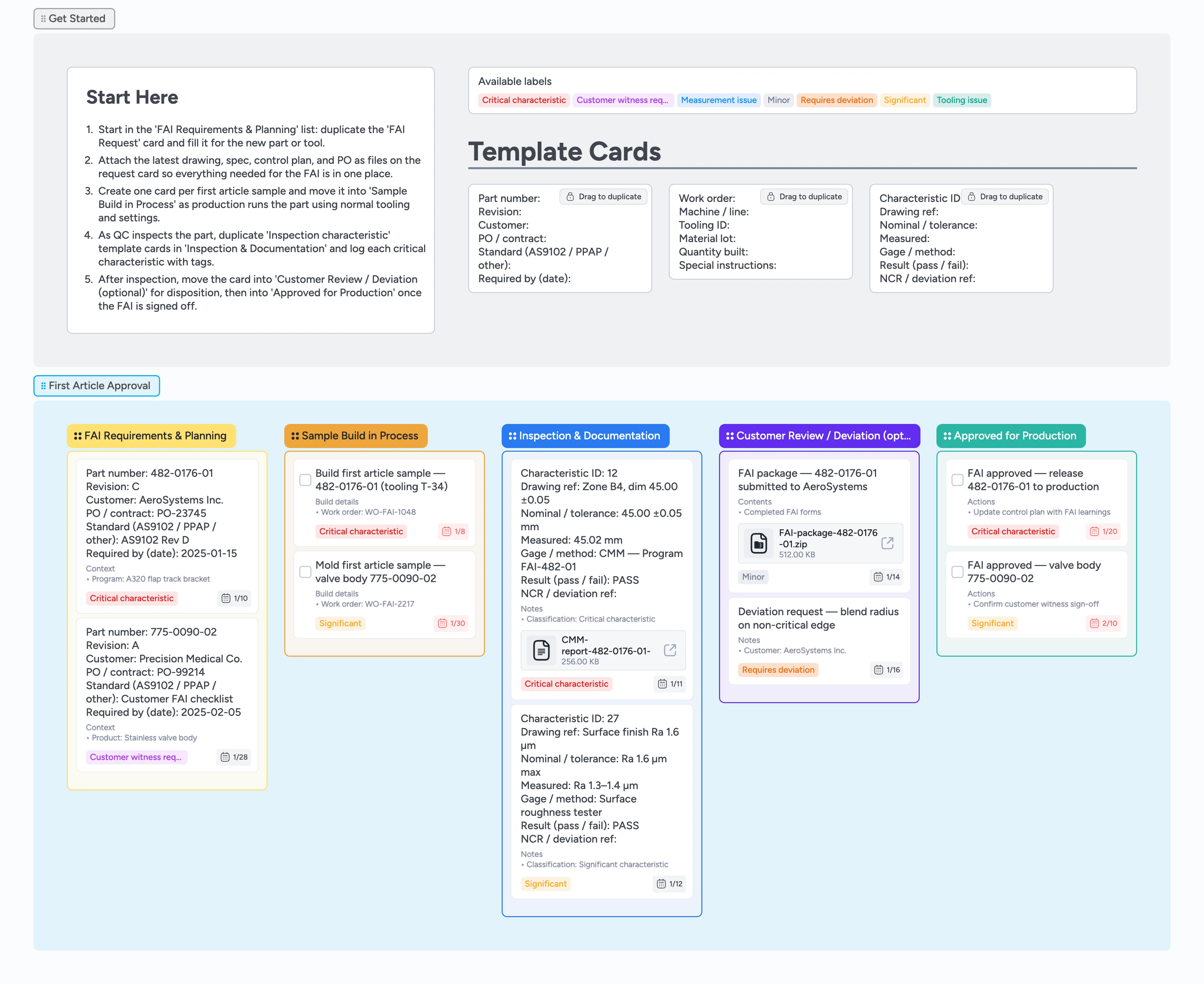
First article approvals stall when requests, prints, and inspection data live in different spreadsheets and inboxes. This template brings FAI planning, sample builds, inspection results, and customer sign-offs onto a single Instaboard canvas so quality, manufacturing, and customers are looking at the same board. Duplicate locked micro-templates to keep every card structured, assign owners and due dates, drag work left to right, and attach CMM reports, certs, and deviation forms directly where they are needed.
- See every first article request from intake to approval in one view
- Assign owners, due dates, and labels so no FAI stalls unnoticed
- Attach drawings, CMM reports, and certs directly to the cards that need them
- Reuse locked micro-templates so every FAI package is complete and consistent
Start in the FAI Requirements & Planning list
Open the Getting Started section on the board and read the Start Here card, then go to the FAI Requirements & Planning list. Duplicate the locked FAI Request template card for each new part or tooling change and fill in part number, revision, customer, and standard. Attach the latest drawing, spec, and PO as files so reviewers never have to hunt for them. Assign the quality owner, set a due date, and add Critical characteristic or Customer witness required labels where they apply.
Pro tip: Keep one FAI Request card per part to avoid scattering information across multiple cards.
Track first article samples through the build
When production begins making parts, drag each FAI card into the Sample Build in Process list. Use the Sample build micro-template fields to log work order, machine or line, tooling ID, material lot, and quantity built. Assign the operator or cell lead as the owner and update the description whenever you pause, scrap, or rerun a build. Apply Tooling issue or Measurement issue labels early so quality knows what to watch for before inspection starts.
Capture inspection results and evidence in one place
Move the card into the Inspection & Documentation list once a sample is ready for measuring. For each critical or significant characteristic, duplicate the Inspection characteristic micro-template card and fill in drawing reference, nominal and tolerance, measured values, and gage or method. Attach CMM reports, spreadsheets, or photos as files so approvers can open evidence directly from the board. Use Critical characteristic, Significant, or Minor labels to make it easy to filter the board for high-risk items.
Run customer review and deviations with full context
After you assemble the FAI package, drag the card into Customer Review / Deviation (optional). Create or update a summary card that lists what is in the package and attach the zipped FAI folder, deviation forms, and key email threads. Assign the account owner or quality lead and add Requires deviation or Customer witness required labels when special approval is needed. Track follow-up questions as checklist items on the card so nothing is lost between calls and sign-offs.
Release approved parts into production with confidence
When the customer signs off, move the card into Approved for Production. Use the card description or checklist to note follow-up actions like updating control plans, locking inspection programs, and notifying planning that serial production can start. Keep Critical characteristic labels on the card so future design or process changes trigger a new FAI instead of silent drift. Leave approved FAI cards in this lane as a searchable history rather than archiving them away.
What’s inside
Start-here control panel
A Getting Started section with a Start Here card and locked micro-templates that show exactly which cards to duplicate first and how to tag them.
FAI requirements and planning lane
A list dedicated to capturing part numbers, revisions, standards, and due dates so every FAI request starts with complete context and clear ownership.
Sample build tracking list
Cards that track work orders, machines, tooling IDs, material lots, and quantities built so production and quality stay aligned on which samples are running.
Inspection and documentation workspace
A lane for measurement results where you duplicate Inspection characteristic templates, attach CMM reports, and flag critical, significant, or minor features with labels.
Customer review and release lane
Lists for customer review, deviations, and final approval so you can see exactly which FAIs are waiting, approved, or ready to release into serial production.
Why this works
- Keeps first article requests, builds, inspections, and approvals in a single live view
- Replaces scattered FAI spreadsheets with structured cards, labels, and attachments
- Makes critical characteristics, deviations, and witness requirements filterable in seconds
- Gives quality and production a shared, audit-ready approval record
- Scales from one-off samples to ongoing FAI programs without redesigning the process
FAQ
Does this template work for AS9102 and PPAP?
Yes. Use the same lanes for both and customize card fields or labels to match your customer’s AS9102, PPAP, or internal FAI requirements.
What if our customers require their own forms?
Attach their PDF or spreadsheet forms to the FAI card and link to shared drives if needed so you still track owners, dates, and status in the same board.
Can we support multiple plants or customers on one board?
Yes. Add labels for plant codes or customer names and filter cards by label, or duplicate the board and adjust micro-templates for each site.
How do we handle repeat or partial FAIs?
Duplicate the last approved FAI card, update the scope and revision fields, and move it back through the pipeline with fresh attachments so history and changes stay connected.