BCP/DR Test Pipeline Template
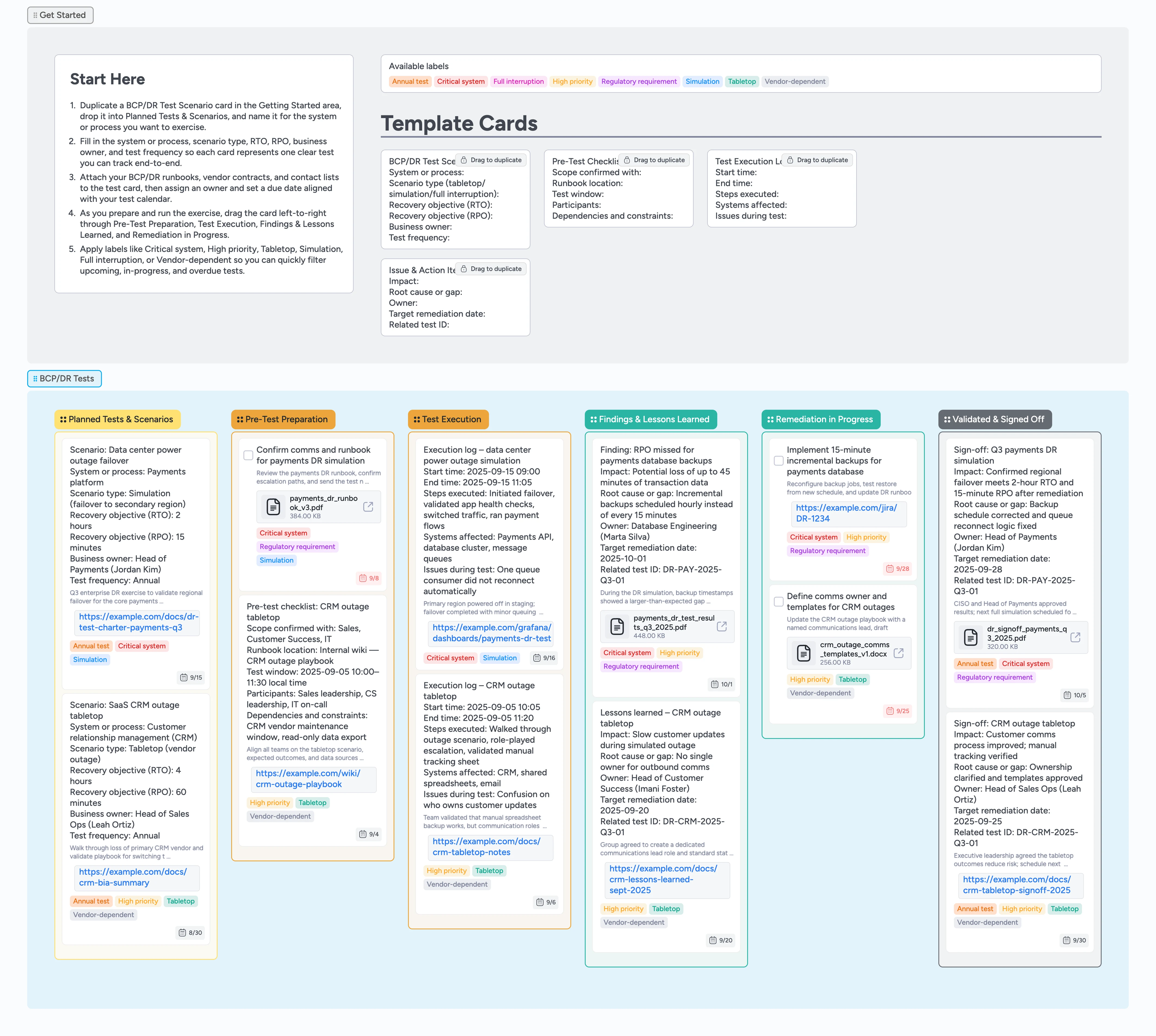
Make BCP/DR testing visible and repeatable
BCP and disaster recovery tests often live in scattered documents, spreadsheets, and calendar invites that make it hard to see what is planned, what actually ran, and which gaps are still open. For BCP coordinators, IT and security teams, and compliance leads, this template turns your BCP/DR program into a single visual pipeline where you duplicate a scenario micro-template card, attach runbooks, and move it left-to-right through planning, execution, findings, remediation, and sign-off. Structured micro-templates help you capture RTO/RPO targets, test scope, execution logs, and action items the same way every time, while labels show test type and criticality at a glance. Attach runbooks, contact lists, and evidence files directly to cards so each exercise leaves behind a clean record that is ready for audits and future reviews.
- Track BCP and DR tests from planning through sign-off
- Capture scenarios, RTO/RPO targets, and scope in structured cards
- Attach runbooks, contact lists, and evidence files to each test
- Use labels to distinguish tabletop, simulation, and full interruption tests
- Move remediation cards through the pipeline and attach sign-off proof to the original scenario card
Plan your first exercise in Planned Tests & Scenarios
Open the board and start in the Getting Started area above the BCP/DR Tests section, where you will see the BCP/DR Test Scenario micro-template card. Duplicate that card, drop it into the Planned Tests & Scenarios list, and rename it for the system or process you want to exercise next. Fill in the system or process, scenario type, RTO, RPO, business owner, and test frequency fields so the card becomes the single source of truth for that exercise. Attach your current BCP or DR runbook, vendor contracts, and any relevant diagrams so all context lives on the card. Apply labels such as Critical system, High priority, Tabletop, Simulation, or Vendor-dependent, then assign an owner and set a due date aligned with your test calendar.
Pro tip: Use one card per scenario so you can clearly see how many tests cover each critical system and how often they run.
Prepare logistics and scope in Pre-Test Preparation
When you are ready to firm up details, drag the scenario card into the Pre-Test Preparation list so the team can see that planning is underway. In the Getting Started area, duplicate the Pre-Test Checklist micro-template card and drop it beside the scenario card to capture scope confirmations, runbook location, test window, participants, and dependencies. Link or attach calendar invites, chat channels, and tracking sheets directly to this checklist card so facilitators always open the card first to coordinate during the exercise instead of hunting through scattered messages. Use labels like Regulatory requirement or Annual test when a scenario ties directly to an audit or policy. As pre-work completes, update both cards with final dates and owners so there is no ambiguity about who is doing what on test day.
Log what happens during Test Execution
On test day, move the scenario card into the Test Execution list and duplicate a Test Execution Log micro-template card under it. Use that log card to record start and end times, major steps executed, systems affected, and any issues observed as the test runs. Attach monitoring dashboards, screenshots, or exported reports to the log card so you can prove what was tested and what you saw. As you discover gaps or unexpected behaviors, either add them to the execution log or create separate Issue & Action Item cards in the same list for anything that deserves its own owner. When the exercise finishes, make sure both the scenario and log cards are up to date, then drag the scenario into Findings & Lessons Learned.
Capture findings and assign remediation in Findings & Lessons Learned
In the Findings & Lessons Learned list, duplicate the Issue & Action Item micro-template for each significant gap you discovered during the test. On each card, describe the impact, root cause or missing control, owner, target remediation date, and related test ID so the link back to the scenario is clear. Apply labels like Critical system, High priority, or Vendor-dependent to highlight which issues are most urgent, and attach evidence files such as test reports or meeting notes for future audits. Assign owners and set due dates so remediation work is easy to filter by owner or due date inside Instaboard instead of getting lost in a document. Once you have captured all findings and agreed next steps, drag active remediation cards into Remediation in Progress.
Drive remediation to closure and record sign-off
As teams implement fixes, keep remediation cards in the Remediation in Progress list and update their descriptions, attachments, and labels as work moves forward. Attach tickets from your issue tracker, updated runbooks, or configuration screenshots so each card contains concrete proof that the gap was addressed. When a fix is complete and validated, move the related cards and the original scenario into Validated & Signed Off. From the examples in that list, create or duplicate a sign-off card that summarizes impact, what changed, residual risk, approvers, and the next planned test date. Over time, this final column becomes an audit-ready history of your BCP/DR tests that you can filter by label, system, or year whenever you need to demonstrate program coverage.
What’s inside
BCP/DR test pipeline section
A dedicated BCP/DR Tests section with lists for Planned Tests & Scenarios, Pre-Test Preparation, Test Execution, Findings & Lessons Learned, Remediation in Progress, and Validated & Signed Off so each exercise moves left-to-right from idea to documented outcome.
Scenario and checklist micro-templates
BCP/DR Test Scenario and Pre-Test Checklist cards give you ready-made fields for system or process, scenario type, RTO, RPO, owners, test window, and dependencies so every exercise starts with the same baseline information.
Execution logs and issue tracking
Test Execution Log and Issue & Action Item micro-templates help you capture what actually happened during the test, including start and end times, steps executed, impacts observed, root causes, and owners for follow-up work.
Risk and test-type labels
Labels like Critical system, High priority, Tabletop, Simulation, Full interruption, Vendor-dependent, Regulatory requirement, and Annual test make it easy to filter the board for the riskiest scenarios, vendor-heavy tests, or upcoming annual exercises.
Audit-ready sign-off column
The Validated & Signed Off list keeps sign-off cards together with evidence files and next-test dates, where you attach sign-off summaries and set the next test date so you can quickly answer questions about when a system was last tested, what gaps were found, and how they were closed.
Why this works
- Turns scattered BCP and DR test plans into one visible pipeline
- Connects scenarios, execution logs, findings, and remediation by moving related cards through adjacent lists and attaching evidence to the original scenario card
- Makes test frequency, criticality, and vendor dependencies easy to scan with labels
- Keeps evidence files and sign-offs attached to the scenarios they belong to
- Creates an audit-ready history of continuity and DR testing over time
FAQ
What kinds of tests is this BCP/DR template for?
You can use this pipeline for tabletop exercises, simulations in staging, full interruption tests, and vendor-focused continuity drills; treat each card as one scenario and use labels to distinguish test type and priority.
How does this template work with existing runbooks and ticketing tools?
Keep authoring and storing runbooks in your existing knowledge base or ITSM platform, then attach those documents and related tickets to scenario, checklist, and remediation cards and move those cards through the pipeline lists so Instaboard becomes the visual hub that shows status and ownership across tools.
Can I track tests for multiple sites or systems on one board?
Yes. Use labels like Critical system or Vendor-dependent along with system names in the scenario title so you can filter by site, application, or vendor while still keeping a single consolidated pipeline for the whole program.
Does this replace my formal BCP or DR plan?
No. Your written BCP and DR plans remain the source of truth for policies and detailed procedures; this template gives you a live workspace to schedule tests, capture evidence, and ensure remediation work and sign-offs are completed against those plans.