Customer QBR Prep Pipeline Template
Make every QBR feel prepared, not scrambled across Slack, Slides, and CRM
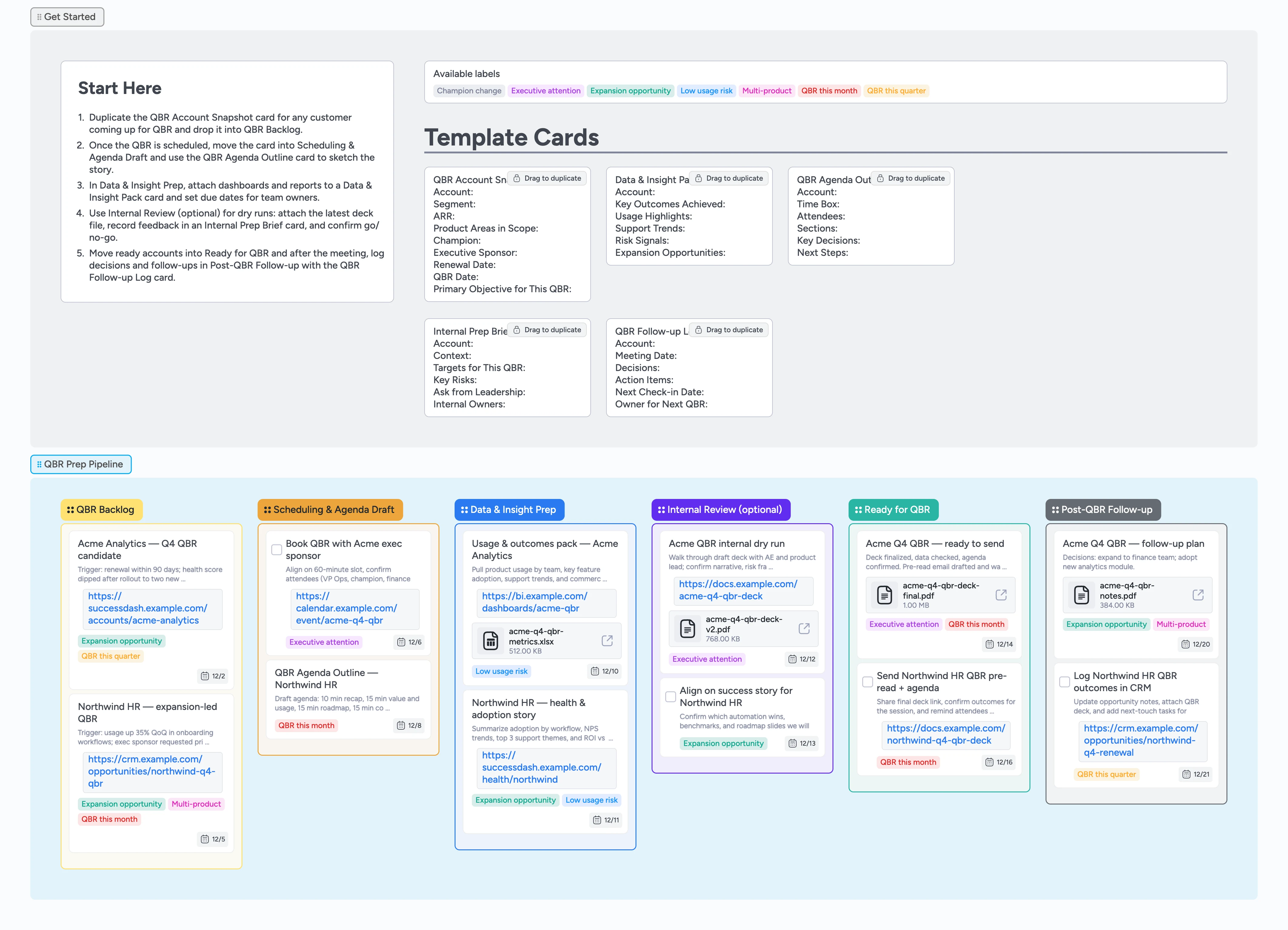
Quarterly business reviews are where renewals, expansions, and executive relationships are won or lost — but most teams still chase slides, dashboards, and notes in the week before the call. This template turns Instaboard into a QBR prep command center: a Start-Here strip with duplicate-locked cards for account snapshots, insight packs, agendas, and follow-up logs, plus a left‑to‑right pipeline from QBR Backlog through Post-QBR Follow-up. Instead of rebuilding decks from scratch, your team moves one card per account across stages, attaches the latest metrics and decks, and keeps owners, labels, and dates in the same view.
- Standardize QBR prep across accounts with guided templates
- See every upcoming QBR on one pipeline instead of scattered calendars
- Attach decks, dashboards, and notes directly to account cards
- Coordinate CS, sales, and leadership with shared cards, comments, and @mentions instead of scattered threads
- Log decisions and follow-ups with card owners and due dates so nothing falls through after the call
Capture QBR candidates in the backlog
On the board, start in the Get Started section: duplicate the QBR Account Snapshot card and drag it into QBR Backlog for any customer whose QBR is due this quarter. Fill ARR, renewal date, champion, and primary objective, assign an owner, and tag the card with QBR this month or QBR this quarter so priorities are obvious.
Schedule the meeting and frame the agenda
When a QBR is on the horizon, move the card into Scheduling & Agenda Draft and duplicate the QBR Agenda Outline card underneath it. Use its fields to list attendees, time box segments, and call out 2–3 decisions you want from the customer, then attach the calendar invite or meeting link so everyone can jump in from the board.
Pro tip: If you support multiple segments, clone this board and tweak the Agenda Outline fields to match enterprise vs. SMB review patterns.
Build the data and insight pack
Drag the card into Data & Insight Prep and duplicate a Data & Insight Pack card for that account. On that card, assign collaborators from product, support, or revops with due dates, then attach dashboards or exports and summarize usage highlights, risks, and expansion opportunities directly in the description. Ask partners to comment inline on the card next to the charts they own, and apply Low usage risk, Expansion opportunity, or Executive attention labels so you can filter which QBRs need the deepest prep.
Run an internal review and finalize the story
If the account is strategic, move the card to Internal Review (optional) and attach the latest QBR deck file. Open an Internal Prep Brief card while you run the dry run and edit its fields live to capture context, targets, and asks from leadership so everyone sees the same story, risks, and commercial ask. Assign reviewers and set a deadline for comments on that card so alignment happens in one place before the customer sees it.
Pro tip: During the dry run, edit the Internal Prep Brief live so it becomes the single source of truth for what you will promise and what you will ask for.
Run the QBR and track follow-ups
Once the deck is final and invites are confirmed, move the card into Ready for QBR and keep it open during the call. Afterward, slide it into Post-QBR Follow-up, duplicate the QBR Follow-up Log card, and record decisions, action items, and owners; attach the final deck and notes, set card due dates (including for the next value check-in) so the board, not your inbox, reminds you before momentum fades.
What’s inside
QBR prep pipeline
Columns cover QBR Backlog, Scheduling & Agenda Draft, Data & Insight Prep, Internal Review (optional), Ready for QBR, and Post-QBR Follow-up so you can see where each account sits from first candidate through follow-up and let leaders filter by label to see which QBRs need executive attention without another status meeting.
Account and insight templates
Duplicate-locked QBR Account Snapshot, Data & Insight Pack, QBR Agenda Outline, Internal Prep Brief, and QBR Follow-up Log cards keep fields consistent while leaving space for customer-specific details, so every CSM captures ARR, renewal dates, objectives, and follow-ups in a familiar structure.
QBR-specific labels
Use labels like QBR this month, QBR this quarter, Low usage risk, Expansion opportunity, Executive attention, Champion change, and Multi-product to sort reviews by urgency and strategy.
Demo cards with real prep examples
Pre-filled cards for accounts like Acme Analytics and Northwind HR model how to summarize triggers, attach metric packs and decks, and write crisp follow-up plans.
Start-Here guidance
A Start-Here card walks you through duplicating templates, tagging urgency, and moving cards left→right so new CSMs can run QBR prep without guessing.
Why this works
- Turns ad-hoc QBR prep into a consistent, stage-based pipeline the whole team can see
- Keeps account snapshots, metrics, decks, and follow-ups on one card instead of scattered tools
- Uses duplicate-locked templates so every QBR captures the same strategic details while staying flexible per customer
- Highlights urgency and opportunity with QBR-specific labels so leaders know where to lean in
- Makes it easy to reuse a proven QBR prep workflow across segments, regions, and CSMs
FAQ
Does this replace our QBR slide deck?
No. Keep using your slide template if you like, but attach the latest deck file to each account card so the pipeline shows both the work and the artifact in one place. Attaching it means your team and execs can always open the latest version from the card alongside comments, labels, and follow-up tasks.
How far in advance should we start QBR prep?
Most teams start 3–4 weeks before the meeting: add candidates to QBR Backlog, schedule time with champions, then work across Data & Insight Prep and Internal Review so the story and asks are solid before you send a pre-read.
Can we use this for different customer segments or products?
Yes. Duplicate the board or adjust the template cards, labels, and stage names to match each segment’s cadence, metrics, and decision-makers while keeping the same left→right flow.
Where do we track post-QBR action items?
Use the Post-QBR Follow-up column with the QBR Follow-up Log card attached to each account. Record decisions, owners, and due dates directly on the card first, then link any Jira or CRM tasks if needed, and keep the board as your live source of truth until every follow-up is complete.