Implementation Health Checks Template
Spot implementation risks before they snowball
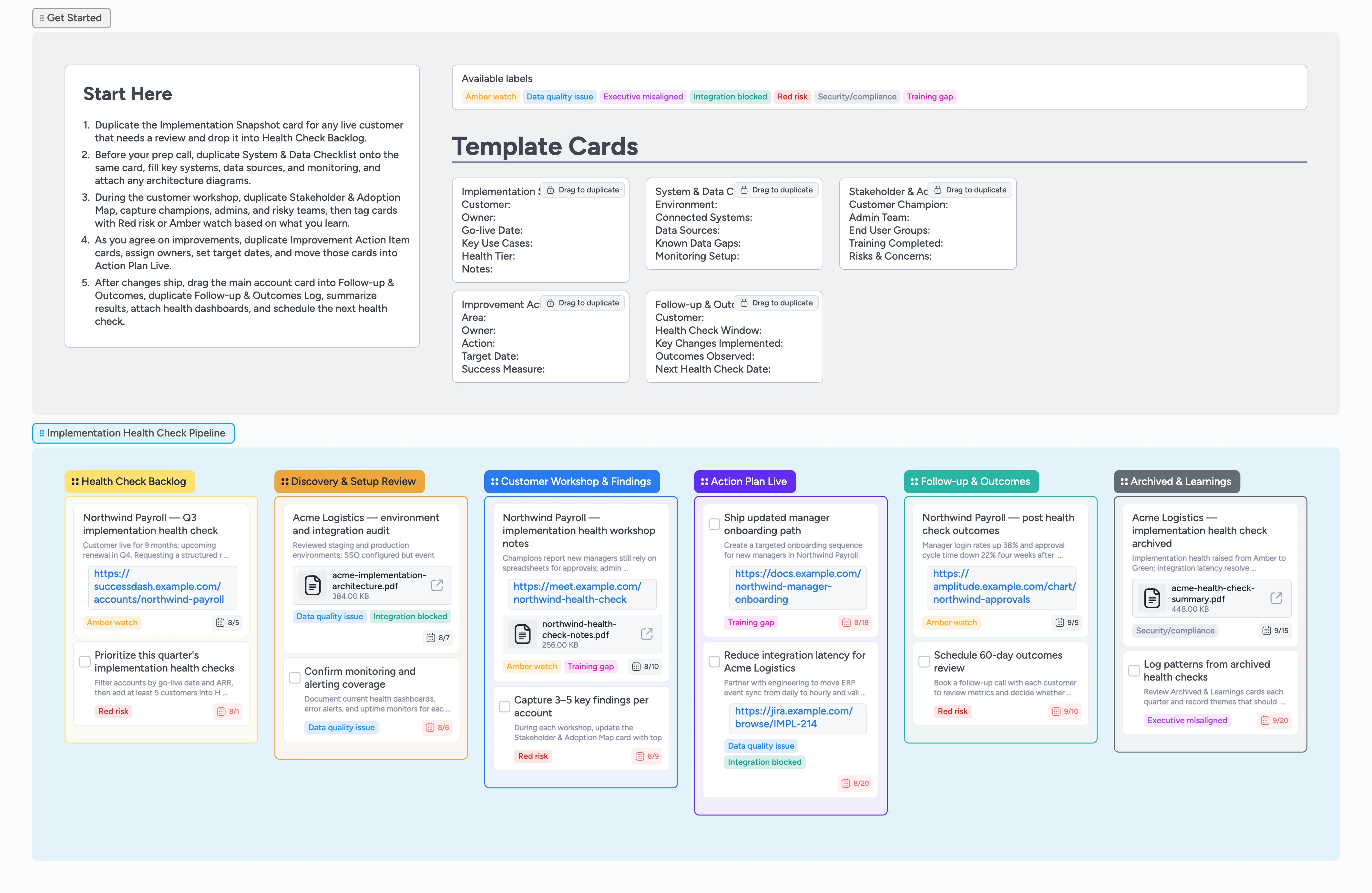
Implementation and customer success leaders need a repeatable way to see where live customers are healthy, drifting, or at real risk. This Instaboard template turns your implementation health checks into a visual pipeline with a clear Start-Here strip, duplicate-locked cards for snapshots and action items, and demo content that shows what good looks like. Drop each account into the Health Check Backlog, move the same card as you review systems, run workshops, and track follow-up outcomes, and keep architecture diagrams, dashboards, and notes attached so every stakeholder sees the same story.
- Standardize implementation health checks by duplicating the same snapshot card for every customer
- See which accounts need discovery, workshops, or follow-up by scanning pipeline columns
- Duplicate guided micro-templates instead of reinventing checklists every time
- Attach architecture diagrams, monitoring dashboards, and workshop notes to each account
- Assign owners, due dates, and labels so follow-ups never get lost
Capture the implementation snapshot
Start in the Get Started section and duplicate the Implementation Snapshot card. Drop it into Health Check Backlog, fill Customer, Owner, Go-live Date, Key Use Cases, and Health Tier, then assign the CSM or implementation lead on the card. Set a due date for the health check and apply Red risk or Amber watch if you already know the account is shaky. Attach any existing architecture diagrams or health dashboards so the review starts with real context.
Review systems, data, and monitoring
For each account you are preparing, duplicate System & Data Checklist onto the same card and drag it into Discovery & Setup Review. Fill Environment, Connected Systems, Data Sources, Known Data Gaps, and Monitoring Setup so technical details live in one place. Tag the card with Integration blocked or Data quality issue where needed, and attach PDFs or links to error dashboards. Assign engineering or data partners as assignees and set due dates so follow-ups stay visible.
Run the customer workshop and log findings
When a workshop or check-in is scheduled, move the card into Customer Workshop & Findings and duplicate Stakeholder & Adoption Map. During the session, capture champions, admin contacts, end user groups, and any Training gap or Executive misaligned risks directly in the card fields. Add a basic notes card for the workshop if you like, attach the calendar invite or call recording, and update labels to reflect what you heard. This keeps qualitative context tied to the same pipeline card you will move through Action Plan Live and Follow-up & Outcomes.
Launch improvements and track outcomes
As next steps solidify, drag the account into Action Plan Live and duplicate Improvement Action Item cards for each area you want to fix. For every card, set an owner, Target Date, and Success Measure, and nest dependent tasks using indentation when helpful. Attach Jira tickets, training docs, or Loom walkthroughs so owners have everything at hand. Once changes ship, move the account into Follow-up & Outcomes, duplicate Follow-up & Outcomes Log, record the metrics you see, and schedule the next health check date so improvements keep compounding.
Pro tip: Use labels like Training gap and Integration blocked consistently so you can filter columns during quarterly implementation reviews.
Archive learnings and reuse patterns
When a health check cycle is complete, slide the account card into Archived & Learnings. Update the Follow-up & Outcomes Log with final notes, attach a PDF summary if you have one, and clear any remaining tasks. Periodically filter this column by labels like Training gap or Integration blocked to spot patterns, create new Improvement Action Item templates if you see repeat work, and share standout examples with the team. Over time this column becomes your implementation playbook, ready to reuse the next time you launch a similar customer.
Pro tip: Before a big renewal or roadmap planning session, filter by labels and revisit Archived & Learnings cards for customers in that segment.
What’s inside
Start-Here health check strip
Implementation Snapshot, System & Data Checklist, Stakeholder & Adoption Map, Improvement Action Item, and Follow-up & Outcomes Log cards sit duplicate-locked so every review follows the same fields.
End-to-end health check pipeline
Six columns cover Health Check Backlog, Discovery & Setup Review, Customer Workshop & Findings, Action Plan Live, Follow-up & Outcomes, and Archived & Learnings so you can track each account from idea to improvement.
Risk and blocker labels
Red risk, Amber watch, Integration blocked, Data quality issue, Training gap, Executive misaligned, and Security/compliance tags make it easy to filter by risk themes during reviews.
Demo cards that model best practice
Filled examples show how to capture health context, list key findings, record action items, and log outcomes with assignees, due dates, attachments, and labels already in place.
Repository of learnings
Archived & Learnings cards keep each health check’s summary, attached PDFs, and patterns so you can revisit them before renewals or roadmap planning.
Why this works
- Gives every implementation health check the same structure and fields
- Keeps technical details, stakeholder context, and action items on one live board
- Surfaces integration, data, and training risks early through consistent labels
- Makes it easy to assign owners, due dates, and attachments for follow-up work
- Builds a reusable archive of health check outcomes you can revisit before renewals
FAQ
How often should we run implementation health checks?
Most teams run a full implementation health check once or twice a year per customer, plus focused check-ins after major launches or changes; use this board to queue accounts and track each cycle.
Who should own this board?
Implementation leads or customer success managers typically own the board, but you can assign engineering, data, and product partners on individual cards so cross-functional work stays coordinated.
Can we change the stages or labels?
Yes. Rename columns, adjust labels, and edit the micro-templates so the pipeline matches your implementation process, while keeping the core pattern of Start-Here guidance and left-to-right flow.
Does this work if we are still in rollout?
You can use the same template during rollout by focusing early cards on System & Data Checklist and Stakeholder & Adoption Map, then reusing the pipeline later for post-launch health checks.