Customer Reference Request Tracker Pipeline Template
Keep every customer reference request on one board
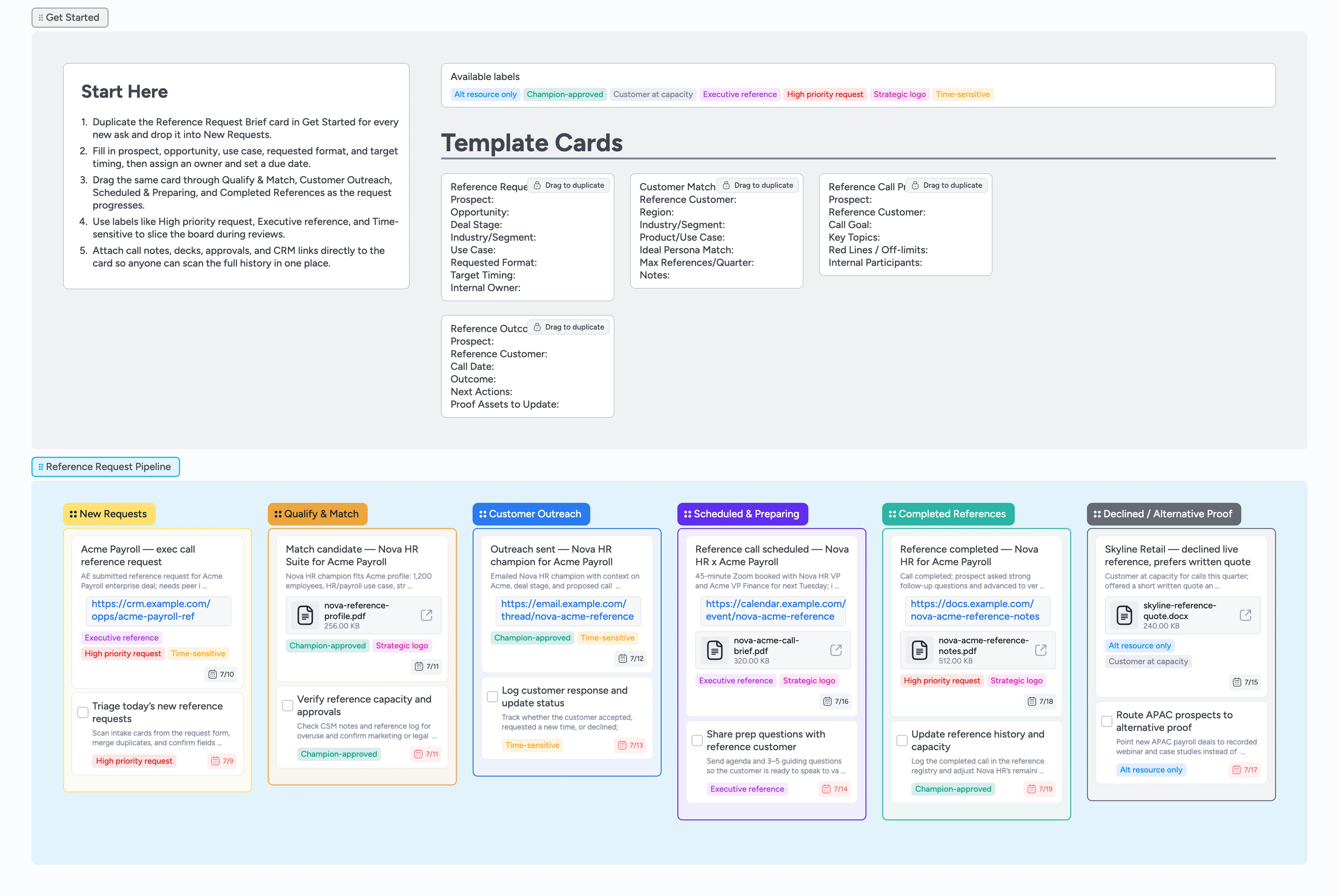
Customer reference calls are often the last proof point before a deal closes, but tracking who asked, which customers are available, and what happened after the call usually lives in scattered forms, sheets, and DMs. This template turns Instaboard into a shared reference request tracker: a Start-Here strip with duplicate-locked cards for request briefs, match candidates, call prep, and outcomes, plus a left-to-right pipeline from New Requests through Qualify & Match, Customer Outreach, Scheduled & Preparing, Completed References, and Declined / Alternative Proof. Instead of guessing who can take another call, your team moves one card per request, attaches notes and files, applies labels, and sees the full history at a glance.
- Create a dedicated pipeline where every customer reference request moves left→right from intake to outcome
- Standardize how sales and success submit reference requests with guided micro-templates
- Protect your reference customers by tracking capacity, approvals, and outcomes
- Attach briefs, emails, decks, and call notes directly to each request card
- Filter by priority, executive references, or alternative proof to plan reviews quickly
Capture new reference requests in New Requests
On the board, start in the Get Started section and duplicate the Reference Request Brief card to create a new request. Drag the duplicate into the New Requests column and fill in prospect, opportunity, deal stage, industry, use case, requested format, target timing, and internal owner. Assign the AE or CSM who owns the deal, set a due date for when the reference is needed, and apply labels like High priority request, Executive reference, or Time-sensitive so it is easy to filter later. Attach any existing brief, opportunity link, or Slack thread so reviewers have context without hunting across tools.
Qualify and match the right customer
When you are ready to find a reference, move the card into Qualify & Match and duplicate a Customer Match Candidate card for each potential customer. On those cards, capture region, segment, product or use case, persona match, and a simple capacity line like "Q1: 2/4 calls used" so you do not overuse your champions. Tag truly strategic names with Strategic logo and note whether the CSM has already confirmed the customer is willing to speak. Attach a short profile or past case study where available, then choose the best candidate and keep that card closest to the main request card.
Coordinate outreach and approvals with customers
Once you have a match, drag the main request card into Customer Outreach and update the description with what you are asking the customer to do. Duplicate a Reference Call Prep card to outline call goals, key topics, and red lines so both the internal team and the customer know what to expect. Assign the CSM or advocacy owner to send the outreach, set a due date, and attach email drafts or templates so the work is easy to repeat. Use labels like Champion-approved and Customer at capacity to reflect the customer’s response, and add link attachments for email threads or ticket IDs so you can always trace what was agreed.
Prepare and run the reference call
When the customer agrees, move the request into Scheduled & Preparing and attach the calendar invite or meeting link to the card. Update the Reference Call Prep card with final attendees, call goals, and off-limits topics, then tag it as Executive reference when leadership is involved. Assign everyone who needs to join the call, set the due date to the meeting date, and attach the briefing doc or deck so participants open everything from the card instead of hunting through email and calendar tabs. During or immediately after the call, add quick notes in the card description so nothing relies on memory or private notes.
Log outcomes, capacity, and alternative proof
After the call, slide the request into Completed References and duplicate a Reference Outcome Summary card to capture the outcome, next actions, and proof assets to update. Attach call notes, recordings, or follow-up decks, and update labels to reflect whether the customer is available for more calls or approaching capacity. If a customer declines or you decide to send case studies instead, move the card into Declined / Alternative Proof, attach the quote or asset, and tag it Alt resource only so AEs know what to share for similar deals. Over time, scan these final columns to see which customers carry the load, where you need more champions, and how references influence closed-won deals.
What’s inside
Reference request pipeline
Six columns for New Requests, Qualify & Match, Customer Outreach, Scheduled & Preparing, Completed References, and Declined / Alternative Proof so every reference ask moves left→right from intake through outcome instead of disappearing into inbox threads.
Start-Here micro-templates
Duplicate-locked Reference Request Brief, Customer Match Candidate, Reference Call Prep, and Reference Outcome Summary cards give sales and success a consistent way to capture deal context, customer fit, call goals, and outcomes without rebuilding fields from scratch.
Reference program labels
Labels like High priority request, Executive reference, Time-sensitive, Champion-approved, Customer at capacity, Alt resource only, and Strategic logo make it easy to slice the board for weekly reviews and avoid overusing the same champions.
Realistic demo cards
Pre-filled cards for scenarios like Nova HR and Acme Payroll, Skyline Retail capacity limits, and APAC routing show how to capture request details, attach briefs and notes, and update tags as the request progresses.
Declined and alternative proof lane
A dedicated Declined / Alternative Proof column where you log when customers say no, attach quotes or case studies instead, and keep a record that informs future matching and capacity planning.
Why this works
- Gives sales, success, and advocacy a single live view of every customer reference request
- Protects valuable reference customers by making capacity and approvals visible on the board
- Standardizes briefs, matching, prep, and outcomes with duplicate-locked micro-templates instead of ad-hoc documents
- Keeps emails, decks, notes, and links attached to the request card so context is never lost between teams
- Builds a growing history of which references influenced which deals so you can tune your program over time
FAQ
Who is this reference request tracker for?
This template is built for customer marketing and advocacy owners, customer success leaders, and sales teams who need a shared place to manage customer reference requests from intake through outcome.
Does this replace our CRM or advocacy software?
No. Keep using your CRM or advocacy platform of record, but link opportunities, contacts, and campaigns from each Instaboard card so the pipeline shows the live status of every reference request alongside the supporting context.
How do we avoid overusing the same reference customers?
Track capacity in the Customer Match Candidate and Reference Outcome Summary cards, tag Customer at capacity when someone has reached their limit, and use the Declined / Alternative Proof column to route future deals to case studies or other champions instead.
Can we adapt the stages and labels to our program?
Yes. Rename stages, tweak New Requests or Declined / Alternative Proof to match your process, and adjust labels like High priority request or Executive reference while keeping the left-to-right flow from intake to outcome.