Renewal Risk Watchlist Template
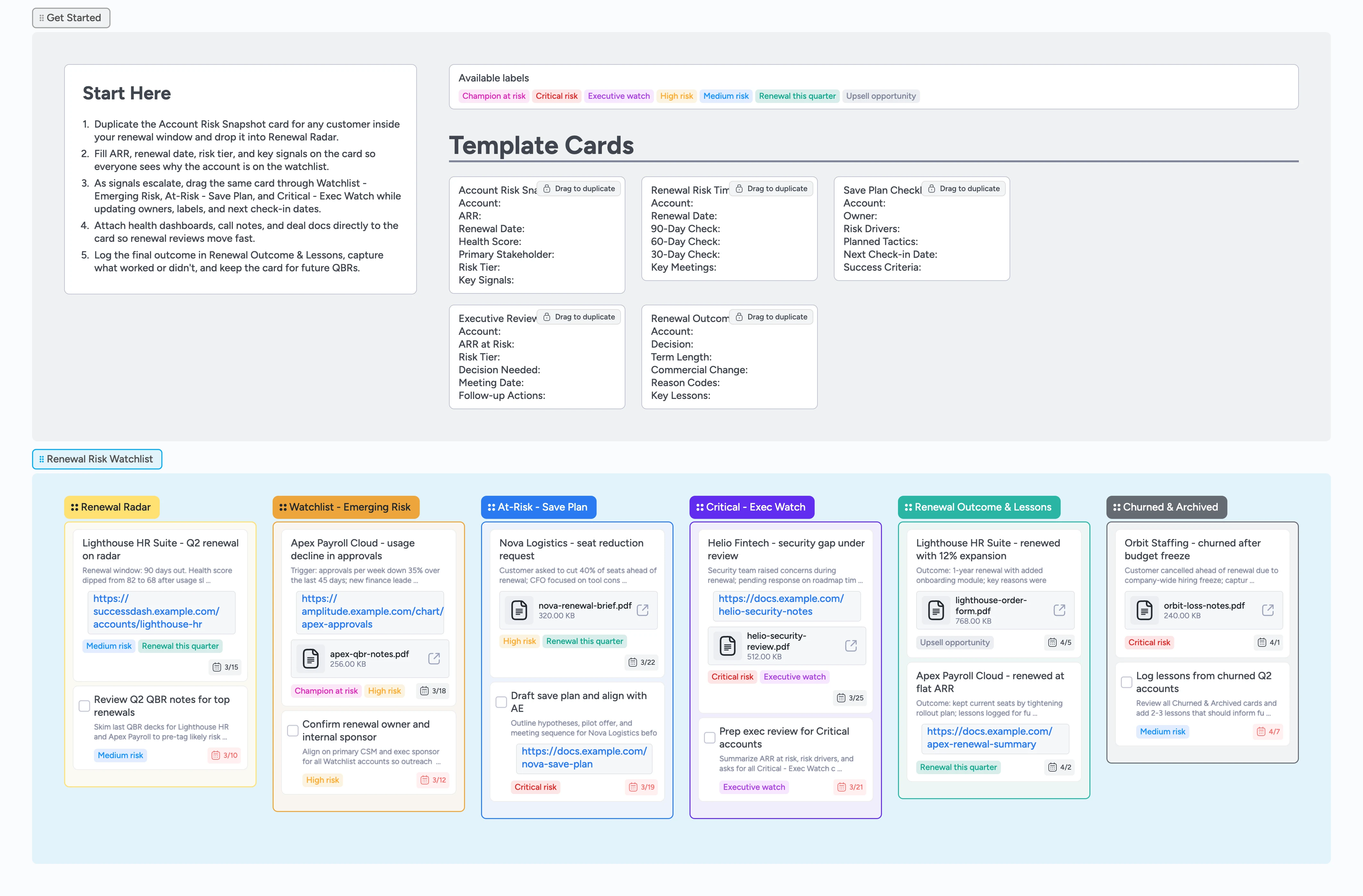
See every renewal risk in one lane
Customer success and account teams need a clear, shared view of which renewals are safe, shaky, or in trouble. This Renewal Risk Watchlist template turns Instaboard into a single pipeline for every account inside your renewal window, organized from Renewal Radar through Churned & Archived. Duplicate guided cards to capture ARR, renewal dates, risk signals, and owners, then drag each account through emerging risk, save plan, and executive review. Attach health dashboards, QBR decks, and order forms so leaders can scan the watchlist and make decisions quickly, without hunting across spreadsheets and slides.
- Centralize every renewal risk on one visual board
- Assign clear owners, labels, and check-in dates for each account
- Duplicate guided micro-templates instead of rebuilding renewal notes from scratch
- Attach health dashboards, QBR notes, and order forms to the account card
- Filter by Critical risk, High risk, or Renewal this quarter during reviews
Log renewals into Renewal Radar
Start in the Get Started section and duplicate the Account Risk Snapshot card. Drag the new card into the Renewal Radar column and fill in Account, ARR, Renewal Date, Health Score, Primary Stakeholder, Risk Tier, and Key Signals so everyone understands why it is on the watchlist. Assign the primary CSM or AE, set a due date for the first renewal touch, and apply a label like Medium risk or Renewal this quarter to make filtering useful. Attach your latest health dashboard or CRM snapshot so leaders can click straight into proof instead of guessing from memory. As you add more accounts, keep Renewal Radar focused on deals inside the upcoming renewal window so the list stays actionable.
Move emerging risks into the watchlist
When you see early warning signs on an account, drag its card from Renewal Radar into Watchlist - Emerging Risk. Duplicate the Renewal Risk Timeline card and note the renewal date, upcoming checkpoints at 90, 60, and 30 days, plus key meetings you need to land. Update the description on the main account card with concrete signals, such as usage drops or champion changes, and tag it with High risk or Champion at risk if those drivers are confirmed. Assign yourself and any partner roles, like an AE or product specialist, and add due dates for the next call or QBR. Use attachments to pin QBR decks or internal notes so the history of the risk is easy to scan.
Plan and run save motions
Once an account requires a proactive save, drag its card into At-Risk - Save Plan. Duplicate the Save Plan Checklist card, then fill in Owner, Risk Drivers, Planned Tactics, Next Check-in Date, and Success Criteria so the team knows the plan and how you will measure success. Turn follow-up actions into task cards, assign owners, and set due dates directly on those tasks so nothing quietly slips. Attach draft proposals, enablement plans, or enablement Looms to the account card so everyone shares the same materials. As you execute, update the card description with quick status notes and adjust labels if an account moves from High risk toward Medium risk again.
Escalate critical accounts for executive review
If an account becomes truly urgent, move its card into the Critical - Exec Watch column. Duplicate the Executive Review Pack card and complete fields for ARR at Risk, Risk Tier, Decision Needed, Meeting Date, and Follow-up Actions so leadership can make a call in one meeting. Tag the card with Critical risk and Executive watch to keep it front and center during reviews. Attach a concise save brief, financial model, or security memo so execs have context without opening extra tools. Assign your VP or CRO on the card and set a meeting date so escalation does not stall in email threads.
Capture renewal outcomes and lessons learned
When the renewal decision lands, move the account into Renewal Outcome & Lessons. Duplicate the Renewal Outcome & Lessons card and record the Decision, Term Length, Commercial Change, Reason Codes, and Key Lessons, attaching the signed order or loss summary as a file. If the customer churns, drag the card into Churned & Archived once lessons are documented so the board reflects reality. Assign follow-up owners for any promised roadmap updates or re-engagement plans and set a future touchpoint date on the card. Periodically scan this lane during QBR prep to spot patterns in risk drivers and refine your save playbooks.
What’s inside
Start-Here risk strip
Duplicate-locked cards for Account Risk Snapshot, Renewal Risk Timeline, Save Plan Checklist, Executive Review Pack, and Renewal Outcome & Lessons so every renewal follows the same fields.
Six-stage renewal pipeline
Columns for Renewal Radar, Watchlist - Emerging Risk, At-Risk - Save Plan, Critical - Exec Watch, Renewal Outcome & Lessons, and Churned & Archived so every account has a clear home.
Risk tier labels
Tags like Critical risk, High risk, Medium risk, Renewal this quarter, Executive watch, Champion at risk, and Upsell opportunity so you can slice the watchlist in seconds.
Demo cards with real context
Filled examples for Lighthouse HR, Apex Payroll, Nova Logistics, Helio Fintech, and Orbit Staffing with assignees, dates, labels, and attachments that model strong renewal hygiene.
Outcome and lessons lane
Dedicated Renewal Outcome & Lessons and Churned & Archived columns so you can log final decisions and capture reusable playbook insights.
Why this works
- Keeps every upcoming renewal and risk signal on one live board
- Turns vague concern about churn into clear tiers, owners, and next steps
- Combines health data, notes, and documents so reviews move quickly
- Makes escalations faster by packaging context, ARR at risk, and decisions
- Builds a reusable library of outcomes and lessons to strengthen future saves
FAQ
Who is this renewal risk watchlist for?
This template is designed for customer success leaders, account managers, and renewals teams who need a single, shared view of renewal risk across their book of business.
How many accounts should live on the board?
Focus the watchlist on customers inside your active renewal window, such as 90 or 120 days out, so the pipeline highlights deals that need attention now instead of every customer you have.
Can we adapt the stages or labels?
Yes. You can rename stages, adjust labels like Critical risk or Renewal this quarter, and tweak the micro-templates while keeping the overall flow from Radar to Outcome intact.
How does this differ from a standard sales pipeline?
Sales CRMs focus on new deals, while this watchlist focuses on protecting and expanding existing ARR by capturing risk signals, save plans, and lessons learned in one collaborative view.