Incident Escalations Pipeline Template
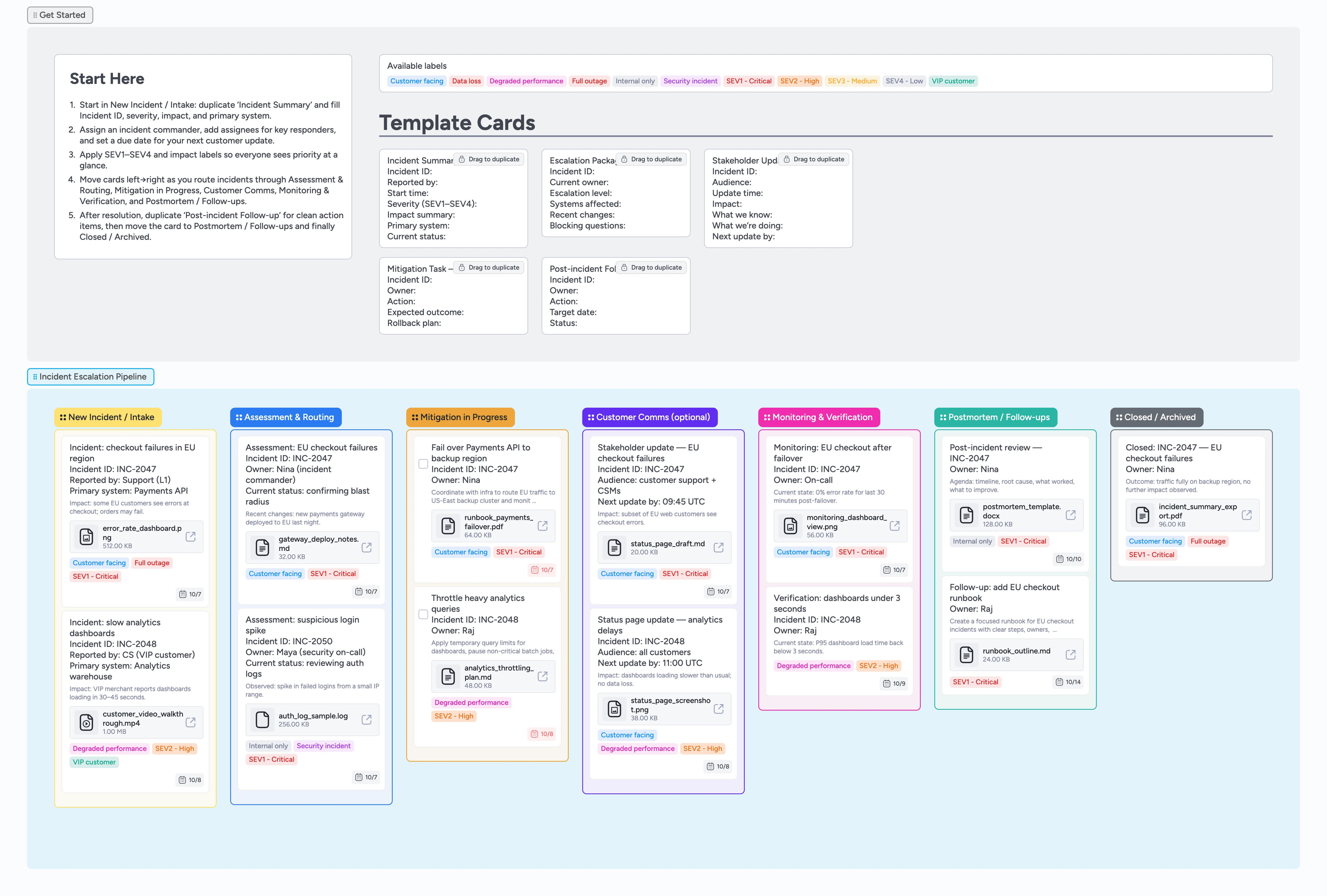
Run every incident escalation on one board
This template helps support and on-call teams move incidents from first report to postmortem without losing context in Slack threads and scattered docs. Start in New Incident / Intake with an Incident Summary card that captures severity, impact, and systems in a few fields. As the situation unfolds, route cards through Assessment & Routing, Mitigation in Progress, and Customer Comms while labels like SEV1–SEV4, Customer facing, and Security incident keep priorities obvious. Monitoring & Verification and Postmortem / Follow-ups give you a place to track validation checks, action items, and final documentation before you slide incidents into Closed / Archived.
- Standardize how incidents are summarized and escalated
- Keep owners, responders, and stakeholders aligned in one view
- Track severity and impact with filterable labels
- Capture postmortem follow-ups as assigned cards with target dates
Start in New Incident / Intake
Open the Incident Escalations Pipeline and glance at the Getting Started area, then focus on the New Incident / Intake list. Drag the Incident Summary micro-template to duplicate it and fill in Incident ID, reporter, start time, severity, impact summary, and primary system. Assign an incident commander in the card header, add any other key responders as assignees, and set a due date for the next customer-facing update. Apply labels like SEV1 - Critical, Customer facing, or Security incident so the bridge immediately sees how urgent this is.
Pro tip: Create one Incident Summary card per incident and link Mitigation Task and Stakeholder Update cards back to it so your whole timeline lives in one place.
Assess and route with context
When triage begins, move the card to Assessment & Routing so the team sees it is being actively evaluated. Use the description to log hypotheses, recent changes, and early findings, attaching logs or screenshots directly to the card. When you need to hand the incident to an on-call engineer or another team, duplicate the Escalation Package micro-template, fill in systems affected and blocking questions, and tag SEV1–SEV4 plus Internal only or Customer facing. Slide cards to Mitigation in Progress once owners and next steps are clear.
Coordinate mitigation work
In Mitigation in Progress, duplicate the Mitigation Task micro-template for each major action, such as failover, throttling, or configuration changes. Assign each task to a specific responder, set due dates, and keep checkbox tasks unchecked until the action is fully verified. Attach runbooks, change tickets, or dashboards so people do not have to hunt through chat history for links. Use tags like Data loss, Degraded performance, or Full outage to filter the view during standups or bridge calls.
Keep stakeholders informed in Customer Comms
When customers or executives need updates, move the incident card into Customer Comms (optional) and, for larger incidents, create a dedicated communication card linked from the Incident Summary. Duplicate the Stakeholder Update micro-template to capture audience, update time, what you know, what you are doing, and when the next update is due. Set a due date on the comms card to match the promised next update and tag Customer facing or Internal only to keep channels straight. Attach status page drafts, prepared emails, or talking points directly to the card so anyone joining the bridge immediately sees the latest approved message.
Monitor, run the postmortem, and close
After a fix is deployed, move the incident into Monitoring & Verification and record validation checks in the description while you watch error rates and latency, pasting in dashboard links or screenshots as proof. Once you are confident the incident is resolved, slide the card into Postmortem / Follow-ups and duplicate the Post-incident Follow-up micro-template for each action item. Assign owners, add target dates, and attach the postmortem document so nothing gets lost after the bridge ends. Finally, drag the incident into Closed / Archived so the team has a clean, filterable history for future audits and training.
What’s inside
Incident escalation pipeline
New Incident / Intake → Assessment & Routing → Mitigation in Progress → Customer Comms (optional) → Monitoring & Verification → Postmortem / Follow-ups → Closed / Archived so escalations move predictably from intake to postmortem instead of stalling in chat threads.
Incident micro-templates
Duplicate-locked starters for Incident Summary, Escalation Package, Stakeholder Update, Mitigation Task, and Post-incident Follow-up so every card begins with the right fields.
Severity and impact labels
SEV1–SEV4 levels, Customer facing vs Internal only, Security incident, Degraded performance, Data loss, Full outage, and VIP customer labels ready to filter standups and bridges.
Realistic demo incidents
Filled example cards for EU checkout failures, slow dashboards, and security log anomalies with due dates, tags, and file attachments like runbooks, screenshots, and postmortem docs.
Why this works
- Keeps severity, impact, ownership, and communications visible on every incident card
- Gives support, on-call, and leadership a shared view of escalation status
- Reduces confusion during bridges by standardizing summaries, escalation packages, and stakeholder updates
- Captures postmortem documents and follow-up tasks where the incident actually lived
- Makes it easy to replay past incidents for training, audits, and continuous improvement by filtering cards by SEV level, impact, or label
FAQ
How is this different from a regular support board?
Your main support board captures every ticket; this incident escalation pipeline is for the smaller set of cases that need SEV levels, on-call coordination, and structured communications from intake through postmortem.
Can we change SEV levels or labels?
Yes. You can rename labels like SEV1 - Critical or Security incident to match your playbooks while keeping the same cards, lists, and flow.
Where should we store logs, screenshots, and reports?
Attach key evidence directly to the incident and mitigation task cards so investigators, support, and leadership all pull from the same timeline instead of hunting through chats and folders or scrolling long Slack threads.
Does this work with Jira, ServiceNow, or PagerDuty?
Yes. Link tickets or alerts inside the card description or attachments so the Instaboard view shows the incident summary, owners, and work while your existing tools handle ticketing and paging.