For teachers and tutors
Jamboard alternatives for teachers, and how to get your old Jams back
Google Jamboard shut down on December 31, 2024. Your Jams weren't deleted: Google turned them into PDFs in your Google Drive. Here is how to find them, how to keep teaching with them, and which Jamboard alternatives work best in a classroom.
Updated
The short answer
- Your old Jams are PDFs in Google Drive. Search Drive for type:Jam to find them.
- Need students to post without any account? Whiteboard.fi and Jotboard are built for that.
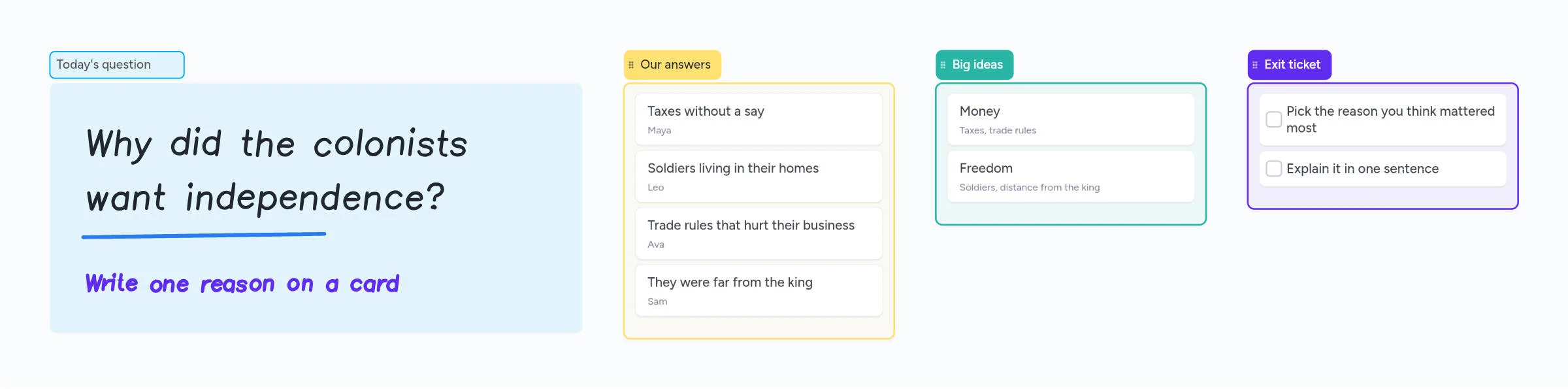
- Want one board for drawing, sticky-note style cards and lists, with your PDFs on it? Instaboard (us) is free to start, and students sign in for free to write.
Where your Jams went
Google first announced that Jam files would be deleted. In the end they were kept: Google's help page now says Jams were converted to PDFs in 2025 and are in Google Drive.
- Open Google Drive and search for type:Jam.
- Open a Jam to see it as a PDF, or download it.
- Import the PDF into your new whiteboard to keep teaching with it.
In Instaboard, choose Import PDF and the file opens as a board with its pages, so you and your students can write and draw on them again.
The old migration tools are mostly gone
Lucid's editable Jamboard import ended on December 31, 2024, and FigJam now imports Jamboard PDFs as images. Miro and Padlet still document Drive importers, but they were built for the old Jam files.
What teachers miss most about Jamboard
From teacher threads on r/Teachers, r/gsuite and r/edtech, the same things keep coming up:
- No student accounts. "We can't expect a 6 year old to log into another account."
- Simple. Most replacements are business tools with too many buttons.
- Free, with no three-board trap.
- Frames like slides. Students click through pages, and the teacher sees who is where.
- Sticky notes on a shared board for questions and exit tickets.
- Chromebooks and Google Classroom. Drawing on a touchscreen or interactive board.
No single app matches every point, so choose by the one that matters most in your room.
Jamboard alternatives compared
| App | Free for teachers | Students need accounts? | Good for |
|---|---|---|---|
| Instaboard | 5 boards, unlimited collaborators; pen strokes don't count toward the 150-item limit | To view, no. To write, a free sign-in (Google, Apple or email) | Drawing, cards and lists on one board; your PDFs as pages; video calls |
| Jotboard | Unlimited boards, 5 collaborators at once | No, guests join by link | The closest Jamboard look and feel |
| Whiteboard.fi | Free temporary rooms | No | Each student writes on their own board while you watch |
| FigJam | Free Education plan for verified teachers | Yes; under-13s need school approval | Older students, design-style activities |
| Miro | Free Educator plan, 100 members | Students can be invited without registering | Big projects and templates |
| Lucidspark | Free for K-12 and higher ed | Yes, school email | Schools already on Lucid |
| Canva Whiteboards | Free for verified K-12 teachers | Yes, invited by email | Classes already using Canva |
| Explain Everything | 3 projects with 1 slide each | — | Recorded explainers |
Swipe the table sideways to see every column.
Plan details from each app's official pages, checked October 2026.
Which one should you pick?
If students must never sign in: Jotboard or Whiteboard.fi
Jotboard was built as a Jamboard look-alike and lets guests join without accounts. Whiteboard.fi gives every student their own board so you can see all of their work at once.
If you want one board that does more: Instaboard (that's us)
Instaboard puts handwriting, sticky-note style cards, lists and checklists on one infinite board. Write the question with your pen, have students add their answers as cards, then drag the answers into groups. Import a PDF worksheet as pages, use the laser pointer, and have students follow your view. It runs in the browser on Chromebooks and has apps for iPad and Android.
Be aware: students can view a shared board without an account, but they need a free sign-in to write on it. The free plan has 5 boards; for many classes, Pro is $5 a month billed yearly ($59.99 a year).
If your school already pays for something: use it
FigJam, Lucid and Canva are free for verified educators and fit well if your school already uses them.
Start from the ready board
It opens in your browser in a few seconds, with nothing to install. Sign in for free when you want to save it and share it.
Questions
When did Google Jamboard shut down?
Jams became view-only on October 1, 2024, and the Jamboard app shut down on December 31, 2024.
Were my Jams deleted?
No. Google's help page says Jams were converted to PDFs in 2025 and are in Google Drive. Search Drive for type:Jam to find them.
Can I keep editing my old Jams?
Not as Jams, but you can import the PDF into another whiteboard. In Instaboard, Import PDF opens it as a board with its pages, and you can write and draw on them.
What is the best free Jamboard alternative for students without accounts?
Jotboard and Whiteboard.fi let students join without accounts. In Instaboard, students can view a shared board without an account but need a free sign-in to write.
Does Instaboard work on Chromebooks?
Yes, Instaboard runs in Chrome, so it works on Chromebooks, including touchscreen ones. There are also apps for iPad, iPhone and Android.
Sources
- Google Workspace Updates: The next phase of digital whiteboarding (Sept 28, 2023)
- Google Jamboard Help: Jamboard has been discontinued
- Lucid: Transition from Jamboard to Lucidspark
- Figma Help: Migrate Google Jamboards to FigJam
- Jotboard pricing
- Whiteboard.fi
- Figma for Education
- Miro for Education
- Lucid for Education
- Canva for Teachers
- Explain Everything pricing
Related
Microsoft Whiteboard alternatives: what to use now that the apps are gone
The standalone Microsoft Whiteboard apps stopped on October 16, 2026. What changed, how to save your boards, and free alternatives for pen users, tutors and teachers, with real free-plan limits.
An online whiteboard for tutoring that works the way you teach
A free online whiteboard for tutoring: pressure-sensitive pen, PDF worksheets, Desmos, equations and a video call on the board. Includes a ready lesson board, setup tips and honest price comparisons.