For college and nursing students
How to organize photos of handwritten notes on one study board
You wrote the notes by hand, you photographed the pages, and now they sit in a camera roll in no order. This page is a board for laying them out: one board per topic, a photo of each page with your own short version beside it, and a list of what you still can't explain. It is a layout, not a reader. Instaboard does not read, search or convert your handwriting, so you can't type a word and find it inside a photo. Goodnotes, Notability, OneNote, Evernote and Apple Notes have handwriting recognition, search or text extraction of their own; the "better choice" section below says what each one's own pages say.
Updated
The short answer
- One board per topic. A grey card where each photo goes, your own version of that page on a green card beside it, and an arrow between them. Add an index list at the bottom so you know what is on which page.
- The free plan holds 3 photos per board and 5 boards, so at most 15 photos in all (our arithmetic). Each photo is 1 image and also 1 of your 150 free items. A semester of handwritten pages doesn't fit. Your choices: type the key line of a page on a card, give each topic its own board, or move to Pro ($5 a month billed yearly, $59.99, or $7.99 monthly), which has no image limit.
- We don't read, search or convert handwriting. There is no text recognition and no search inside a photo. If you want that, an app built for it is the better choice (see below).
- You can write on a photo with the pen. Add the photo first, then the ink, or the photo covers it. Pen notes can also go in a grey section next to the photos. Pen strokes, sections and arrows don't count toward the 150-item free limit.
- Red list for what you can't explain yet. It is the part of your notes to go back to before the exam.
The layout, row by row
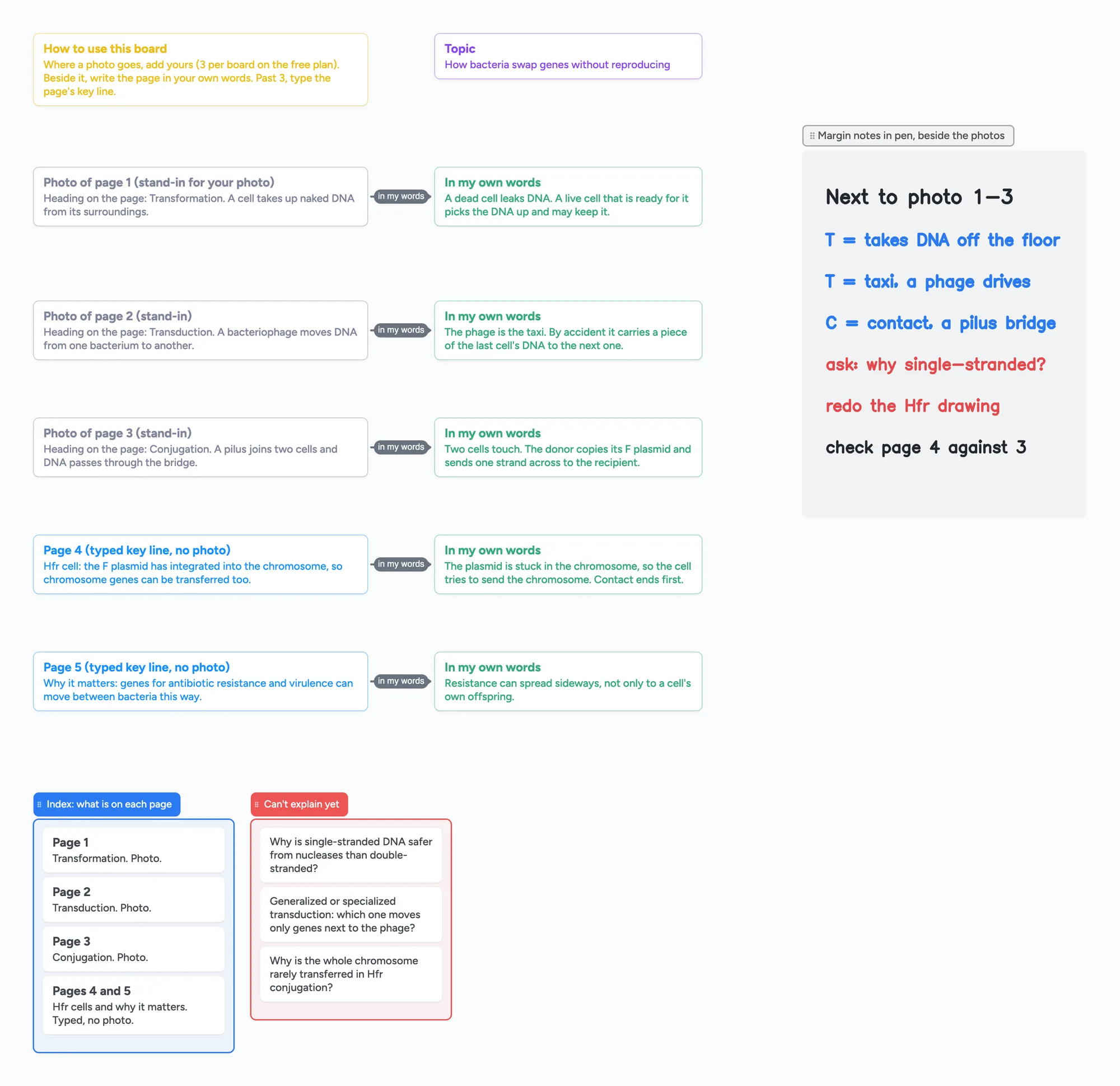
The ready board is an example topic, bacterial gene transfer: transformation, transduction and conjugation. The pages are typed stand-ins so you can see the pattern; replace them with your own photos.
- Name the board for one topic on the purple card, so a board holds one chapter or lecture, not a whole course.
- Put one photo per grey card. Paste or add the picture of the page. Free plan: 3 per board. For page 4 and later, type the page's key line on the card instead, as the ready board does.
- Write the page in your own words on the green card beside it. Don't copy the page. Write what you would say to someone who missed the class.
- Keep an index list. One card per page: what is on it and whether it is a photo or typed. It is what you read first when you come back to the board.
- Add notes with the pen: a mnemonic, a page to recheck, a question for the lecturer. You can write on a photo with the pen, but add the photo first and the ink after it, because ink drawn before a photo is hidden behind it. The grey section beside the photos is a place for notes that don't belong on one page.
- Move whatever you can't yet explain to the red list. If a page leaves nothing there, you are done with it.
Arrows link each photo card to its own-words card and stay attached when you move either card. Each card and list counts as one of your 150 free items: the ready board is 21 of them (our count), so a topic like this leaves room for several more boards.
The 3-photo limit, and what to do about it
The free plan allows 3 images per board and 5 boards per account, so at most 15 photos in all (our arithmetic). Each photo is 1 image and also 1 of your 150 free items. A board you open from someone else's link also counts toward your 5. A 10-page chapter doesn't fit on one free board, and a semester doesn't fit on the free plan at all.
- Photograph the 3 pages you struggle with and type the key line of the others on cards, as in the ready board. A typed card counts toward the 150-item limit, and so does a photo.
- One board per topic. Each board counts toward your 5, so this covers a few topics, not a course.
- Pro has no image limit. Pro is $5 a month billed yearly ($59.99), or $7.99 monthly.
- Or scan the pages into one PDF and import it. Import PDF makes a new board from your PDF's pages, and you write on them. It uses 1 of your 5 boards. Its pages don't count toward the 3 photos, and a 4th photo added to that board is still blocked on the free plan. A long PDF opens as one board. We don't read or search the pages, so a scanned PDF is a picture of your handwriting, not text.
If you add a PDF to an existing board as a file instead, the free plan allows 1 file per board and 10 MB. Free-plan details for photos and the 5-board count are the same as on the lecture slides page, which has the longer version.
What people say about organizing handwritten notes (one person's view each)
These are replies from three Reddit threads, read on November 9, 2026. Each is one person's experience, they disagree, and none of them is a study of what works.
- Photograph, tag, search. In r/organization (2022; 9 of 13 comments loaded), one reply photographs notes into OneNote or Google Photos, adds tags such as date and title, and doesn't keep the paper. Another says "the trick is not to organise": put things into pages with extra words and rely on tags and search, not folders. That is an argument for a search app, and a board is the opposite of it. Use a board when laying the pages out beside your own words is the point.
- Handwriting recognition in a notes app. In r/GradSchool (2021; all 9 comments read), one reply handwrites in Goodnotes, which "recognizes handwriting as text, so it's easily searchable". Another uses OneNote, and a historian says handwriting helped them commit things to memory.
- Scan, then store. In r/NoteTaking (2026-04; first 25 of 40 comments loaded), one reply says to scan into a PDF unless you have an iPad, then use Goodnotes or something similar. Another snaps lower-resolution pictures into Apple Notes so they are "saved and ocr'ed automatically". Another transfers notes to Obsidian or Notion only after enough of the book is understood.
None of these is a board. The board is for the step they don't cover: seeing your pages next to your own condensed version and your open questions.
When something else is the better choice
These lines come from each vendor's own page, read on November 9, 2026. They are the vendor's description of its own product.
- You want to search what you wrote. Apple's iPad guide says that in Notes you can search all your notes for typed and handwritten text (in supported languages), objects in images and text in scanned documents. Goodnotes supports handwriting recognition and Handwriting Search on Apple devices in a list of languages that includes English, Spanish, French, German and Chinese. Notability's help page says you can search for handwriting across all of your notes or within one note, and can convert handwriting to text. Evernote's page says its Personal, Professional and Enterprise plans search text in PDFs, images and scanned documents, and that you can find words in handwritten notes and photos of whiteboards. We can't do any of this.
- You want the text out of a photo. OneNote's help page describes Copy Text from Picture: it extracts text from an inserted picture, results depend on the image quality, and some take up to 24 to 48 hours. Apple's iPhone guide describes Scan Text in Notes, which inserts text from the camera in supported languages. We have no text recognition.
- You want to scan the pages first. In the Notes app on iPhone you open a note and tap Scan Documents, and the scan is saved as a PDF in the note (Apple's iPhone guide). That scan is Apple's. On Instaboard you can import the PDF as a board of pages you write on, or add pictures yourself.
- You have a whole semester of pages. A notes app built for notebooks holds many pages with no per-board photo limit, and you don't have to sort them into boards. A board suits one topic at a time.
Already use Goodnotes or Notability and like it? Keep it for the notes themselves. The board is a second place to lay out one topic, with your photos or typed lines, your own words and your questions.
Both let people work on the same note live, with conditions (help pages read November 9, 2026). In Goodnotes a real-time session starts once a Goodnotes Pro subscriber opens the shared document, up to 50 people at once, and people without Pro can join. Notability's Live Collaboration works across iOS, Mac and Web, the owner chooses whether contributors can view or edit, and the feature runs on Notability Cloud, which Notability says is free for all users. The difference here is that your classmates need the same app to join, where a board link opens in a browser and writing needs a free sign-in.
What this board doesn't do
- It doesn't read, search, tag or convert handwriting. No text recognition, no handwriting search, no search inside a photo.
- It doesn't scan. You add pictures or a PDF you already made.
- Writing needs a free sign-in. Viewing a shared board doesn't.
- The free plan is 5 boards and 150 items per account (cards, lists, images, text boxes; pen strokes, sections and arrows don't count), with 3 images and 1 file per board.
- Written for adult learners and students 13 and older. Instaboard's terms say users are not minors.
Start from the ready board
It opens in your browser in a few seconds, with nothing to install. Sign in for free when you want to save it and share it.
Questions
How do I organize photos of handwritten notes?
Give each topic its own board, put each photo beside a card with your own version of the page, keep an index list of what is on each page, and move what you can't explain to a red list. Students in the threads we read disagree on method: some tag and search in a notes app instead of sorting. Each is one person's view.
Does Instaboard read my handwriting?
No. It doesn't read, search or convert handwriting, and it has no text recognition. The notes are the ones you write. Goodnotes, Notability, OneNote and Evernote describe handwriting or picture-text features on their own pages.
How many photos can I put on a board?
On the free plan, 3 images per board, and 5 boards per account, so at most 15 photos in all (our arithmetic). Pro has no image limit. A photo counts as one of your 150 free items.
What do I do with more than 3 pages?
Type the key line of the other pages on cards, give each topic its own board, scan the pages into one PDF and import it, or use Pro. The ready board types pages 4 and 5.
Can I import a PDF of my scanned notes?
Yes. Import PDF makes a new board from the PDF's pages and you write on them with the pen. It uses 1 of your 5 free boards, and its pages don't count toward the 3-photo limit. Instaboard doesn't read or search the pages.
Can I write on a photo?
Yes, with the pen. Add the photo first and draw after it: ink drawn before a photo is hidden behind it.
Is Instaboard free?
Yes. The free plan includes 5 boards, 150 cards and items across your account (pen strokes, arrows and sections don't count), 3 images and 1 file per board, unlimited collaborators and video calls up to an hour. Pro is $5 a month billed yearly ($59.99 a year), or $7.99 monthly, and the people you invite join free.
Sources
- Reddit r/organization: How do you organize handwritten notes? (2022-02-06; 9 of 13 comments loaded, read Nov 9, 2026)
- Reddit r/GradSchool: Note taking, how do you organize all of it? (2021-10-10; read in full, Nov 9, 2026)
- Reddit r/NoteTaking: How to combine digital and physical note taking in a single system? (2026-04-05; first 25 of 40 comments loaded, read Nov 9, 2026)
- Apple iPad User Guide: Search through your notes on iPad (read in full, Nov 9, 2026)
- Goodnotes Support: Collaborate in real time with Live Cursor (read in full, Nov 9, 2026)
- Notability Help: Live Collaboration and Explore Notability Cloud (read in full, Nov 9, 2026)
- Apple iPhone User Guide: Scan text and documents in Notes using the iPhone camera (read in full, Nov 9, 2026)
- Goodnotes Support: Handwriting Recognition and Search Languages in Goodnotes (read in full, Nov 9, 2026)
- Notability Help: Handwriting and Math Conversion (read Nov 9, 2026)
- Microsoft Support: Copy text from pictures and file printouts using OCR in OneNote (read in full, Nov 9, 2026)
- Evernote: Search (read in full, Nov 9, 2026)
Related
How to study from lecture slides: your notes beside each slide
Put your lecture slides beside your own-words notes and a 'can't explain yet' card, then study with a group on one board. Free plan: 3 images per board.
Cornell notes, digital: cue cards that stay linked to your notes
How to take Cornell notes on a screen: a filled example (glycolysis) with cue cards joined to note cards by arrows, a self-quiz checklist and a summary. What a board does that a printable can't, and where a printable is better.
Make a biology concept map from your own notes
Turn your lecture notes into a biology concept map: concepts on cards, labelled arrows, feedback loops and a recall check. Worked example on the HPA axis, a ready board to copy, and a nursing version.
A free infinite canvas app for your notes, on Windows, Android, Chromebook and iPad
Free infinite canvas apps for class notes on Windows, Chromebook, Android and iPad: where each one runs, what its free plan really gives, and a ready notes board to open.