For the people hosting a rehearsal dinner
A rehearsal dinner planning board: hosts, speeches and tables on one page
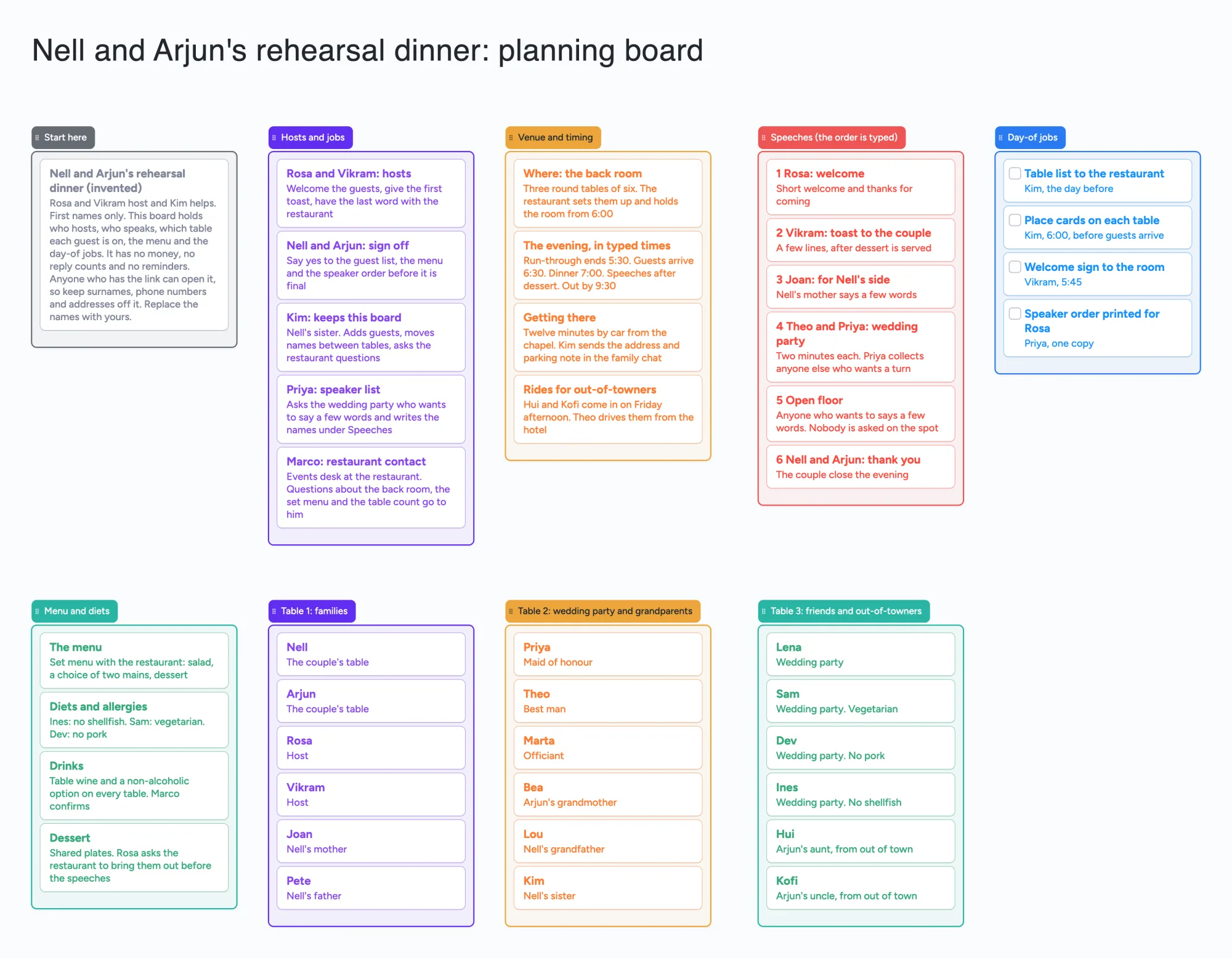
We make Instaboard, an online board. This page is for the hosts and helpers who are planning the dinner the night before a wedding, not the couple's whole wedding. The board is filled in for an invented dinner: Rosa and Vikram host 18 people for Nell and Arjun, with Nell's sister Kim keeping the list. It holds who hosts, who speaks and in what order, which table each guest is on, the menu and diets, and the day-of jobs. It has no money, no reply counts and no reminders, and anyone who has the link can open it. If you need to collect RSVPs, an RSVP tool does that better, and we name two below.
Opens in your browser. Anyone can view; a free sign-in lets you edit.
Updated
Read this first: what this board does and doesn't do
- It holds a plan you type. Who hosts, the speaker order, the tables, the menu and the day-of jobs are cards. Nothing seats anyone or sends reminders or due-date alerts, sorting works one list at a time, and the times on the cards are text.
- No replies, no money. The board counts no RSVPs, sends no invitations or reminders, and has no budget or payment. Who is paying is a conversation, not a card.
- A link is not private. Anyone who has the link can open the board. Use first names and one line each; keep surnames, phone numbers and home addresses off it. A diet word like "vegetarian" is as far as a guest's details should go.
- Guests don't need an account to read it, helpers do to write. New boards start as "Anyone who joins can view". To let hosts and helpers add cards, switch Share to "Anyone who joins can edit"; each person signs in free to write, and the board then counts as 1 of their 5 free boards.
- Free plan limits: 5 boards, 150 items across your account and 3 pictures per board. A copy of this board takes 1 of your 5. Pro removes the item limit and the picture limit and costs $5 a month billed yearly ($59.99 a year), or $7.99 monthly.
When an RSVP tool, a group chat or a printed run of show is the better pick
A rehearsal dinner is small. The Knot's who-to-invite article (the page prints "Updated Sep 26, 2023") quotes an etiquette expert who has seen rehearsal dinners from 15 to 50 people, and a planner who says the average couple has about 10 to 12 people in the wedding party. If one person is organising it and it is a restaurant's set menu, a printed run of show and a group chat are enough. If you need to know who is coming and who has which meal, an RSVP tool does that. A shared board fits in between: two or three hosts and helpers who each own a piece and want the speaker order, the tables and the day-of jobs in one place.
The comparison table further down says what each tool's own page says, read November 24, 2026.
Who hosts, and who signs off
The Knot's rehearsal dinner checklist (page prints "Updated May 31, 2023") says the dinner is traditionally thrown in the couple's honour, often by the groom's parents, but that anyone can host, and that someone hosting on the couple's behalf should get the couple's input on the guest list, date and time. It says the host usually takes care of the bill, which we leave off the board. Whatever your family's arrangement, a board is useful for one thing here: a card for each person with the job in one line, and a card that says who has the final say.
- Rosa and Vikram, the hosts, welcome the guests, give the first toast and have the last word with the restaurant.
- Nell and Arjun say yes to the guest list, the menu and the speaker order before it is final.
- Kim keeps the board: adds guests, moves names between tables, asks the restaurant questions.
- Priya keeps the speaker list and Marco is the restaurant's contact for the back room, the set menu and the table count.
These are our invented roles. The board doesn't assign anyone or tell them anything; it is where the answer is written down.
The speaker order, typed
Speeches are the part where the order is easiest to see on a card. The board has a list with one card per speaker, numbered in the title so the order survives if someone drags a card. The numbers are text you type; the board has no running order and sends no reminders or due-date alerts.
The Knot's rehearsal dinner speech page (the page prints "Updated Sep 12, 2025"; read November 24, 2026) lists a typical order as the parents or father of the groom (or whoever is hosting) first, then the parents or father of the bride, then wedding party members, then other family and friends, and the couple last, with speeches after the meal has been served and each no longer than 5 to 7 minutes. Its checklist adds that toasts usually happen during or just after dessert and that it helps to give each toaster a time guide. Our example is shorter on purpose: Priya asks the wedding party for two minutes each. Your family's order may differ, and this page takes no side on who should speak.
Tables, not seats
Three lists hold the guests: Table 1 for the families, Table 2 for the wedding party and grandparents, Table 3 for friends and out-of-towners. A card is a first name and a line, like "Arjun's grandmother". Moving someone is dragging a card to another list. The tables are lists, so a table's name is a title you type; the board doesn't draw a room or check how many fit.
Whether to assign tables at all is a live argument in the threads we read. Four r/weddingplanning threads, read November 24, 2026 (each reply is one person's view; we read the comments we could open):
- "Seating chart…for rehearsal dinner?" (u/mistigirl20, posted December 6, 2023; read all 7 comments; Reddit's own count is 7). The poster had 36 people at three tables of 12 and asked about assigning tables, not seats. u/wickedkittylitter wrote that assigning tables "ensures that couples sit together and the friends who don't know very many other guests are seating with someone they know". u/cheerio089 wrote that their dinner had no chart and they ended up at a table practically by themselves. u/initialsareabc wrote that they assigned tables but not seats.
- "Rehearsal Dinner- seating chart questions" (u/ashley6483, posted July 17, 2025; 11 comments, we read the 5 top-level ones). About 50 guests. u/Existing_Mail asked whether assigned tables rather than seats would do. Another commenter suggested mixing the two families, with someone at a table who can translate for relatives with limited English. u/GlitterDreamsicle wrote that they had never seen a rehearsal dinner this large, and that they would expect "10 people at most at a casual restaurant" with no seating arrangement.
- "Do rehearsal dinners require seating charts/place settings?" (u/kokomo318, posted February 19, 2024; 4 comments, we read the 2 top-level ones). u/nopanicatthisdisco wrote that one isn't necessary but would be nice for a sit-down dinner. u/Coldman5 wrote that they don't think it would take them "more than 5-10 minutes to bang it out, but I do it professionally", and that "Once you hit 50+ or so it is a must in my opinion".
- "Speeches at Rehearsal dinner" (u/Glum-Percentage1619, posted October 22, 2026; 12 comments, we read the 8 top-level ones). u/Positive_Shake_1002 wrote that traditionally the hosts give a speech and that nobody will miss speeches if there are none. u/TXaggiemom10, a self-described coordinator, wrote that there are no hard and fast rules. u/TinyLawfulness3710 wrote "No one is to ever be forced." That matches the open floor card in our example, which says nobody is asked on the spot.
That is a handful of commenters, not a count of what people do. None of the comments we read asked for a shared board.
Nell and Arjun's board, list by list
The dinner is invented: 18 guests in a restaurant's back room, three round tables of six. All names are first names.
| List | What goes in it | In Nell and Arjun's board |
|---|---|---|
| Start here (grey) | What the board is and isn't, and that the link is not private | One card |
| Hosts and jobs (purple) | Who hosts, who signs off, who keeps the board | 5 cards: Rosa and Vikram, Nell and Arjun, Kim, Priya, Marco |
| Venue and timing (orange) | The room and the evening in typed times | 4 cards: the back room, the evening, getting there, rides for out-of-towners |
| Speeches (red) | One card per speaker, numbered in the title | 6 cards: welcome, toast, Nell's side, wedding party, open floor, thank you |
| Day-of jobs (blue) | Small jobs with a tick box each | 4 cards with tick boxes: table list to the restaurant, place cards, welcome sign, printed speaker order |
| Menu and diets (green) | The set menu, drinks, dessert, and a diet word per guest | 4 cards |
| Table 1, 2 and 3 | A first name and one line per guest | 6 cards each, 18 guests |
Swipe the table sideways to see every column.
The board's own wording. Times are typed text. The board has no clock, countdown or reminder.
One dinner, start to finish
This is how Rosa's group might use the board. The order is our example, not a rule.
- Kim makes the board and Rosa posts the Start here card first, then Kim shares the link with the hosts and helpers only.
- Rosa and Vikram write the hosts and jobs cards, and Nell and Arjun read them and say yes in the family chat.
- Marco's answers go in Venue and timing: the back room, three tables of six, the set menu and when the room is open.
- Priya writes the speaker cards as people say yes, and moves a card when the order changes.
- Kim fills the tables from the guest list in the chat, one card per person, and moves cards between tables as replies change.
- Menu and diets get one line each, and the day before, Kim sends the table list to the restaurant.
- On the night, the day-of cards get ticked. Everyone with edit access sees a tick live; nothing records who ticked it or when, and anyone with edit access can untick it.
Where other tools do this better
Read November 24, 2026. Prices and limits change, so check the page. No ranking: they suit different people. Every row is what the tool's own page says; nothing is from using it.
| Tool | What its page says | Better than a board at | Where a board fits |
|---|---|---|---|
| A group chat | The Knot's checklist says to make a timeline for the ceremony run-through and the dinner and to share it with the wedding party, with the venue address and start time | Reaching everyone at once and answering quick questions | One place for the plan, with a card per job, instead of scrolling a thread |
| The Knot's printable checklist and timeline | The rehearsal dinner page ("Updated May 31, 2023") has a printable checklist and a printable timeline from four to five months before to the day-of | A single host working from a printed list | Several people editing the same list from their phones |
| The Knot guest list tool | Its page says it tracks RSVPs and meal choices, reminds unconfirmed guests, collects addresses with a shared link, and offers a spreadsheet template to import | Replies, reminders and meal choices | A plan for the hosts rather than a guest list for the couple; no replies and no reminders |
| RSVPify | Its personal events pricing page says Free is $0 a month for up to 100 guests with basic email invitations and RSVP tracking, and Gold is $10 a month (base price, which "may vary by event type") for up to 300 guests, secondary events "like a rehearsal dinner" and premium features including seating charts. Platinum is $15 a month and adds custom reminder emails. Its features menu also lists meal and dietary questions and table captains | RSVPs, a seating chart you drag around, meal and diet questions | A shared plan of speeches, jobs and a table list, with no RSVP form |
| Google Sheets or Docs | Not read | Sums, sorting and filters | Cards you can drag between tables |
Swipe the table sideways to see every column.
Set it up in six steps
- Open the board and make your copy. "Make a copy" takes 1 of your 5 free boards; replace Nell, Arjun, Rosa and the rest with your own people.
- Rename the title text box and the lists you need. Delete the ones you don't.
- Share the link with the hosts and helpers. To let them write, tick "Anyone who joins can edit" in Share; each person signs in free to add or move cards.
- Write the speaker cards with a number in the title, so the order is visible at a glance.
- Add one card per guest to a table list, first name and one line. Skip surnames, phone numbers and addresses.
- Give the day-of jobs a tick box and a name and a time in the text.
Limits of the free plan for this board
- Items. Each card and each list is 1 of 150 free items across your account; the example is 52. Arrows, sections and pen strokes don't count.
- Boards. 5 on the free plan. "Make a copy" takes 1 of them.
- Pictures. 3 per board. The example has none; photos of the couple belong in a shared album, not on a link board.
- Writing needs a sign-in. Anyone who has the link can read the board; to change it they sign in free, and the board then counts as 1 of their 5.
- Private details. A link board isn't the place for surnames, phone numbers, home addresses, medical details or money.
- Reusing it. A copy keeps its ticks, so untick the Day-of jobs cards when you reuse the board.
Start from the ready board
It opens in your browser in a few seconds, with nothing to install. Sign in for free when you want to save it and share it.
Questions
Can every guest see the table list?
Anyone who has the link can open the board and see every card, including who sits where. Share the link with the hosts and helpers, and send guests their table in whatever message you already use.
Do the hosts need an account to edit?
To write on the board, yes: they open the link and sign in free, and you tick "Anyone who joins can edit" in Share. The board then counts as 1 of their 5 free boards. Someone who only wants to read can open the link without signing in.
Can the board collect RSVPs or send reminders?
No. It has no replies, deadlines, polls, reminders or notifications. The Knot's guest list page and RSVPify's pricing page list RSVP tracking and reminders; a group chat reaches everyone at once.
Who should give speeches at a rehearsal dinner?
That is for your family to decide, and the sources we read disagree. The Knot describes a typical order with the hosts first and the couple last; commenters in a Reddit thread wrote that there are no hard and fast rules and that nobody should be forced. The board only holds the order you type.
How many cards fit on the free plan?
150 items across your account, where each card and each list is one item. This board is 52. The same layout for 50 guests at tables of six is 90: 24 fixed cards, 15 lists, 50 guest cards and the title. That is our arithmetic, and your other boards share the same 150; Pro removes the item limit.
Is this for planning the whole wedding?
No. It is for the dinner the night before, with its own hosts, speeches and tables. It has no money, no vendors and no ceremony timeline, and the example is invented.
Sources
- The Knot: A Step-by-Step Rehearsal Dinner Checklist (page prints "Updated May 31, 2023"; read November 24, 2026)
- The Knot: Everything You Need to Know About Giving a Rehearsal Dinner Speech (page prints "Updated Sep 12, 2025"; read November 24, 2026)
- The Knot: Exactly Who to Invite to the Rehearsal Dinner (page prints "Updated Sep 26, 2023"; read November 24, 2026)
- The Knot: wedding guest list tool (read November 24, 2026)
- RSVPify: personal events pricing and features menu (read November 24, 2026)
- r/weddingplanning: "Seating chart…for rehearsal dinner?" by u/mistigirl20 (posted 2023-12-06; read 7 of 7 comments; read November 24, 2026)
- r/weddingplanning: "Rehearsal Dinner- seating chart questions" by u/ashley6483 (posted 2025-07-17; read 5 top-level comments of 11; read November 24, 2026)
- r/weddingplanning: "Do rehearsal dinners require seating charts/place settings?" by u/kokomo318 (posted 2024-02-19; read 2 top-level of 4 comments; read November 24, 2026)
- r/weddingplanning: "Speeches at Rehearsal dinner" by u/Glum-Percentage1619 (posted 2026-10-22; read 8 top-level comments of 12; read November 24, 2026)