For two designers, or a designer and a developer, testing a prototype
A board game playtest log for two designers
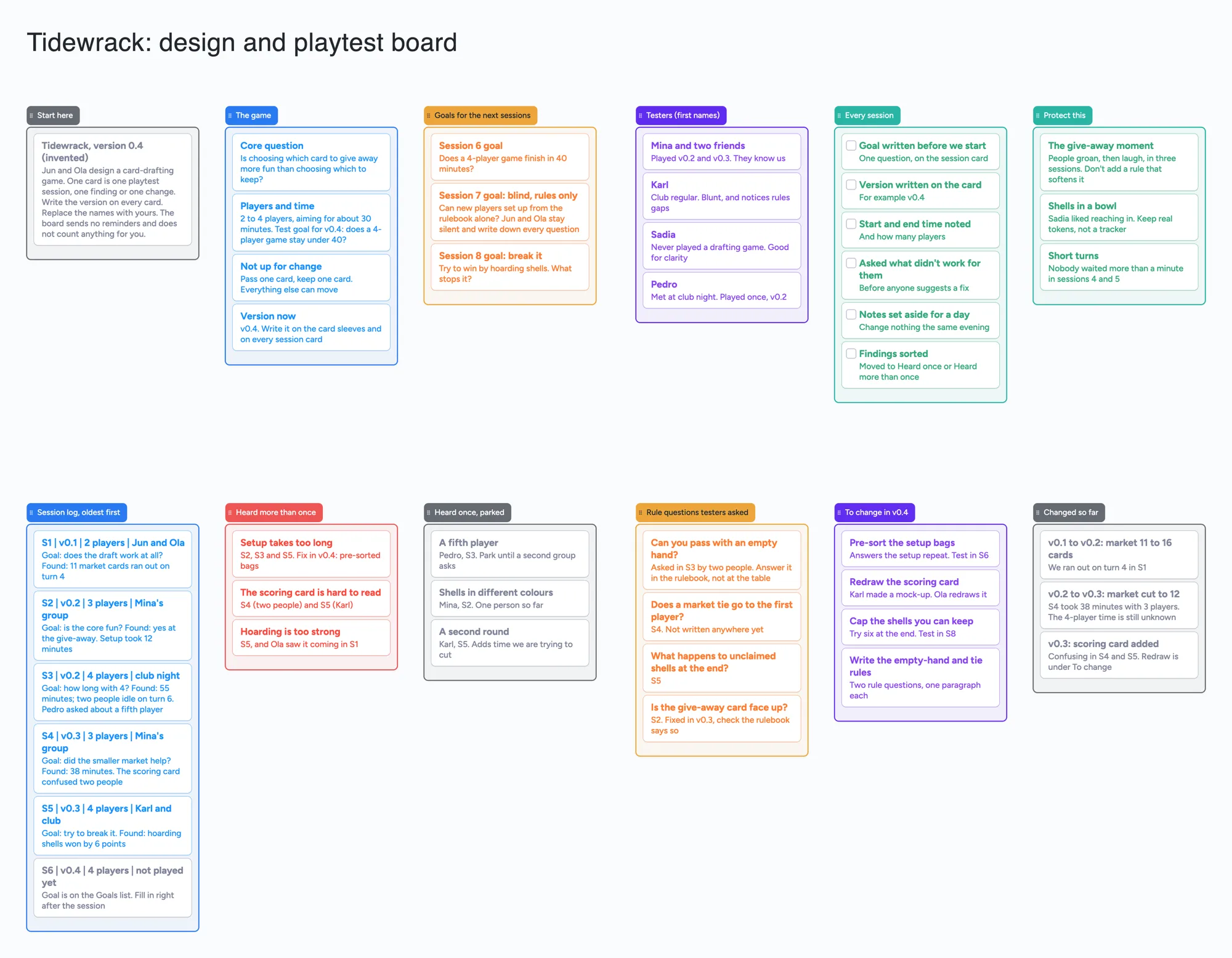
We make Instaboard, an online board. This one is a playtest log for a prototype: a card per session with the version, player count and goal, feedback sorted into "heard once" and "heard more than once", the rule questions testers asked, and what you changed in each version. It is filled in for an invented card-drafting game, Tidewrack, designed by Jun and Ola. It counts nothing, sorts nothing and holds no files, so a spreadsheet or a tool built for playtests does several parts of this better, and we say which below. What a board adds is one place where two designers see every session, every repeated complaint and every change at a glance.
Opens in your browser. Anyone can view; a free sign-in lets you edit.
Updated
What this board does and doesn't do
- It logs; it doesn't analyse. A session is a card you type: version, player count, who played, the goal and what you found. Nothing adds up times, win rates or ratings.
- No forms, no search, and no sorting across lists. Each list has its own Sort / Filter. Feedback is cards you drag between lists by hand. If you want one table you can sort and filter across everything, a spreadsheet does that.
- No files and no prototype photos. Free boards take 3 pictures each. Keep rules, print-and-play files and photos in a folder and write the file name on the card.
- Free plan limits: 5 boards, 150 items across your account and 3 pictures per board. A copy of this board takes 1 of your 5. Pro removes the 3-picture limit and the item limit.
- Everyone with edit access can move any card. Agree who files which findings.
When a notebook, a sheet or a playtest tool is the better pick
If you design alone and test with friends, a notebook with one page per session is enough: the One Thousand XP playtest journal (described in a 2017 post by Chris Rowlands) prints start time, end time, player count and a goal at the top of every page, and its post says "32 pages = 32 playtests!". If you run many blind sessions and want to compare numbers, a spreadsheet or a tool built for playtests does that and a board doesn't. A board fits between those: two or three people who need to see, in one glance, what each session found, what keeps coming up and what changed. The table further down names what each tool's page says about itself, read November 24, 2026.
Tidewrack, list by list
The game is invented: a two-to-four-player card-drafting game, version 0.4, with five sessions played. Testers are first names only.
| List | What goes in it | In Tidewrack |
|---|---|---|
| Start here (grey) | What the board is and how to read it | One card |
| The game (blue) | The core question, players and time, what is not up for change, the version now | 4 cards |
| Goals for the next sessions (orange) | One question per planned session | 3 cards: session 6, a blind rules-only session 7, a break-it session 8 |
| Testers (purple) | First name and what kind of tester they are | 4 cards: Mina and two friends, Karl, Sadia, Pedro |
| Every session (green) | The steps that repeat, with a tick box each | 6 tick-box cards: goal written, version written, times and players noted, asked what didn't work, notes set aside, findings sorted |
| Protect this (green) | What testers enjoyed, so you don't fix it away | 3 cards |
| Session log, oldest first (blue) | One card per session: S number, version, player count, who, goal, found | 6 cards: S1 to S5 played, S6 not played yet |
| Heard more than once (red) | Findings that two or more sessions showed | 3 cards, each naming the sessions |
| Heard once, parked (grey) | Findings from one person or one session | 3 cards |
| Rule questions testers asked (orange) | Every question about the rules, with the session | 4 cards |
| To change in v0.4 (purple) | What you will change next, and which session tests it | 4 cards |
| Changed so far (grey) | What changed in each version and why | 3 cards |
Swipe the table sideways to see every column.
The board's own wording. Times and counts are typed text; the board adds nothing up.
One session across the board: session 5
This is how Jun and Ola might use the board for one session. The order is our example, not a rule.
- Before: the goal for session 5, "try to break it", is written on the Goals list and, when the session starts, on its new card in the session log, with the version (v0.3) and the player count (4). Two of the six tick boxes in "Every session" are ticked.
- During: Karl and the club play. Jun and Ola note on paper that hoarding shells won by 6 points.
- Right after: the session card gets one line, "Found: hoarding shells won by 6 points". The tick box "Asked what didn't work for them" is ticked once Karl has answered, before anyone suggests a fix.
- A day later: the notes are sorted. Hoarding was also seen by Ola in S1, so the finding goes to "Heard more than once" with S5 and S1 named.
- Then: a card "Cap the shells you can keep" goes to "To change in v0.4", with "Test in S8" on it, and session 8's goal reads "Try to win by hoarding shells. What stops it?".
- When v0.4 exists: the change cards move to "Changed so far" and the version on "The game" says v0.4.
"Every session" is a checklist list: tick items together and everyone with edit access sees a tick live. Nothing records who ticked or when, and there is no reset-all, so before the next session you untick the six boxes by hand.
Sorting what testers say: heard once and heard more than once
The two sorting lists are the part a notebook is slowest at. Designers who wrote about feedback, read November 24, 2026:
- r/BoardgameDesign, "How to prepare a board game prototype before submitting it to a publisher" (u/SubstantialCollege17, posted February 4, 2026; 25 comments read). The post says: "If several people point to the same problem spot — that's real. Fix that spot." It also says: "Also track the positives. If people keep praising the same moment — that's a strength. Protect it." and "Save old versions of your game so you can roll back if changes go the wrong way." The first is the "Heard more than once" list, the second is "Protect this", the third is a folder you keep, not something this board does.
- Stonemaier Games, "Tabletop Game Prototyping, Playtesting, and Development" (the text we read shows no date and no author; it is on the studio's blog and written in the first person). The author writes that he sets his notes aside for a day "for a little separation before I sit down to process the playtest and implement changes", and that he waits until a wave of blind playtests is over before looking at any results. The post also says: "Playtesters raise questions; developers propose answers." That is why Tidewrack's "Rule questions" list keeps questions and the "To change" list keeps answers, separately.
- The same post on how many sessions: "At minimum, I put a game through 3 waves of blind playtesting, but it's often more than that." and the author says he asks playtesters to rate the game from 1 to 10. A board can hold the ratings as text on a card; it won't average them.
This is the view of a few designers, not a rule. Stonemaier's process is a publisher's, with surveys and a data analyst (the post says the studio has one); two friends testing a prototype in a kitchen need much less.
A goal for each session, and sessions where you say nothing
Two habits shape the Goals list and the "blind, rules only" card in Tidewrack.
- A goal per session. The One Thousand XP post, "Creating a Game Playtest Journal" by Chris Rowlands, June 2, 2017 (a 2017 post about a journal product, not current advice), says: "One of the biggest pieces of advice I give to newer designers is to have goals for each playtest. Usually in the form of a question, the goal will help guide your observations during the test and the questioning after." Its examples include "Is the core fun?" and "Break the game by hoarding cash." The board keeps the next three goals on their own list and copies each onto the session's card.
- A silent rules test. The r/BoardgameDesign post says to give people who don't know your game the box and the rules, "stay silent", and write down every place they get confused, and that rule tests need feedback from "at least two or three different groups". Session 7 in Tidewrack is that test, and its questions go to the rule questions list.
Should you use a template at all? A warning from the designers
This page is a template, so it is fair to say what designers said about templates. In r/BoardgameDesign, "My playtest feedback template if anyone wants to use it" (u/boredgameslab, posted July 6, 2022; 12 comments read), two commenters pushed back on forms. u/TheZintis wrote: "I did these forms for awhile, but ended up thinking they were too much effort. Maybe if you are doing mass blind testing." u/PaperWeightGames wrote that they very much don't like "template" feedback forms: "Develop them as you would the game." The poster agreed that a formal form suits a day at a convention with lots of strangers, and that for a more intimate playtest feedback "could come in a very different format".
That is why this board has no form. The lists are a starting point: rename them, delete the ones you won't use, and write the questions your game needs. One designer's thread, not a count of what designers prefer.
Where other tools do this better
Read November 24, 2026. Prices and features change, so check each page. No ranking: they suit different people. Every row is what a page or a commenter says; nothing is from using the tool, and Instaboard isn't affiliated with any of them.
| Tool | What its page or commenter says | Better than a board at | Where a board fits |
|---|---|---|---|
| Boardssey | Its features page (no date shown) lists a Playtest Session Tracker with fields for date, goal, version tested, player count and full playthrough status, time logging with totals calculated, a scoreboard for player data, ratings, and a history table that is "sortable and searchable". Its pricing page lists plans by number of games (5, 20, unlimited) with unlimited seats; we did not read the amounts | Structured session fields, calculated times, sorting and searching, all in a tool made for board game design | A free-form board with no setup; none of the calculation |
| Break My Game's log templates | Its designer resources page (no date shown) lists an official Virtual Playtest Log Template as a Google Sheet, a print-and-play playtest log and a printable playtest log PDF. We did not open the files | A ready log you can print or fill in a sheet | Cards you drag, and repeated findings you can see side by side |
| A paper journal | The One Thousand XP post (by Chris Rowlands, June 2, 2017, a 2017 post) describes a 32-page journal with a goal, times and player count at the top of every page and a legend of symbols | Taking notes during a session at the table | Sorting those notes afterwards with a co-designer who isn't in the room |
| A spreadsheet | Stonemaier's post says its session surveys ask for name, email, player count, length, winning and losing details, rating, what was bad and what was good | Sorting, filtering, averaging ratings and times across many sessions | Seeing patterns as cards rather than rows |
| Miro | The post body quotes u/blekibum: "For organizing feedback across multiple test groups, MIRO helped us cluster insights and track iteration cycles." We did not read Miro's pages for this | Clustering notes on a large canvas | No claim; if your team already uses it, stay |
Swipe the table sideways to see every column.
From the pages and threads named in Sources, as read November 24, 2026.
Does it fit in 150 items?
Each card and each list is 1 of your 150 free items, across all your boards. The title text box counts too. Arrows, sections and pen strokes don't. Our arithmetic:
- As built: 12 lists + 44 cards + the title = 57.
- Each further session adds a session card, and on average, say, a finding or rule question and a change: 3 cards. 57 + 3 × 31 = 150, which is session 37 (31 more than the 6 on the board). Session 38 would pass the limit if the account has nothing else on it.
- A tidier board: if you delete a change card once it is in "Changed so far" and merge duplicate findings, the count grows by about one card a session and lasts much longer.
- A second game on the same account takes another 57, so 114; a third, 171, passes the limit.
- Other boards share the 150. A second board on the same account draws from the same pool, and a tester who adds cards counts them toward their own 150.
Pro ($5 a month billed yearly, $59.99 a year, or $7.99 monthly) removes the item limit.
What a board can't do for a playtest log
- Add up, average or chart. Times, scores and ratings are text you type; nothing totals them or shows a win rate.
- Sort, filter or search. To find every session at 4 players you read the list.
- Send a form to testers or collect answers. A tester can add a card only if they sign in free and you gave them edit access.
- Hold your prototype. No rules files, no print-and-play, no photos beyond 3 pictures per board on the free plan.
- Be version control for the game. Version numbers are words on cards; keep the actual files of each version in a folder.
- Remind or alert. No reminders or due-date alerts, no notice when a card moves.
- Record who ticked a box, or when. Anyone with edit access can untick or move any card.
- Keep a design private. Anyone with the link can read the board. Share it only with people you trust with the design, and put no testers' surnames or contact details on it. A board is not legal or publishing advice.
Set up your own, in order
- Write the core question and the version on "The game" before anything else.
- Open the board and replace Tidewrack's cards, keeping the lists you use and deleting the rest.
- Make one card per session you have already played, oldest first, with version and player count in the title.
- Write the next session's goal on the Goals list as a question.
- Share the link with your co-designer. New boards start view-only; to let them write, tick "Anyone who joins can edit" in Share, and each person signs in free to write.
- Agree who files findings and when you sort them, since anyone with edit access can move any card.
- Keep testers to a first name.
Limits of the free plan for this board
- Items. Each card and each list is 1 of 150 free items across your account; the example is 57. Arrows, sections and pen strokes don't count.
- Boards. 5 on the free plan. "Make a copy" takes 1 of them.
- Pictures. 3 per board. The example has none.
- Writing needs a sign-in. Anyone with the link can read the board; to change it they sign in free, and the board then counts as 1 of their 5.
- Private details. A link board isn't the place for testers' surnames or contact details, or for a design you haven't agreed to share. Pro has invite-only boards.
Start from the ready board
It opens in your browser in a few seconds, with nothing to install. Sign in for free when you want to save it and share it.
Questions
Does this board calculate play times or ratings?
No. Times, scores and ratings are text you type on a card. For totals, averages or a sortable table, use a spreadsheet or a tool made for playtests.
Can playtesters fill in a feedback form on the board?
No. There are no forms. A tester can add a card only after signing in free and being given edit access. Most designers collect feedback on paper, in a message or in a separate form and file it on the board afterwards.
How do I reset the checklist for the next session?
There is no reset-all. Untick the six boxes by hand, or keep a separate checklist list for each session. A tick shows live to everyone with edit access, and nothing records who ticked it.
How many sessions fit on the free plan?
150 items across your account, where each card and each list is one item. The example is 57. If each session adds about three cards, it reaches 150 at session 37 by our arithmetic; deleting finished cards makes it last longer. Your other boards share the same 150.
Where do I keep the rules and the prototype files?
Not on this board, which holds 3 pictures at most on the free plan and no files. Write the file name or folder on the card and keep the files in a shared folder.
Is it safe to put my unpublished game on a link board?
Anyone who has the link can read the board, so share it only with people you trust with the design, and keep testers to first names. Pro has invite-only boards. A board is not legal or publishing advice.
Sources
- r/BoardgameDesign: "How to prepare a board game prototype before submitting it to a publisher" by u/SubstantialCollege17 (posted 2026-02-04; 25 comments read; read November 24, 2026)
- r/BoardgameDesign: "My playtest feedback template if anyone wants to use it" by u/boredgameslab (posted 2022-07-06; 12 comments read; read November 24, 2026)
- Stonemaier Games blog: Tabletop Game Prototyping, Playtesting, and Development (the text read shows no date or author; read in full November 24, 2026)
- One Thousand XP: Creating a Game Playtest Journal (by Chris Rowlands, June 2, 2017; read in full November 24, 2026)
- Break My Game: Designer Resources (page shows no date, only © 2020; read November 24, 2026)
- Boardssey: features (page shows no date; read November 24, 2026)
- Boardssey: pricing (plan names and game counts read November 24, 2026; amounts not read)
Related
A game jam plan your whole team can see and edit
A shared game jam or hackathon plan for a small team: scope lists, a list per person, assets and hour checkpoints. A filled example to copy.
A visual novel planning board: scenes as cards, choices as arrows
Plan a branching story on one shared board: a card per scene, a captioned arrow per choice. Free ready board, and where Twine, Ink and Arcweave do more.
DnD session planner online: a filled board for one session, shared with your table
A filled D&D session plan to copy: last session's recap, scenes, secrets with arrows to where players learn them, NPCs, handouts and a next-session list. Free plan limits stated.