For small teams that outgrew a free Mural workspace
A free Mural alternative where the people you invite can write, and where Mural is better
Mural's Free plan lets you invite unlimited visitors, but its help article says "Visitors have view-only access. To get edit access, they must become a member." (support.mural.co, read November 8, 2026). On an Instaboard board, anyone with the link can read it with no account; to write, they sign in free (Google, Apple or email). There is no workspace to join, and the board counts as 1 of their 5 free boards. Instaboard is a board of cards, lists and arrows, not a facilitation tool: far fewer templates than Mural's 250+, and no integrations. If your team runs workshops on Mural's toolkit, stay on Mural.
Updated
The short answer
- Mural Free: the three most recently created murals stay editable, and older ones become view-only, still visible and shareable. Visitors are unlimited but view-only; to edit, a person has to become a member of your workspace. Free has open rooms only (Mural help, read November 8, 2026).
- Instaboard Free: 5 boards and 150 items across your account. Each card and each list is 1 of the 150; pen strokes, sections and arrows don't count. Set the board to "Anyone with the link can edit" and each person who signs in free can write on it. The example board is 36 of the 150 (our arithmetic).
- Mural is better at templates (250+), facilitation tools on every plan, integrations, and unlimited guests on Business. It is also the safer pick for a team that already lives in it.
- What you give up: the toolkit around the canvas. This is a shared board for cards and arrows with built-in video calls (free calls run up to 60 minutes per call, and calls need a free sign-in).
When Mural is the better choice
- You run workshops. Mural's pricing page lists Facilitation Superpowers on every plan: summon and take control, timer, voting, private mode, outline and instructions, laser pointer, hide and reveal, and facilitator lock. If your sessions depend on those, Mural is built for them.
- You want templates. The pricing page lists "250+ expert Mural templates" and custom templates. Instaboard has far fewer templates.
- You need your tools connected. Mural's pricing page lists integrations including Microsoft Teams, Webex, Zoom, Jira Cloud, Google Workspace, Slack and Adobe Creative Cloud Library, and more. Instaboard has no integrations.
- You work with clients on a paid plan. The pricing table lists unlimited guests on Business and Enterprise.
- You want a lot of boards. Mural Free allows unlimited murals per workspace, even though only three are editable at once. Instaboard Free allows 5 boards.
- Your company already runs on Mural. Its pricing table lists SSO and 2FA on Business, chat and email support on Business, and self-serve support on Free. Instaboard's free plan is a shared board, not a managed workspace.
If that's how your team works, stay with Mural.
What Mural's own pages say about the Free plan
From Mural's help article "Introducing the Mural Free plan" (last published June 1, 2026; read November 8, 2026):
- "One Mural workspace."
- "Unlimited murals per workspace. However, only the three (3) most recently created murals are editable at any given time. Older murals remain visible and shareable, but become view-only."
- "Access to open rooms only (private rooms are not available on the Free plan). This means all murals created in the Free plan workspace will be visible to all members of the workspace."
- "Unlimited visitors and members in the Free plan."
- "Visitors have view-only access. To get edit access, they must become a member."
- "This plan is free forever - no trial period or credit card required."
Mural's help article "What is a visitor in Mural?" (published October 15, 2026) adds: "In the Free plan, visitors can request edit access from the mural owner and join as a member in order to collaborate." It also lists what visitors can't do, among them using Facilitation Superpowers, exporting murals and duplicating murals. A person with no Mural account who opens a visitor-enabled link can "Continue to view the mural as an unauthenticated visitor" ("Accessing a mural as a visitor", December 13, 2024).
Mural's pricing page (read November 8, 2026) lists Team+ at "$9.99 per month, billed annually" or "$12 per month, billed monthly" per member, and Business at $17.99 per member per month, billed annually. A team of six on Team+ with annual billing is $719.28 a year (our arithmetic: 6 × $9.99 × 12).
Mural Free and Instaboard Free side by side
Mural rows are from its own pages, read on November 8, 2026. Plans change, so check the page before you commit.
| Mural Free | Instaboard Free | |
|---|---|---|
| Editable boards | Unlimited murals, but only the 3 most recently created are editable; older ones are view-only | 5 boards; 150 items across your account; 3 images per board |
| Someone you invite wants to write | Visitors are view-only; they must become a member of your workspace (or request edit access from the mural owner) | They sign in free (Google, Apple or email) and write on the board you shared |
| Someone opens the link with no account | Can view as an unauthenticated visitor, if visitors are enabled | Can read everything; can't change anything |
| Who sees what | Open rooms only: every mural in the workspace is visible to every member | You share one board at a time, by link or 4-digit code |
| Templates | 250+ | Far fewer |
| Facilitation tools | Facilitation Superpowers on every plan (voting, timer, private mode, summon, facilitator lock) | Cards, lists, arrows, pen, a countdown timer and a laser pointer |
| Paid, as listed | Team+ $9.99 per member a month billed annually ($12 monthly); Business $17.99 per member | Pro $5 a month billed yearly ($59.99 a year); the people you invite join free |
Swipe the table sideways to see every column.
Mural's sources are listed at the bottom of the page, all read on November 8, 2026. Instaboard's free calls run up to 60 minutes per call, with a warning 10 minutes before the end; calls need a free sign-in, there is no recording, and Pro has no limit.
When Instaboard fits better
- You need an outsider to write, not watch. A client, a volunteer or a friend opens your link, signs in free and adds cards. They don't join a workspace, and they don't need a paid seat.
- You want one board, not a workspace. You send one link. What you share is that board, nothing else in your account.
- You want to talk while you work. Start a call right on the board; everyone signs in free to join.
- You don't want to pay per person. Pro is one price, and the people you invite join free. Six people on Mural Team+ is $719.28 a year at the annual price (our arithmetic); Pro is $59.99 a year.
- You draw as well as write. The pen is pressure-sensitive, and pen strokes don't count toward the 150 items.
What this retro board can't do
- No Mural import. Instaboard can't open a mural. To keep a retro, open the ready board and retype the cards you want.
- No integrations, and no reminders for cards with an owner's name on them. The "owner" is text on the card.
- Far fewer templates than Mural's 250+. There is the ready board here and a handful of others, not a library to browse.
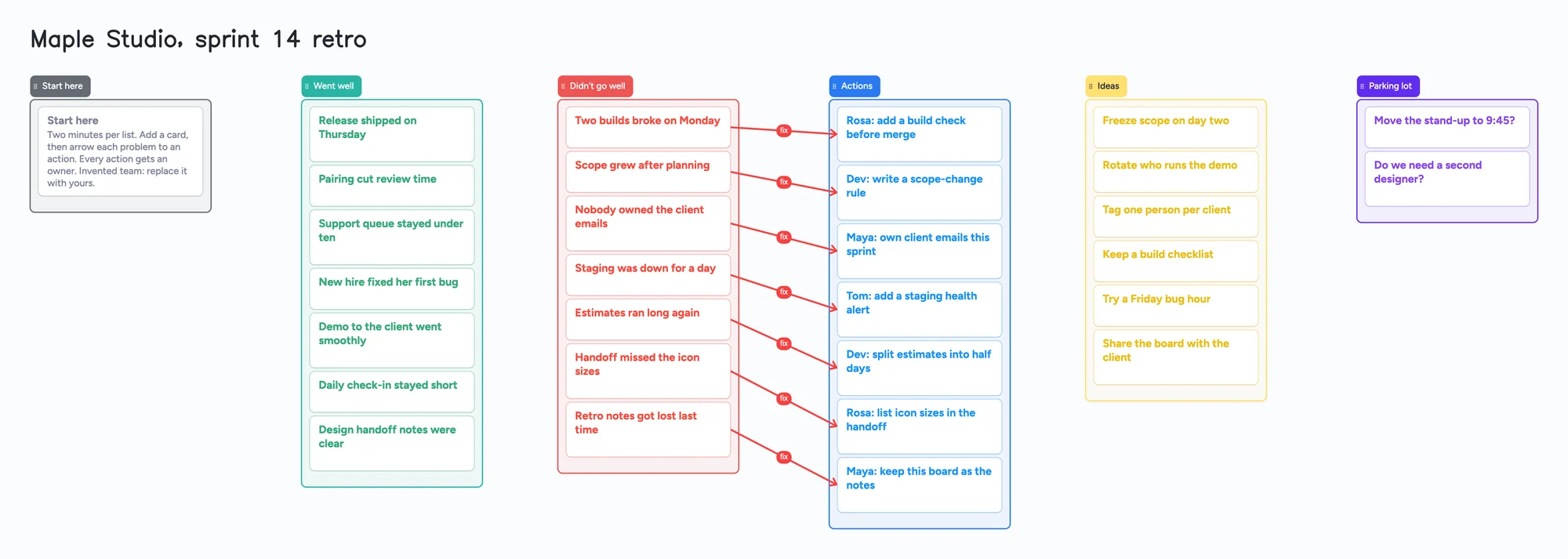
- 150 items on the free plan, across your account. Each card and each list counts. The example board is 30 cards and 6 lists, 36 items. Four retros like it are 144, and a fifth passes 150 if you keep them all on the free plan (our arithmetic). Pro removes the limit.
- 5 boards and 3 images per board. Keep one board per team and clear old cards, or keep one per sprint until you reach the limit. The example board has no images.
- Writing needs a free sign-in. Someone who isn't signed in can read the board but can't change it.
How to run the retro on the board
- Open the ready board and read the Start here card.
- Share it. In the share menu, set "Anyone with the link can edit"; new boards start as "Anyone with the link can view". Send the link, or the 4-digit join code, which expires after 2 hours of inactivity.
- Everyone signs in free (Google, Apple or email) and adds cards to Went well, Didn't go well and Ideas. What they add shows up on your board within a few seconds.
- Draw an arrow from each problem to an action. An arrow between cards in different lists takes a caption and its own colour, and it stays attached when you reorder cards or move a list. Arrows don't count toward the 150.
- Give every action an owner, in the card's title, like "Rosa: add a build check before merge".
- Keep the board as the notes. The board counts as 1 of each person's 5 free boards, and the cards they add count toward their own 150. If someone is already at 5 boards, they can still open the link and write; the board just isn't added to their boards.
Selected cards or lists can be copied as an image with "Copy as image" and pasted into a doc or chat.
Start from the ready board
It opens in your browser in a few seconds, with nothing to install. Sign in for free when you want to save it and share it.
Questions
Is Mural free?
Yes, with limits. Mural's help article says the Free plan has one workspace and unlimited murals, but only the three most recently created murals are editable; older ones become view-only, still visible and shareable. Visitors have view-only access (Mural help, read November 8, 2026).
Can someone edit a Mural without joining my workspace?
Not on the Free plan. Mural's help says visitors have view-only access and must become a member to edit; on the Free plan they can request edit access from the mural owner.
Can someone edit an Instaboard board without an account?
No. Anyone with the link can read it, but writing needs a free sign-in with Google, Apple or email. There is no workspace to join, and the board counts as 1 of their 5 free boards.
Does Instaboard have as many templates as Mural?
No. Mural's pricing page lists 250+ templates. Instaboard has far fewer.
Can I import a mural into Instaboard?
No. You retype the cards you want onto the ready board.
How many retro boards fit on the free plan?
The example board is 36 items. Each card and each list counts toward 150 items across your account, so four boards like it are 144 and a fifth passes 150 (our arithmetic). Pro removes the limit.
Is Instaboard free?
Yes. The free plan includes 5 boards, 150 cards and items across your account (pen strokes, arrows and sections don't count), 3 images and 1 file per board, unlimited collaborators and video calls up to an hour. Pro is $5 a month billed yearly ($59.99 a year), or $7.99 monthly, and the people you invite join free.
Sources
- Mural help: Introducing the Mural Free plan (3 editable murals, open rooms only, visitors view-only; published June 1, 2026; read Nov 8, 2026)
- Mural help: What is a visitor in Mural? (visitors view-only on Free, request edit access, what visitors can't do; published Oct 15, 2026; read Nov 8, 2026)
- Mural help: Accessing a mural as a visitor (view as an unauthenticated visitor; published Dec 13, 2024; read Nov 8, 2026)
- Mural help: Invite a visitor to your mural (visitors are view-only on the Free plan; published Dec 8, 2025; read Nov 8, 2026)
- Mural: pricing (plan table, 250+ templates, Facilitation Superpowers, integrations, Team+ $9.99 and Business $17.99; read Nov 8, 2026)
Related
A free Miro alternative for personal use, tutors and families
Miro Free keeps only 3 boards editable. Instaboard has 5 editable boards, video calls, Apple Pencil and sync when you're back online. Where Miro still wins.
MindMeister's free plan now keeps your 3 oldest maps. Here's what to do.
Since October 14, MindMeister's free Basic plan keeps only your 3 oldest maps and counts shared ones. Free can't export. How to get a map back, and free alternatives.
A free Milanote alternative for student projects, and where Milanote is better
Milanote's free plan stops at 100 notes, images or links. What Instaboard's free plan gives a student project, where Milanote is better, and a ready project board.
A Trello alternative for families, classes and groups bigger than 10
Trello's free plan stops at 10 collaborators per Workspace, and boards go view-only past it. An honest comparison, plus a free alternative with unlimited collaborators, drawing and calls.