For a small group building matching costumes together
Group cosplay build board: who makes which piece, on one shared page
If you need budgets, timelines and reference images, use a cosplay planner app such as Costumary or Cosflowy. We make Instaboard, and this page gives you something different: a text-only board for a group of friends, with one list per person, one card per costume piece and a colour for who makes it, so all of you see the whole build in one place. The group is invented. Open it, replace the names and pieces with yours, and send one link to your crew.
Opens in your browser. Anyone can view; a free sign-in lets you edit.
Updated
The short answer
- What it is: one list per person in the group, one card per piece of their costume, and a colour for who is making it. It answers "who has which piece, and what is still undecided", not "how much will it cost".
- What it isn't: a budget, timeline or reference-image tool. Costumary's page describes a budget that totals spending, a timeline you can attach to a date and a reference board; Cosflowy's page describes budgets, tasks and a calendar. This board has none of those.
- Why a group needs a shared list: one group cosplayer's advice is to "be sure who's in charge of costumes and props", whether that is one person or each person for their own. The board has a Shared jobs list and an Open questions list for that.
- Text only: the free plan allows 3 pictures per board, so reference images stay in a shared album and the board holds words.
- Free plan: 5 boards, 150 items across your account. Anyone who joins can view; editing needs a free sign-in.
- Not on it: money totals, event rules or deadlines, addresses and phone numbers. A board shared by link can be opened by anyone who has the link.
What this board doesn't do, before you build
- No budget and no totals. Nothing on the board adds anything up. Keep costs in a spreadsheet or in a planner app.
- No reminders or due-date alerts. The board has one card for the day you are building towards and nothing that counts down to it or tells anyone.
- No reference pictures. The free plan holds 3 pictures per board, so a group's reference images belong in a shared album, not here.
- No event rules. Rules on props, sizes or entries differ by event and change. Read them on the event's own page and write only your date on the board.
- No assigning. Colour is a note to each other. The board doesn't send a message when you move someone's card.
- Not private by default. Anyone who has the link can see every card, so keep addresses, phone numbers and full names off it. If you are under 18, check with a parent or your school before you share a board.
When a cosplay planner app is the better choice
- You want a budget that totals itself. Costumary's page says a project has "a budget that totals what you've actually spent" and a materials list you can mark as needed, ordered, arrived or owned. Its Starter plan is free with 2 active projects; Base is $9 a month and Studio $19 a month on its page.
- You want a timeline for the build. Costumary says you can attach a project to a real event date or type your own build date, and set milestones backwards from it. This board has no timeline view.
- You want tasks, tags and a calendar. Cosflowy's page describes to-do lists with tags and deadlines, expenses, reference image collections and a calendar, on the web and as an installable app on phones. Its footer reads "© Copyright 2020 Cosflowy" and its Android and iOS apps are marked beta, so check that it still works before you start.
- You want to log every work session. Cosplanner.net's page describes tracking the time and progress of items you make, reference images by character and a project summary with budget and due date. Its footer reads "Copyright © 2014-2020 Cato Kusanagi", so check that it still works before you start. In r/CosplayHelp (January 2026) one user wrote that the Cosplanner app they use isn't available for new downloads and another said theirs was not working any more; we don't know whether that is the same product as cosplanner.net.
- You plan alone. One person with one costume gets more from the apps above than from a board built for a group.
The board helps with the other half: four or five people who each make some pieces and want to see who has what, what is shared and what is still undecided, without anyone being the only keeper of the plan. If you also need a budget, use an app or a sheet for the money and this board for the people.
What group cosplayers say about running a group
Each is one person's view, read November 24, 2026.
- Say who is in charge of the costumes. In a post dated October 15, 2017, Vesna Kurilic wrote "whether one person is the designated costume department (and costume transport), or every person is responsible for their own costume and prop parts before and during the event, make sure everyone knows that!" She suggested the second way, each person responsible for their own.
- Involve everyone in the making. In the same post: "If you're the most experienced cosplayer in your respective group, you might be tempted to speed things along or do the most of the work yourself", and she said people are more into it if they do at least a little of the prep. A list per person makes that visible.
- Know your group. She also wrote that it pays to know how much time and other resources each person is willing to spend. That is a conversation, not a card; the board's Open questions list is where its result goes.
- Groups can take a long time. She wrote that her group of twelve took a year and one month to plan, because they chose the convention they wanted for that particular cosplay.
- Credit on entry forms. In r/CosplayHelp (January 2026) u/OddScholar9173 wrote that most masquerade-style contests they had entered had two places for credit, "made by" and "worn by", and that the rules depend on the event. If your colours show who made what, they may help you work out whose name goes under "made by" and "worn by"; read the event's own form.
What people say they use instead
These are replies, each one person's view. None of these three threads is about a group build or asks for a shared board.
- A general tool. In r/CosplayHelp (December 2025) u/tlhintoq wrote "Personally I just use OneNote", u/MethicalBanana said their friends use Milanote and u/WheelDirect6097 wrote "I use Trello. It doesn't have the social aspect but it does keep me organized."
- Sheets plus Trello. In r/dragoncon (March 2021) u/dreamerlilly wrote "I use Google Sheets to track supplies and costs, and Trello to track task progress."
- Milanote alone. In r/CosplayHelp (January 2026) u/lithium_vanilla wrote "Milanote is the only thing I use to plan cosplays!"
So the people who don't use a planner app mostly use a general board or notes tool. This page is another one of those, shaped for a group.
Mina, Jo, Sam and Priya's build, list by list
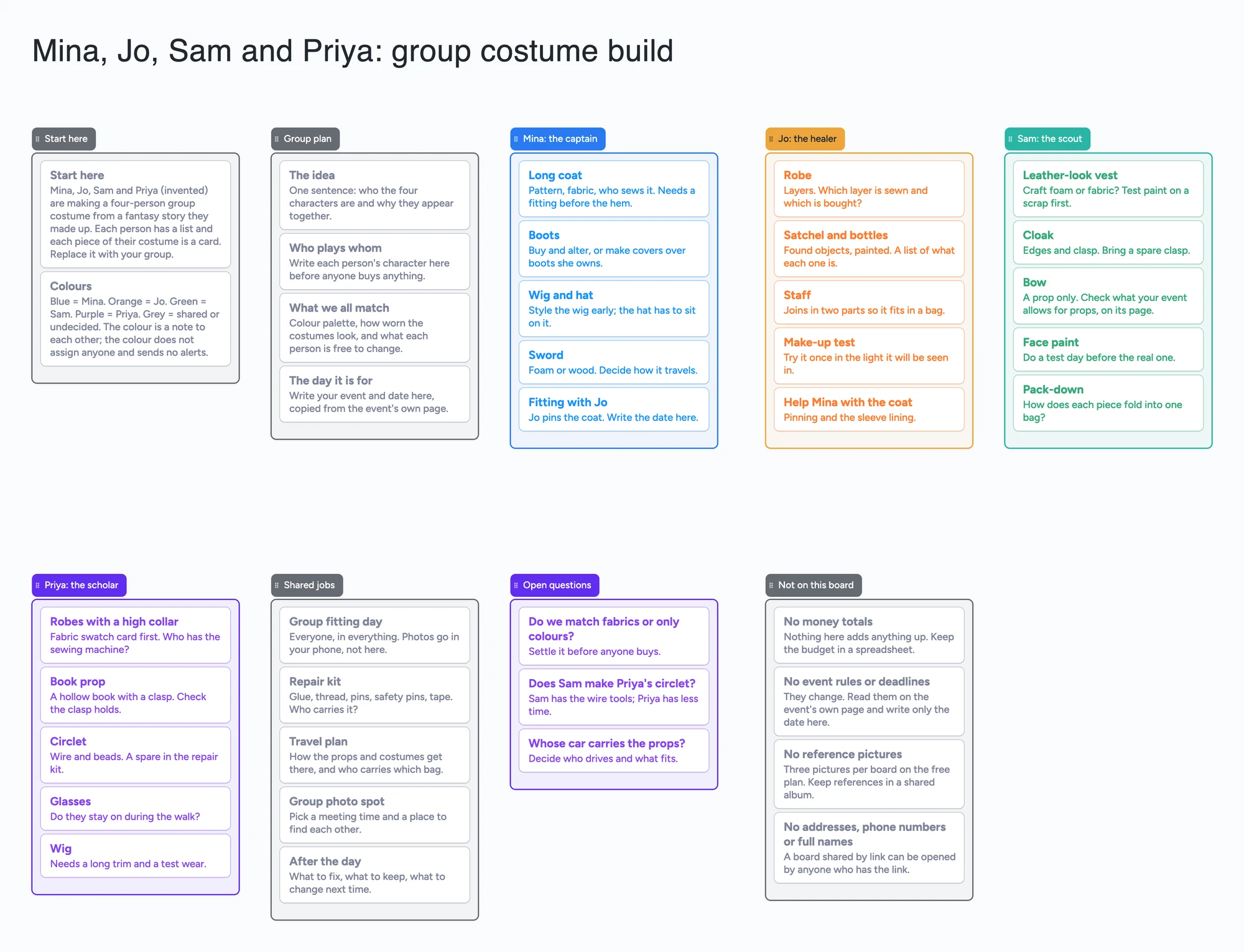
The example is invented. Four friends are making a group costume from a fantasy story they made up. Each person has a list, and each piece of their costume is a card.
| List | What goes in it | In the example board |
|---|---|---|
| Start here (grey) | The group and the colour rule | Blue is Mina, orange Jo, green Sam, purple Priya, grey shared or undecided |
| Group plan (grey) | What all four agree before anyone buys anything | The idea, who plays whom, what the four match, the day it is for |
| One list per person (their colour) | Each costume piece as a card, with a note on the next step | Coat, boots, wig and hat, sword and a fitting for Mina; robe, satchel, staff and make-up test for Jo, and so on |
| Shared jobs (grey) | What is nobody's piece but still has to happen | Group fitting day, repair kit, travel plan, group photo spot, after the day |
| Open questions (purple) | What the group hasn't decided | Match fabrics or only colours, who makes Priya's circlet, whose car carries the props |
| Not on this board (grey) | What stays off a link board | No money totals, no event rules, no pictures, no addresses or phone numbers |
Swipe the table sideways to see every column.
The board's own wording. Names, characters and costumes are made up.
The useful move is the Shared jobs list. Pieces get made because someone owns them; the repair kit, the bags and the photo spot don't belong to anyone, so they go on their own list until someone takes a card.
Does your group fit in 150 items?
The free plan allows 150 items across all your boards. Each card, list and text box is one item; sections, arrows and pen strokes aren't. The ready board has 24 fixed items: the Start here, Group plan, Shared jobs, Open questions and Not on this board lists (5), their 18 cards (2 + 4 + 5 + 3 + 4), and the title. Each person adds one list plus one card per piece. Our arithmetic:
| Group | Person lists | Piece cards | Items | Of the free 150 |
|---|---|---|---|---|
| 4 people, 5 pieces each (as built) | 4 | 20 | 48 | 102 left |
| 6 people, 8 pieces each | 6 | 48 | 78 | 72 left |
| 8 people, 14 pieces each | 8 | 112 | 144 | 6 left |
| 8 people, 15 pieces each | 8 | 120 | 152 | Over 150 |
Swipe the table sideways to see every column.
Our arithmetic: 24 fixed items on the ready board, plus one list per person and one card per piece. Items are counted across all your boards, so a second board uses the same 150.
If you reach the limit, merge small pieces into one card per person or upgrade. Pro removes the item limit; it is $5 a month billed yearly ($59.99 a year), or $7.99 monthly.
Set it up for your own group, in order
- Open the board and sign in free to edit it. Delete the example cards as you go.
- Write the idea and who plays whom on the Group plan cards before anyone buys anything.
- Make a list per person, name it with their name and character, and give each person a colour.
- Put each piece on its own card, with the next step written on it.
- Set the board's Share setting to "Anyone who joins can edit" so each of you can move your own cards, and give each person their own cards rather than typing in the same one.
- Put what nobody owns on Shared jobs and what nobody has decided on Open questions, and re-read the board together before you buy anything big.
Start from the ready board
It opens in your browser in a few seconds, with nothing to install. Sign in for free when you want to save it and share it.
Questions
Can a group plan a cosplay on one board?
Yes. Send the link; anyone can view it, and editing needs a free sign-in. Once you set Share to "Anyone who joins can edit", each person can add and move cards on their own list. Colour is a note to each other; the board doesn't assign pieces or send a message.
Does this track my budget?
No. It has no sums. Keep costs in a spreadsheet or in a planner app such as Costumary, whose page describes a budget that totals what you've spent.
Can I put reference pictures on it?
Not many. The free plan allows 3 pictures per board, so keep references in a shared album and use the board for who makes what.
Is this better than a cosplay planner app?
For a budget, a timeline or a build log, an app is better. This board is for seeing the whole group's pieces, shared jobs and open questions in one place.
Does the board know my event's rules?
No. Rules on props, entries and sizes differ by event and change, so read them on the event's own page and write only your date on the board.
How many costume pieces fit on the free plan?
With the 24 fixed items, 8 people with 14 pieces each is 144 items (our arithmetic). The limit is 150 items across all your boards. Pro removes the item limit.
Sources
- Vesna Kurilic: 11 Tips for Group Cosplay (October 15, 2017; read November 24, 2026)
- Reddit r/CosplayHelp: How do cosplay contests work for teams? (u/Necessary-Jelly-4769, January 11, 2026; u/OddScholar9173)
- Reddit r/CosplayHelp: Any apps that are kind of like Cosplay Planner? (u/Kitt-M, December 23, 2025; u/tlhintoq, u/MethicalBanana, u/WheelDirect6097)
- Reddit r/CosplayHelp: Cosplay planner app (u/bubbly_aki, January 28, 2026; u/Toothless_cos, u/lithium_vanilla)
- Reddit r/dragoncon: Favorite cosplay planning apps? (u/ChthonicGarnet, March 21, 2021; u/dreamerlilly)
- Costumary: Cosplay planner (budget, materials, timeline, Starter free with 2 active projects, Base $9 and Studio $19 a month; the page's own plan table says "Checked September 2026"; read November 24, 2026)
- Cosflowy: Cosplay planner and manager (tasks, expenses, references, calendar; footer "© Copyright 2020 Cosflowy"; apps marked beta; read November 24, 2026)
- Cosplanner.net: The planning app for cosplay (progress, references, summary with budget and due date; footer "Copyright © 2014-2020 Cato Kusanagi"; read November 24, 2026)
Related
A moving board: pack by room, number every box, share one list
Plan a move on one shared board: a list per room with a card for every numbered box, plus moving-day tasks. Free ready board; a moving app or a spreadsheet searches better.
A decision log template on one shared board: open, decided, revisit, reversed
A decision log template on one shared board for two to five people: open questions, decided with the why, revisit on a date, reversed. When a spreadsheet or Notion is the better home.