For a student or small group testing an argument before writing it
An argument map template: claim, reasons, objections and replies on one board
An argument map puts a claim in one box and shows what supports it and what pushes against it. This is for a student or a small group who want to see an essay or debate argument laid out before writing it, and who may want a second person to add an objection. The ready board has one claim card, a list of reasons, a list of objections, a list of replies and a short check list, joined by captioned arrows (because, but, reply). It is a planning board: no automatic layout, no logic checking, no export beyond Copy as image. If you want a dedicated mapping tool, we name several below that do more.
Opens in your browser. Anyone can view; a free sign-in lets you edit.
Updated
The short answer
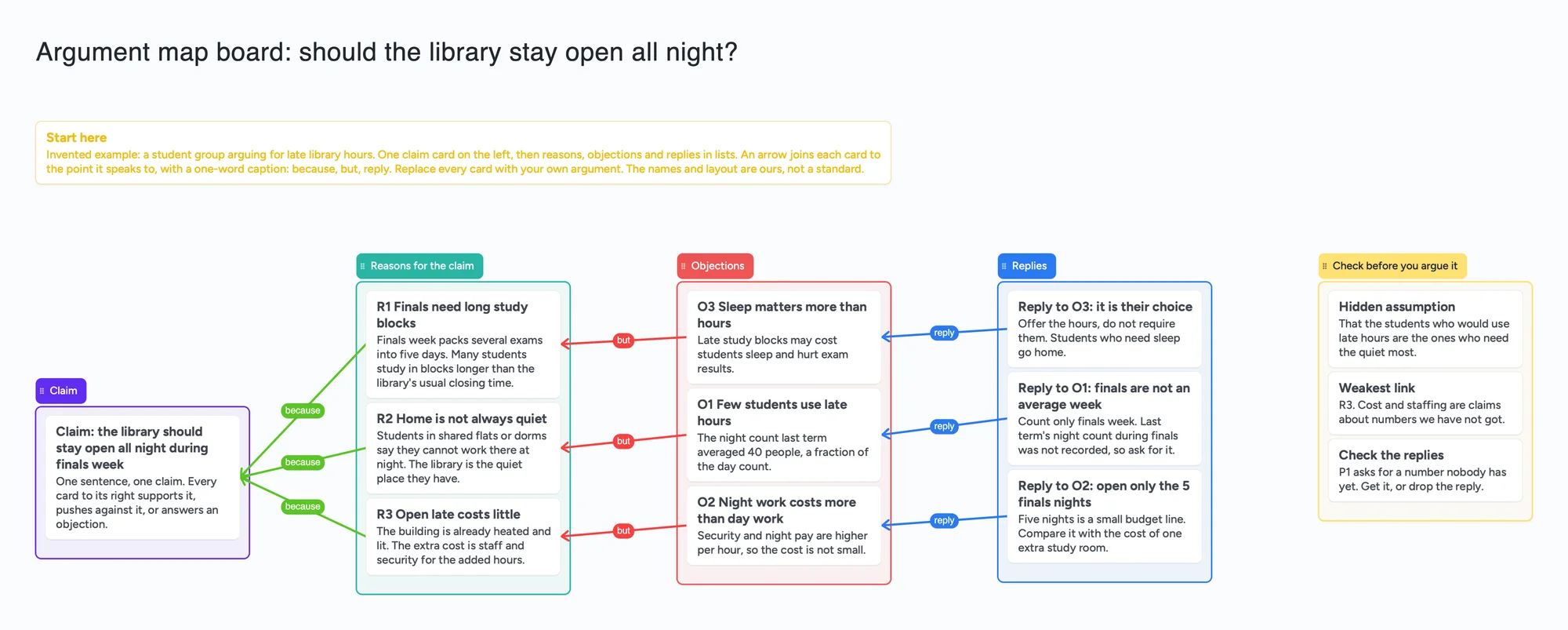
- What it is: a Claim list with one card, a Reasons list, an Objections list, a Replies list and a Check before you argue it list. Green arrows ("because") run from each reason to the claim, red arrows ("but") from each objection to the reason it challenges, blue arrows ("reply") from each reply to its objection.
- Why arrows: each arrow takes a one-word caption and its own colour and stays attached when a card or list moves. That is the part a plain list can't show: which objection hits which reason, and which objection is still unanswered.
- The example is invented: a student group arguing that a library should stay open all night in finals week. Replace every card with yours.
- What it isn't: no automatic layout, no co-premise brackets or inference boxes, no checking of whether the reasoning is valid, no PDF or file export (Copy as image only), no reminders.
- Sharing: anyone with the link can read the board with no account. Writing takes a free sign-in, and new boards start view-only, so set Share to "Anyone with the link can edit" for a partner or group.
- Free plan: the example is 20 of your 150 free items (14 cards, 5 lists and the title text box, our count). Arrows, sections and pen strokes don't count.
What an argument map is, according to the people who teach it
Monash University's Student Academic Success page "Structure your argument" (read November 19, 2026) calls an argument map a visual representation of an argument, especially useful for a complex argument or one built from a review of literature. Its hint is to put one sentence in each box to identify the claim and show its place in the structure, and it says you can build the map with specialised argument or mind-mapping software, sticky notes or by hand. The board follows that hint: one sentence per card.
The University of Hong Kong's philosophy department page "[A10] Argument mapping" (read November 19, 2026) describes an argument map as a diagram that captures the logical structure of a simple or complex argument, with the premises numbered and linked to the conclusion. The board's cards are labelled R1, R2, O1 and so on for the same reason: so you can say which one you mean.
MindMup's help page "How to Use Mindmup for Argument Visualization" (read November 19, 2026) gives a build order: start with a claim, add reasons that support it, add objections that challenge it, develop individual points, then examine the inferences between them. The board is laid out left to right in that order.
How to fill it in
- Open the board above and make it yours. The example, a library's late hours in finals week, is invented: replace every card.
- Write the claim as one sentence in the Claim card. If you can't state it in one sentence, that is the first finding.
- Add one card per reason, with a short title and one sentence under it. Draw a green "because" arrow from each reason to the claim.
- Add the strongest objection you can think of for each reason, as a card in Objections. Draw a red "but" arrow from the objection to the reason it challenges. An objection to the claim itself can point at the claim.
- Answer each objection in Replies, with a blue "reply" arrow. An objection with no arrow coming in is unanswered.
- Use the check list last. Name the hidden assumption, the weakest link and what is still unanswered. Delete a card that has no arrow and no job.
- Share the link so a partner can add the objection you missed. Set Share to "Anyone with the link can edit"; they sign in free.
If you are under 18, check with a parent or your school before you sign up for a new tool. The example argument is invented and takes no side on a real dispute.
How this differs from our concept map, Cornell and thesis boards
The biology concept map links ideas to ideas with arrows, so it shows how things relate. This board's arrows mean something specific: because, but and reply, so it shows which points support, challenge or answer which. The thesis planning board has a core argument list and chapters, and plans a whole document. This board is one argument on one screen, before you decide how to turn it into paragraphs. Cornell notes record what a source says; a map tests what you say.
Where FigJam, Miro, Mindomo, MindMup, Because and Kialo are better
Read November 19, 2026, from each tool's own pages. FigJam's argument mapping template page describes a box-and-line flowchart that starts with a thesis and branches to supporting points and objections, with containers and connectors, connectors worded "because", "and" or "but", and Simple Vote or Poll for group decisions; its template link says to try FigJam for free. Miro's argument map template page is a Miroverse template by Steve Blaylock (10K views, 1.2K uses, 102 likes on the page) that says its board holds instructions on how to make your own argument maps. If you want a drawing canvas with shapes and a vote, those are the better start.
Mindomo's argument map template page describes one side of the diagram for reasons and evidence, a dedicated space to add assumptions and support them, and the opposite side for objections and counter-evidence, with links, images, video, notes and comments on each. Its page also says you can switch a template to a concept map, outline or Gantt chart and export in more than twenty formats. The board does none of that.
MindMup's help page says Argument Visualization is a separate map type: you can't switch an existing map to it or from it. Its method ends by examining the inferences between points, which this board only prompts you to do in a card. Because (philmaps.com, "Because: free argument mapping software") says it is a free browser-based editor for argument maps with no account, keeps maps on your device or in your Google Drive unless you share them, and builds with the keyboard: Enter adds a reason, Tab adds a co-premise, Alt+O adds an objection. Co-premises (reasons that only work together) are its structure; the board has none, so a joint reason becomes one card with two sentences.
A Daily Nous guest post (August 17, 2026) by Jonathan Surovell and Dona Warren says Argumentation.io allows unlimited mapping with the free account, while a paid account adds save, export, share and real-time collaboration. Kialo Edu is a different job: its home page says students write pros and cons below each other's points to make a discussion map, and its pricing page says it is free as a nonprofit. It is for a whole class debating one question, which this board is not.
Where these win
For a canvas with shapes and voting, use FigJam or Miro. For assumption slots, attachments and export, use Mindomo. For co-premises and inference checking, use Because or MindMup. For a class debating a question, use Kialo Edu. Use this board for a shared, editable, one-screen map of a single argument that you can reshape with your hands and send as a link.
This board vs FigJam vs Miro vs Because
| Tool | What we read (Nov 19, 2026) | Good at | Not what you get |
|---|---|---|---|
| Instaboard board | Free: 5 boards, 150 items, 3 images per board. Pro $5 a month billed yearly ($59.99 a year), or $7.99 monthly | Captioned, coloured arrows between cards; shared by link; any card or list can move | Auto-layout, co-premises, inference boxes, export |
| FigJam | Template page: containers and connectors, "because/and/but" connectors, Simple Vote or Poll; free to try | A drawing canvas with shapes and voting | Plan limits not read on this page |
| Miro | Miroverse template with instructions; Free plan lists 3 editable boards on its pricing page | Instructions inside the template, large template library | More than 3 editable boards on Free |
| Because | Free, browser-based, no account; maps stay on your device or Google Drive; Enter, Tab and Alt+O add reasons, co-premises and objections | The argument-map structure itself | A shared board with other kinds of cards beside the map |
Swipe the table sideways to see every column.
From each tool's own pages, read November 19, 2026. We name no tool as the best; they do different jobs.
Limits of the free plan for an argument board
- Items. Each card and each list is 1 of your 150 free items, across all your boards. The example is 14 cards, 5 lists and a title text box, 20 in all (our count). A larger argument with 8 reasons, 8 objections and 8 replies plus the claim and the check list is 8 + 8 + 8 + 1 + 3 = 28 cards, 35 items with the five lists, Start here and the title (our arithmetic).
- Arrows are free but hand-drawn. They don't count toward 150, but you place them, and nothing moves a card for you when the argument grows.
- Boards. The free plan includes 5 boards. Making your own copy of the example uses 1.
- No logic checking. The board holds what you write; it does not tell you whether a reason supports a claim.
- No export. To send the map to someone without the link, use Copy as image on the board. There is no PDF of a card board.
- Writing needs a free sign-in. Viewing doesn't.
Start from the ready board
It opens in your browser in a few seconds, with nothing to install. Sign in for free when you want to save it and share it.
Questions
Is there a free argument map template I can edit online?
Yes. Open the board, replace the example argument with yours, and set Share to "Anyone with the link can edit" if a partner needs to write on it. It is a board of cards, lists and captioned arrows, not a document. FigJam, Miro, Mindomo and Because also offer argument map templates or editors; each is described above.
What goes in an argument map?
A claim, the reasons that support it, the objections that challenge it, and your replies to those objections. Monash University's guide says to put one sentence in each box. The ready board has one card per point and an arrow between each point and the one it speaks to.
How do I make an argument map for an essay?
Write your claim as one sentence, add a card for each reason, add the strongest objection you can think of to each reason, and add a reply to each objection. Arrows show which point answers which. Any objection with no reply is the paragraph you still have to think about. Then turn the cards into paragraphs in your word processor.
How is an argument map different from a concept map?
A concept map shows how ideas relate to each other. An argument map shows which points support a claim, which challenge it and which answer the challenge. On this board the arrows are captioned because, but and reply so the meaning is on the arrow.
How many cards fit on the free plan?
The example is 20 items of your 150. A larger argument with 28 cards would be 35 items. That is our arithmetic. Arrows are free.
Can I map an argument with a partner at the same time?
Yes. Set Share to "Anyone with the link can edit"; your partner opens the link and signs in free to write. Anyone who only wants to read can open the link with no account. Two people typing in the same card merge as they type, so separate cards keep each person's points apart.
Is Instaboard free?
Yes. The free plan includes 5 boards, 150 cards and items across your account (pen strokes, arrows and sections don't count), 3 images and 1 file per board, unlimited collaborators and video calls up to an hour. Pro is $5 a month billed yearly ($59.99 a year), or $7.99 monthly, and the people you invite join free.
Sources
- Monash University: Structure your argument (read November 19, 2026)
- HKU Philosophy: [A10] Argument mapping (read November 19, 2026)
- MindMup: How to Use Mindmup for Argument Visualization (read November 19, 2026)
- FigJam: Argument mapping template (read November 19, 2026)
- Miro: Argument Map template (read November 19, 2026)
- Miro: pricing (read November 19, 2026)
- Mindomo: Argument map template (read November 19, 2026)
- Because: free argument mapping software, PhilMaps (read November 19, 2026)
- Daily Nous: Two Argument Mapping Tools, guest post (August 17, 2026)
- Kialo Edu (read November 19, 2026)
- Kialo Edu: why it's free (read November 19, 2026)
Related
Plan a thesis on one board you can share with your advisor
An editable thesis planning board: a list per chapter, literature clusters, advisor feedback and the core argument on one shared board you send to your advisor.
Make a biology concept map from your own notes
Turn your lecture notes into a biology concept map: concepts on cards, labelled arrows, feedback loops and a recall check. Worked example on the HPA axis, a ready board to copy, and a nursing version.
Cornell notes, digital: cue cards that stay linked to your notes
How to take Cornell notes on a screen: a filled example (glycolysis) with cue cards joined to note cards by arrows, a self-quiz checklist and a summary. What a board does that a printable can't, and where a printable is better.
How to study from lecture slides: your notes beside each slide
Put your lecture slides beside your own-words notes and a 'can't explain yet' card, then study with a group on one board. Free plan: 3 images per board.