For online tutors
A tutoring progress report template for parents, filled in so you can see how it reads
A session note tells you where to start next lesson. A progress report answers a parent's bigger question: is this working? It covers a month of lessons, not one, and it is written for someone who wasn't in the room. Most templates give you empty boxes to print. This one comes filled in for an invented student, Maya, so you can see what a useful line looks like. Open the board, replace Maya with your student, and send the parent the link.
Updated
The short answer
- Write one report a month, not one per lesson. Tutorbase's guide suggests weekly summaries and a formal report monthly for ongoing K-12 support.
- Cover six things: sessions held, one number that moved, a win, what is still hard, next month's goal, and what you need from home.
- Send the board link. Anyone with the link can view it without an account, so the parent reads the report where you wrote it.
- Free boards open by link, so use first names only. Invite-only boards are on Pro.
A progress report is not a session note
The two documents have different jobs, and mixing them is why reports end up either too long or too vague. If you want the per-lesson version, use our tutoring session notes template. This page is for the monthly report a parent reads.
| Session note | Monthly progress report | |
|---|---|---|
| Covers | One lesson | A month of lessons |
| Written for | You, so the next lesson starts well | A parent who wasn't there |
| Length | A few lines | One screen |
| Answers | Where do we start next time? | Is this working, and what happens next? |
| Shows | What went wrong and the next task | What changed since the start, and the plan |
Swipe the table sideways to see every column.
The comparison is ours. Classeem's free tutor progress report page draws the same line: its report covers progress across a reporting period, not a single session. Read November 2, 2026.
The six things a monthly report needs
Published tutoring templates agree on a short core. Tutorbase's monthly report lists goals set at the start, progress evidence, wins, gaps, an updated plan, a recommended schedule and what the tutor needs from the client. Classeem's version lists starting goals, topics worked on, progress, strengths, areas needing practice, homework habits, goals for the next period and an optional parent summary. Our board keeps six:
| Field | What to write | Why a parent wants it |
|---|---|---|
| Sessions | Lessons held out of lessons planned. | Shows the time was used. |
| One number | One thing you can count, such as problems solved alone each week. | Gives "is this working?" an answer they can see. |
| One win | Something the student now does. | Tells them what the money bought. |
| Still hard | The skill, named plainly, not a label. | Honest, and it explains the next goal. |
| Next month | One goal and the homework that goes with it. | Gives the next month a direction. |
| From home | One small thing the parent can do. | Turns a report into a partnership. |
Swipe the table sideways to see every column.
Fields adapted from Tutorbase, "Progress Report Template Tutoring" (December 27, 2025) and Classeem's tutor progress report page; read November 2, 2026. The wording in the right-hand columns is ours.
What a filled report looks like
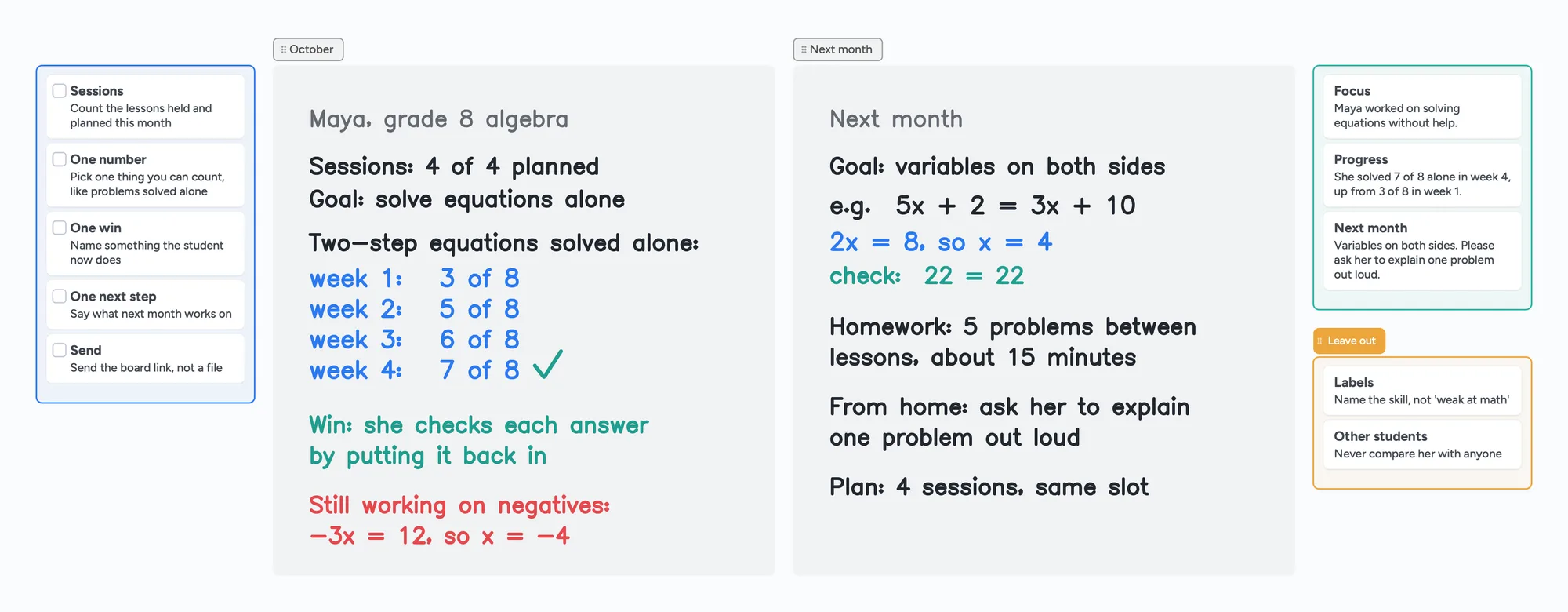
This is the report on the board above, written out. Maya is invented: a grade 8 student working on algebra equations, with a month of four lessons.
| Field | Maya's report |
|---|---|
| Sessions | 4 of 4 planned. |
| One number | Two-step equations solved alone, out of 8 each week: 3, 5, 6, 7. |
| One win | She checks each answer by putting it back into the equation. |
| Still hard | Negatives, for example -3x = 12, so x = -4. |
| Next month | Variables on both sides, for example 5x + 2 = 3x + 10, so 2x = 8 and x = 4. Five problems between lessons, about 15 minutes. |
| From home | Ask her to explain one problem out loud. |
Two habits make this useful. The number is something the parent can compare with last month, and the "still hard" line names a skill instead of a verdict ("negatives", not "weak at math"). A reader who isn't a teacher can see both without any explanation.
The message that goes with it
The board holds the detail. The message on top is three sentences, and it is what most parents read first:
- The focus: what you worked on this month.
- The evidence: the number, with where it started.
- The next step: next month's goal, and the one thing you would like from home.
For Maya: "This month Maya worked on solving equations without help. She solved 7 of 8 alone in week 4, up from 3 of 8 in week 1. Next month is variables on both sides; please ask her to explain one problem out loud." You can paste that into a message, with the board link underneath.
How often to send it
Tutorbase's guide describes two layers: a quick summary after each session, and a formal report at decision points. For ongoing K-12 support it suggests weekly summaries and a monthly formal report, and for exam preparation it suggests notes every session with a monthly or post-assessment report. For adult learners it suggests a quarterly one. It also suggests a report whenever attendance drops or a student plateaus. Those are one company's recommendations, not rules; pick a rhythm you can keep.
A report you send every month for a year is worth more than a detailed one you stop sending in week six. That is the reason this board has six fields and no more.
Use the board as your reports in five steps
- Open the progress report board above and make it yours.
- Rename it for one student and replace Maya's report with a real one. Use a first name only.
- Fill the six fields at the end of the month, using your session notes. If you keep them on a board too, the numbers are already written down.
- Add each new month in its own section next to the last one, so a parent can see the whole run.
- Send the board link with the three-sentence message. Open the same board next month.
If you already teach on a board, you can keep the report on the lesson board itself. A tutoring whiteboard guide and how to teach math online show how a lesson board is laid out.
When another format is the better choice
- You want to print a report or hand over a paper copy. Classeem's free tutor progress report is built for printing, with no account; nothing is saved after you close the tab.
- You have many students and want reports sent on a schedule. Tutorbase describes client portals, scheduled sends and exportable records for tutoring centers. Instaboard sends nothing for you.
- You track scores and need to chart them. A spreadsheet is better. A board has no charts.
- A school, agency or funder requires a specific form. Use theirs.
- You want a long narrative letter. Some tutors write one: Housecalls Tutoring publishes a long sample letter about one student. A board suits short reports.
Instaboard fits when you already teach on a board, you have a handful of students, and you want one link that holds the lesson, the notes and the monthly report.
What Instaboard doesn't do for reports
- No progress tracking. It won't chart scores or compare months. You write the number by hand.
- No scheduling, reminders or automatic parent emails. You send the link yourself.
- Free covers 5 boards. One board per student fits five students; each imported PDF uses one of the five. Cards and lists count toward 150 items across your account, while pen strokes don't. Pro lifts the limits.
- Parents sign in only to write. Anyone with the link can view; writing needs a free sign-in.
- Free boards are shared by link. Anyone who has the link can view it, so use first names only. Invite-only boards are on Pro.
- It is manual. Nothing fills itself in from your lessons, and there is no AI writing.
Start from the ready board
It opens in your browser in a few seconds, with nothing to install. Sign in for free when you want to save it and share it.
Questions
What should a tutoring progress report include?
Sessions held, one number that moved, a win, what is still hard, next month's goal and one thing you need from home. Published templates add a recommended schedule and the original goals; keep them short.
How often should I send a tutoring progress report?
Tutorbase suggests weekly summaries and a formal report monthly for ongoing K-12 support, and quarterly for adult learners. Choose a rhythm you can keep up.
How is a progress report different from session notes?
Session notes cover one lesson and are mostly for you. A progress report covers a month and is written for a parent. See our tutoring session notes template for the per-lesson version.
How do I send the report to a parent?
Send the board link with a three-sentence message. Anyone with the link can view the board without an account. Free boards are shared by link, so use a first name only; invite-only boards are on Pro.
Does Instaboard track my student's progress?
No. You write the number by hand. There are no charts, scores or automatic reports. A spreadsheet or tutoring management software is better if you need those.
Is Instaboard free?
Yes. The free plan includes 5 boards, 150 cards and items across your account (pen strokes, arrows and sections don't count), 3 images and 1 file per board, unlimited collaborators and video calls up to an hour. Pro is $5 a month billed yearly ($59.99 a year), or $7.99 monthly, and the people you invite join free.
Sources
Related
A tutoring session notes template, filled in so you can see how it reads
What to write after each tutoring session: outcome, what went wrong, evidence, next task and a short parent note. A copy-and-use template and a filled board you can send as one link.
An online whiteboard for tutoring that works the way you teach
A free whiteboard for online tutoring: paste the worksheet, write with a pen, and your student answers on the same board. Call on it or beside Zoom.
How to teach math online: your first lesson, step by step
How to tutor math online as a beginner: what you need, how to run a first lesson on a board your student writes on too, with Zoom, Google Meet or no video app at all, and what to do without a whiteboard.
Online tutoring setup: what you need before your first lesson
What you need to start tutoring online: sound, light, camera, internet, a way to write, and a board your student writes on too. A plain checklist with a five-minute test call and a ready board to open.
An online whiteboard for math: write, graph and let your student write too
What a math tutor needs from an online whiteboard: handwriting, typed equations, graphs and worksheets, and which tools have each. Free limits compared, plus a ready slope lesson board.