For anyone packing a home, alone or with a partner and helpers
A moving board: pack by room, number every box, share one list
This is for a move you plan with other people: a list for each room, a card for every numbered box saying what is in it and who packed it, a list of open-first boxes, and lists for the tasks before, on and after moving day. It is a planning board, not an inventory app. It takes only 3 pictures per board, so no photo of each box; it shows no countdown, sends no reminders, and nothing here searches or prints. A spreadsheet or a moving app does those better.
Opens in your browser. Anyone can view; a free sign-in lets you edit.
Updated
The short answer
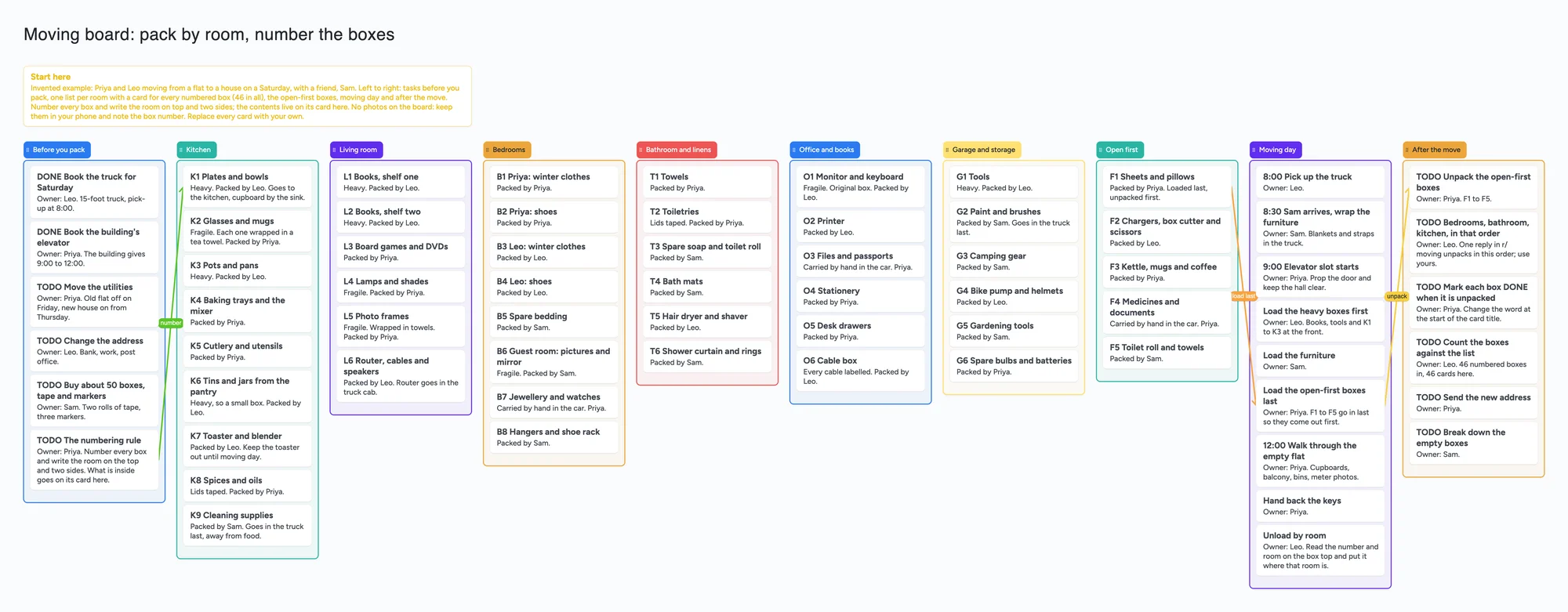
- What it is: one board, left to right: tasks before you pack, one list per room (kitchen, living room, bedrooms, bathroom and linens, office and books, garage and storage), the open-first boxes, moving day and after the move. In a room list each card is one numbered box: a letter and number (K1, L4), what is in it, and who packed it. Task cards start with DONE, WAIT or TODO and name an owner.
- The numbering rule: every box gets a number, and the room goes on the box top and two sides. The contents live on the card here. This follows what people in r/moving describe (see below); it is a habit, not a feature of the board.
- What it isn't: no photos of the inside of each box (3 images per board on Free), no countdown or reminders, no search, no printing, no QR labels. The example is invented: Priya and Leo, a friend Sam, a Saturday.
- Arrows: an arrow can join a card in one list to a card in another, takes a caption and its own colour, and stays attached when a card or list moves. The example has three: the numbering rule to the first kitchen box, the open-first sheets to the load-last task, and that task to the unpack task.
- Free plan: the example is 79 of your 150 free items (68 cards, 10 lists and 1 title text box, our count). A real 60-box move replaces 46 box cards with 60: 93 items (our arithmetic below). Arrows don't count.
What people say works: numbered boxes and a list
Read in full on November 21, 2026. Each reply is one person's view, credited per account. In r/moving, "How do you keep track of what's in your boxes?" (u/Ok_Basil7060, June 29, 2026), u/Solid-Replacement-69 wrote that numbered boxes plus a searchable list is the system that survived three moves, with only the number and room on two sides and the top and the contents list kept somewhere searchable. u/ktbroderick keeps a Google Sheet with the box label in one column and one item per row beside it. u/mskhofhinn used numbered boxes with a list in a paper notebook, colour-coded masking tape on the boxes and matching tape on the doorjambs so the movers knew where each went. u/Ok-Practice-1832 warned that a very detailed inventory is something people start with good intentions and give up after two or three boxes. u/Key_Evening9523 pointed out that a label like "front hall closet" breaks if the new place has no such room.
In a second thread, "How do you label boxes so you actually know what's inside?" (u/Dreznon, October 24, 2026), u/No-Stress-7034 numbered each box on the top and all four sides, kept a Google spreadsheet with a column per box, and added a priority level so the first priority boxes were unpacked first; u/kotabryant said being able to press Ctrl+F for "spoons" or "beanie" is the point. u/Sousaclone's advice was one or two open-me-first boxes, packing by room, and not making the list too detailed ("does 'guest bathroom' really need an inventory?"). u/dgeniesse suggested keeping your own list of boxes rather than relying on the movers' inventory stickers, and marking boxes off as they arrive. u/No-Boat-1536 numbers boxes in the order they are packed and unpacks in reverse. u/Theredheadsaid wrote that a descriptive label such as "art" is a sure way to get a box stolen by movers, so the outside says only a code like "K3".
Some replies in both threads come from people who say they built a box-inventory app; we don't cite those as advice. This page doesn't tell you which system is best: the commenters differ on photos, codes, spreadsheets and apps.
Where a spreadsheet, a moving app and a checklist are better
Read November 21, 2026, from each page. BoxBuddy's own page describes an iPhone and iPad app (it also says a web version exists) that photographs each box, takes a voice note, prints a QR label and lets you search for an item by name. It lists an Individual plan at $19.99 a year for up to 1,000 boxes and a Family plan at $29.99 a year for up to 5 people, with the first 10 boxes free, and says it needs an internet connection to save a box. If you want to scan a label and see what is inside, or search "coffee maker", that is the better tool; this board has no scanning and no search.
A spreadsheet is what most commenters above use, and it searches: pressing Ctrl+F in a Sheet is what two commenters praise. Vertex42's Moving Checklist page (updated April 2, 2024 per the page) offers a free printable checklist as a PDF, Word, Excel or Google Sheets file, with steps from two months before to the weeks after; a board doesn't print. Notion's moving planner category page lists 24 templates, all marked Free; we read the category page, not each template, so we say nothing about what one contains.
Where these tools win
Use a spreadsheet or a moving app when you want to search for an item or print a list. Use a printable checklist when you want the standard order of tasks on paper. Use this board when two or three people share a move and want one place that shows which room each box belongs to, who packed it, and what has to happen before the truck leaves.
How to plan a move on the board
- Open the board and make it yours. Replace Priya, Leo and Sam with your names and the example rooms with yours.
- Write the numbering rule on a card (the example's first list has it) and keep to it: number on every box, room on the top and two sides.
- Make a card for each box as you pack it, in the list for its room: the number, what is in it, who packed it, and "heavy" or "fragile" if it is. Don't tape a box until its card exists.
- Keep it short. One commenter gave up detailed inventories after a few boxes; "K6 Tins and jars" is enough on a card.
- Make an open-first list. Sheets, chargers, a box cutter, kettle, medicines and toilet roll. Load these last so they come off first; the example joins them to the load-last task with arrows.
- Put moving day on one list with times and an owner on each card, from picking up the truck to handing back the keys.
- Unpack in an order you choose and change DONE at the start of each card title as boxes are emptied. Count the cards against the boxes that arrive.
- Share it. In the share menu set Share to "Anyone who joins can edit" (new boards start view-only). A partner or friend signs in free and writes live. Someone who only needs to read can open the same link signed out.
This board vs a spreadsheet vs BoxBuddy vs a printable checklist
| Tool | What we read (Nov 21, 2026) | Good at | Not what you get |
|---|---|---|---|
| Instaboard board | Free: 5 boards, 150 items, 3 images per board. Pro $5 a month billed yearly ($59.99 a year), or $7.99 monthly | Boxes by room with a packer on each, moving-day tasks, a partner and helpers on one link after a free sign-in | Photos per box, search, printing, QR labels, reminders |
| Spreadsheet (Google Sheets, Excel) | Used by several commenters in r/moving; our reading, not a vendor claim | One row per item, Ctrl+F search, sorting | A card per box with tasks and arrows around it |
| BoxBuddy | iPhone and iPad app (a web version is mentioned); Individual $19.99 a year for up to 1,000 boxes, Family $29.99 a year for up to 5 people; first 10 boxes free; needs internet to save | Photos, voice notes, QR labels, item search | A free plan beyond 10 boxes; moving-day tasks |
| Vertex42 moving checklist | Free printable checklist as PDF, Word, Excel or Google Sheets; page updated April 2, 2024 | Standard order of moving tasks, on paper | Boxes, owners, a shared live list |
| Notion moving templates | Category page lists 24 templates, all marked Free (template contents not read) | A database you can filter and search | A board a helper opens without an account |
Swipe the table sideways to see every column.
From each tool's own pages and the two r/moving threads, read November 21, 2026. Prices change; check the page.
Limits of the free plan for a move
- Items. Each card, list and text box is 1 of your 150 free items, across all your boards. The example is 68 cards, 10 lists and 1 title text box, 79 in all. Arrows, sections and pen strokes don't count.
- A bigger move. The example has 46 box cards. A 60-box move replaces them with 60: 79 − 46 + 60 = 93 items (our arithmetic). The most one board can hold is 139 cards beside its 10 lists and the title (150 − 10 − 1), before anything else on your free plan.
- Boards. The free plan includes 5 boards. Making your own copy of the example uses 1.
- Photos. 3 images per board, so no photo of each box. Keep box photos in your phone and write the box number on the card. A link card's preview picture no longer counts toward the 3.
- No search and no printing. Scan the room list. If you need to find "the cheese grater" by name, use a spreadsheet or an app.
- No countdown, no reminders, no due-date alerts. The board doesn't tell anyone that the truck is booked for Saturday.
- Writing needs a free sign-in. A helper who joins by link or code can add cards and arrows, and the board counts as one of their 5.
Start from the ready board
It opens in your browser in a few seconds, with nothing to install. Sign in for free when you want to save it and share it.
Questions
Is there a free moving board or template I can share?
Yes. Open the board, replace the example move with yours and turn on "Anyone who joins can edit" if a partner or helper needs to write on it. It is lists of cards, not a spreadsheet, so it doesn't search or print.
How do I number and label moving boxes?
Several people in r/moving give the same rule: number every box and write the number and room on the top and two or more sides, then keep the contents list somewhere you can read it. On this board the contents are on a card per box. Pick a numbering you will keep up; one commenter numbers in the order boxes are packed.
Can I put a photo of each box on the board?
No, not beyond 3 images per board on the free plan. Keep the photos in your phone and write the box number on the card, or use an app built for box photos.
Can I use it as a shared packing list for a group trip?
The shape carries over: a list per person or per room, a card per bag or item, a first name on each, and the shared link so everyone sees what is packed. It has no weather, no reminders and no reuse across trips. For planning the trip itself, see the group trip planning board.
How many boxes fit on the free plan?
Each card, list and text box is one item of the 150 across all your boards. The example is 79 items with 46 box cards; a 60-box move is 93. That is our arithmetic. Arrows are free.
Is Instaboard free?
Yes. The free plan includes 5 boards, 150 cards and items across your account (pen strokes, arrows and sections don't count), 3 images and 1 file per board, unlimited collaborators and video calls up to an hour. Pro is $5 a month billed yearly ($59.99 a year), or $7.99 monthly, and the people you invite join free.
Sources
- r/moving: How do you keep track of what's in your boxes? (u/Ok_Basil7060, June 29, 2026; replies are single accounts, read November 21, 2026)
- r/moving: How do you label boxes so you actually know what's inside? (u/Dreznon, October 24, 2026; replies are single accounts, read November 21, 2026)
- BoxBuddy: moving box inventory app (read November 21, 2026)
- Vertex42: Moving Checklist (page updated April 2, 2024; read November 21, 2026)
- Notion: free moving planner templates (read November 21, 2026)
Related
Home renovation planner: a shared board for the decisions
Decide paint, floor and sofa together: a list per decision, a few candidates, who decides and an order-by date. A shared board, not a floor-plan or budget tool.
A group trip planning template on one shared board: who's going, which dates, which stay, who books what
A group trip planner template to open and edit with friends: who is going, dates by who can make them, stays side by side and who books what.
Family reunion planning template: one shared board for the committee
A free family reunion planning template to open and edit with your committee: venues, dates by who can attend, headcount by branch, food and lodging.