For the senior who is juggling nine applications
A college application board: schools, essays, recommenders and deadlines in one place
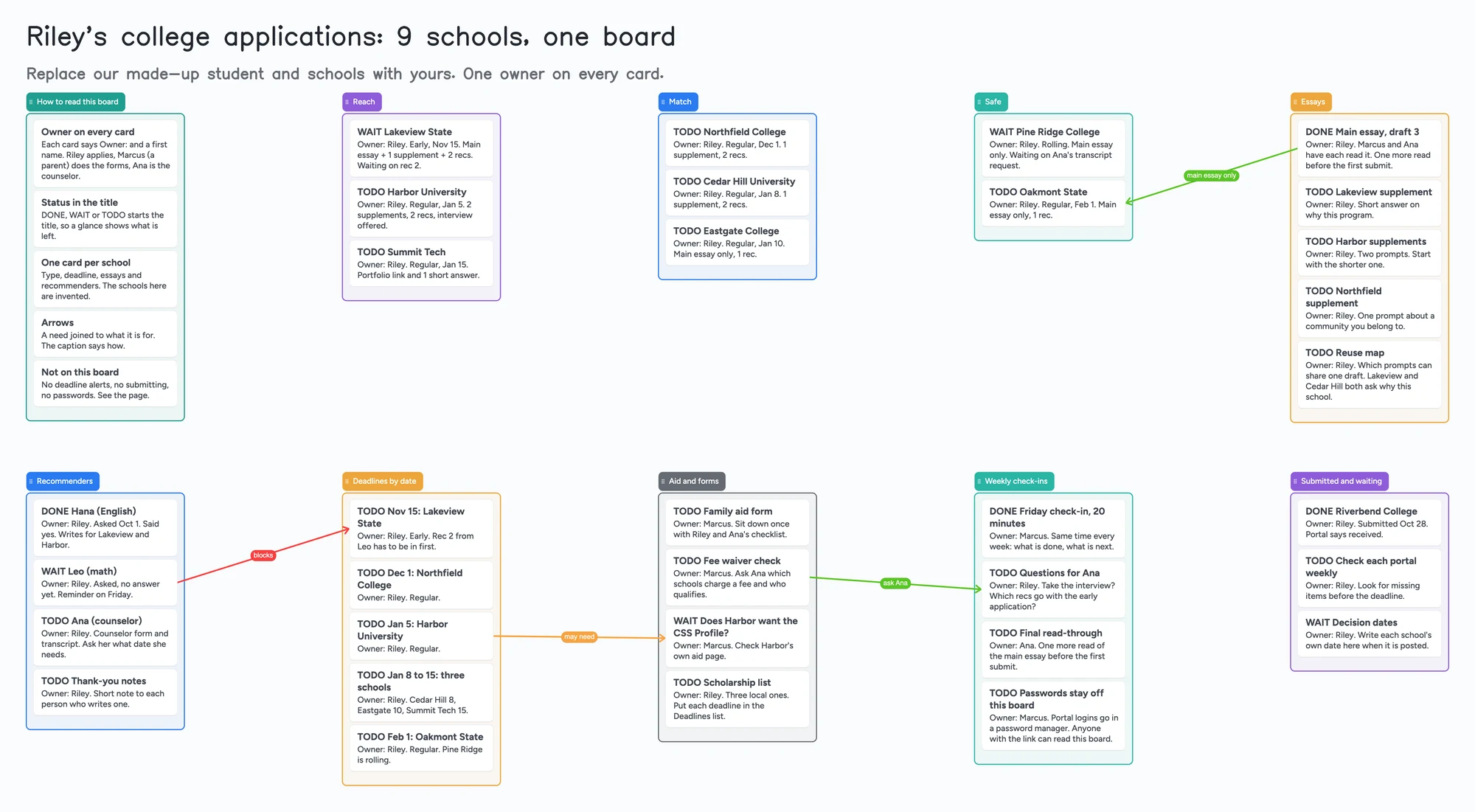
This is for a high school senior applying to a handful of colleges, with a parent or a counselor helping. It has a list each for reach, match and safe schools, essays, recommenders, deadlines by date, aid and forms, weekly check-ins and what is already submitted, with an owner's name on every card. It is a planning board, not an application service. It doesn't submit anything, send deadline alerts, store logins or tell you your chances; the Common App, Scoir and a spreadsheet do their own jobs, and the next section says where they are better. Use the board for the part around them: what is left, who owns it, and what is waiting on someone else. If you are under 18, check with a parent or your school before you put your plans on a shared board.
Updated
The short answer
- What it is: one board with a list for each part of application season (reach, match and safe schools, essays, recommenders, deadlines by date, aid and forms, weekly check-ins, submitted and waiting) and a card for each school or task. Every card says "Owner:" and a first name, and DONE, WAIT or TODO starts the title.
- What it isn't: no application portal, no deadline alerts, no essay feedback and no odds of getting in. Keep portal logins in a password manager, never on a board that anyone with the link can read.
- Arrows: an arrow can join a card in one list to a card in another, takes a caption and its own colour, and stays attached when a card is reordered. The example joins a recommender who hasn't answered to the early deadline it blocks.
- Free plan: the example is 48 of your 150 free items (38 cards and 10 lists, our count). Arrows, sections and pen strokes don't count. Nine schools with a card each fit with room to spare (Pro is $5/mo billed yearly).
What this board doesn't do, and where Common App, Scoir and a spreadsheet are better
Read on November 11, 2026 from each tool's own pages. The Common App's home page says it covers 1,200+ colleges and notes that many colleges never charge an application fee and offer fee waivers; that is where you apply, and nothing on this board submits or replaces it. Scoir's student pricing page says Scoir is free to students. Coalition for College's "Stay on Track" tips say Scoir tracks application deadlines and submission statuses, takes recommendation and transcript requests, and lets a student invite a parent or guardian to link with them to collaborate on the college list. If your school already runs on Scoir, that link is a better home for the deadlines than a board.
Coalition for College's tips also describe the plainest tracker there is: a spreadsheet with a row per school and columns for the deadline, the essays and the materials you still owe, shared with someone you trust. Niche's college application organizer (December 8, 2023) is a Google Sheets copy you make with File > Make a copy, with a printable PDF. Notion's marketplace has a school-applications category with hundreds of templates, many marked free. A sheet sorts by deadline and adds things up, which this board doesn't.
Where these tools win
To apply, use the Common App or the school's own portal. To keep a counselor-linked list with deadlines, use Scoir if your school is on it. To sort every school by date and count what is left, use a spreadsheet. Use this board first, or next to them, when a student, a parent and a counselor need one picture of who owns each open item and what each is waiting on.
How to run application season on the board
Students in r/ApplyingToCollege describe the same shape. In a 2022 thread one commenter said a spreadsheet and the Common App did a fine job; others used Notion or OneNote, and one kept a colour-coded essay sheet that turned 67 essays into 28 by reuse. A January 2026 post lists a master tracker with early decisions first, a calendar, one document per school and colour for what is submitted. Each of those is one person's method, not a rule. The board doesn't force one. It gives every part of the season a list.
- Start with one card per school. Put the type (early or regular), the deadline, the essays it wants and how many recommendations on the card. The example sorts nine schools into reach, match and safe lists; the schools are invented.
- Name an owner on every card. Write "Owner:" and a first name on the first line. The student owns the applications and essays, a parent can own the aid forms, the counselor owns the transcript and her read-throughs.
- Start each title with DONE, WAIT or TODO. Change the word as things move. Nothing sorts by it, so you scan for it by eye.
- Track recommenders on their own list. One card each, with who was asked, when, and which schools they write for. A commenter in the 2022 thread suggested tracking the number and type of letters each school wants; the example does that on the school cards.
- Reuse essays on purpose. A card that maps which prompts can share one draft saves writing the same answer to "why this school" twice.
- Join a blocker to what it blocks. The example draws an arrow captioned "blocks" from a recommender who hasn't answered to the early deadline, and one captioned "main essay only" from the finished essay to a school that wants nothing else.
- Hold a weekly check-in. One list holds the 20-minute Friday check-in, questions for the counselor and a last read of the main essay. Coalition for College's tips suggest sharing planning documents with someone you trust; the board is that shared page.
This board vs Common App vs Scoir vs a spreadsheet
| Tool | What we read (Nov 11, 2026) | Good at | Not what you get |
|---|---|---|---|
| Instaboard board | Free: 5 boards, 150 items. Pro $5/mo billed yearly | Who owns what, what a task is waiting on, a parent and counselor on one link | Submitting, deadline alerts, sorting, sums |
| Common App | 1,200+ colleges; many never charge a fee and offer fee waivers | Applying to many colleges from one application | A shared plan for the whole season |
| Scoir | Free to students (Scoir); deadlines, recommendation requests and a parent link (Coalition for College) | A counselor-linked list with deadlines and recommendation requests | A free-form board of cards and arrows |
| Niche or Notion organizer | A Google Sheets copy (Niche); Notion templates, many free | A row per school you sort and filter | An arrow from a task to what it blocks |
Swipe the table sideways to see every column.
From each tool's own pages, read November 11, 2026. We name no tool as the best; they do different jobs.
Limits of the free plan for applications
- Items. Each card and each list is 1 of your 150 free items, across all your boards. The example is 38 cards and 10 lists, 48 in all (our count). Arrows, sections and pen strokes don't count. A student with twelve schools and a card per essay prompt still fits.
- Boards. The free plan includes 5 boards. Making your own copy of the example uses 1 of them; a card that opens its own board uses another, so the example keeps everything on one board.
- Photos. 3 images per board. The example has none. On the web a link card's preview picture no longer counts toward the 3, but the iPhone, iPad and Android apps still count it until their next update.
- No reminders, no due-date alerts, no sorting by date. The board doesn't tell anyone a deadline is close. Keep dates in your calendar too. Card colour is the border and text only.
- No submitting and no portal logins. It doesn't connect to the Common App or any school, and passwords should never go on it.
- No essay or admissions advice. It doesn't read your essays or estimate odds. The reach, match and safe lists are your own sorting.
- Writing needs a free sign-in. A parent or counselor who joins by link or code can add cards and arrows, and the board counts as one of their 5.
Start from the ready board
It opens in your browser in a few seconds, with nothing to install. Sign in for free when you want to save it and share it.
Questions
Is there a free college application tracker template?
Yes. Open the board, replace the example student and schools with yours and set Share to "Anyone with the link can edit" if a parent or counselor needs to write on it. It is a board of cards, lists and arrows, not a sortable spreadsheet.
Can I submit applications from the board?
No. It doesn't connect to the Common App, Scoir or any school. Apply in the portal and mark the card DONE here.
Is it safe to put my school list on a shared board?
Anyone with the link can read it, so leave out passwords, test scores and personal ID numbers. If you are under 18, check with a parent or your school first.
Will it remind me before a deadline?
No. The board has no reminders or alerts. Put each date in your calendar as well, and use the Deadlines list to see them in order.
How many cards fit on the free plan?
Each card and each list is one item of the 150 across all your boards. The example is 48. That is our arithmetic. Arrows are free.
Sources
- Common App home page (read November 11, 2026)
- Scoir: student and family pricing (read November 11, 2026)
- Coalition for College: Stay on Track, organizational tips for the college process (read November 11, 2026)
- Niche: College Application Organizer (December 8, 2023; read November 11, 2026)
- Notion Marketplace: School Applications templates (read November 11, 2026)
- r/ApplyingToCollege: how do you keep track of applications (2022, replies are single accounts)
- r/ApplyingToCollege: application organization post (January 2026, one poster's list)
Related
Plan a thesis on one board you can share with your advisor
An editable thesis planning board: a list per chapter, literature clusters, advisor feedback and the core argument on one shared board you send to your advisor.
An office holiday party planning board: who owns what, in one place
Plan the office holiday party with a small committee on one shared board: budget, venue, food, gift swap rules and the evening. Free ready board, and where SignUpGenius does more.
A wedding vendor comparison board you and your family can all see
Compare wedding venue and vendor quotes on one shared board: a list per vendor type, a card per quote, decide-by dates. A filled example to copy. Not a spreadsheet.