For a student teacher and a mentor teacher who share a placement
Student teaching placement board: phases, lessons, observation days and feedback asks, shared by two adults
We make Instaboard, an online board. This is a student teaching plan for two adults who share one link, filled in for an invented pair: Maren, a student teacher, and Tomas, her mentor in a grade 4 class, over a 16-week placement. It holds the placement phases, Maren's lessons with an owner on each, the observation days, the feedback she wants to ask for, and a Friday check. It leaves off everything your program keeps in its own system: the midterm and final forms, the supervisor's observation logs, rubrics, sign-off and licensure paperwork. It has no reminders or due-date alerts, and it must never hold a pupil's name, work or results: pupils are children, and anyone with the link can read every card. If your program wants a printed student teacher binder, that is the better choice.
Opens in your browser. Anyone can view; a free sign-in lets you edit.
Updated
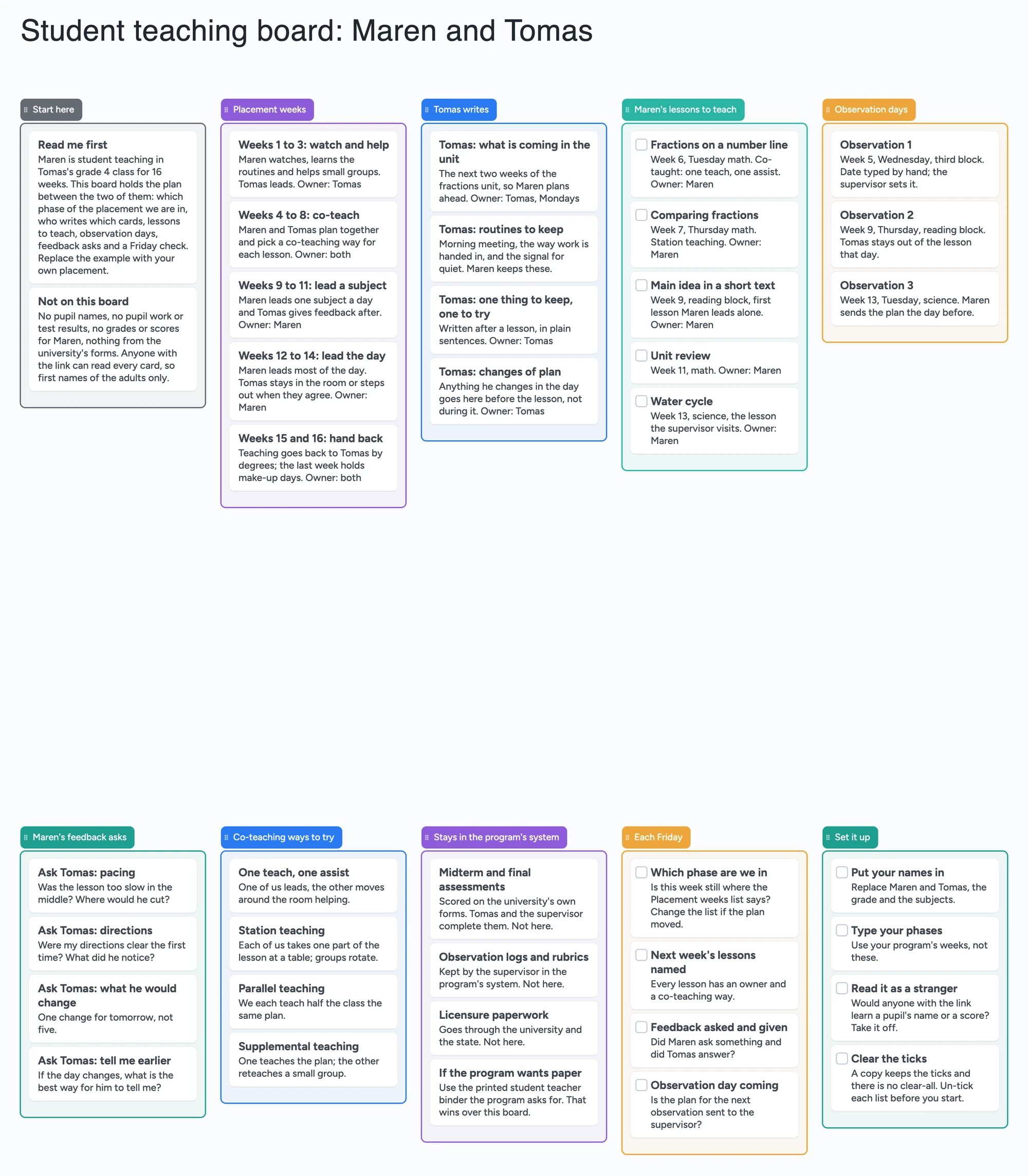
Read this first: what this board holds, and what stays in your program's system
- What the board is: the working plan between a student teacher and a mentor: placement phases typed by hand, the lessons to teach, observation days, feedback asks, co-teaching ways to try and a Friday check.
- What it isn't: not your program's forms. Midterm and final assessments, observation logs, rubrics, sign-off and licensure paperwork stay where the university keeps them. There are no reminders or due-date alerts and no record of who ticked or when.
- Adults only: no pupil names, pupil work, test results or support-plan details, and no grades or scores for the student teacher. Anyone with the link can read every card, so mentor feedback is visible to everyone who has it. First names only.
- Ticks: tick items together, and everyone with edit access sees it live. Anyone with edit access can un-tick anything, so a tick is a note, not proof.
- Free plan: the example is 50 of your 150 free items (39 cards, 10 lists and 1 title text box, our count). Arrows and pen strokes don't count. Writing needs a free sign-in, and a reader can open the link signed out. Pro removes the item limit.
Maren and Tomas's board, list by list
Everything in the example is invented: a grade 4 class, 16 weeks, first names of the two adults only, no pupils.
- Start here (2 cards). How the board is used, and a "Not on this board" card that names what stays off.
- Placement weeks (5 cards). One card per phase: weeks 1 to 3 watching and helping, weeks 4 to 8 co-teaching, weeks 9 to 11 leading one subject, weeks 12 to 14 leading the day, weeks 15 and 16 handing back. The week numbers are the example's; type your program's.
- Tomas writes (4 cards). What is coming in the unit, routines Maren keeps, one thing to keep and one to try after a lesson, and changes of plan written before the lesson.
- Maren's lessons to teach (5 cards, tick boxes). Each lesson has a week, a block, a co-teaching way where it fits and an owner.
- Observation days (3 cards). Dates typed by hand, because the supervisor sets them. One card says Tomas stays out of the lesson that day.
- Maren's feedback asks (4 cards). Questions she brings to Tomas: pacing, directions, one change for tomorrow, and how he wants to tell her when the day changes.
- Co-teaching ways to try (4 cards). One teach one assist, station, parallel and supplemental teaching, each in a sentence.
- Stays in the program's system (4 cards). The forms and logs this board doesn't replace, and a card that says the printed binder wins if the program wants paper.
- Each Friday (4 cards, tick boxes) and Set it up (4 cards, tick boxes).
There are no arrows. The order of the lists, left to right and then down, is the order of the placement.
Two ways a placement can be scheduled, from one university's handbook
The University of Montana's Student Teaching Handbook (cover reads "Revised, 2026"; read November 24, 2026) is a university's own document. It is the source for this section, and the example's phases are modelled on it. Your program's schedule decides yours.
- The length. The handbook says elementary, early childhood and secondary candidates complete a 16-week assignment, with weeks 1 to 15 co-teaching and week 16 reserved for make-up days and additional observations.
- The co-teaching model. It says the cooperating teacher typically leads co-planning and presenting early on, lesson planning is done as a team from the start, no sequential order of strategies is required, and the candidate gradually takes on more responsibility.
- The traditional model. It describes the first 11 weeks as slow incorporation, weeks 12 to 14 as full responsibility for the candidate, and week 15 as half days of teaching with half days of observation, and says the college prefers co-teaching.
- Observations. It says the university supervisor conducts six regular formal observations and also says four to six, adjusting to the length of the placement, and keeps the observation records.
- Midterm and final. Formal assessments happen at the midpoint and the end, scored on the program's forms, which the handbook says are grounded in the Danielson Framework for Teaching. The supervisor collects signatures and submits the paperwork.
The board's five phases are our mapping of the two models, not the university's table. If your program uses only one model, rename the phase cards.
Co-teaching ways the board lists, and where they come from
The handbook's appendix lists co-teaching strategies and credits St. Cloud State University's Teacher Quality Enhancement Center (copyright 2009). Its list is One Teach, One Observe; One Teach, One Assist; Station Teaching; Parallel Teaching; Supplemental Teaching; Alternative Teaching; and Team Teaching. The board names four of them in one sentence each, in our own words, and puts the way on the lesson card when one applies.
The handbook says no order or hierarchy is required. The board therefore doesn't tie a way to a phase.
What student teachers and mentors say they want from each other
Three r/StudentTeaching threads, read November 24, 2026 with their replies. Each reply is one account's view; none asks for a shared board.
- "First time mentor teacher" (u/sfrii, 2024-11-17). The poster, a first-time mentor, asks what student teachers would want. u/Squeakmaster3000, writing as a student teacher, says to communicate everything and describes a mentor who printed changed assignments without telling them and who sometimes stepped in during a recorded observation, which that commenter asks mentors not to do. u/queenfrostine20 asks for constructive feedback in small chunks, a few things at a time. u/tiny_dog42779 says lesson plans were due a week ahead, so knowing next week's plan early helps. u/Additional_Aioli6483, a cooperating teacher, says to make the student teacher feel welcome and to model your own thinking, including lessons that went badly.
- "When you took over the teaching, how much were you teaching your MT's existing curriculum/lessons?" (u/ChalkSmartboard, 2024-12-09). Answers differ by mentor. u/UnerringIsland says they had to create everything, u/Additional_Aioli6483 says they encourage a bit of both, and u/BlueGreen_1956, who describes mentoring several student teachers, says they gave the objective and some materials and then checked the content was taught.
- "What to put in student teacher binder?" (u/businessbub, 2025-01-02). u/BeauWordsworth describes people putting every material they used into a binder. u/SeaworthinessNo8585 kept a digital binder and photographed the mentor's sticky-note feedback. u/Medium-Silver-3934 keeps the program's required checklist in theirs.
The board borrows four ideas, each from a different commenter: write down changes of plan before the lesson (u/Squeakmaster3000), ask for one change at a time (u/queenfrostine20), name next week's lessons early (u/tiny_dog42779), and say who writes the materials, since it varies (u/UnerringIsland, u/Additional_Aioli6483). The commenters who say it depends on the mentor are right, and the board doesn't change that.
What stays in your program's system
The University of Montana handbook says the supervisor keeps observation and conference records and uses an observation log of their choice, and that final paperwork is signed by all three parties and submitted by the supervisor. Boise State's Teacher Education Mentor Handbook (revised Summer 2025; read November 24, 2026) says mentors complete an evaluation on the Danielson Framework and that mentors and liaisons hold midterm and final conferences. Whatever your program uses, the forms, scores and sign-off are its own.
- On the board: the plan, the lessons, the dates you type, and the questions you ask each other.
- Not on the board: assessment forms, rubric scores, observation logs, signatures, licensure documents, grades.
- Never on the board: a pupil's name, a pupil's work, test results, an IEP or 504 detail, a photo of a classroom.
Boise State's mentor handbook also recommends dialogue journals, physical or digital, with the candidate and mentor writing to each other 2 to 3 times a week. If your program asks for those, keep them where the program says; this board is a plan, not a journal.
How to set it up for your placement
- Open the board and replace the example. Swap Maren, Tomas, the grade and the subjects for your own. Each card is 1 of your 150 items.
- Type your program's phases. Use the week numbers your handbook gives, not the example's.
- Type the observation dates. The supervisor sets them. Nothing on the board reminds anyone.
- Decide who writes what. The mentor writes the "Tomas writes" list, the student teacher writes lessons and feedback asks.
- Share it. In Share, new boards start as "Anyone who joins can view". Set it to "Anyone who joins can edit" for the two of you; each signs in once, free. Open the link signed out to check a reader sees only what you want shown.
- Read it as a stranger. Would anyone with the link learn a pupil's name, a score or a colleague's review? Take it off.
- Clear the ticks. There is no clear-all button and a copy keeps its ticks, so un-tick each list first.
Where something else does it better
| Option | What its own page or thread says (November 24, 2026) | Better for | Not what you get |
|---|---|---|---|
| Your program's handbook and forms | University of Montana: six formal observations by the supervisor, midterm and final on program forms, paperwork signed and submitted by the supervisor | Everything scored, signed or required by the university | A shared plan the mentor edits |
| A printed student teacher binder | Commenters describe binders holding lesson plans, handouts, observation notes and the program's checklists | Programs that want paper, and a keepsake | Anything the mentor can edit from home |
| A digital binder in a drive | One commenter describes a digital binder with lesson plans, schedules and photographed feedback notes | Keeping lesson documents together | Not read in detail |
| Dialogue journal | Boise State's handbook recommends one, 2 to 3 times a week, physical or digital | Conversation about lessons and students | A plan with phases and owners |
| Group chat or email | Not read | Quick changes of plan | A list that stays in order |
Swipe the table sideways to see every column.
From each page or thread, read November 24, 2026. Not affiliated with either university.
Where these win
If the program wants its own forms or paper, use those. Use this board when two adults want to see the same plan: which phase the placement is in, who owns each lesson, which observation is coming and what feedback was asked for.
Limits of the free plan for a student teaching board
- Items. Each card, list and text box is 1 of your 150 free items, across all your boards. The example is 39 cards, 10 lists and 1 title text box, 50 in all. Arrows and pen strokes don't count. Our arithmetic: a third copy reaches 150 and a fourth passes it. Pro removes the item limit ($5 a month billed yearly, $59.99 a year, or $7.99 monthly).
- Boards. The free plan includes 5 boards, and a copy takes 1 of them.
- Photos. 3 images per board. The example has none; a photo of a lesson sheet or a classroom could show a child.
- Children. Pupils are children. This page never tells anyone to put a child's name, work or results on a link board, and the board is built to leave them off.
- Not private by default. New boards start with "Anyone who joins can view". Anyone with the link can read every card, including feedback. Invite-only boards are a Pro feature.
- No reminders or due-date alerts. The board doesn't tell anyone when a lesson or an observation is due.
- No record of who ticked. Anyone with edit access can un-tick any box and nothing records who did.
- Writing needs a free sign-in. A reader can open the link signed out and can't change anything.
Start from the ready board
It opens in your browser in a few seconds, with nothing to install. Sign in for free when you want to save it and share it.
Questions
Is there a student teaching plan template I can share by link?
Yes. Open the board, replace Maren and Tomas with your own names and phases, and share the link. It holds placement phases, lessons with an owner, observation days, feedback asks and a Friday check, and none of your program's forms.
Can I put my evaluations or scores on it?
No. Midterm and final assessments, rubric scores, observation logs and sign-off belong in your program's own system. Anyone with the link can read every card.
Can I put pupils' names or work on it?
No. Pupils are children, and a link board is readable by anyone who has the link. Keep names, work, test results and support-plan details off it.
Will it replace a student teacher binder?
Not if your program asks for one. The binder, or the program's own checklist, is the better choice when the program wants paper or its own forms.
Can I tell who ticked a box?
No. A tick records no name and no time, and anyone with edit access can un-tick it. Treat a tick as a note to the two of you.
How many cards fit on the free plan?
Each card, list and text box is one of the 150 items across all your boards. The example is 50, so a third copy reaches 150 and a fourth passes it (our arithmetic). Arrows are free, and Pro removes the item limit.
Sources
- University of Montana, Phyllis J. Washington College of Education: Student Teaching Handbook (cover reads "Revised, 2026"; read November 24, 2026; a university's document)
- Boise State University: Teacher Education Mentor Handbook (revised Summer 2025; read November 24, 2026; a university's document)
- r/StudentTeaching: First time mentor teacher (2024-11-17; read November 24, 2026; replies are single accounts)
- r/StudentTeaching: When you took over the teaching, how much were you teaching your MT's existing curriculum/lessons? (2024-12-09; read November 24, 2026; replies are single accounts)
- r/StudentTeaching: What to put in student teacher binder? (2025-01-02; read November 24, 2026; replies are single accounts)
Related
A co-teaching planning board you both edit, not a form you print
A shared co-teaching planning board: a list per weekday, who leads each block, accommodations, the six approaches and open questions. Not a printable form.
A backward design unit plan template on one board
A backward design unit plan template on one shared board: results, evidence, then the weekly learning plan. No standards library or grades; Common Planner and Docs do more.