For picture-book and short-film roughs
Sketch a rough storyboard by hand, with a co-writer or director on the same board
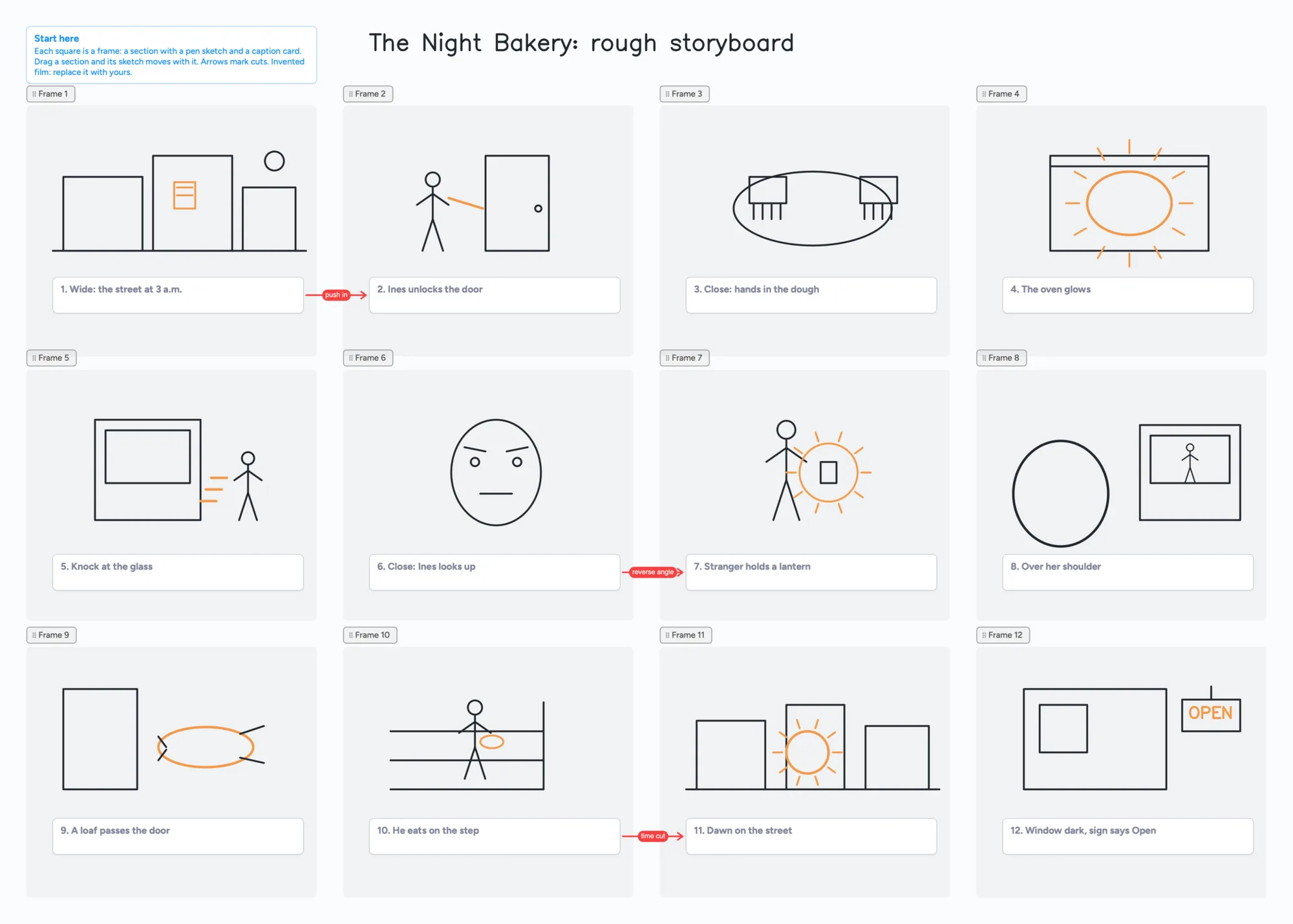
A rough storyboard is twelve small pictures and a line under each, drawn fast enough to throw away. This page shows one way to draw it on a shared board: each frame is a section, the pen sketch is drawn inside the section, and a caption card sits under it. Drag a section and its sketch goes with it, so you can re-order the story without redrawing. It is for roughs. It doesn't make frames for you, doesn't set shot sizes or aspect ratios, doesn't time an animatic and doesn't produce a shot list, so a finished storyboard for a client belongs in a storyboard tool (below). The example is an invented short film, "The Night Bakery", in twelve frames.
Updated
The short answer
- What it is: one board of frames. Each frame is a section; you draw the sketch inside it with the pen and put one caption card under it. A section moves with the ink inside it.
- What it isn't: no shot sizes, no aspect-ratio presets, no animatic timing, no shot list and no AI frames. Frames are plain sections you resize by hand.
- The example board uses 13 of your 150 free items: 12 caption cards and 1 Start here card (our arithmetic). Sections, arrows and pen strokes don't count toward the 150.
- To get it out, select the frames and use Copy as image. On Chrome, Save as image downloads a PNG too (tested 11-11 on the web app; Safari and Firefox not tested).
What this board can't do for a storyboard
- Frames are sections, not storyboard panels. You resize a section by dragging its corner, and it can be any shape. There are no 16:9 or 4:3 presets, no grid and no snap, so you match the frames by eye.
- No shot list, no timing, no animatic and no PDF of the whole storyboard. What you get out is a picture: Copy as image, or Save as image on Chrome.
- Drawing is free ink, not an object. Ink drawn inside a section moves with it. Ink drawn over a card or a list does not, so draw the sketch in the section and keep the caption in its own card.
- 3 images per board and 150 items on the free plan. Photos and reference pictures count toward the 3; a caption card counts as 1 of the 150. A hand-drawn board uses none of the 3. Pro is $5 a month billed yearly ($59.99 a year).
- 5 boards on the free plan. One board per story is the simplest way to keep them.
- Drawing needs a pen. A finger works for boxes and stick figures; a stylus or tablet is what makes it feel like sketching.
How to sketch a rough storyboard on one board
- Draw a section for each frame. Use the Section tool and drag out twelve squares in rows. Keep them roughly the same size; there is no snap.
- Sketch inside the section. Use the pen. Ink that starts inside a section stays attached to it, so moving the section moves the sketch. On the example board each sketch is three or four simple shapes: a street, a door, a pair of hands.
- Put one caption card under each frame. One line, eight words or fewer, numbered. A card is a separate item, so the caption doesn't move with the section; move them together by selecting both.
- Draw the cuts as arrows. An arrow from one caption card to another takes a caption and its own colour. On the example board three red arrows say "push in", "reverse angle" and "time cut". Arrows stay attached when you move the cards, and they are free: they don't count toward the 150.
- Re-order by dragging. To swap two frames, select a section and its caption, then drag. To try a different order without losing the first, select all the frames and press Cmd+D; the copy comes with its ink and caption cards.
When you want the pictures somewhere else (an email, a chat, a slide), select the frames, right-click, and choose Copy as image, then paste it. On Chrome, Export > Save as image downloads a PNG instead. We tested a 12-frame board on the web app on November 11, 2026: it came out as one picture with the frames in their board positions and every sketch inside its frame. We have not tested it on Safari or Firefox, and a board this size is a big picture (ours was about 5,400 by 3,500 pixels).
Two people sketching on the same board
- In the share menu, set "Anyone with the link can edit". New boards start view-only.
- Send the link, or the 4-digit join code. The code expires after 2 hours of inactivity.
- Your co-writer or director signs in free (Google, Apple or email) to write. Someone who isn't signed in can open the link and read the board, but can't change anything.
- You can both type in different caption cards at the same moment, and both edits are kept. If two of you type in the same card, the text merges as you go and nothing is overwritten, but the two sets of words end up interleaved, so give each person their own cards. The other person's "is editing" tag shows on the card; it doesn't lock it.
- A card one of you moves, or recolours, shows up for the other within a second or two.
- The board counts as one of their 5 free boards, and the cards they add count toward their own 150.
Free calls on the board run up to 60 minutes per call, with a warning 10 minutes before the end; everyone signs in free, calls aren't recorded, and Pro has no limit. So you can talk through frame 7 while one of you sketches it.
Where to make the finished storyboard
Each row is from the maker's own pages, read on November 11, 2026. Prices change, so check the page before you choose.
| Tool | Built for | What its page says | Where it fits |
|---|---|---|---|
| Instaboard | A rough you sketch by hand, shared by link | Free: 5 boards, 150 items, 3 images per board; Pro $5 a month billed yearly | Frames as sections with pen sketches inside; no shot data or export of the whole board |
| Storyboarder | Fast sketching and animatics | Free and open source for Mac, Windows and Linux; exports to Premiere, Final Cut, Avid, PDF and animated GIF | Better for timing and handing boards to an editor; a desktop app, so sharing is a file |
| Boords | Storyboards and scripts for video teams | Free plan: 5 active storyboards and 3 active scripts; Solo $39 a month, or $26 a month billed yearly; clients review and comment without an account | Better for client sign-off and a clean storyboard document |
| Storyboard That | Drag-and-drop storyboards from an art library | Free: 2 storyboards per week; free storyboards are public and can be copied by anyone | Better if you don't want to draw; its art is made for you |
| Milanote | Boards for creative projects | Free: 100 notes, images or links and 10 file uploads; $9.99 a month per person billed annually | Better for mood boards and many pictures; we allow 3 images per board |
| Canva | Design, with a storyboard maker | Its storyboard page: free, drag-and-drop, 3M+ stock photos and graphics, "invite others and design together" | Better for polished frames from templates and stock images |
Swipe the table sideways to see every column.
Sources are listed at the bottom of the page, all read on November 11, 2026.
When another tool is the better choice
- You need an animatic or timing. Storyboarder is free and built for it.
- You need a client to approve the storyboard. Boords is made for review and comments.
- You don't want to draw. Storyboard That and Canva give you art and stock images; Instaboard gives you a pen and a blank frame.
- Your frames are photos or finished art. Instaboard allows 3 images per board on the free plan. Milanote's free plan is more generous with pictures.
- You need a document with shot sizes, camera notes and dialogue per frame. A storyboard tool or a shared document is better than caption cards.
If you are outlining the story before you draw it, see outlining a story with a co-writer or outlining with index cards. If you came from Milanote and used up its 100 free items, see the Milanote section for writers.
Start from the ready board
It opens in your browser in a few seconds, with nothing to install. Sign in for free when you want to save it and share it.
Questions
Can I draw a storyboard by hand on Instaboard?
Yes. Draw a section for each frame, sketch inside it with the pen, and put a caption card under it. The sketch moves with the section. It is a rough-sketch board, not a storyboard tool with shot data or timing.
Can two people draw on the same storyboard?
Yes. Set "Anyone with the link can edit" and send the link. Your co-writer signs in free to write, and what each of you draws and types shows up for the other within a few seconds. Give each person their own caption cards, because two people typing in the same card get their words mixed together.
How do I save the storyboard as an image?
Select the frames, right-click, and choose Copy as image, then paste it. On Chrome, Export > Save as image downloads a PNG. We haven't tested Save as image on Safari or Firefox.
Does it count against the free limits?
Each caption card is 1 of your 150 free items; sections, arrows and pen strokes don't count. The example board's 12 captions and 1 Start here card come to 13 (our arithmetic). Free also means 5 boards and 3 images per board.
Can I set the frames to 16:9?
Not with a preset. A section is any size you drag it to, so you match your frames by eye, or copy one frame and paste it for the next.
Sources
- Storyboarder (Wonder Unit): home page (free and open source; Mac, Windows, Linux; export to Premiere, Final Cut, Avid, PDF, animated GIF; read Nov 11, 2026)
- Boords: pricing (Free 5 active storyboards and 3 active scripts; Solo $39 a month or $26 a month yearly; clients review without an account; read Nov 11, 2026)
- Storyboard That: pricing (Free: 2 storyboards per week; free storyboards are public; read Nov 11, 2026)
- Milanote: plans and pricing (Free 100 notes, images or links and 10 file uploads; $9.99 a month billed annually; read Nov 11, 2026)
- Canva: free storyboard creator (drag-and-drop, 3M+ stock photos and graphics, invite others and design together; read Nov 11, 2026)
Related
Outline a story with a co-writer, on one board you both edit
Outline a story with a co-writer on one shared board: ideas lists for each of you, an agreed outline, a decide-by list. A filled example to copy. Not a drafting tool.
Outline a novel or screenplay with index cards, on a board you can share
Outline a novel or screenplay on digital index cards: one list per act, 40 short cards, subplot arrows, a co-writer on the same board. Free to start; TV pilot too.
A free Milanote alternative for student projects, and where Milanote is better
Milanote's free plan stops at 100 notes, images or links. What Instaboard's free plan gives a student project, where Milanote is better, and a ready project board.
Character relationship map: a filled template two people can edit
A filled character relationship map to copy: factions, a card per character and captioned arrows for who wants what. Edit it together with a co-writer. Free plan limits stated.