For filmmakers planning a shoot day
A shot list on a shared board: one card per shot, one list per scene
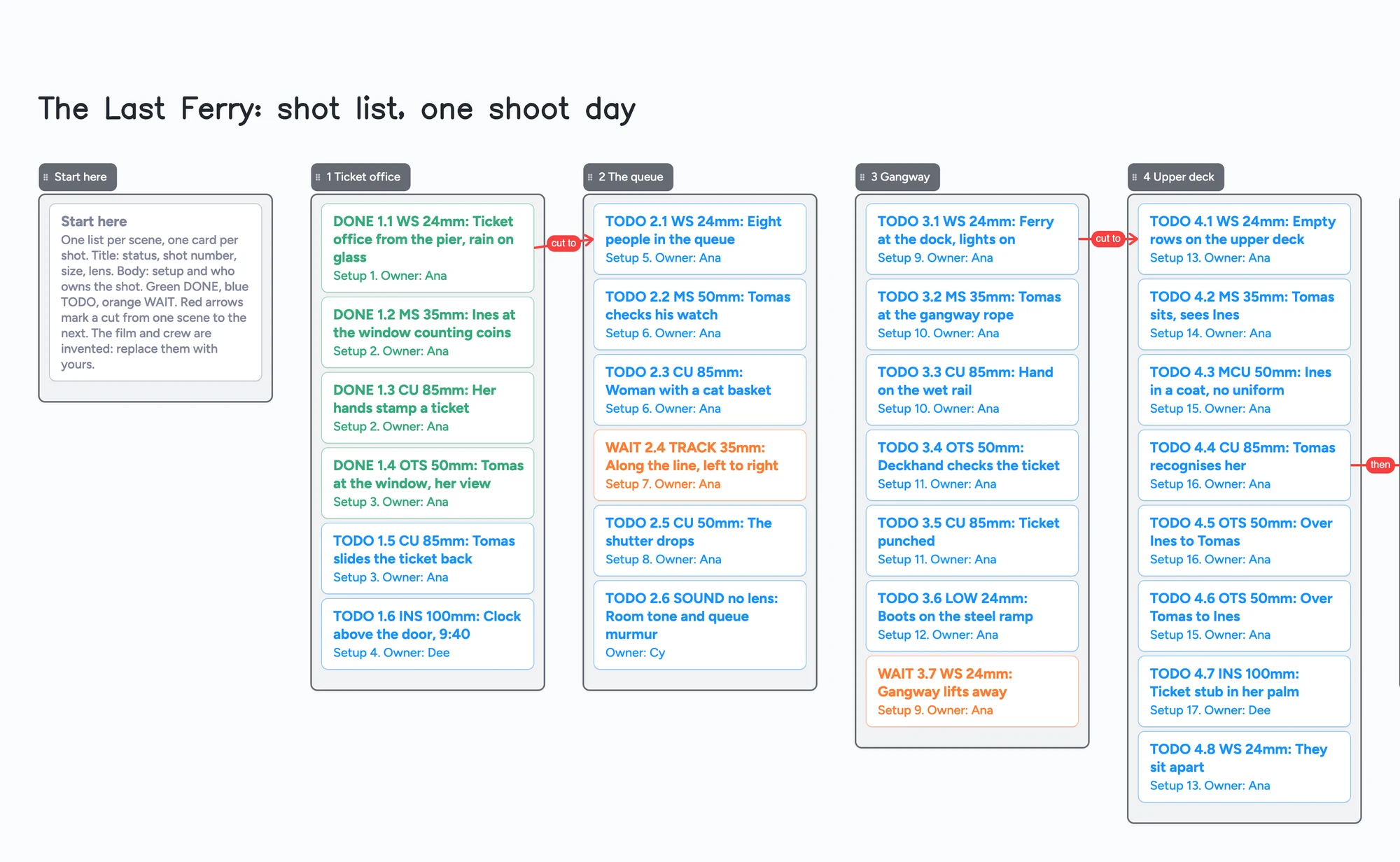
A shot list is one row for every shot you plan to film: the scene, the size of the frame, the lens, who has it and whether it is done. This page shows that on a board instead of a sheet: a list for each scene, a card for each shot, and the size, lens, setup and owner written on the card. The director, the DP and an AD open the same link, change a card's colour when a shot is done, and see each other's changes within seconds. It is a list you can read on a tablet at the monitor, not shot-list software. It doesn't import a script, tag shots, link a frame to a shot, schedule the day or export a PDF, and StudioBinder and Boords do those jobs better (below). The film in the example, "The Last Ferry", is invented, so swap in your own.
Opens in your browser. Anyone can view; a free sign-in lets you edit.
Updated
The short answer
- What it is: one board with a list for each scene and a card for each shot. The card's title says the status (DONE, TODO or WAIT), the shot number, the size (WS, MS, CU) and the lens. Its second line says the setup and who owns it. The card's colour matches its status.
- What it isn't: no script import, no shot tagging, no frames linked to shots, no scheduling, no call sheets and no PDF of the list. StudioBinder and Boords do those. There is no scene tagging or breakdown, and nothing reminds anyone of anything.
- Pictures: 3 images per board on the free plan, so the shots are text. Draw a frame with the pen if you want a thumbnail; pen strokes don't count toward any limit.
- Free plan, our arithmetic: the example is 40 shots + 4 pickups + 3 questions + 1 Start here card = 48 cards, plus 9 lists = 57 of your 150 free items. A day of 60 shots in 8 scene lists is about 60 cards + 8 lists + a few notes = 70, so two such days fit and a third doesn't. Pro is $5 a month billed yearly ($59.99 a year), or $7.99 monthly.
- To use it: open the board, delete the example cards, add your scenes, set the board's link to edit and send it. A new board starts view-only; editing takes a free sign-in, reading doesn't.
What this shot list can't do
- It can't turn a script into shots. StudioBinder's shot list maker imports a script and "Shot Tagger" adds a shot from any line you select. Here you type every card.
- Shot sizes aren't fields. The size, lens and setup are words on the card, not columns you can filter or sort. The board doesn't count shots per scene or tally minutes.
- No frames linked to shots. Boords builds the shot list from an approved storyboard, frame by frame. Here a card is text, and any thumbnail is a pen drawing next to it.
- No schedule. There is no timeline axis, no setup timer and no call sheet. Setup numbers are text you type.
- No export. You can copy a selection as an image to paste in a message. There is no spreadsheet or PDF of the list.
- No reminders and no sorting by status. Colour is the card's border and text. To see what's left, look for orange and blue.
- 3 images per board, 150 items on the free plan, 5 boards. Each card and each list is 1 of the 150; arrows, sections and pen strokes aren't.
How to build the list
- Make a list for each scene. Name it with the scene number and a place ("3 Gangway"). A scene with a lot of coverage can have its own list; small scenes can share one.
- Write one card per shot. Start the title with the status (DONE, TODO or WAIT), then the shot number, the size, the lens and what the camera sees. The example reads "TODO 4.4 CU 85mm: Tomas recognises her".
- Put the setup and the owner on the second line. Shots that share a camera position share a setup number, so the crew can shoot them back to back even when they sit in different scenes. Boords' template makes the same point: number shots in edit order, group by setup when you plan the order of shooting.
- Change the colour when the status changes. Green for done, blue for to do, orange for waiting on something (a rental, a permit, a location). Change the first word on the card at the same time, so the status survives a screenshot.
- Add pickups and inserts as their own list. Shots you remember late go there with a number that doesn't clash (P1, P2), so scene numbers stay as they are.
- Draw arrows only where they help. An arrow from one card to another takes a caption. The example uses four: "cut to" between scenes and "then". Arrows stay attached when you move the cards and they don't count toward the 150.
- Keep the open questions in a list. "Is 5.1 shot from shore or a second boat?" with who answers it and by when.
Free calls on the board run up to 60 minutes per call, with a warning 10 minutes before the end; everyone signs in free, calls aren't recorded, and Pro has no limit. That is enough to walk a director and a DP through the list the night before.
A documentary shot list on the same board
A documentary shot list is a guess, and the sources say so. StudioBinder's guide says documentaries "can often be unscripted and change dramatically during or after shooting" and starts from the outline. Desktop Documentaries says your documentary shot list will be, at best, "a guess" of what you'll film, and that you may never reference it while filming. Its six shot types (establishing, critical action, reaction, secondary establishing, lead-in and detail) fit this board as a short list inside each scene: one card for each type you expect to get.
StudioBinder's guide also tells you to say which camera each shot is for, because an interview usually has an A and a B camera. On this board write the camera in the card title ("A cam", "B cam"). If your story is still an outline, start with the documentary outline board and then list the shots under each act.
How this differs from the storyboard and pre-production boards
Three boards on this site cover different jobs for the same film, and they don't repeat each other.
| Board | Job | A card or frame is | Use it for |
|---|---|---|---|
| [Short film pre-production board](/short-film-pre-production-board) | Getting ready: cast, crew, gear, permits, locations, shoot days | A task with an owner | Who is doing what before the shoot |
| [Hand-drawn storyboard board](/hand-drawn-storyboard-board) | What each frame looks like | A section with a pen sketch and a caption | Roughing the pictures in order |
| This shot list board | How each shot is captured on the day | A shot: size, lens, setup, owner, status | Running the shoot day and ticking shots off |
Swipe the table sideways to see every column.
All three can be open for one film. The shot list is the one the crew works from on the day.
Our hand-drawn storyboard page says plainly that its board has no shot list; this is the board that does. The other way round, this page has no frames of its own: if you want to draw what a shot looks like, use the storyboard board and write the shot number in the caption.
Where to make a shot list that does more
Each row is from the maker's own pages, read on November 15, 2026. Prices change, so check the page before you choose.
| Tool | Built for | What its page says | Where it fits |
|---|---|---|---|
| Instaboard | A shot list shared by link, on any device with a browser | Free: 5 boards, 150 items, 3 images per board; Pro $5 a month billed yearly ($59.99 a year), or $7.99 monthly | Cards you type and colour; no script import, schedule or export |
| StudioBinder | A full pre-production suite | Free plan, "free forever"; its shot list page lists script import, Shot Tagger, shot specs (size, movement, lens, frame rate), images, camera setups with time estimates, view-only links, comments, a PDF generator and export; paid plans from $29 a month billed monthly (Starter, 1 user) | Better for importing a script, tagging shots, scheduling setups and a PDF for the crew |
| Boords | Storyboards and scripts for video teams | Free plan: 5 active storyboards and 3 active scripts; Solo $39 a month billed monthly; its page says a finished shot list can be exported for Google Sheets or Excel | Better when the shot list should follow an approved storyboard |
| Shot Lister | A shot list and shooting schedule app for iPhone, iPad, Mac and Apple Watch | Free with in-app purchases; its page lists a live mode that tracks minutes ahead or behind, scheduling, and Pro features such as crew sync, script importing and storyboards ($15.99 a month or $99.99 a year on its site) | Better for scheduling the day and tracking time on set |
| Shot Designer | Camera diagrams with a linked shot list, iPhone and iPad | Free with in-app purchases; its App Store listing says the shot list is tied into the diagram, and that Save, Export and Sync/Team are Pro features | Better when you plan blocking and camera positions |
| A spreadsheet | Rows you sort, filter and fill down | Boords offers a free template that opens in Google Sheets and downloads as an Excel file, with 14 planning columns; Filmsourcing offers a free Google Sheet with editable pre-fill options and an interactive PDF | Better for entering many shots fast, sorting and a printout |
Swipe the table sideways to see every column.
Sources are listed at the bottom of the page, all read on November 15, 2026.
What filmmakers say about shot list tools
These are single accounts, not a survey. In r/cinematography (December 2024), u/_cant_talk asked for a shot list app where he can "draw storyboard images inside of the shotlist", with checkboxes to cross shots off on set and easy collaboration; he had been using Google Sheets and found it "tedious to add images". u/luota15 had just shot a feature with the shot list in Google Sheets, looked it up on a phone, and wrote that it was a pain. u/pierre-maximin suggested StudioBinder and printing the pages if you want a shot list with pictures, and several replies named Shot Designer.
In r/Filmmakers (April 2023), one commenter (a deleted account) wrote that most shot list software "is basically a spreadsheet with a nicer UI" and described an Excel template with drop-downs for shot type and movement. u/PortageLakes wrote in August 2025 that StudioBinder's free plan lets you do one shot list before you have to pay (we did not check that against the current plan). A 2026 reply (u/jeffjassky) said a spreadsheet beats card-based apps for data entry and that dedicated apps help more on the output side, such as a clean PDF with thumbnails. Those are the places a card board is weaker, and the limits above say so.
When another tool is the better choice
- You have a script and want shots from it. StudioBinder imports it and tags shots from the lines you select.
- The shot list must follow an approved storyboard. Boords builds the list from the frames and exports it.
- You need to schedule the day to the minute. Shot Lister and StudioBinder's setups with time estimates are made for it.
- You are blocking a scene. Shot Designer draws the camera diagram and keeps the shot list tied to it.
- You want hundreds of shots sorted by size, lens or camera. A spreadsheet sorts and filters; a card board doesn't.
- You need a printable list with thumbnails for the crew. A storyboard or shot list tool makes a PDF; this board gives you a picture of a selection.
If you are still planning who does what, see the short film pre-production board. To rough out the frames first, see the hand-drawn storyboard board. To outline a documentary before listing shots, see the documentary outline board.
Start from the ready board
It opens in your browser in a few seconds, with nothing to install. Sign in for free when you want to save it and share it.
Questions
Is there a free shot list template I can edit online with my crew?
Yes. Open the board, change the example shots to yours and send the link. Set the board's link to edit and anyone who signs in free can write on it; everyone else can read. It is a board of cards, not a spreadsheet, so it doesn't sort or export; StudioBinder, Boords and the Google Sheets templates from Boords and Filmsourcing do more on that side.
Is there a shot list app for iPad?
Instaboard's board runs in a browser and as an iPhone and iPad app, and you can draw with a stylus next to the cards. For an app built only for shot lists on iPad, Shot Lister and Shot Designer are on the App Store; their pages list scheduling, a live mode and camera diagrams that we don't have.
How do I make a shot list for a short film?
List the scenes, then write one line for each shot: its number, the size, the lens, what the camera sees and who is responsible for it. Group shots that share a camera position under one setup number so you can shoot them together. Boords' guide suggests creating the list after the script is finished, at the same time as the storyboard. The board above has 40 shots for a six-minute short as one example.
How do I make a shot list for a documentary?
Start from the outline, list the interviews, the A-roll and B-roll and the events you expect, and say which camera each shot is for. Expect it to change; StudioBinder's guide and Desktop Documentaries both say a documentary shot list is a plan you adjust. The documentary section above has the six shot types as a list per scene.
Does it count against the free limits?
Each card and each list is 1 of your 150 free items. The example is 48 cards and 9 lists, 57 in all (our arithmetic). Arrows and pen strokes don't count. Free also means 5 boards and 3 images per board. A 60-shot day in 8 scene lists is about 70 items, so two such days fit and a third doesn't.
Can I put frames on each shot?
Not as photos beyond 3 per board. You can draw a small frame with the pen next to a card, or keep the pictures on the hand-drawn storyboard board and write the shot number in each caption. Boords and StudioBinder link a frame to every shot.
Sources
- StudioBinder: shot list maker (script import, Shot Tagger, shot specs, camera setups, view-only links, comments, PDF generator; read Nov 15, 2026)
- StudioBinder: shot list software page (read Nov 15, 2026)
- StudioBinder: plans and pricing (Free forever; Starter $29 a month billed monthly, 1 user; read Nov 15, 2026)
- StudioBinder: how to create a documentary shot list (read Nov 15, 2026)
- Boords: free shot list template (14 columns, setup numbers, "number shots in edit order"; updated October 22, 2026; read Nov 15, 2026)
- Boords: shot list software (shot list from an approved storyboard; read Nov 15, 2026)
- Boords: pricing (Free 5 active storyboards and 3 active scripts; Solo $39 a month billed monthly; read Nov 15, 2026)
- Filmsourcing: advanced shot list template (Google Sheet with pre-fill options and interactive PDF; read Nov 15, 2026)
- Shot Lister: home page (Pro $15.99 a month or $99.99 a year; read Nov 15, 2026)
- Shot Lister: App Store listing (free, in-app purchases; live mode, scheduling; read Nov 15, 2026)
- Shot Designer: App Store listing (free, in-app purchases; Save, Export and Sync/Team in Pro; read Nov 15, 2026)
- Desktop Documentaries: how to create a shot list for your documentary (six shot types; read Nov 15, 2026)
- Reddit r/cinematography: "I bought an iPad mini, what apps do y'all use for preprod & on set?" (u/_cant_talk, u/luota15, u/pierre-maximin, December 2024; read Nov 15, 2026)
- Reddit r/Filmmakers: "Shot list programs?" (April 2023 onwards; read Nov 15, 2026)
Related
A short film pre-production board: who owns what, on one screen
Plan a short film with a director and a producer on one shared board: cast, crew, gear, permits, locations and shoot days. Free ready board, and where StudioBinder does more.
Sketch a rough storyboard by hand, with a co-writer or director on the same board
Sketch a rough storyboard by hand on one shared board: a frame is a section, the pen sketch sits inside it, a caption card goes under it. A filled example to copy.
A music video planning board: the treatment, one list per section of the song, a name on every shot
A music video plan to open and edit: treatment, locations, a list per song section with shot ideas and an owner on each. Item counts and where other tools win.
A documentary outline board: the story you hope to tell, and what you still need to get
Outline a documentary on one shared board: three act lists, interviews, scenes to film and archive, with arrows between them. Free ready board, and where Celtx, StudioBinder and Boords do more.
Outline a novel or screenplay with index cards, on a board you can share
Outline a novel or screenplay on digital index cards: one list per act, 40 short cards, subplot arrows, a co-writer on the same board. Free to start; TV pilot too.