For adventure-game designers, writers and escape-room builders
A puzzle dependency chart you and your co-designer both edit
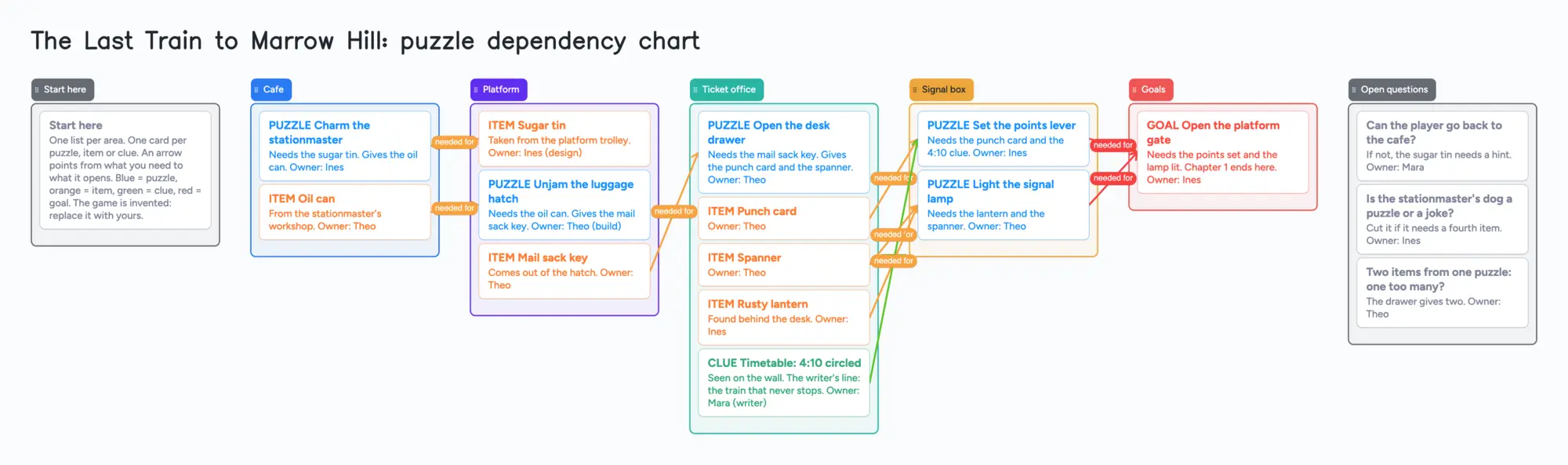
A puzzle dependency chart answers one question: what does the player need before they can do this? Ron Gilbert, who describes the method on his Grumpy Gamer blog, says the charts show dependency, not flow. This page shows one on a shared board: a list for each area, a card for each puzzle, item and clue, and an arrow from what you need to what it opens. A designer, a writer and a builder can all see it and move things. It is a planning board, not a tool that runs your game. It doesn't lay itself out, check for loops or export to an engine; the tools in the table below do some of that better. The example is an invented game, "The Last Train to Marrow Hill", so replace every name with yours.
Updated
The short answer
- What it is: a list per area, a card per puzzle, item or clue with an owner in its text, and arrows from each thing you need to the puzzle or goal it opens. Arrows take a caption and their own colour, and they stay attached when you reorder cards or move a list.
- What it isn't: not a layout tool and not an engine. It doesn't lay itself out, doesn't check for loops, doesn't mark what is solvable and exports nothing to an engine. You place every card yourself.
- The example board uses 24 of your 150 free items: 17 cards and 7 lists (our arithmetic). Each card and each list counts; arrows, pen strokes and sections don't.
- Your co-designer needs a free sign-in to write. They can open the link and read the board without one.
- Set the link to edit. New boards start view-only.
What this board can't do for a puzzle chart
- No automatic layout. Puzzlon's IFWiki page says layout is automatic there. Here you drag every card, so a big chart takes tidying.
- No loop check and no solvability check. Nothing warns you if two puzzles need each other. You read the arrows yourself.
- No engine or file export. Puzzlon exports SVG; the itch.io chart tools save and load JSON. This board has no such export, and nothing it holds reaches Unity, Unreal or Godot.
- An arrow is only a line. You choose its caption and colour. It doesn't know that a card is an item or a puzzle, so the types in the example are words in the card titles and colours, which you keep up yourself.
- Check an arrow after you move its card. Arrows between cards in different lists stay attached when cards are reordered inside a list and when a whole list moves. We haven't tested what an arrow does when its card is dragged into another list, so look at it after you move one.
- 150 items on the free plan, across your account. Each card and each list is 1 of the 150. The example is 24. A full game of around 140 puzzles, items and clues passes the limit on its own (our arithmetic), and any other board on your account counts too. Pro is $5 a month billed yearly ($59.99 a year) and removes the item limit.
- 5 boards and 3 images per board on the free plan. Keep one board per game, or one per chapter. The example has no images.
How to build a puzzle dependency chart on one board
Gilbert's Grumpy Gamer post says a chart shows what the player needs before they can do something, and that a flowchart shows the order things happen in. Those are different, and the board follows the first. This is how the example puts it to work.
- Make a list for each area. The example has a Cafe, a Platform, a Ticket office and a Signal box. Put a card in the area where the player does the thing.
- Make a card for each puzzle, item and clue. Start the title with the word PUZZLE, ITEM or CLUE and give each its colour, so the chart reads at a glance. Put the owner in the card text, as the example does.
- Draw arrows from what you need to what it opens. The sugar tin points at the stationmaster puzzle, the oil can at the luggage hatch, the mail sack key at the desk drawer. Caption each "needed for", and use a different colour for clues so a path stands out.
- Write a goal card at the end and point the last puzzles at it. In the example both signal puzzles point at "Open the platform gate".
- Keep an Open questions list. The example holds three: can the player go back to the cafe, is a dog a puzzle or a joke, and does one puzzle give two items. Questions that touch the story go to the writer, questions about code go to the builder.
- Read it backward from the goal. Follow the arrows from the goal toward the start. A puzzle with nothing pointing at it is either a starting puzzle or a gap in your chart.
The board shows the dependencies and who owns what in one place. It can't tell you whether the order is fun. Whether to cut the dog or add a hint is a design call for you and your co-designer.
What designers say about charts and tools
These are single accounts, not a measured pattern. In r/adventuregames (November 2024), u/Ekkobelli, who writes the puzzles while a friend does the programming and graphics, said they use Twine for dialogue, Google Docs for the plot and Google Sheets for items, and already use dependency charts but struggle to tie it all together. u/Kubdya_Khavis said puzzles are generally organized with a puzzle dependency chart and pointed to visual boards like Milanote; u/DrElectro suggested a Miro board. u/caesarcub said they keep two charts, one for puzzles and one for rooms, plus a spreadsheet and a story document.
Gilbert's Grumpy Gamer post is blunt about software: you need something that rebuilds the charts as you connect nodes, because in a flowchart program you will spend forever reordering the boxes. His post names OmniGraffle on the Mac and graphviz. A shared board is the opposite trade: you do the placing, and in exchange your writer and your builder can all open the link and edit it, with no install.
For escape-room design
The same board works for a room. Make a list for each space or puzzle stage, a card for each puzzle, lock, prop and clue, and arrows from each prop or clue to the lock it opens. In r/escaperooms (June 2021), u/Kulty said that, as far as they knew, escape room design does not have any specialized tools. u/MuppetManiac said they use a flow chart, named the puzzle dependency chart as something more specific and linked Puzzlon. That is two people's views, not a survey. What a board adds is a place where the designer and the builder both see which prop is missing.
Set up the board with your co-designer
- In the share menu, set "Anyone with the link can edit". New boards start view-only.
- Send the link, or the 4-digit join code. The code expires after 2 hours of inactivity, so send the link to anyone you'll need later.
- Each person signs in free (Google, Apple or email) to write. Someone who isn't signed in can open the link and read everything, but can't change anything. Once they're signed in, what they move or add shows up on your board within a few seconds, and you see theirs the same way.
- The board counts as one of their 5 free boards, and cards they add count toward their own 150. If they're already at 5 boards, they can still open the link and write; the board just isn't added to their boards.
- Agree who owns which cards. If two of you type in the same card at once, the two edits merge letter by letter with no lock, so give each person their own cards and write the owner's name in the text.
Free calls on the board run up to 60 minutes per call, with a warning 10 minutes before the end; everyone signs in free, calls aren't recorded, and Pro has no limit. If your game is a branching story rather than a set of puzzles, the visual novel planning board is built for that.
Puzzle chart and game-planning tools, side by side
Each row is from the tool's own page (for Puzzlon, its IFWiki entry), read on November 11, 2026. Features and prices change, so check the page before you choose.
| Tool | What its page says | Where it beats a shared board | Where a shared board fits |
|---|---|---|---|
| Instaboard | Free: 5 boards, 150 items; Pro $5 a month billed yearly | Nothing in this table: no automatic layout, no loop check, no engine export | A chart and its owners on one board that a designer and a writer both edit, with arrows that keep their captions |
| Puzzle Dependency Chart (itch.io) | Free, browser-based; nodes and directional links, colour by act or character, collapse, save and load JSON | Built for exactly this chart, with collapsing and colour by act | No file to pass around: one link, edited together |
| Puzzle Dependency Chart Studio (itch.io) | "No install, no account — runs entirely in the browser"; save and load JSON; made for escape-room designers, adventure writers and puzzle hunt organizers | Recognizes verbs and is made for this chart | A shared board with an owner on each card |
| Puzzlon | Browser tool; a text editor with autocompletion; layout is automatic; SVG export; one file edited at a time | Lays the chart out for you and exports it | Several people at once; no text language to learn |
| Twine | Open source; for nonlinear stories; publishes to HTML | Runs the story, so you can play it | Planning before you write a passage |
| Arcweave | Basic $0: 200 items per project, 3 projects, unlimited members and guests, not for commercial projects; Pro $15 per member a month yearly or $18 monthly; home page lists playtest and Unity, Unreal and Godot integrations | Playtest and engine integrations | A small chart that needs no playtest or engine link, shared by one link; our limits are 5 boards and 150 items |
| articy:draft X | A visual database with a nested Flow View and Unity and Unreal integrations; Windows and macOS | A full production database for a big game | A light chart in a browser, nothing to install |
Swipe the table sideways to see every column.
Sources are listed at the bottom of the page, all read on November 11, 2026. No price is quoted for articy:draft because its pricing page could not be read.
When another tool is the better choice
- You want the chart laid out for you. Puzzlon lays it out automatically, and the first itch.io tool adds flow direction and snaps nodes into rows or columns. A shared board starts empty and stays where you put things.
- You want to play the story. Twine publishes to HTML and Arcweave has a playtest, so use one of them when it has to run. This board plans, it doesn't run.
- You want engine integration. Arcweave and articy:draft X list Unity and Unreal integrations. This board has none.
- You are a solo designer on one machine. A free itch.io chart tool is a quick way to draw one chart. A shared board starts to pay off when someone else needs to edit it.
Start from the ready board
It opens in your browser in a few seconds, with nothing to install. Sign in for free when you want to save it and share it.
Questions
Can my writer and I edit the chart at the same time?
Yes. Set "Anyone with the link can edit" and send the link. Each person signs in free to write, and what they move shows up for the other within a few seconds. Avoid typing in the same card at once: the edits merge with no lock.
Does the board check my puzzles for loops or lay them out?
No. It doesn't lay itself out, check for loops or mark what is solvable. You place each card and read the arrows yourself. Puzzlon lays the chart out automatically.
Can I export the chart to my game engine?
No. The board has no engine or file export. Selected cards and lists can be copied as an image, and on Chrome you can also use Save as image; Safari and Firefox haven't been tested.
How many puzzles fit on the free plan?
The free plan holds 150 items across your account, and each card and each list counts. The example board is 24. Arrows don't count. A full game of around 140 puzzles, items and clues passes the limit (our arithmetic). Pro removes it.
Is this the same as a flowchart?
No. Gilbert's post says the charts show dependency, not flow. An arrow here means you need one thing before the next, not that one thing happens after another.
Sources
- Grumpy Gamer: Puzzle Dependency Charts (Ron Gilbert; dependency not flow, software that rebuilds the chart, OmniGraffle and graphviz; read Nov 11, 2026)
- IFWiki: Puzzlon (browser tool, text editor, automatic layout, SVG export, one file at a time; read Nov 11, 2026)
- itch.io: Puzzle Dependency Chart by WishIWasALemon (free, browser-based; read Nov 11, 2026)
- itch.io: Puzzle Dependency Chart Studio v2.0 by WishIWasALemon (no install, no account; read Nov 11, 2026)
- Twine: home page (open source, nonlinear stories, publishes to HTML; read Nov 11, 2026)
- Arcweave: pricing (Basic $0, not for commercial projects; Pro $15 per member a month yearly; read Nov 11, 2026)
- Arcweave: home page (playtest, Unity, Unreal and Godot integrations; read Nov 11, 2026)
- articy: articy:draft X home page (visual database, Flow View, integrations; read Nov 11, 2026)
- r/adventuregames: how do you organize puzzles, dialogue and items (Nov 2024; four commenters, one person's view each)
- r/escaperooms: tools for designing an escape room (Jun 2021; two commenters, one person's view each)
Related
A visual novel planning board: scenes as cards, choices as arrows
Plan a branching story on one shared board: a card per scene, a captioned arrow per choice. Free ready board, and where Twine, Ink and Arcweave do more.
DnD NPC tracker online: a filled board you can share with your table
A filled NPC tracker to copy: people by place, factions, a next-session list and arrows for who leans on whom. Share one link with your table. Free plan limits stated.
Sketch a rough storyboard by hand, with a co-writer or director on the same board
Sketch a rough storyboard by hand on one shared board: a frame is a section, the pen sketch sits inside it, a caption card goes under it. A filled example to copy.
A game jam plan your whole team can see and edit
A shared game jam plan for a small team: a one-page design, must/should/cut scope lists, a list per person, assets with arrows to the features that need them, and hour checkpoints. A filled example to copy.