For master's and PhD students, and anyone sorting papers into a literature review
A literature review board that sorts papers by theme, not by author
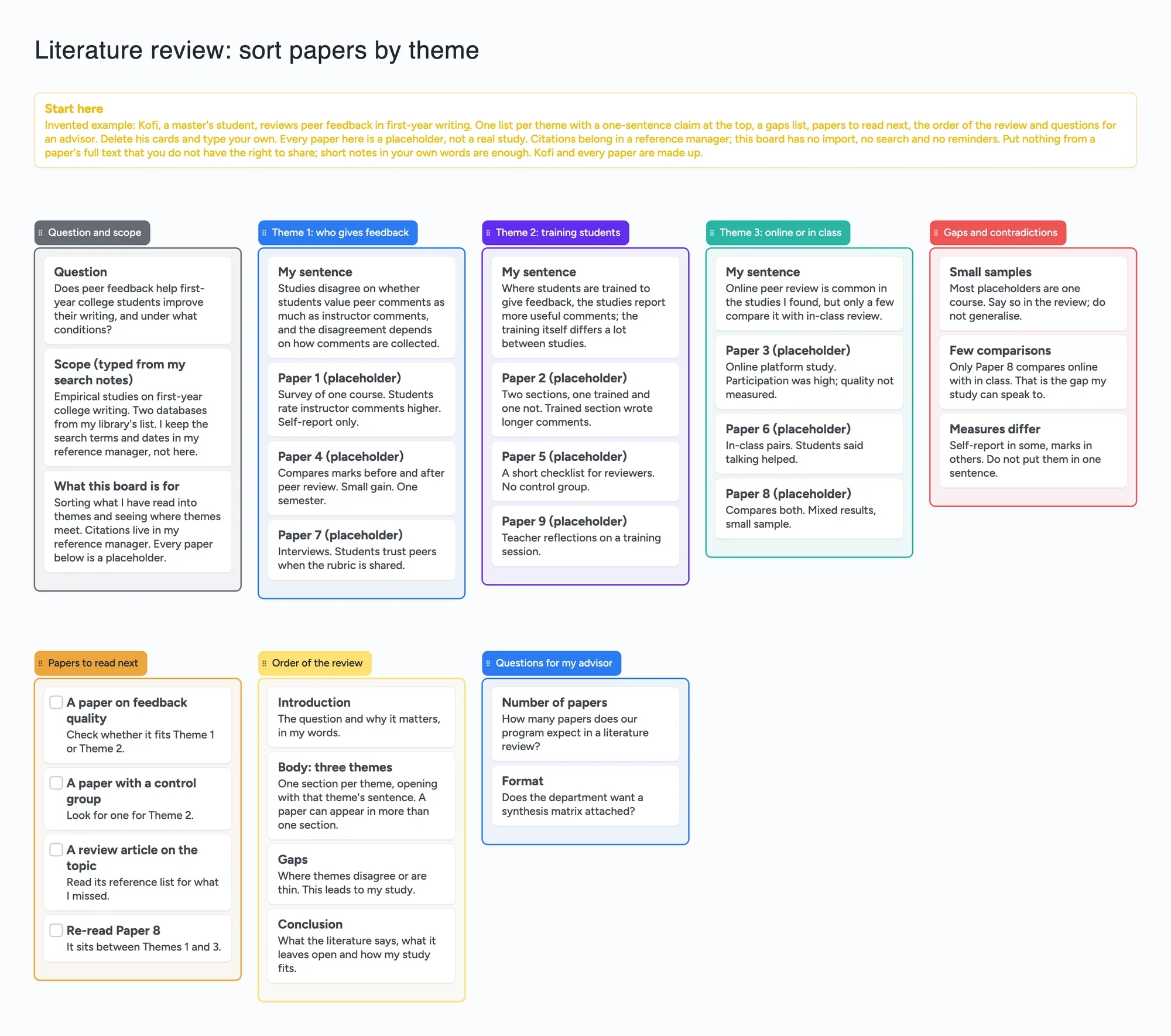
We make Instaboard, an online board. This page gives you a literature review laid out on it and filled in for an invented master's student, Kofi, who is reviewing research on peer feedback in first-year writing. Each theme gets its own list with one sentence at the top that says what the papers in it show, the papers sit under that sentence, and separate lists hold the gaps, the papers still to read, the order of the review and questions for an advisor. Every paper on it is a placeholder, not a real study. The board is not a reference manager: it has no import, no search and no reminders, and citations stay in the tool you already use. Kofi and his numbers are made up.
Opens in your browser. Anyone can view; a free sign-in lets you edit.
Updated
Read this first: what the board does and doesn't do
- It is not a reference manager. It cannot import citations, search a database or format a bibliography. Keep citations in the tool you already use; the board holds your notes on how the papers fit together.
- A spreadsheet or a graph may suit you better. A synthesis matrix in a spreadsheet is one common way to take notes on many papers (Brown's guide and UNC's post both describe it), and some people prefer a linked-notes graph. The board is for the step after that: seeing the themes and the gaps on one screen, with someone else able to write on it.
- What it is: a theme map. One list per theme with a one-sentence claim, a gaps list, a reading list with tick boxes, the order of the review and questions for your advisor. The example uses 38 of your 150 free items.
- Keep other people's text off it. Short notes in your own words are enough; do not paste in a paper's full text, and put no unpublished data or personal details on a board that anyone with the link can read.
- Free plan: 5 boards, 150 items, 3 pictures per board. Copying the board takes 1 of your 5 boards. Writing on it needs a free sign-in. New boards start with "Anyone who joins can view".
Why a pile of summaries is not a review
The board is built around one problem that comes up again and again. In r/PhD ("How do you actually get from 50+ papers to a structured lit review?", OP u/Downtown_Kitchen2461, October 24, 2026), the poster says their supervisor told them the draft reads like a list of summaries rather than a synthesis. Replies are single accounts, not research, and we read the comments in the thread.
- u/stanlymt suggests looking at the grammatical subject of each sentence in a paragraph: if most subjects are authors, it reads as a list of summaries however well the papers are grouped. They suggest writing, for each section, the one sentence you would say if your supervisor asked what this literature says, then pulling only the notes that support or complicate it.
- u/Dctreu says to use the papers to tell a story: describe the previous literature in one sentence and break that idea into sections.
- u/DrJohnnieB63 treated the literature as conversations about important concepts and asked how authors confirm, challenge or complicate each other, which also made gaps easy to spot.
- u/Prestigious_Story275 uses a Google doc outline with one section per theme and says to focus on why a source matters rather than what it says.
- u/Dependent-Law7316 starts from a framework, with the topic and why anyone should care at the top and smaller pieces under it, then sorts papers into whichever section fits.
That is why each theme list on the board starts with a card called "My sentence". The papers are evidence for that sentence. If the sentence is hard to write, the list is not a theme yet.
Kofi's board, list by list
Kofi is invented, and every paper on his board is a placeholder with a made-up finding. Nothing on it is a result from the literature. Read it left to right, top row then bottom row.
- Question and scope. The research question, a scope card typed from his search notes (which databases, which years; the search itself lives in his reference manager) and a card saying what the board is for.
- Theme 1: who gives feedback. One sentence on whether students value peer comments as much as instructor comments, then three papers under it: a survey, a before-and-after study and a set of interviews, each with a one-line note and its limit.
- Theme 2: training students. One sentence on what changes when students are trained to give feedback, and three papers, one of which has no control group.
- Theme 3: online or in class. One sentence on how online peer review compares with in-class review, and three papers, one of which compares both.
- Gaps and contradictions. Small samples, few comparisons, and measures that differ (self-report in some, marks in others), each on its own card.
- Papers to read next. Four tick-box cards: a paper on feedback quality, a paper with a control group, a review article whose reference list may hold what he missed, and a paper to re-read because it sits between two themes.
- Order of the review. Introduction, body of three themes, gaps, conclusion, one card each.
- Questions for my advisor. How many papers the program expects and whether a synthesis matrix should be attached.
From a synthesis matrix to theme lists
Two university pages describe the step before this board. UNC's Writing and Learning Center post "How I Made My Life Easier By Using A Synthesis Matrix" (by Abbie, a Writing Center Coach; posted March 24, 2022) describes a research worksheet in Excel or Google Sheets with one row per source and columns for the information she wanted, including author, date and citation. She says that once it was filled in she could see where sources overlapped and where they agreed and disagreed, and she colour-coded the boxes by where they might fit in her outline. She also says she would paraphrase more and paste in fewer quotes if she did it again.
Brown University Library's Literature Reviews guide (last updated July 24, 2026) puts the same idea in a tip: as you read, themes emerge that help organize the review, and a simple synthesis matrix tracks your notes while you do. It advises weaving the points together rather than listing a summary of each source, and including the most important sources rather than everything you read. It names introduction, body and conclusion as the three elements of a review, and thematic as one possible organizational structure beside chronological and methodological.
This board takes over from the matrix. Keep the detailed row-per-paper notes in the matrix or reference manager. When the themes show, move one short card per paper onto the theme's list, with a sentence at the top, and use the board to see whether the lists balance and where they disagree.
How many papers belong on the board
In r/PhD ("How do you organize and extract info from 100+ papers for a literature review without going insane?", OP u/Mountain25111, April 5, 2025), the poster has about 150 papers and a messy file. Replies are single accounts, and we read the comments in the thread.
- u/beejoe67 asks whether the papers build on each other or share similar results and says to group them that way instead of treating every paper individually, which they say would drive you insane.
- u/Trick_Highlight6567 plans before the review what to extract, builds a standardised extraction sheet and splits it by the tables planned for the paper.
- u/MisterKyo says there is no reason or way to be exhaustive and the goal is to be reasonably fair and representative of the topic.
A board with one card per paper stops being readable somewhere before it stops fitting. Keep the cards for the papers that carry a theme and leave the rest in the matrix.
Moving cards around, the way some people do it on a wall
In r/PhdProductivity ("How do you organise your research?", OP u/thecuriousstudent11, March 3, 2026), the poster says Obsidian, Notion and Zotero feel like digital filing cabinets and wants to see the connections between sources. Replies are single accounts, and we read the comments in the thread.
- u/regardkick mapped research questions with sticky notes and postcards on a wall, with short-form citations on the cards and different colours for different things. The papers stayed in what they call their digital filing cabinet, but they could see the relationships and what they were missing.
- u/v01dm4n keeps a Google Sheets file with columns such as year and month, venue, title, author, links, type, contribution, method, strengths and weaknesses, and fills in notes when there is time.
- u/noctorumsanguis uses Zotero with Obsidian and says it makes a spiderweb-like graph that helps with connections.
- u/Happy_er_est names Milanote in one line. We read nothing of Milanote for this page.
The board keeps short cards, one list per idea and colours on the lists. It does not keep the feel of paper, and it does not draw links between papers for you.
How much of the free plan does a literature review use?
Each card and each list is 1 of your 150 free items, across all your boards. The title text box counts too. Arrows, sections and pen strokes don't. Our arithmetic from the example, counted as if one account made everything:
- As built: 8 lists + 29 cards + 1 title = 38 items. Nine of those cards are papers, so 29 items are not papers.
- One card for each of 30 papers: 29 + 30 = 59.
- One card for each of 100 papers: 29 + 100 = 129.
- About 150 papers, as in the r/PhD post: 29 + 150 = 179, over the limit, so only the papers that carry a theme go on the board. With nothing else added, 121 paper cards reach 150.
- A second review on a copy: another 38, so 76. Each copy takes 1 of your 5 boards.
- Past 150: Pro removes the item limit.
What a board can't do
- No citations, import or search. It cannot read a PDF, pull a reference or find a paper. Use your reference manager and your library's databases.
- No columns to compare. Cards sit in lists, so you cannot sort or filter papers by method or year. A spreadsheet does that better.
- No links between papers. A paper that fits two themes needs a second card or a note; the board does not draw the connection.
- No reminders or calendar, so it cannot tell you what to read by when.
- Ticks don't say who or when. Anyone with edit access can untick a box, and a copy keeps its ticks, so untick the reading list before you reuse the board.
- Not private by default. New boards start with "Anyone who joins can view", so anyone with the link can read it. Keep unpublished data, anything you do not have the right to share and personal details off it.
- A copy takes 1 of your 5 free boards, and the example uses none of the 3 pictures allowed per board.
Where other tools do this better
Read on November 24, 2026; pages change, so check them. A date is printed only where the page shows one.
| Tool | What we read | Better for |
|---|---|---|
| Reference manager (Zotero) | Brown's guide says to work with Zotero to capture the citations and build the structure for writing; Zotero's own pages not read for this page | Collecting citations, PDFs and the bibliography |
| Spreadsheet synthesis matrix | UNC's post describes Excel or Google Sheets with a row per source; u/v01dm4n and u/Trick_Highlight6567 each describe their own sheet | Row-per-paper notes you can sort, filter and count |
| Linked notes (Obsidian with Zotero) | One commenter, u/noctorumsanguis, reports a spiderweb graph; Obsidian's pages not read for this page | Seeing links between papers and ideas |
| Milanote | Named by u/Happy_er_est in one line; its plans not read for this page | Not checked |
| Instaboard board | Free plan: 5 boards, 150 items, 3 pictures per board. One list per theme, short cards you type, shared by link. No citations, import, search or reminders | Seeing the themes and gaps of a review on one screen that an advisor or a study partner can read and write on |
Swipe the table sideways to see every column.
From each page or comment named, read November 24, 2026: libguides.brown.edu/organize/litreview, writingandlearningcenter.unc.edu/2022/03/synthesis-matrix, and the three Reddit threads in the sources. Our wording, not theirs.
Where these win
Use a reference manager for citations and a spreadsheet when you need to sort and count papers. Use this board when you want the themes, the gaps and the order of the review in one place that someone else can read and write on.
How to use it, in about fifteen minutes
- Open the board and sign in free when it asks you to write. Delete Kofi's cards and keep the lists.
- Type your question and scope on the first list, and keep the search itself in your reference manager.
- Name your themes by renaming the three theme lists, and write the "My sentence" card first. If the sentence is not clear, hold off on adding papers to that list.
- Add one short card per paper that carries a theme, in your own words, with its limit. Leave the rest in your matrix.
- Move a card to another list when it fits better, and note on the card if it fits two themes.
- Fill the gaps list from where the themes disagree or run thin, and put what you still have to read in the tick-box list.
- Order the review from the last two lists, and take your questions to your advisor.
- To share it, set Share to "Anyone who joins can edit" if your advisor or partner should write. Each person who writes signs in for free.
Start from the ready board
It opens in your browser in a few seconds, with nothing to install. Sign in for free when you want to save it and share it.
Questions
How do I organize papers for a literature review?
Some people take notes in a spreadsheet matrix with one row per paper, then group the papers by theme. This board is for the grouping: one list per theme, a sentence at the top saying what the papers show, and the papers under it.
How do I stop a literature review reading like a list of summaries?
One commenter on r/PhD suggests checking whether most sentence subjects are authors, and writing one sentence per section that says what the literature shows. The board's "My sentence" card on each theme list is a place to write it.
Does the board manage citations or import papers?
No. It has no import, no search and no bibliography. Keep citations in your reference manager and put short notes in your own words on the cards.
How many papers can it hold?
As built it uses 38 of the 150 free items. With 29 items that are not paper cards, 121 paper cards reach 150, so keep only the papers that carry a theme and leave the rest in your matrix.
Can my advisor or a study partner write on it?
Yes. New boards start with "Anyone who joins can view", so anyone with the link can read it. Set it to "Anyone who joins can edit" if they should write; each person who writes signs in for free. Keep unpublished data and personal details off it.
Is Instaboard free?
Yes. The free plan includes 5 boards, 150 cards and items across your account (pen strokes, arrows and sections don't count), 3 images and 1 file per board, unlimited collaborators and video calls up to an hour. Pro is $5 a month billed yearly ($59.99 a year), or $7.99 monthly, and the people you invite join free.
Sources
- Brown University Library: Organizing and Creating Information, Literature Reviews (last updated Jul 24, 2026; read November 24, 2026)
- UNC Writing and Learning Center: How I Made My Life Easier By Using A Synthesis Matrix (by Abbie, a Writing Center Coach; page prints March 24, 2022; page data gives modified December 5, 2025; read November 24, 2026)
- r/PhD: How do you actually get from 50+ papers to a structured lit review? (OP u/Downtown_Kitchen2461, October 24, 2026; replies are single accounts; read November 24, 2026)
- r/PhD: How do you organize and extract info from 100+ papers for a literature review without going insane? (OP u/Mountain25111, April 5, 2025; replies are single accounts; read November 24, 2026)
- r/PhdProductivity: How do you organise your research? (OP u/thecuriousstudent11, March 3, 2026; replies are single accounts; read November 24, 2026)