For college graduates studying for a graduate school entrance test, and the study partner who reads their log
An error log board for the GRE® General Test, shared with a study partner
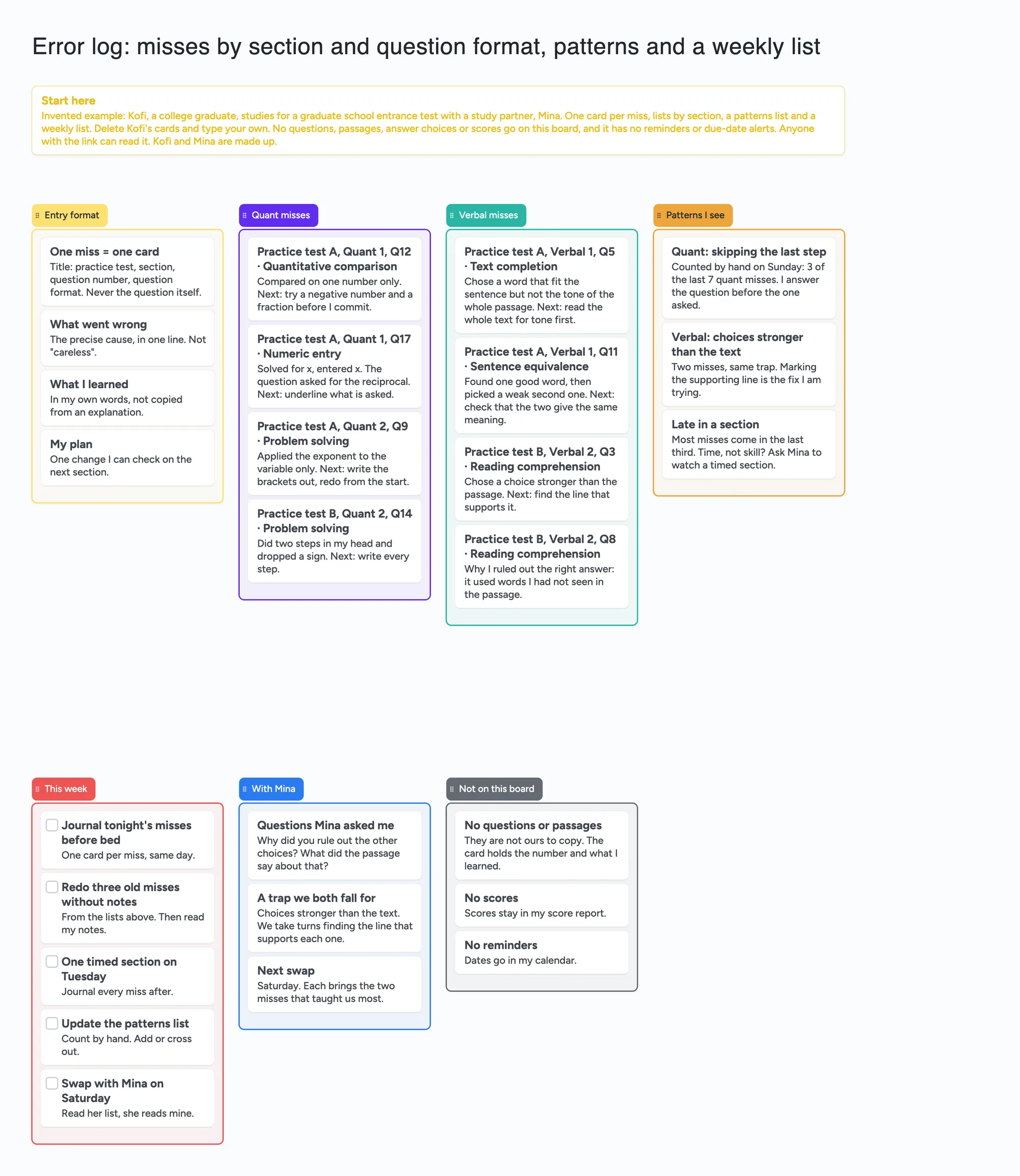
We make Instaboard, an online board. This page gives you an error log for the GRE® General Test laid out on it and filled in for an invented college graduate, Kofi, who studies with a study partner, Mina. One card holds one miss: the practice test, section, question number and question format in the title, and what went wrong, what Kofi learned and his plan in the body. Lists group the misses by section, a patterns list holds what he counted by hand, a weekly list holds the plan, and one list says what is not on the board. The board holds no questions, passages, answer choices or scores, it does not count for you, and it has no reminders or due-date alerts. Kofi and Mina are made up.
Opens in your browser. Anyone can view; a free sign-in lets you edit.
Updated
Read this first: what the board does and doesn't do
- It does not count for you. The patterns list in the example was counted by hand. A list can be sorted or filtered on its own, but nothing totals your misses across lists. If you want counts across many practice tests, use a spreadsheet and keep this board for the reasons and the weekly plan.
- No questions, passages, answer choices or scores go on it. A card holds the practice test, section and question number, the question format and your own words. The board never needs the questions.
- It has no reminders or due-date alerts. The weekly list has tick boxes only. Put dates in your calendar yourself.
- What it is: a log of why you miss questions, kept where a study partner can read it. The example uses 35 of your 150 free items.
- Nothing private goes on it. Anyone with the link can read the board, so keep personal details off it. New boards start with "Anyone who joins can view".
- Free plan: 5 boards, 150 items, 3 pictures per board. Copying the board takes 1 of your 5 boards. Writing on it needs a free sign-in.
What an error log entry holds, according to three pages
Three pages we read on November 24, 2026 say what to write down. Two come from companies that sell test prep and one from a tutor's own site, so read them as their view.
- Magoosh (error log template and guide; page prints "Last updated on August 5, 2023") lists five things to note: an optional question identifier, the question type, the error type, why you made the mistake (lack of understanding, carelessness, time pressure, unfamiliarity with the topic) and, optionally, the right approach. It links a Google Sheet to copy, and says to review the log regularly for patterns and then build an improvement plan.
- Vince Kotchian, a tutor (error log template page; page data: published March 26, 2026, modified October 16, 2026), says a basic template "just needs a few columns" and lists four: problem location, what caused the mistake, what you learned and your plan. He says to redo the question from start to finish before you log it, to name the cause precisely (not "careless"), and to review the log weekly. He also links a Google Sheet to copy.
- Target Test Prep, a course seller (page prints "Last Updated on April 10, 2025"; page data: published September 2, 2022), says a log answers four questions: which questions you miss, what the specific error was, why it happened and how you will avoid it. It says to log every wrong question, not only some.
Kofi's board keeps the part a board is good at: the reasons, in your own words. The "Entry format" list follows the four things Vince Kotchian lists: a card's title is the practice test, section, question number and format, and the body holds what went wrong, what he learned and his plan.
Kofi's board, list by list
Kofi, Mina, the practice test names and every miss on the board are invented, and no card holds a question. Read the top row left to right, then the bottom row.
- Entry format. Four cards: one miss is one card, what went wrong, what I learned, my plan.
- Quant misses. Four example cards, each titled with a made-up practice test, section, question number and format (quantitative comparison, numeric entry, problem solving), with the cause and the next step.
- Verbal misses. Four example cards (text completion, sentence equivalence, reading comprehension twice) in the same shape. The last one records why Kofi ruled out the right answer.
- Patterns I see. Three cards Kofi wrote after counting by hand on a Sunday: a quant habit, a verbal trap and a note that most misses come late in a section.
- This week. Five tick-box cards: journal the misses the same night, redo three old misses without notes, one timed section, update the patterns list, swap with Mina.
- With Mina. The questions Mina asked, a trap they both fall for and the next swap.
- Not on this board. Three cards: no questions or passages, no scores, no reminders.
Verbal misses need one more line
Vince Kotchian warns that a verbal entry is easy to leave fuzzy: without care you may not know exactly what caused the error or what you learned, and he says that when in doubt you can consult an expert, for example on r/GRE. In r/GRE ("Error log for verbal", OP u/Sakshaha, August 22, 2024), u/ScottKampeTutor answers an OP who asked how to log verbal misses: for any log, note the question type, the question format, the type of trap answer you fell for and how not to make the same mistake again; for verbal, also note why you eliminated the correct answer; for quant, the concepts and techniques that apply. Replies are single accounts, not research, and these are the comments we read; all were read on November 24, 2026.
That is why Kofi's last verbal card is a "why I ruled out the right answer" entry, and why the "With Mina" list holds a trap they both fall for. A study partner can ask the question a log cannot: why did you rule out the other choices?
Why the board holds numbers, not questions
ETS's page on how others may use its trademarks (page prints "Revised: May 7, 2021"; read November 24, 2026) says: "ETS copyrighted material cannot be used without permission." This page is not legal advice, and we read that page only for its trademark rules. It is one reason the board keeps no question text. The other is the work it saves.
- In r/GRE ("Error log strategies", OP u/Secure_Campaign_871, September 3, 2025), the OP is two weeks into a study plan and puts problems into an Excel sheet by hand; they find it hard to copy the problems over in a way that is efficient and not clunky, and ask for tips. The three replies we read each offer something else: u/Scott_TargetTestPrep lists three questions a log should answer and links a Target Test Prep article, u/Vince_Kotchian posts a link to a GregMat article on error logs, and u/dardukhpeeda replies "Bookmark them or add them to the superquiz!", which points to a GregMat feature for revisiting problems.
- In r/GRE ("How to maintain an error log?", OP u/TurboSea21, June 10, 2023), u/sarveshak99 points to the Magoosh template and says to write the tricky question, its correct approach and what you did wrong. u/Unable-Mood8439 solves everything in one go, analyses each question from the solutions and writes in a notebook whenever an answer was wrong or a better technique turned up; the OP replies that this traditional log would be inefficient in the long run. Replies are single accounts, and these are the comments we read.
Our reading from these two threads: for at least some people, copying questions in takes a lot of the effort. A log that holds only the numbers and your reasons skips that, and the question stays in your practice material.
A log should not choose your study plan
Target Test Prep (a course seller; its view) says not to build your study plan around an error log: some students practise random questions, collect "errors" and then study only those topics, and it calls that a losing strategy. Its advice is to learn one topic, practise it, and then use the log to fill gaps in what you already studied. The weekly list on Kofi's board follows that: it redoes old misses and updates the patterns, and it does not pick what to study next. Your study plan lives somewhere else.
How much of the 150 it uses
Our arithmetic: the example is 7 lists, 27 cards and a title, 35 items. Eight of the cards are example misses, so 27 items stay fixed. At 10 misses a test, 123 miss cards reach 150, which is during the 13th test (12 tests make 147). At 20 misses a test, 6 tests make 147 and the 7th goes over. Someone who writes on your board adds the cards they type to their own 150. A copy takes 1 of your 5 free boards. Pro removes the item limit.
What a board can't do
- No counting. The board does not total your misses by section or format; you count them by hand. A list can be sorted or filtered on its own, but there is no view of all your misses at once.
- No scores, questions or answer choices. The board holds your own words about them.
- No reminders or due-date alerts. The tick boxes do not remind you of anything. Use your calendar.
- No import from a score report or a practice test. Every card is typed by hand.
- Ticks don't say who or when. Anyone with edit access can untick a box, and a copy keeps its ticks, so untick the weekly list before you reuse the board.
- A copy takes 1 of your 5 free boards, and the example uses none of the 3 pictures allowed per board.
Where other tools do this better
Read on November 24, 2026; pages change, so check them. A date is printed only where a page shows one.
| Tool | What we read | Better for |
|---|---|---|
| Magoosh Google Sheet | Its page calls the template free and links a copy for your own Drive (page prints "Last updated on August 5, 2023"). We did not open the sheet | Spotting patterns in a table you can sort, and tracking improvement across practice tests |
| Vince Kotchian's Google Sheet | A template of a few columns (he lists four), linked from his page (page data: published March 26, 2026, modified October 16, 2026). We did not open the sheet | A plain few-column log with a weekly review |
| Target Test Prep's course log | The seller says a log built into a prep course tracks how often you make each kind of error, and that a spreadsheet log tends to grow unruly (page prints April 10, 2025). We did not try it or read its price | Counting your error types without doing it by hand, if you already use that course |
| Instaboard board | Free plan: 5 boards, 150 items, 3 pictures per board. Lists and cards you type, shared by link. No counting, import, reminders or due-date alerts | Your reasons and weekly plan on one screen that a study partner can read and write on |
Swipe the table sideways to see every column.
From each page named, read November 24, 2026: magoosh.com, vincekotchian.com, gre.blog.targettestprep.com. Our wording, not theirs.
Where these win
Use a spreadsheet, or the log inside a course you already use, when you want to total and filter misses across many practice tests, and your calendar for dates. Use this board when you want the reasons behind your misses, a weekly plan and a study partner's questions in one place.
How to use it, in about fifteen minutes
- Open the board and sign in free when it asks you to write. Delete Kofi's cards and keep the lists.
- After each practice section, add one card per miss. Title: practice test, section, question number, format. Body: what went wrong, what you learned, your plan.
- Put each card in its section's list. Add a list if you want one for a format, such as reading comprehension.
- Once a week, count by hand and update the patterns list. Cross out a pattern when it stops showing up.
- Fill the weekly list and put the dates in your calendar. Untick it before the next week.
- To share it, set Share to "Anyone who joins can edit" if your study partner should write. Each person who writes signs in for free. Keep questions, passages, scores and personal details off it.
GRE® is a registered trademark of ETS. This product is not endorsed or approved by ETS.
Start from the ready board
It opens in your browser in a few seconds, with nothing to install. Sign in for free when you want to save it and share it.
Questions
What should an error log entry include?
Magoosh lists the question type, the error type, why you made the mistake and the right approach. Vince Kotchian says a basic template needs a few columns and lists four: problem location, what caused the mistake, what you learned and your plan. On this board a card's title holds the practice test, section, question number and format, and the body holds your reasons and your plan.
Can I put the questions or answer choices on the board?
It is not meant for them. ETS's trademark guidelines page says its copyrighted material cannot be used without permission, and the board never needs the questions. Anyone with the link can read the board.
Does the board count my misses by section?
No. It has one list per section, you move cards by hand and you count them yourself. A spreadsheet can total and filter across practice tests, and a course's built-in log can count error types for you.
Should the log decide what I study next?
Target Test Prep says no: it says to learn a topic, practise it and then use the log to fill gaps. That is its view as a course seller; the weekly list on this board only redoes old misses and updates the patterns.
Can my study partner write on it?
Yes. New boards start with "Anyone who joins can view", so anyone with the link can read it. Set it to "Anyone who joins can edit" if they should write; each person who writes signs in for free.
Is Instaboard free?
Yes. The free plan includes 5 boards, 150 cards and items across your account (pen strokes, arrows and sections don't count), 3 images and 1 file per board, unlimited collaborators and video calls up to an hour. Pro is $5 a month billed yearly ($59.99 a year), or $7.99 monthly, and the people you invite join free.
Sources
- ETS: guidelines for informational use of ETS trademarks by third parties (page prints Revised: May 7, 2021; read November 24, 2026)
- Magoosh: error log template and guide (page prints "Last updated on August 5, 2023"; a vendor's page; read November 24, 2026)
- Vince Kotchian: error log template (page data: published March 26, 2026, modified October 16, 2026; a tutor's page; read November 24, 2026)
- Target Test Prep blog: do I need an error log? (page prints "Last Updated on April 10, 2025", page data published September 2, 2022; a course seller's page; read November 24, 2026)
- r/GRE: Error log strategies (OP u/Secure_Campaign_871, September 3, 2025; replies are single accounts; read November 24, 2026)
- r/GRE: Error log for verbal (OP u/Sakshaha, August 22, 2024; replies are single accounts; read November 24, 2026)
- r/GRE: How to maintain an error log? (OP u/TurboSea21, June 10, 2023; replies are single accounts; read November 24, 2026)