For one person, or two people holding each other to a plan
A 12 Week Year template on one shared board: three goals, twelve weeks of tactics
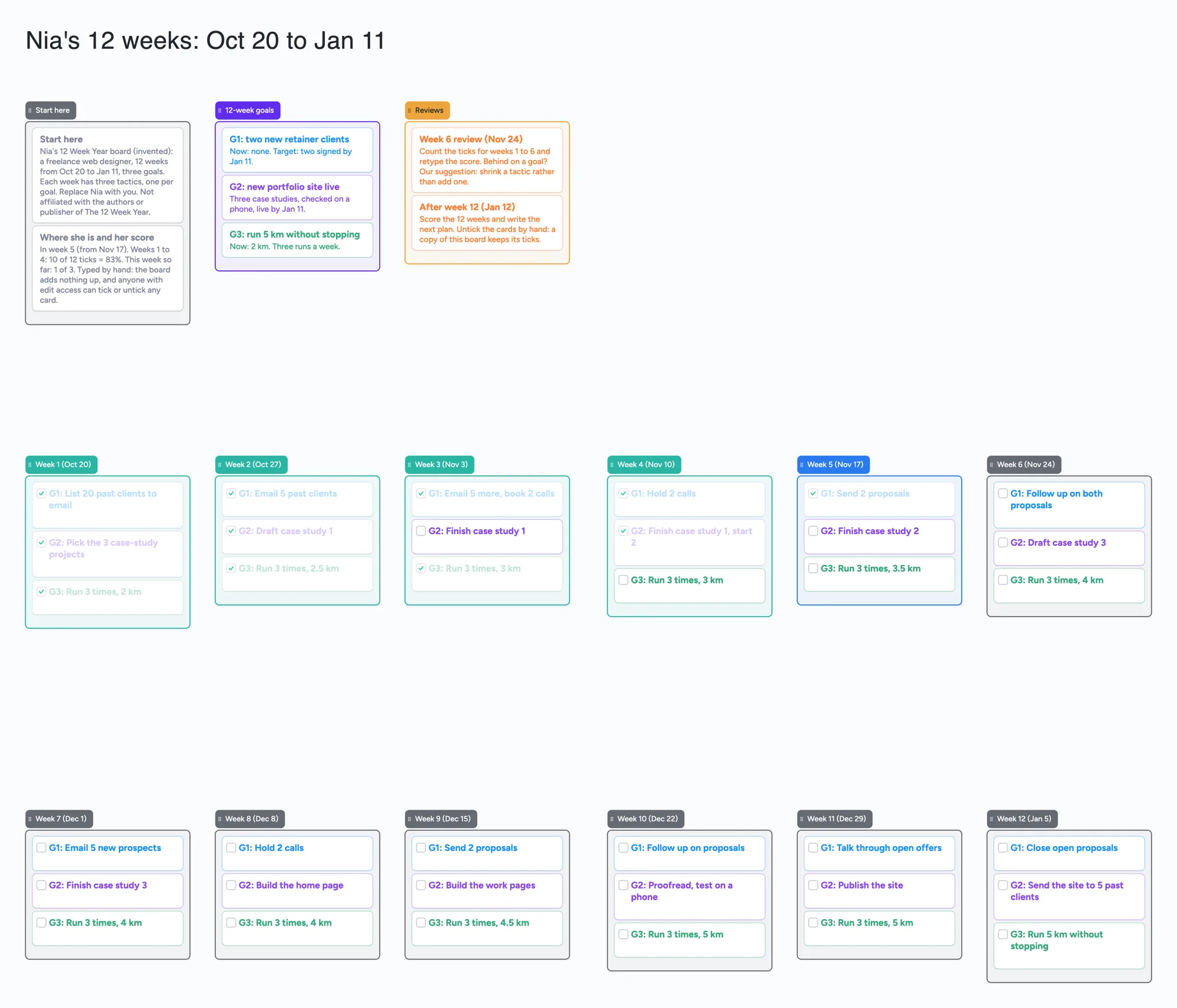
We make Instaboard, a free online board. This page gives you a 12-week plan already laid out on it, filled in for an invented freelance web designer, Nia, who is in week 5 of 12. A Start here list, her three goals, a list for each week with one tick-box tactic per goal, and a Reviews list. Open it, swap Nia for you and share the link with whoever you plan with. It is a plan you read and tick by eye. The board adds nothing up, so the weekly score is a number you count and type, and it sends no reminders. If you want the score worked out for you, an app does that better, and below we say which. "The 12 Week Year" is a book and method by other people: we are not affiliated with or endorsed by its authors or publisher.
Opens in your browser. Anyone can view; a free sign-in lets you edit.
Updated
Read this first: what the board does and doesn't do
- What it is: one screen holding a 12-week plan: three goals, one list per week, and a tick-box tactic for each goal each week. Nia's board uses 59 of your 150 free items.
- What it is not: no scoring, no sums, no percentage, no dates that mean anything to the board, no reminders, no weekly review that runs by itself. You count the ticks and type the score.
- Ticks are shared and anonymous: everyone with edit access sees a tick live and can untick any card. The board doesn't record who ticked or when, so it can't tell you whose week it was.
- It does not reset: there is no untick-all. You untick by hand, and a copy of a ticked board keeps its ticks.
- Free and Pro: Free keeps 5 boards, 150 items and 3 pictures per board. Pro is $5 a month billed yearly ($59.99 a year), or $7.99 monthly, and adds no image limit, invite-only boards and per-person permissions.
The method, in a few lines (and whose it is)
The 12 Week Year is a book by Brian P. Moran and Michael Lennington (Wiley, May 2013, 208 pages; paperback listed November 2025). Wiley's description says it "redefines your 'year' to be 12 weeks long", so there is less time to get complacent and urgency goes up (Wiley product page, read November 22, 2026; the page shows the book's dates, not a page date). 12weekyear.com is in Brian Moran's name (its About section says "Co-Author of the New York Times Bestseller" and names his business partner, Michael Lennington). It offers a free "Getting Started Bundle" (printable planning templates, a mini training course, sample plans and a live onboarding call) behind a sign-up form, plus coaching, certification and a Member Login (read November 22, 2026; the page shows no date).
We have not reproduced the method's materials. What follows is how a small shared board can hold a 12-week plan, described in our own words, using the plain outline that other vendors and readers also give: a few goals for the 12 weeks, weekly actions the method calls tactics, and a weekly check of how many you did. Griply and monday describe the check as the share of planned tactics completed in the week, with 85% named as the benchmark (both are vendors describing the method, read November 22, 2026; we haven't checked those lines against the book).
Nia's board, list by list
The example is invented. Nia is a freelance web designer. Her 12 weeks run from October 20 to January 11 and she has three goals. Here is what each list holds.
| List | What goes in it | In Nia's plan |
|---|---|---|
| Start here (grey) | What the board is, where she is, her score so far | "In week 5 (from Nov 17). Weeks 1 to 4: 10 of 12 ticks = 83%. This week so far: 1 of 3." Typed by hand |
| 12-week goals (purple) | Three goal cards, each with a starting point and what done looks like | "G2: new portfolio site live. Three case studies, checked on a phone, live by Jan 11." |
| Week 1 to Week 12 (one list each) | Three tick-box cards, one tactic per goal, labelled G1, G2, G3 | Week 5: "G1: Send 2 proposals", "G2: Finish case study 2", "G3: Run 3 times, 3.5 km" |
| Reviews (orange) | What to do at the mid-point and at the end | "Week 6 review (Nov 24): count the ticks for weeks 1 to 6 and retype the score." |
Swipe the table sideways to see every column.
The board's own wording. Dates and the score are text typed by hand; the board has no date field and adds nothing up.
Weeks that are done are ticked, the current week is half ticked, and the weeks still to come are unticked, so the plan reads left to right and top to bottom like a calendar without being one.
A week on the board
- Pick the tactic, one per goal. In week 5 Nia's three are: send two proposals, finish case study 2, run three times. Small enough to finish.
- Tick as you go. Nia ticks "Send 2 proposals" on Tuesday. Anyone she shares the board with, a friend or a co-worker, sees the tick appear live.
- Count on the last day. She finishes the week with 1 tick of 3. That is 33% for the week.
- Type the number. She edits the Start here card: weeks 1 to 4 were 10 of 12 ticks, which is 83% (our arithmetic: 10 divided by 12). Nothing else on the board changes it.
- Move the focus. At the week 6 review she looks at which goal has the most unticked tactics and, rather than add one, shrinks the next tactic for that goal.
Everyone with edit access can tick or untick any card, so agree a rule between you: for example, only the person who owns a goal ticks its tactics, and the other person only comments in the review. That is a team agreement, not something the board enforces.
The score: the part a board can't do for you
A weekly score is the part people most often ask a tool for, and this board has no answer to it. It does not count ticks, show a percentage or draw a chart. It also keeps no record of who ticked a card or when, so you can't look back and see which day a tactic was done.
- What to do instead: count ticks per week and retype one line, as Nia does. Ten of twelve ticks is 10 divided by 12. The line is only as correct as the person who typed it.
- What you lose: a running average, a chart over 12 weeks, an alert when you fall behind. If those matter, use an app that does them.
- What you keep: the whole plan visible at once, a partner who can tick the same cards, and no setup.
Does it fit in 150 items?
Each card and each list is 1 of your 150 free items, across all your boards. The title text box counts too. Arrows, sections and pen strokes don't. Our arithmetic from Nia's lists:
- As built: 15 lists + 43 cards + the title = 59. The 43 cards are 2 Start here, 3 goals, 2 reviews and 36 tactics (12 weeks x 3).
- Five tactics a week instead of three: 60 tactic cards + 7 other cards + 15 lists + the title = 83.
- A second 12 weeks on the same board (12 more week lists and 36 more cards = 48): 59 + 48 = 107. A third cycle would bring it to 155, over the limit.
- With five tactics a week, a second cycle (12 lists + 60 cards = 72) makes 83 + 72 = 155, over the limit.
- Other boards share the 150. Another board on the same account uses the same pool. A copy for a new cycle takes 1 of your 5 boards, and its cards count too.
So one cycle fits comfortably on Free and a second three-tactic cycle still fits on the same board, but a person with many tactics per week will meet the limit on the second cycle. Pro does not change the 150 (we have no source that says it does); what Pro adds is listed above.
What a board can't do for a 12-week plan
- Score it. No sums, no percentage, no chart. You count the ticks.
- Remind you. No reminders, due dates or alerts. "Week 6 review (Nov 24)" is text; nothing fires on Nov 24.
- Show who ticked or when. A tick stores neither, so there is no history of a week.
- Protect a tick. Anyone with edit access can untick any card, and the board records nothing when they do.
- Reset for the next cycle. There is no untick-all. A copy of the board keeps its ticks, so untick by hand or write the new plan on fresh lists.
- Repeat weeks for you. Each week is its own list you write. Nothing copies last week forward.
- Offline. Changes made offline are kept and sync when you're back online.
Where other tools do this better
Read November 22, 2026. Prices change, so check the page before you buy. No ranking: they suit different people. Griply publishes its own comparison and ranks itself first, so treat the rows taken from it as its own assessment.
| Tool | What its page says | Better than a board at | Where a board fits |
|---|---|---|---|
| Achieve (the method's own app) | Per Griply's page, built around the method's vision, 12-week goals and weekly scorecard, web only, from $115 a year. We did not read Achieve's own pricing page | A built-in weekly score and the method's own structure | A free shared layout, no account to start reading, nothing to buy |
| Griply | Vendor page: a vision, a 12-week goal and weekly habits, with the completion rate read as the weekly score; iOS, Android, web, desktop; free plan of 2 goals and 2 habits, then $5.99 a month or $49.99 a year | Working out the weekly percentage, habits, a chart of progress | Planning a cycle with another person on one screen |
| Notion template (free, by Tony David) | Marketplace page lists it at $0 with 5 ratings; the page text we read gives little detail. Griply's page says Notion templates need formulas you build yourself | Database views and formulas you can set up yourself | No setup, no formulas to write, a link is enough |
| 12weekyear.com Getting Started Bundle | Free printable planning templates, a mini course and sample plans, after a sign-up form that asks for SMS consent | The method's own training and sample plans | A plan two people can both edit live, which a printable can't do |
| A spreadsheet | Not read for this page | Adding ticks with a formula and charting the weeks | Seeing the whole plan on one screen and ticking cards together |
Swipe the table sideways to see every column.
From each vendor's own pages, read November 22, 2026. The Notion template page, Griply and 12weekyear.com pages show no date we could read. Instaboard isn't affiliated with any of these.
What people who use it say
On r/productivity (thread posted January 17, 2025, read in full November 22, 2026), u/kaina_m, a student, asked how others plan 12-week cycles and said weekly priorities felt like too much at once. Replies, each one person's view:
- u/MilionarioDeChinelo: the point of weekly goals is not to get overwhelmed, so put one goal in a week.
- u/medway808 (April 9, 2025): the sample weeks in the book show multiple goals per week, since some goals like exercise are habits.
- u/Watcher-On-The-Way (February 4, 2025): on their 5th "year" of using it, started by tracking too much, rebalances the targets every month, and now has 9 trackables across three goals; reports a week at 89% and an average of 69% for the year so far.
- u/enzup (June 2, 2025): thinks the book says anything over 85% counts as a success.
On r/12weekyear (thread posted February 28, 2025; 25 of its 32 comments loaded when we read it on November 22, 2026), u/Ok-Influence7332 shared a 12-week planner they built, in beta, stored in the browser. The replies show what people look for: u/capital-minutia asked whether plans can be edited or started over; u/WillYouMaryJaneMe asked whether it gives the percentage done at the end of the week (the builder said yes); u/Magneto88888 later found only a waitlist; u/QuietDesperation1248 had used it for two cycles and asked for an app version.
In that thread two people asked for the weekly percentage and for a way to edit or start a plan over; that is two commenters, not a count of what people want. This board lets you edit and restart a plan, but it does not give you the percentage. How many goals to run at once is also not settled: monday's blog says to limit each cycle to 2 to 3 goals, Griply says one or two, and the commenters above split between one and several.
Set up your own, in order
- Open the board and replace Nia. Delete her cards as you go so the plan is never half hers.
- Write your three goals. Each with where you are now and what done looks like.
- Set the 12 week dates in the list titles, typed by hand. Start the first week list on the day you start.
- Write one tactic per goal per week. Small enough to finish. Leave later weeks rough and rewrite them at each review.
- Share it. Set the share setting so anyone who joins can edit ("Anyone who joins can edit"); new boards start view-only, and each person signs in free to write.
- Fix a counting day. Pick one day, count the ticks, and retype the score on the Start here card.
Limits of the free plan for this board
- Items. Each card and each list is 1 of 150 free items across your account; the example is 59. Arrows, sections and pen strokes don't count.
- Boards. 5 on the free plan. "Make a copy" takes 1 of them.
- Pictures. 3 per board. The example has none.
- Writing needs a free sign-in. Anyone with the link can read the board; to change it they sign in free, and the board then counts as 1 of their 5.
- Private plans. A link board is not the place for health or money details you want kept private; invite-only boards are a Pro feature.
Start from the ready board
It opens in your browser in a few seconds, with nothing to install. Sign in for free when you want to save it and share it.
Questions
Is there a free 12 Week Year template?
Yes, several: 12weekyear.com's free Getting Started Bundle of printable templates (after a sign-up form), a free Notion template, and the ready board here. The board has three goals, a list for each of 12 weeks with a tick-box tactic per goal, and a Reviews list, free within 5 boards and 150 items. It does not add up a score.
Can I use a board for the 12 Week Year instead of an app?
For the layout, yes: goals, weekly tactics and a review. For the weekly score, an app or a spreadsheet does it for you and the board doesn't. Many people count the ticks and type the number, as the example does.
Does the board work out my weekly execution score?
No. It has no sums or percentages. Count the ticks yourself (for example 10 of 12 is 83%) and retype the line. Griply and monday describe the score as the share of planned tactics done, with 85% named as the benchmark.
How many goals should I put on a 12-week plan?
Sources differ. monday's blog says to limit each cycle to 2 to 3 goals, Griply says one or two, and Reddit commenters split between one goal a week and several. The example uses three, with one tactic each per week.
Can the board remind me or show who ticked a tactic?
No. Instaboard has no reminders or due dates, and a tick doesn't record who did it or when. Everyone with edit access can tick or untick any card, so agree who ticks what.
How many weeks fit on the free plan?
Each card and each list is 1 item of the 150 across your account. The example is 15 lists, 43 cards and the title, 59 items, and a second 12-week cycle on the same board brings it to 107. With five tactics a week a second cycle goes over. That is our arithmetic, and your other boards share the 150.
Sources
- Wiley: The 12 Week Year, Brian P. Moran and Michael Lennington (May 2013, 208 pages; paperback November 2025; read November 22, 2026)
- 12weekyear.com (Brian Moran's site; Getting Started Bundle, coaching, certification; read November 22, 2026; page shows no date)
- r/productivity: "Anyone Using the 12-Week Year for Planning?" (u/kaina_m, posted 2025-01-17; replies by u/MilionarioDeChinelo, u/medway808, u/Watcher-On-The-Way, u/enzup; read in full November 22, 2026)
- r/12weekyear: "Built a 12-Week Year Planner App" (u/Ok-Influence7332, posted 2025-02-28; 25 of 32 comments loaded; read November 22, 2026)
- Griply: Best goal tracking app for the 12 Week Year (a vendor ranking itself first; Achieve price is Griply's statement; read November 22, 2026; page shows no date)
- monday.com: How To Plan And Execute In 12-Week Cycles (vendor blog; 2 to 3 goals, 85% benchmark; read November 22, 2026; page shows no date we could read)
- Notion Marketplace: 12 Week Year Planner by Tony David (listed $0, 5 ratings; read November 22, 2026; page shows no date)
Related
A GTD template on one shared board: inbox, next actions, projects and a Friday review
A Getting Things Done style template on one shared board: inbox, next actions by context, projects, waiting for, someday and a Friday review. What a board can't do, and the apps that can.
A personal annual review template on one board
A personal annual review template on one shared board: wins, hard parts, lessons, stop, keep, next steps. No reminders; Todoist and free booklets do more.
A now next later roadmap template on one shared board
A now next later roadmap template on one shared board: problems not dates, a Not doing list, evidence beside it. Filled in for a three-person team. No timeline, votes or reminders.