For people on Windows, Android or a Chromebook
Freeform for Windows and Android: there is no app, but a board you can open in a browser
Apple's pages list Freeform for iPhone, iPad, Mac and Apple Vision Pro, and nothing else. There is no Windows app, no Android app and no web version, so a Freeform board can't be opened on a Windows PC or an Android phone. If you landed here from a search for Freeform on Windows or Android, here is what Apple says, which Android apps called Freeform are not Apple's, and what does open on those devices. We make Instaboard, one of the options, so its limits are listed first.
Opens in your browser. Anyone can view; a free sign-in lets you edit.
Updated
The short answer
- No Freeform app for Windows or Android. Apple's support page "If a Freeform link isn't working" (published September 14, 2026) says: "You can open Freeform links on iPhone, iPad, Mac, and Apple Vision Pro." It names no other platform.
- No web version either. Apple's list of what iCloud.com offers web-only accounts has Apple Invites, Contacts, iCloud Drive, Keynote, Numbers, Notes, Pages, Photos and iCloud Settings. Freeform isn't on it (read November 15, 2026).
- Limits of the board on this page, up front: the free plan is 5 boards and 150 items across all your boards, with 3 pictures and 1 file per board. Viewing by link needs no account; writing takes a free sign-in with Google, Apple or email.
- What opens on Windows and Android: a board in a browser (Instaboard, Miro, Excalidraw), or a sketching app made for those devices (Concepts). The table below says what each costs and where it is better than we are.
- If everyone you work with has an Apple device, stay in Freeform. Its live sharing, free price and Apple's own tools are hard to beat there.
What Apple's pages say about Windows, Android and the web
- Where links open. "You can open Freeform links on iPhone, iPad, Mac, and Apple Vision Pro." (Apple Support, "If a Freeform link isn't working", published September 14, 2026.)
- Where the app is listed. Apple's overview of apps that use iCloud says of Freeform: "Available on iPhone, iPad, Mac, and Apple Vision Pro." The App Store listing names iPhone, iPad and Apple Vision (read November 15, 2026).
- Not in iCloud for Windows. The same overview names iCloud for Windows against several other apps, such as Photos, iCloud Drive and Calendar, and not against Freeform.
- Not on iCloud.com. The web-only list above has no Freeform. A Windows PC or an Android phone with a browser can't open a board there.
People do ask for it. In r/applefreeform, u/LBarouf (April 19, 2024) asked how to reach a board from a hotel business centre desktop and wrote that Apple should "create an iCloud.com web app for FreeForm"; u/AeroDynamicDuck (September 30, 2026) added that "having access from a windows desktop would be pretty great". In r/ipad, u/abitcitrus (February 23, 2026) wrote that they love Freeform "but I hate the fact is OS locked so I can't open it on browser". Each is one person's view. We found no Apple-made way around the limit, so a board built in Freeform stays on Apple devices.
Android: the apps called Freeform in Google Play are not Apple's
A search for Freeform in Google Play turns up apps with the name. Two that we read:
- Freeform Desktop (developer JDA, updated October 30, 2026) describes itself as a launcher with the look and feel of a desktop, for running several windows on a phone. It has nothing to do with whiteboards.
- Freeform: App for Android Hint (developer MarioIndie, updated May 10, 2026) says in its own listing that it is "an independent and unofficial guide" that is "not affiliated with, endorsed by, or sponsored by any official Freeform application". It is a text guide, not a canvas.
Neither opens a Freeform board. If a video or a download page promises Apple's Freeform for Android, check it against Apple's own pages above first.
What opens on Windows and Android instead
| Runs on | Free plan | Others write on it | Better than Instaboard at | |
|---|---|---|---|---|
| Instaboard (us) | A browser on any computer; apps for iPhone, iPad and Android | 5 boards, 150 items (pen strokes, sections and arrows don't count), 3 pictures and 1 file per board. Pro $5 a month billed yearly ($59.99 a year), or $7.99 monthly | Anyone with the link can view with no account; writing takes a free sign-in | - |
| Miro | A browser; apps for iPad, Windows and Android tablets (Miro Help Center) | 3 editable boards: you can create unlimited boards, but only the three most recent stay editable. Starter $8 a month per member, billed yearly | Starter adds visitor editing with no sign-in | 7000+ templates, 250+ integrations, and timer and voting on Starter (Miro pricing page) |
| Excalidraw | A browser at excalidraw.com | Free: 1 infinite scene, unlimited collaborators. Plus from $6 a month per user | Invite collaborators by link, free | Free with unlimited collaborators; quick sketches and diagrams. The free app says drawings are saved in your browser's storage |
| Concepts | iOS, Windows, Android and ChromeOS (its own comparison page, undated) | Free, with in-app purchases | Its own table marks live collaboration "-" for Concepts and a tick for Freeform; its table also lists a Teams account | Sketching: pressure and tilt sensitive brushes, layers, snap-to-grid, PNG, JPG and SVG export (Concepts' comparison page) |
Swipe the table sideways to see every column.
Read November 15, 2026: miro.com/pricing and Miro's Tablet app article, plus.excalidraw.com/pricing and excalidraw.com, Concepts' "Freeform vs Concepts" page. Concepts' and Miro's pages are the vendors' own descriptions. None of these tools imports a Freeform board.
Pick by the job. For a sketchbook you draw in alone on a Windows tablet or Android phone, Concepts is made for it. For a big team workshop with templates and integrations, Miro is the bigger tool. For a quick shared sketch on one scene, Excalidraw is simple. Instaboard fits when a mixed group needs one plan with owners on every card, a free sign-in for the people who write, and a call on the same board.
The ready board: one plan for people on three kinds of device
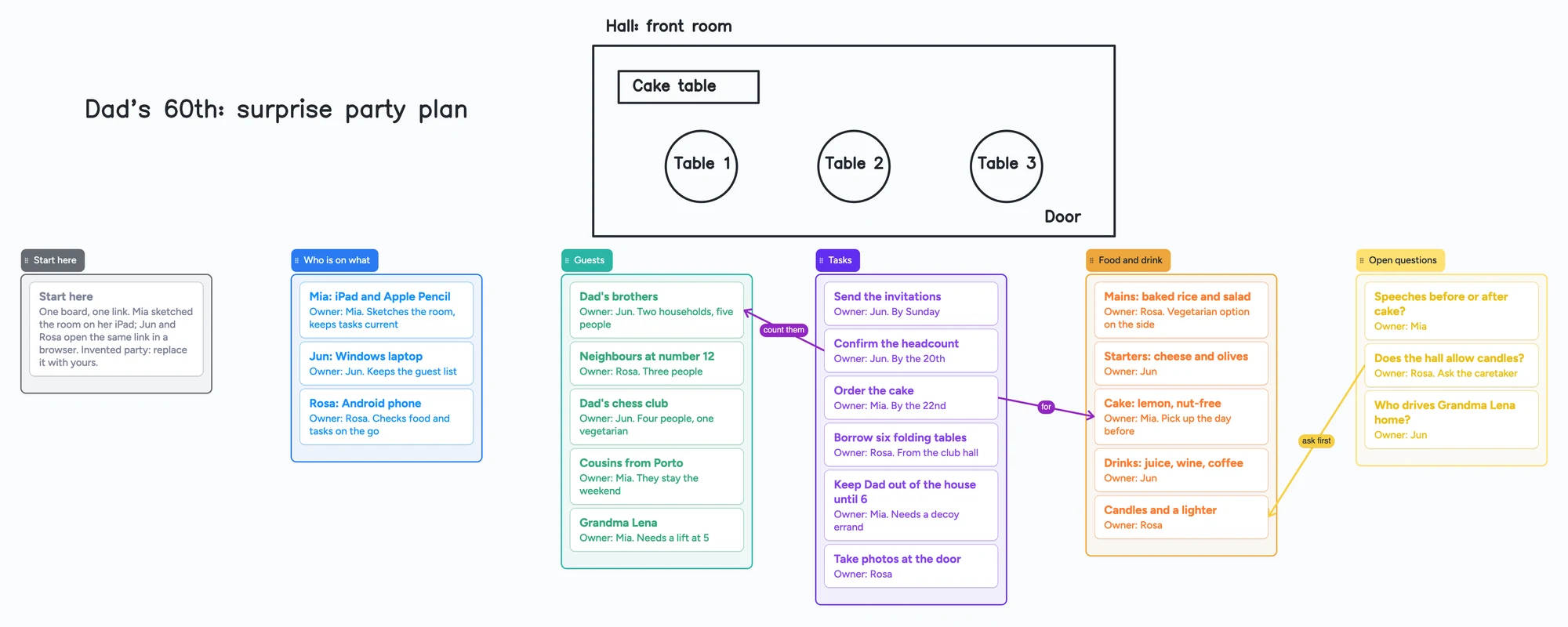
The board above is a plan for an invented surprise party. Mia has an iPad and sketches the hall with her pen; Jun uses a Windows laptop and Rosa an Android phone, and all three open the same link in a browser or the app. It has a room sketch drawn by hand, a list for who is on what, guests, tasks, food and drink and open questions, six lists and 23 cards in all.
- One owner per card. Every card starts with "Owner:" and a name, so nobody has to guess who is checking the headcount.
- Three captioned arrows run from a task to the guests it counts, from "Order the cake" to the cake card, and from a question to the thing it blocks.
- It counts 29 items of your 150 (6 lists and 23 cards; our arithmetic). Five boards of that size come to 145, just under the free limit. The room sketch is pen ink, which doesn't count.
- Everyone with the link sees the whole board. A guest list for a surprise party shouldn't be shared with the person it's a surprise for.
Moving a Freeform board across
You can't open a Freeform board without an Apple device, so a PC-only user needs someone with an iPhone, iPad or Mac to export it. The route that works is a PDF:
- On the Apple device, export the board as a PDF (Share > Export as PDF on iPhone and iPad, File > Export Board as PDF on a Mac).
- Send the PDF to the Windows or Android user. It opens in any PDF viewer.
- To write on it, choose Import PDF in Instaboard. The pages open as a new board you can write and draw on, and the imported file takes 1 of your 5 free boards.
What doesn't carry over
Instaboard can't import a Freeform board as editable items. The PDF is a picture: stickies, text boxes and shapes arrive as part of the image, so retype the few notes that matter as cards.
Step by step, with what Apple allows: how to share a Freeform board with someone on Windows or Android and how to export and back up Freeform boards.
Where Freeform is the better choice
- Price. Apple's App Store listing says creating, viewing and editing boards, and collaborating in real time, does not require a subscription. The subscription is Apple Creator Studio, for premium content and AI features.
- Live sharing among Apple devices. Up to 100 collaborators on a board, and a Messages or FaceTime call one tap away (App Store listing).
- What a board can hold. Scenes, tables, over 700 shapes, a document scanner and brush styles (App Store listing), which Instaboard doesn't match.
- It's already there. It comes with Apple devices and uses the Apple Account people already have.
What Instaboard doesn't do
- No Freeform import beyond a PDF, and it can't open a Send a Copy link.
- Editing needs a free sign-in. Viewing by link doesn't.
- The free plan is 5 boards and 150 items (cards and lists count; pen strokes, sections and arrows don't), with 3 pictures and 1 file per board.
- Calls on the board are free for up to 60 minutes per call, with a warning 10 minutes before the end; everyone signs in free, and calls aren't recorded. Pro has no limit.
- No handwriting search, no AI, no scenes, tables or shape library. The eraser removes a whole stroke at a time.
- Changes made offline are kept and sync when you're back online, but it isn't an offline-first app.
Start from the ready board
It opens in your browser in a few seconds, with nothing to install. Sign in for free when you want to save it and share it.
Questions
Is there a Freeform app for Windows?
No. Apple's pages list Freeform for iPhone, iPad, Mac and Apple Vision Pro, and its overview of iCloud apps does not list Freeform for iCloud for Windows. To work on a Windows PC, use a tool that runs in a browser, such as Instaboard, Miro or Excalidraw.
Is there a Freeform app for Android?
Not from Apple. Apps in Google Play with Freeform in the name are unrelated: one is a desktop launcher, and another says in its own listing that it is an unofficial guide not affiliated with any official Freeform application.
Is there a web version of Freeform?
No. Apple's list of what iCloud.com offers web-only accounts doesn't include Freeform (read November 15, 2026).
Can I open a Freeform link on a Windows PC or an Android phone?
Apple says Freeform links open on iPhone, iPad, Mac and Apple Vision Pro. We found no way to open one on Windows or Android. Ask the sender for a PDF, which opens anywhere but can't be edited as a board.
Can I import a Freeform board into Instaboard?
Only as a PDF, which opens as pages you can write and draw on. The notes and shapes stay part of the picture and don't turn into cards.
What is the closest Freeform alternative on Windows or Android?
It depends on the job. Concepts is built for sketching on Windows and Android, Miro for team workshops, Excalidraw for quick shared sketches, and Instaboard for a group plan with an owner on every card. The table above says what each costs.
Is Instaboard free?
Yes. The free plan includes 5 boards, 150 cards and items across your account (pen strokes, arrows and sections don't count), 3 images and 1 file per board, unlimited collaborators and video calls up to an hour. Pro is $5 a month billed yearly ($59.99 a year), or $7.99 monthly, and the people you invite join free.
Sources
- Apple Support: If a Freeform link isn't working (published Sep 14, 2026; read Nov 15, 2026)
- Apple: Overview of apps and features that use iCloud (read Nov 15, 2026)
- Apple: Apps and features available for iCloud.com web-only accounts (read Nov 15, 2026)
- Apple: Freeform in the App Store (read Nov 15, 2026)
- Google Play: Freeform Desktop (updated Oct 30, 2026; read Nov 15, 2026)
- Google Play: Freeform: App for Android Hint (updated May 10, 2026; read Nov 15, 2026)
- Miro: pricing (read Nov 15, 2026)
- Miro Help Center: Tablet app (read Nov 15, 2026)
- Excalidraw: pricing (read Nov 15, 2026)
- Excalidraw: app (read Nov 15, 2026)
- Concepts: Freeform vs Concepts (undated; read Nov 15, 2026)
- r/applefreeform: Web access (Apr 2024, comments to Sep 2026; read in full Nov 15, 2026)
- r/ipad: Alternatives for Freeform app? (Jan 2025, comments to Feb 2026; read in full Nov 15, 2026)
Related
A Freeform alternative that works on Windows, Android and the web
Freeform only runs on Apple devices, and everyone needs an Apple Account even to view a shared board. A free alternative that works on Windows, Android and any browser, with a call on the board.
How to share a Freeform board with someone on Windows or Android
Freeform can't be opened or edited on Windows or Android. What Apple lets you send instead (PDF, image), and how to move the board to one you can both write on. Steps for iPhone, iPad and Mac.
How to export an Apple Freeform board (PDF, image or another app)
Freeform has no Save as Image button. For a PNG: on a Mac export a PDF and use Preview > File > Export; on iPhone or iPad take a screenshot. PDF steps too.
A free infinite canvas app for your notes, on Windows, Android, Chromebook and iPad
OmniCanvas alternative? Compare the free plans of OmniCanvas, Goodnotes, Concepts and Obsidian Canvas, and open a free shared infinite canvas board.