For biology, A&P and nursing students
Make a biology concept map from your own notes
A concept map isn't a pretty diagram you download. It's your notes rebuilt as concepts joined by arrows that say how they connect, so you can see a whole topic at once and spot what you don't understand yet. Here is how to build one from the notes you already have, with a finished example on the stress response that you can open and change.
Opens in your browser. Anyone can view; a free sign-in lets you edit.
Updated
The short answer
- Start from one focus question, not a whole chapter.
- Put each concept on its own card, from the most general at the top to the most specific below.
- Join concepts with arrows and write the link on every arrow: "releases", "inhibits", "made by".
- Close the map by testing yourself: cover it and rebuild it from memory.
What a concept map is
Joseph Novak and his team at Cornell developed concept maps in 1972. In their words, a concept map has concepts in boxes and "words on the line, referred to as linking words or linking phrases, [that] specify the relationship between the two concepts." Two concepts plus the words between them make a statement you can read aloud: "the anterior pituitary releases ACTH, which stimulates the adrenal cortex."
- A focus question keeps the map small enough to be useful. "How does the body keep cortisol in check?" beats "the endocrine system".
- General at the top, specific below. Novak describes maps as hierarchical: the broadest concept first, details underneath.
- Cross-links join concepts from different parts of the map. In biology these are often feedback loops, and they are usually what the exam asks about.
Concept map or mind map?
A mind map branches out from one central word and usually leaves the lines unlabelled. A concept map labels every link and can loop back on itself, which is why it suits biology: pathways, feedback and cause and effect.
Build one from the notes you already have
- Write the focus question on a card in the corner, so every concept you add has to earn its place.
- Pull out the concepts. Go through your lecture slides or handwritten notes and put each structure, hormone or process on its own card. Nouns, not sentences. Novak and Cañas say 15 to 25 concepts will usually suffice for a first list, and they call that list a "parking lot": keep the cards in a spare corner and move each one into the map once you know where it fits. Some may stay parked if they connect to nothing. They also keep whole sentences out of the concept boxes; the short detail line under each concept name on the example is a note, so drop it if your instructor wants the strict form.
- Order them. Drag the cards so the cause sits above the effect and the general sits above the specific. Don't connect anything yet.
- Draw the arrows and label every one. If you can't name the link, that's the part of the lecture to reread.
- Add the cross-links, especially feedback. Colour them differently so they stand out.
- Put your source next to it. Snap a photo of the handwritten page or import the lecture PDF, and keep it beside the map while you work.
- Revise it. Novak and Cañas say a concept map is never finished and that good maps usually take three to many revisions. Move a card, reword an arrow, add a concept from the parking lot or delete one that doesn't answer the focus question. The arrows stay attached to their cards when you move them, so nothing has to be redrawn. Then test yourself with it, as in Make it stick below.
Worked example: the HPA axis
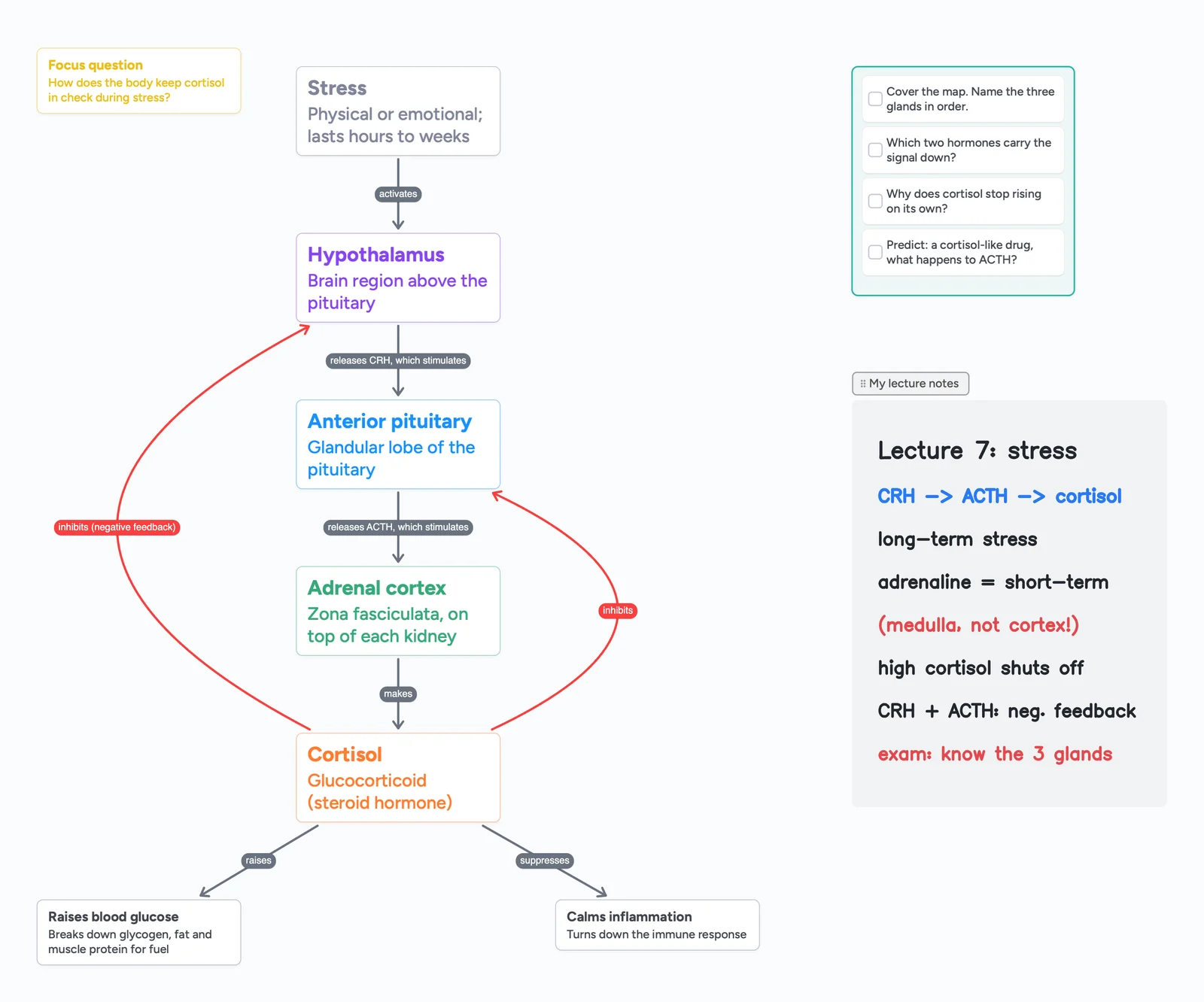
The ready board above maps the stress response, a favourite exam topic because it has a chain of three glands and a feedback loop. The facts come from OpenStax Anatomy and Physiology 2e, chapter 17:
- Stress activates the hypothalamus, which releases CRH (corticotropin-releasing hormone).
- CRH stimulates the anterior pituitary, which releases ACTH (adrenocorticotropic hormone).
- ACTH stimulates the adrenal cortex (the zona fasciculata) to make cortisol, a glucocorticoid.
- Cortisol raises blood glucose by breaking down glycogen, stored fat and muscle protein, and suppresses inflammation.
- Negative feedback: high cortisol inhibits CRH and ACTH release, so the chain switches itself off. These are the two red arrows.
Notice what the map makes obvious that a page of notes doesn't: the adrenal medulla and adrenaline aren't on it. They belong to the short-term fight-or-flight pathway, a different arrow from the hypothalamus. Mixing the two up is one of the most common mistakes on this topic, so the handwritten note on the board flags it.
Make it stick: test yourself with the map
Building a map is not the same as remembering it. In a 2011 study in Science, Karpicke and Blunt found that students who practised recalling a text learned more than students who studied it by drawing concept maps, even when the final test asked them to draw a concept map.
- Cover and rebuild. Hide the map, start a blank area next to it and redraw it from memory. Then compare.
- Read the arrows aloud. Every arrow should make a true sentence. If one doesn't, fix it.
- Answer the recall list. The ready board has a short checklist of questions. Tick each one only when you can answer it without looking.
- Turn notes into cue questions. The Cornell method puts a question next to each note so you can test yourself; see Cornell notes, digital.
More biology maps to open
Each of these boards was built live in a short Boardling lesson. Every lesson page has the video, written notes, a practice question and the finished board to copy.
- The HPA axis, gland by gland: lesson and notes.
- Tropic vs non-tropic hormones: lesson and notes.
- Steroid vs peptide hormones, and where each receptor sits: lesson and notes.
- Clonal selection in four steps: lesson and notes.
- Four endocrine pathways on one board (thyroid, adrenal, parathyroid, ADH): endocrine system concept map.
- Studying for the MCAT: the MCAT concept map starts from AAMC's ten foundational concepts as empty cards for you to fill in.
Watch the HPA axis lesson
The board above is the HPA axis. This Boardling lesson builds it step by step: hypothalamus, pituitary, adrenal gland, and the cortisol feedback loop.
HPA Axis Explained: Hypothalamus → Pituitary → Adrenal (Cortisol)
3:20 min · Notes and board
For nursing students: the patient concept map
Nursing programmes use concept maps differently: one patient in the middle, with the data, problems, interventions and outcomes around them. The full step-by-step, with a worked heart failure example you can open, is on how to build a nursing concept map. If your assignment is one disease on one page, see a pathophysiology concept map.
When another tool fits better
- You want the layout done for you. Lucidchart, Creately and EdrawMind arrange shapes automatically and have large diagram libraries. Instaboard doesn't lay out the map for you; you place each card yourself.
- You want software made only for concept maps. IHMC, the institute behind the Novak and Cañas report, makes CmapTools. Its page lists the download for Windows, macOS and Linux and calls the license "Free for Educational, Personal and Commercial Use"; its products page also lists CmapTools for iPad and in the Cloud, and says several people can edit a map at the same time. Instaboard is a general board, so pick CmapTools when the map is the whole job.
- You need a printout. If your instructor wants a printed or PDF map, a diagram tool or a printable template is simpler. Instaboard exports whole boards as PDF only for drawing boards; for a map like this you can share a link or take a screenshot.
- You want AI to draw it. Instaboard has no AI and won't generate a map from your notes.
Instaboard fits when the map is how you study: cards you can drag as your understanding changes, arrows that follow the cards, your handwritten notes and lecture PDFs next to the map, a pen for quick sketches, and any card can open into its own board, so cortisol can have a whole board of detail without cluttering the overview.
What to know before you start
- Free covers 5 boards and 150 cards and items across your account. Arrows, sections and pen strokes don't count toward the 150, so a concept map goes a long way.
- 3 images per board on Free. Enough for a few photos of notes; Pro has no image limit.
- No automatic layout, no AI, no flashcard mode. You build and test the map yourself.
- Sharing with a study group: anyone with the link can view; to edit, they sign in for free.
Start from the ready board
It opens in your browser in a few seconds, with nothing to install. Sign in for free when you want to save it and share it.
Questions
What is the difference between a concept map and a mind map?
A mind map branches out from one central idea and usually leaves the lines unlabelled. A concept map can link any concept to any other and labels every link, so each connection reads as a statement. That makes concept maps better for pathways and feedback loops in biology.
How many concepts should a concept map have?
Enough to answer one focus question. Novak and Cañas say 15 to 25 concepts will usually suffice when you start from a list. A map of one topic like the HPA axis often keeps fewer, around 5 to 15 (our advice, not IHMC's). If the map gets bigger than your screen, split it: open a detailed concept into its own board.
Can I make a concept map on an iPad?
Yes. Instaboard has an iPad app; you can add cards and arrows with your finger and write notes with Apple Pencil on the same board.
Can I add photos of my handwritten notes?
Yes. Drop a photo onto the board or onto a card, next to the concepts it covers. The free plan allows 3 images per board.
Are concept maps good for studying?
They help you organise a topic and find gaps in your understanding. For remembering it, add retrieval practice: cover the map and rebuild it from memory. A 2011 study in Science found recall practice beat concept mapping alone.
Is Instaboard free?
Yes. The free plan includes 5 boards, 150 cards and items across your account (pen strokes, arrows and sections don't count), 3 images and 1 file per board, unlimited collaborators and video calls up to an hour. Pro is $5 a month billed yearly ($59.99 a year), or $7.99 monthly, and the people you invite join free.
Sources
- Novak & Cañas: The Theory Underlying Concept Maps and How to Construct and Use Them (IHMC)
- IHMC CmapTools (cmap.ihmc.us/cmaptools; read Nov 11, 2026)
- IHMC Cmap products and downloads (cmap.ihmc.us/products; read Nov 11, 2026)
- OpenStax Anatomy and Physiology 2e: 17.3 The Pituitary Gland and Hypothalamus
- OpenStax Anatomy and Physiology 2e: 17.6 The Adrenal Glands
- Karpicke & Blunt (2011), Retrieval practice produces more learning than elaborative studying with concept mapping, Science
Related
Build an endocrine system concept map from your own notes
Build an endocrine system concept map from your notes: glands, hormones, target tissues and feedback loops. A sourced example board to edit. No answer key, no AI.
Build a nursing concept map for your patient
How to build a nursing concept map from your clinical notes, step by step: patient, pathophysiology, assessment data, labs, meds, priority problems, interventions and outcomes. A worked heart failure example you can open and edit.
Cornell notes, digital: cue cards that stay linked to your notes
How to take Cornell notes on a screen: a filled example (glycolysis) with cue cards joined to note cards by arrows, a self-quiz checklist and a summary. What a board does that a printable can't, and where a printable is better.
MindMeister's free plan now keeps your 3 oldest maps. Here's what to do.
Since October 14, MindMeister's free Basic plan keeps only your 3 oldest maps and counts shared ones. Free can't export. How to get a map back, and free alternatives.
How to export an Apple Freeform board (PDF, image or another app)
Freeform has no Save as Image button. For a PNG: on a Mac export a PDF and use Preview > File > Export; on iPhone or iPad take a screenshot. PDF steps too.
An online whiteboard for tutoring that works the way you teach
A free whiteboard for online tutoring: paste the worksheet, write with a pen, and your student answers on the same board. Call on it or beside Zoom.
How to organize organic chemistry notes: a reaction map on cards you can move
How to organize organic chemistry notes so reactions connect: a filled reaction map you can open and edit, with one card per reaction, arrows between functional groups and a synthesis worked backwards. Where a printed reaction map or a notebook is better.
How to teach biology online on a whiteboard: an osmosis lesson, step by step
How a biology tutor can teach on an online whiteboard: an osmosis and tonicity lesson step by step, hand-drawn diagrams the student draws too, and when screen share is better. Ready lesson board included.
How to take anatomy & physiology notes (with a filled example board)
How to take anatomy and physiology notes on a board you can edit: draw the feedback loop first, then terms, examples and a self-quiz. A filled homeostasis example built from OpenStax A&P 2e, for college and nursing students.
AP Biology Unit 5 heredity: a concept map you can edit, from meiosis to dihybrid crosses
A filled AP Biology Unit 5 heredity map you can open and edit: meiosis from one cell to four gametes, a 16-square dihybrid cross colour-coded to 9:3:3:1, the product rule, and four patterns where simple ratios stop working. A student-made study aid.