For curators and artists planning a group show
A group art show plan the curator and every artist can see
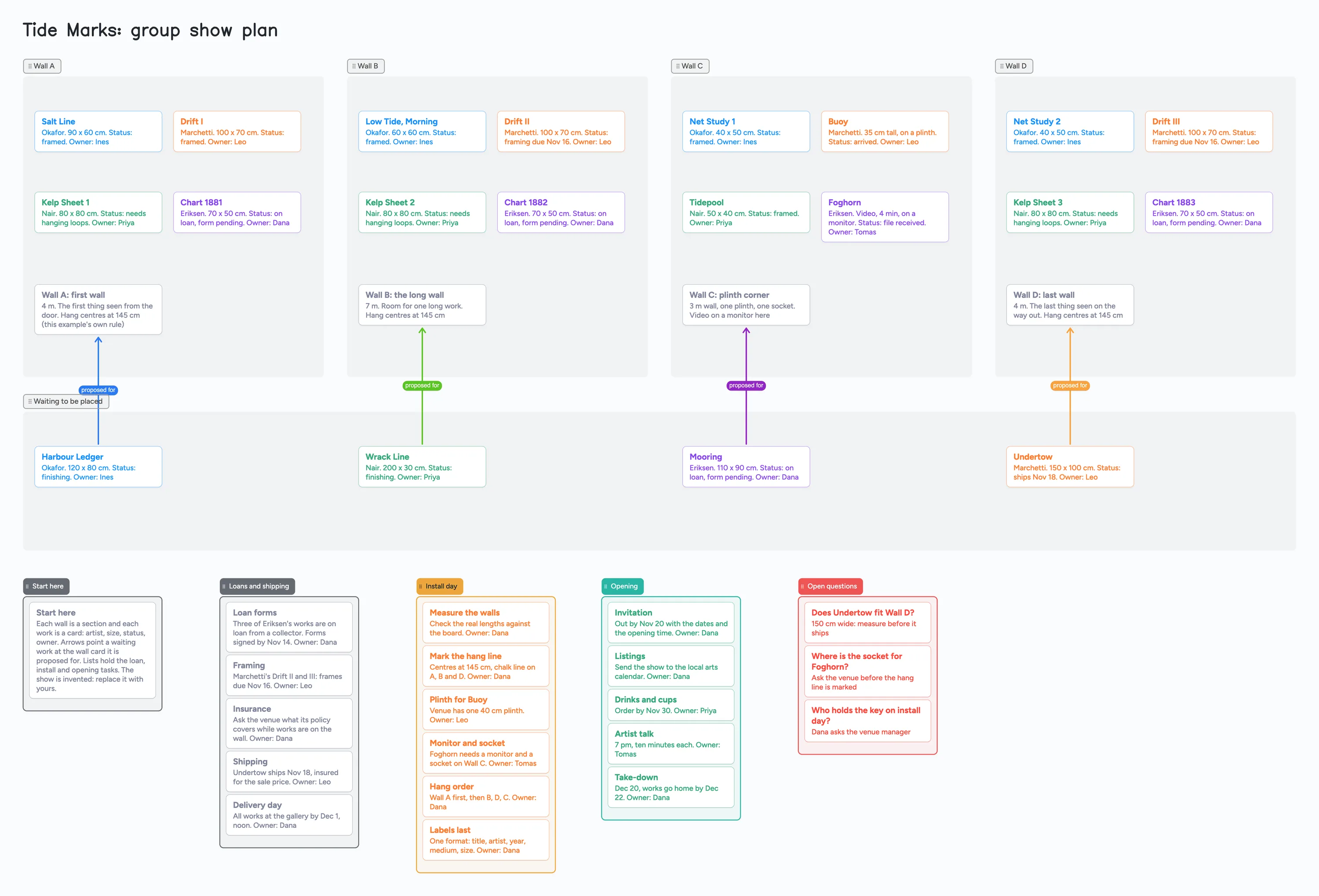
A group show is a curator and a handful of artists trying to answer the same questions: which work goes on which wall, what is still being framed, who is bringing what, and who holds the key on install day. This page shows that plan on one shared board: a section for each wall, one card for every work (artist, size, status, owner), a list of works still waiting for a wall, and lists for loans and shipping, install day and the opening. The show in the example, "Tide Marks", is invented, so replace the names with yours. It is a planning board, not an inventory system, a price list or a label printer; the tools in the table below do those jobs better.
Updated
The short answer
- What it is: a section per wall, a card per work (artist, size, status, owner), a waiting list with arrows to the wall each work is proposed for, and lists for loans and shipping, install day and the opening. Arrows take a caption and their own colour, and they stay attached when you reorder cards or move a section.
- What it isn't: not an inventory or sales system, not a price list or label maker, not a floor plan drawn to scale. It has no reminders, no timeline axis and no photos of the works unless you use your 3 free images per board. The works are text cards.
- The example uses 49 of your 150 free items: 44 cards and 5 lists (our arithmetic). Each card and each list counts; sections, arrows and pen strokes don't. Forty works instead of twenty would bring it to about 69.
- Your artists need a free sign-in to write. They can open the link and read the board without one.
- Set the link to edit. New boards start view-only.
What this board can't do for an art show
- No photos of the works. A free board holds 3 images, so the example uses none: each work is a text card with artist, size, status and owner. Keep images in a shared folder and write where each one is.
- No scale floor plan. A section is a rectangle you name and resize. It doesn't know the wall is 4 metres long; the length is text on the wall card. Check real measurements against the room before you hang.
- No prices, sales or labels. There is no price list, no sales record and no label printing. If you need those, see the table below.
- No reminders and no timeline axis. Dates such as "Forms signed by Nov 14" are words on a card. Nothing tells you the date has passed.
- An arrow is only a line. You choose its caption and colour. It doesn't know whether a work fits a wall. Arrows between cards in different sections stay attached when cards are reordered and when a section moves; we haven't tested what an arrow does when its card is dragged into another list, so look at it after you move one.
- 150 items on the free plan, across your account. Each card and each list is 1 of the 150. The example is 49; any other board on your account counts too. Pro is $5 a month billed yearly ($59.99 a year) and removes the item limit.
- 5 boards and 3 images per board on the free plan. An artist who opens your link uses 1 of their own 5 boards, and cards they add count toward their own 150.
How to plan a group show on one board
This is how the example board is used. The dates and sizes belong to the example.
- Make a section for each wall and put a wall card in it. The wall card says how long the wall is, what is special about it (the first thing seen from the door, a plinth corner, a socket) and the hang rule. The example uses "hang centres at 145 cm", which is its own rule.
- Add one card per work. Title in bold, then artist, size, status and owner in the body. The example colours cards by artist, so a wall's mix is visible at a glance.
- Put works that don't have a wall yet in a waiting section, and arrow each one to the wall card it is proposed for. Move the card into the wall's section when it is agreed, then delete the arrow.
- Write the loans and shipping list. Loan forms, framing, insurance questions, shipping and a delivery day, each with an owner and a date.
- Write the install day list in hang order. Measure the walls, mark the hang line, plinth, monitor and socket, hang order, labels last.
- Write the opening list and an open questions list. Anything nobody can answer yet goes on a red card with who will ask.
The example's hang rule fits one published convention. Storyflow's guide to planning an art exhibition (July 22, 2026) says a common gallery convention centres work near eye level, often about 57 to 60 inches to the centre, which is about 145 to 152 cm (our arithmetic), and adds that the space and the work should rule. The same guide says to schedule backward from the opening date and calls framing a common bottleneck. Storyflow is a company that sells a planning tool and ranks itself first in that guide, so treat its advice as one source.
What people who organised shows say
These are single accounts and guides, not a measured pattern. In r/ContemporaryArt (November 8, 2024), one person asked how to organise a group show. One commenter, u/twomayaderens, listed a budget to stick to, loan agreements (even informal ones), not accepting half-finished work for a low-budget show, and regular email to the artists with the timeline and key dates. Another, u/Glass_Purpose584, suggested borrowing the artists' email lists and sending an email two weeks ahead, a few days ahead and on the day.
Call For Curators' practical guide to organising art exhibitions (April 16, 2025) gives an ideal timeline of 6 to 12 months and says installation takes at least a full day. Artwork Archive's checklist of 25 tasks for an art exhibition (September 6, 2022) says to map out when you will tackle each item and attach each to a deadline. On the board, those are the dates and owners on the cards. They are one guide's advice each, not rules.
Set up the board with the artists
- In the share menu, set "Anyone with the link can edit". New boards start view-only.
- Send the link, or the 4-digit join code. The code expires after 2 hours of inactivity, so send the link to anyone you'll need later.
- Each person signs in free (Google, Apple or email) to write. Someone who isn't signed in can open the link and read everything, but can't change anything. Once they're signed in, what they move or add shows up on your board within a few seconds, and you see theirs the same way.
- If they're already at 5 boards, they can still open the link and write; the board just isn't added to their boards.
- Give each artist their own cards. If two people type in the same card at once, the two edits merge letter by letter with no lock, so keep each work card to one owner and let the curator own the wall cards.
Free calls on the board run up to 60 minutes per call, with a warning 10 minutes before the end; everyone signs in free, calls aren't recorded, and Pro has no limit. If the opening night is the part that needs the most hands, the office holiday party planning board shows the same one-owner-per-task idea for an evening event, and the film festival strategy board does it for a submission plan.
Show planning tools, side by side
Each row is from the tool's own page, read on November 11, 2026. Features and prices change, so check the page before you choose.
| Tool | What its page says | Where it beats a shared board | Where a shared board fits |
|---|---|---|---|
| Instaboard | Free: 5 boards, 150 items; Pro $5 a month billed yearly | Nothing in this table: no inventory, prices, labels or scale plan | Walls, works, owners and the install and opening lists on one board that the curator and every artist can edit |
| Artwork Archive | Pricing page lists artist plans from $9 a month paid annually ($10 monthly): 100 pieces, 10 locations ("track where your work is showing"), single user. Its organization Standard plan is listed at $39 a month paid annually ($46 monthly): 500 pieces, 3 users and "Exhibitions: create virtual exhibits, manage exhibitions, and track past shows" | Records for every piece and where it is showing, with sales tracking and online invoicing listed even on its $9 artist plan, and an Exhibitions feature on organization Standard | A quick shared plan of who hangs what where, with no records to set up and no plan to buy |
| Storyflow | Its guide is dated July 22, 2026; Plus is $7.99 a month billed annually; paid-only during early access, with a Free plan to launch before the end of 2026 | Its own AI to draft a concept statement and wall text, on a canvas that holds images of the works | A free, filled example of a show plan you can edit with artists who have no account to set up |
| Spreadsheet | Not a vendor page; our own point | Sums, sorting and a price list with totals, which a board doesn't calculate | Seeing which wall a work is proposed for as a picture, with arrows |
Swipe the table sideways to see every column.
Sources are listed at the bottom of the page, all read on November 11, 2026, except the Reddit thread and the dated guides, which carry their own dates. Artwork Archive's pricing page shows no date.
When another tool is the better choice
- You keep a record of every piece, with prices and sales. Artwork Archive's pricing page lists piece limits, locations, sales tracking and invoicing. A board has none of those.
- You need a to-scale plan of the room. Storyflow's own guide sends that job to SketchUp or a CAD tool. A section on a board is only a rectangle.
- You want images of the works next to the plan. A free board holds 3 images. Storyflow's guide lists unlimited file uploads on its paid plans.
- You want a budget with totals. A spreadsheet adds up costs and sorts them; a board's cards don't calculate.
- You need reminders. The board has none. Use your calendar or your email list for the two-weeks-ahead and day-of notes.
Start from the ready board
It opens in your browser in a few seconds, with nothing to install. Sign in for free when you want to save it and share it.
Questions
Can the artists edit the plan at the same time?
Yes. Set "Anyone with the link can edit" and send the link. Each person signs in free to write, and what they move shows up for the others within a few seconds. Give each artist their own cards: if two people type in the same card at once, the edits merge with no lock.
Can I put photos of the works on the board?
Only a few. A free board holds 3 images, so the example has none and uses text cards for the works. Keep photos in a shared folder and write where each one is.
Does the board remind us about loan forms or deadlines?
No. It has no reminders. The dates are words on cards that your team agrees to check.
How many items does a group show use?
The example is 49 of the 150 free items: 5 lists and 44 cards, which is 20 works, 4 wall cards and 20 cards in the lists. Forty works would be about 69 (our arithmetic). Sections, arrows and pen strokes don't count. Each artist who joins also uses 1 of their own 5 free boards.
Is this an art inventory?
No. It plans who hangs what where and who does which task. For records of pieces, locations, prices and sales, use an inventory tool such as the ones in the table.
Sources
- Artwork Archive: pricing (artist, collector and organization plans; read Nov 11, 2026; no date shown on the page)
- Artwork Archive: [Checklist] 25 Tasks for a Successful Art Exhibition (September 6, 2022; attach each task to a deadline; read Nov 11, 2026)
- Storyflow: How to Plan an Art Exhibition (2026 Step-by-Step Guide) (July 22, 2026; a company's own guide that ranks its product first; eye-level hang convention, framing lead time, SketchUp for a to-scale plan, pricing; read Nov 11, 2026)
- Call For Curators: A Practical Guide to Organising Art Exhibitions (April 16, 2025; timeline and installation time; read Nov 11, 2026)
- r/ContemporaryArt: question about organising a group show (November 8, 2024; replies by u/twomayaderens and u/Glass_Purpose584; one person's view each; read Nov 11, 2026)
Related
An office holiday party planning board: who owns what, in one place
Plan the office holiday party with a small committee on one shared board: budget, venue, food, gift swap rules and the evening. Free ready board, and where SignUpGenius does more.
A festival strategy board for a short film, shared with your producer
Plan a short film's festival run on one shared board: goals, three budgets, tiers, a card per festival with fee, deadline and premiere rule. A filled example to copy. Not a submission tool.
A wedding vendor comparison board you and your family can all see
Compare wedding venue and vendor quotes on one shared board: a list per vendor type, a card per quote, decide-by dates. A filled example to copy. Not a spreadsheet.