For one person looking back at their own year, not a work performance review
A personal annual review template on one board
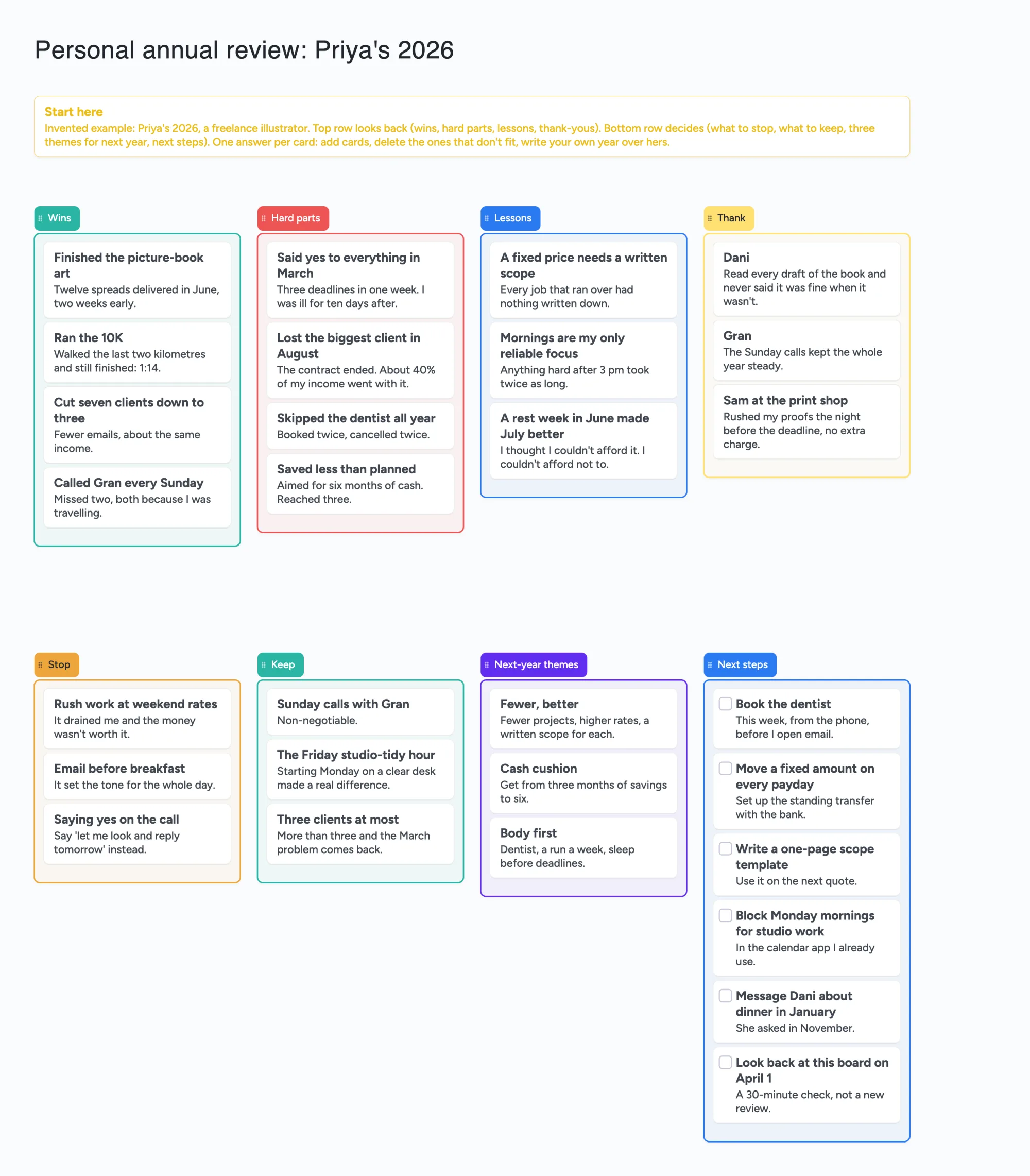
We make Instaboard, a free online board. This page gives you a year-end review already laid out on it, filled in for one invented person, Priya, a freelance illustrator: four lists that look back (wins, hard parts, lessons, thank-yous), four that decide (what to stop, what to keep, three themes for next year, next steps). Open it, write your own year over hers, and, if you want, send the link to a partner so you can read each other's. It is a place to put answers, not a guided exercise: it asks no questions, sends no reminders and does not repeat next December. This is the personal kind of annual review, not the HR form your employer fills in.
Opens in your browser. Anyone can view; a free sign-in lets you edit.
Updated
Read this first: what the board does and doesn't do
- What it is: the answers to a year review on one screen. The top row looks back, the bottom row decides. Each answer is a card with a title and one or two lines. The example uses 39 of your 150 free items.
- What it isn't: no questions to answer, no reminders, no due alerts, no calendar link, and nothing that repeats next year. A card is a line you write; nothing nudges you about it.
- Where the questions come from: the board is a layout. For questions, use the writers below (Sahil Bloom, Chris Guillebeau, Tim Ferriss) or a free booklet such as YearCompass; this page names each and says what it asks. We are not affiliated with any of them.
- Free plan: 5 boards, 150 items, 3 pictures per board. Copying the board takes 1 of your 5 boards. Writing on it needs a free sign-in.
- Private? Not by default. New boards start with "Anyone who joins can view", so keep names, health and money details you don't want shared off it. Pro adds invite-only boards: $5 a month billed yearly ($59.99 a year), or $7.99 monthly.
Priya's year, worked through
The example is invented. Priya is a freelance illustrator whose year had one good stretch and one bad one. Here is how her answers landed.
- Wins. Four cards, from the picture-book art delivered two weeks early to a Sunday call with her gran she only missed twice. A win can be small; the test is that she would want to remember it.
- Hard parts. Four cards, including saying yes to everything in March (three deadlines in one week) and losing her biggest client in August, about 40% of her income by her own count. She writes what happened, not what she should have done.
- Lessons. Three cards, each one sentence she can act on: a fixed price needs a written scope, mornings are her only reliable focus, a rest week in June made July better.
- Thank. Three cards naming the people who made the year easier, with one line each on what they did. Nothing on this list is for sending; it is for remembering.
- Stop and Keep. She moves the things that drained her to Stop (rush work at weekend rates, email before breakfast, saying yes on the call) and the things that held the year together to Keep (Sunday calls, a Friday studio-tidy hour, three clients at most). Pairing the two lists makes her look for what to keep, not only what to cut.
- Next-year themes. Three, each a phrase and a line: fewer but better projects, a bigger cash cushion, body first.
- Next steps. Six cards with tick boxes, written so each can be done in one sitting. Two of them, the dentist and the standing transfer, are things the year showed her she had put off. The last one, "Look back at this board on April 1", is a 30-minute check, not a new review.
Nothing on the board is dated except what Priya writes in a card's words. The board has no calendar, so "April 1" is text she reads, not a reminder.
Three ways people run a year review, and what the board takes from each
Each page below was read in full on November 21, 2026. These are the writers' methods, in our own words. The board's lists are our layout inspired by them, not their templates, and Instaboard is not affiliated with or endorsed by any of them.
| Method | What it asks (our summary) | What the board borrows |
|---|---|---|
| Sahil Bloom, "The Personal Annual Review" (page dated December 10, 2025) | Seven questions: what did I change my mind on, what created energy, what drained energy, what were the Boat Anchors in my life, what did I not do because of fear, what were my greatest hits and worst misses, what did I learn. He suggests going through your calendars for the two energy questions, and offers a free PDF; he also suggests ordering his Life Planner for going deeper. | Hits and misses become Wins and Hard parts; the learn question is Lessons; energy creators and drainers are why Keep and Stop sit side by side. We don't use his seven headings. |
| Chris Guillebeau, "How to Conduct Your Own Annual Review" (the page shows no date) | Look back first (what went well, what did not, at least 6-8 answers each), score last year's goals, then set an average of 3-5 measurable goals in each of his categories, write the actions each needs, pick a theme for the year, and review monthly with a longer check each quarter. He supplies an Excel template and a guided online version. | Wins and Hard parts first; a theme list; next actions as tick-box cards; a check-in card. We have no goal scoring, categories or metrics tab. |
| Tim Ferriss, "Forget New Year's Resolutions and Conduct a 'Past Year Review' Instead" (URL reads /2025/12/26/; oldest comments on the page are dated December 28, 2018, so we print no publication date) | Two columns, POSITIVE and NEGATIVE. Go through the last year's calendar week by week and jot the people, activities and commitments behind peak highs and lows. Find the 20% of each column that produced the most. Schedule more of the positives; put the negatives on a NOT-TO-DO list where you see it each morning. He says it takes 30-60 minutes. | Keep and Stop are his two columns. The board does not read your calendar, schedule anything or show you a list each morning. |
Swipe the table sideways to see every column.
Pages read November 21, 2026: sahilbloom.com/newsletter/the-personal-annual-review (and the free-template page sahilbloom.com/annual-review), chrisguillebeau.com/how-to-conduct-your-own-annual-review, tim.blog/2025/12/26/past-year-review/. Our wording, not theirs.
Ferriss writes "It's not real until it's in the calendar." That is the one step a board can't do for you. That is why Priya's fourth next-step card says to block the time in the calendar app she already uses.
What people say about doing an annual review
From r/productivity, "Do you guys do an annual self-review? How do you do yours?" (OP u/PM_YOUR_SECRET_BEACH, December 29, 2020; the page showed 10 of its 13 comments, and each reply is one person's view). u/AudioKinetic wrote that they used to do annual reviews but found them unhelpful beyond the highest-level goals, and moved to 90-day plans with a monthly review. u/french-earl-grey wrote that they set 12 to 18 goals a year, usually meet about a third, get about half way on another third, and that Atomic Habits taught them to lock in a system or schedule. u/ChildofChaos planned a "think week" and passed on a video's advice to start from zero rather than "the same but more". u/kilo0602 uses YearCompass.
Two lessons for this board: a year is a lot of ground for one sitting, so keep the cards short, and a list of goals you meet a third of the time is not a failure, so Next steps are small things, not targets.
Does a real year fit in 150 items?
Each card and each list is 1 of your 150 free items, across all your boards. The title text box counts too. Arrows, sections and pen strokes don't. Our arithmetic from the example's lists:
- Priya, as built: 8 lists + 30 cards (29 answers and the Start here card) + 1 title = 39.
- A fuller year: 8 cards in each of Wins, Hard parts, Lessons and Thank, 5 in Stop and 5 in Keep, 3 themes and 10 next steps is 55 cards, plus the Start here card, 8 lists and the title = 65.
- Two people, one board each: 2 x 39 = 78, and 2 of your 5 free boards.
- Several years on one board: each extra year adds 8 lists and about 29 cards, 37 items. Three years is 39 + 37 + 37 = 113; a fourth reaches exactly 150, with nothing else on any of your boards. Copying a fresh board each year takes 1 of your 5 boards instead.
What a board can't do
- No reminders and no due alerts. The board will not tell you in January that a card is waiting. A card is a line you read.
- No yearly repeat. Nothing brings the board back next December. Copy it, or set a reminder in a calendar app yourself.
- No questions. It is the page you write on, not the exercise. If you want prompts, use one of the three methods above.
- No read of your calendar. Ferriss's method starts with your calendar week by week; you do that in your calendar app and bring the answers here.
- A copy takes 1 of your 5 free boards, and writing needs a free sign-in. A copy keeps its ticks, so untick the next-step cards when you reuse it.
- It is not private by default. New boards start with "Anyone who joins can view". Anyone you give the link to can read; sign-in is only needed to write. Set it to "Anyone who joins can edit" only if you want someone else to write on it.
- 3 pictures per board. The example has none; a photo from each month will not fit.
Where other tools do this better
Read on November 21, 2026; prices and plans change, so check the page. None of the pricing and booklet pages shows a date.
| Tool | What the page says | Better for |
|---|---|---|
| Sahil Bloom's free template and Life Planner | A free Personal Annual Review template to download; his newsletter also suggests ordering a Life Planner (we did not read its price) | Seven set questions with space to write, and a Life Planner to order if you want more |
| Chris Guillebeau's template | An Excel template to download, plus a guided online companion whose answers stay in your browser | Measurable goals by category, with a goal-by-goal review next year |
| YearCompass | A free booklet to reflect on the year and plan the next, available to download; says it has been used by more than a million people since 2012 | A guided set of questions, a calendar review, and printing it |
| Todoist | Beginner $0 (task reminders, recurring dates, 5 personal projects); Pro $5 a month ($60 billed yearly) or $7 monthly, listed with custom reminders; a recurring date like "every year" is in its help article (last updated November 18, 2026) | Reminders and a date that repeats every year |
| Instaboard board | Free: 5 boards, 150 items, 3 pictures per board. Pro $5 a month billed yearly ($59.99 a year), or $7.99 monthly | A filled-in layout to copy and one link to share with someone who reads or writes with you |
Swipe the table sideways to see every column.
From each page, read November 21, 2026: sahilbloom.com/annual-review, chrisguillebeau.com/how-to-conduct-your-own-annual-review, yearcompass.com, todoist.com/pricing, todoist.com/help/articles/introduction-to-recurring-dates-YUYVJJAV.
Where these win
If you want set questions, use one of the writers' templates or YearCompass; the guided online Guillebeau companion is the closest to an exercise. If you want a reminder in a year, or a task that repeats every December, use Todoist or the calendar you already own. Use this board when you want to see the whole year on one screen, write short answers in your own words and share the link with one person.
How to use it, in about an hour
Ferriss's page puts his version at 30 to 60 minutes and Guillebeau spreads his over several days; pick one pace and say so on the Start here card.
- Open the board and sign in free when it asks you to write. Replace Priya's cards with yours; delete any list you don't want.
- Fill the top row first, before you plan anything. Look at your calendar, photos and messages for the year, and add one card for each thing you'd want to remember or not repeat. Short titles, one line under each.
- Move to Stop and Keep. For each hard part and each win, ask what in it you want less or more of next year. One card each.
- Write three themes and no more. If a fourth keeps coming, merge it into one of the three.
- Write the next steps small, each one doable in a sitting. Tick them off as you go.
- Put the dated things in a calendar app, not here. Add one card with the date you'll look at the board again.
- To share it, set Share to "Anyone who joins can edit" if one other person should write on it, or leave it on view if they should only read. Each person who writes signs in free.
- Next year, copy the board, untick the cards, and start again from the top row. The copy takes 1 of your 5 boards.
Start from the ready board
It opens in your browser in a few seconds, with nothing to install. Sign in for free when you want to save it and share it.
Questions
What is a personal annual review?
It is a look back at your own year, usually near the end, to decide what to keep, stop or start. People such as Sahil Bloom, Chris Guillebeau and Tim Ferriss each publish a version, with different questions. It is not the performance review a manager writes. Here it is a shared board of cards laid out for that.
Is there a free personal annual review template I can use online?
Yes. Open the board, replace the example year with yours and write on it after a free sign-in. It is a layout to copy, not a guided exercise: it has no questions, so many people use it with one of the free templates named on this page.
Does it remind me to do the review or check my next steps?
No. The board has no reminders, due alerts or repeat. Put the review date in the calendar app you already use, or use a task app such as Todoist, which lists reminders and recurring dates.
Can I share my annual review with a partner?
Yes. New boards start with "Anyone who joins can view", so anyone with the link can read it. Set it to "Anyone who joins can edit" if your partner should write on it too; each person who writes signs in free. Don't put anything on it you don't want the people with the link to read.
How many items does a year review take on the free plan?
The example is 39 of your 150 free items, a fuller year about 65, and a fourth year on the same board reaches exactly 150 (our arithmetic). Arrows are free. Copying a fresh board each year takes 1 of your 5 free boards.
Is Instaboard free?
Yes. The free plan includes 5 boards, 150 cards and items across your account (pen strokes, arrows and sections don't count), 3 images and 1 file per board, unlimited collaborators and video calls up to an hour. Pro is $5 a month billed yearly ($59.99 a year), or $7.99 monthly, and the people you invite join free.
Sources
- Sahil Bloom: The Personal Annual Review (page dated December 10, 2025; read November 21, 2026)
- Sahil Bloom: Annual Review Template, free download (page shows no date; read November 21, 2026)
- Chris Guillebeau: How to Conduct Your Own Annual Review (page shows no date; read November 21, 2026)
- Tim Ferriss: Forget New Year's Resolutions and Conduct a 'Past Year Review' Instead (#559) (URL dated 2025/12/26; read November 21, 2026)
- YearCompass (page shows no date; read November 21, 2026)
- Todoist pricing (page shows no date; read November 21, 2026)
- Todoist: Introduction to recurring dates (last updated November 18, 2026; read November 21, 2026)
- r/productivity: Do you do an annual self-review? (OP u/PM_YOUR_SECRET_BEACH, December 29, 2020; replies are single accounts, 10 of 13 comments shown, read November 21, 2026)
Related
A GTD template on one shared board: inbox, next actions, projects and a Friday review
A Getting Things Done style template on one shared board: inbox, next actions by context, projects, waiting for, someday and a Friday review. What a board can't do, and the apps that can.
A moving board: pack by room, number every box, share one list
Plan a move on one shared board: a list per room with a card for every numbered box, plus moving-day tasks. Free ready board; a moving app or a spreadsheet searches better.