For the volunteers organising a craft fair or makers market
A craft fair planning template: one shared board for the organising committee
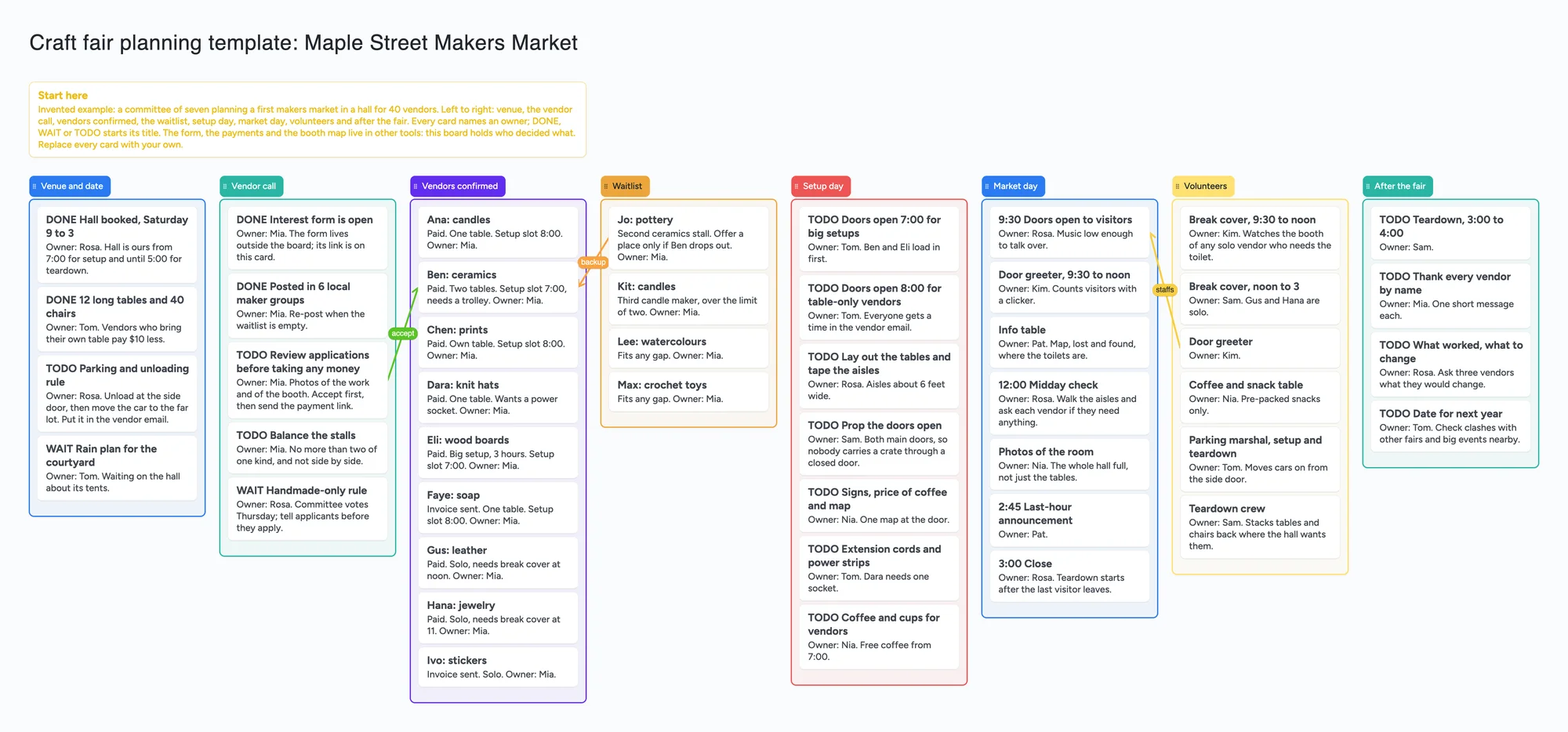
This is for a small committee putting on a craft fair or makers market: a list each for the venue and date, the vendor call, vendors confirmed, the waitlist, setup day, market day, volunteers and the clean-up, with an owner's first name on every card. It is a planning board. It has no vendor application form, takes no payments, draws no booth map and sends no reminders. Zeffy, Eventbrite, a form with a spreadsheet, or Notion handle those parts; this holds who decided what.
Opens in your browser. Anyone can view; a free sign-in lets you edit.
Updated
The short answer
- What it is: one board with a list for each stage of the fair, left to right: venue and date, vendor call, vendors confirmed, waitlist, setup day, market day, volunteers, after the fair. Every card says "Owner:" and a first name, and DONE, WAIT or TODO starts the title of a task. A Start here card explains the layout.
- What it isn't: no application form, no payment link, no ticketing, no booth map and no reminders. The example keeps the form and the money in other tools and holds the decisions here: who is accepted, who is on the waitlist, who covers a lunch break.
- Arrows: an arrow can join a card in one list to a card in another, takes a caption and its own colour, and stays attached when a card or list moves. The example has three: an application review that leads to a confirmed vendor ("accept"), a waitlisted maker who takes a place if one drops out ("backup"), and the door greeter who staffs the doors-open time ("staffs").
- The example is invented: a hall, a Saturday and 40 vendors in the story, nine of them listed as cards. Replace every name and card.
- Free plan: the example is 56 of your 150 free items (47 cards, 8 lists and 1 title text box, our count). Arrows, sections and pen strokes don't count. One card per vendor for a 40-vendor market brings it to 87 (our arithmetic below).
What this board doesn't do, and where Zeffy, Eventbrite, a form and Notion are better
Read on November 21, 2026 from each tool's own pages. Zeffy's home page describes itself as a free fundraising platform for nonprofits with no transaction or platform fees, paid for by optional tips from the people paying; it lists ticketing, raffles and donation forms. It is aimed at nonprofits, so a church group or a club may qualify where a solo organiser may not; check its page before you plan around it.
Eventbrite's pricing page says free events cost nothing to run. For paid tickets it lists a service fee of 3.7% plus $1.79 per ticket for paid tickets and a payment processing fee of 2.9% per order (US pricing, read November 21, 2026). If your fair sells visitor tickets or collects stall fees as tickets, that is the tool that takes the money and counts the sales.
Google Forms is the common place for the vendor application: Google's help says form responses can be linked to a Google Sheet or downloaded as CSV, and it lists new limits of 1 GB and 500,000 responses per form from September 2026. Notion's pricing page lists basic forms and databases on the Free plan, and its forms help says members on every plan can create forms, with conditional logic limited to Business and Enterprise. Both are better than a card board for collecting and sorting applications, and a spreadsheet adds up stall fees for you; this board doesn't.
Where these tools win
Use Zeffy or Eventbrite when money changes hands, a form and a spreadsheet when you collect and sort applications, and Notion if your committee already lives there. Use this board next to them, when seven people need one place that shows who owns each open item and what each answer is waiting on.
How to plan the fair on the board
The advice on the board comes from two threads in r/CraftFairs, read on November 21, 2026 (the comments the page loaded; the first thread has more). Each reply is one person's view. In a thread from October 2025, u/nomuskever said they needed 2 hours to set up, u/Ashamed_Blackberry55 said an hour is not enough once unloading is counted, u/ladysig220 and u/Ok-Spirit9977 put setup at about 90 minutes or more, u/husbandwithregret said setup time varies a lot by vendor and suggested asking each one how long they need, u/NightOwl_Archives_42 raised strict, clearly communicated parking rules and propping doors open, u/shootingstare advised reviewing applications and sending acceptances before taking payment, and u/Ok-Spirit9977 said it helps when staff watch for restroom breaks. In a May 2026 thread about a church makers market, u/photographermit said to balance the types of vendor so they are not all next to each other, and u/Normal-Hall2445 said markets there usually start at $30 a stall and that vendors need access to facilities. The example board turns those points into cards; they are not rules.
- Open the board and make it yours. Replace the Maple Street example with your fair's name, hall and date.
- Start with venue and date. One card per booking or rule: the hall, tables and chairs, the parking and unloading rule, the rain plan. Put an owner's name on each.
- Run the vendor call from a form. Keep the form link on a card in the vendor call list. Review applications before you take any money, then accept, then send the payment link; the board holds the decision, not the money.
- Move accepted vendors into the confirmed list, one card each: what they make, how many tables, their setup slot, and whether they need break cover or a power socket. Draw an arrow captioned "accept" from the review card to a confirmed vendor if you want the trail visible.
- Keep a waitlist. One card per maker you could not place, with why. A "backup" arrow from a waitlist card to the vendor it replaces shows what happens if someone drops out.
- Give vendors a setup slot. Put the setup times on cards in the setup day list, and list the loading order so heavy setups arrive first.
- Staff the day. Put the hour-by-hour plan in market day and the shifts in volunteers: door greeter, info table, coffee table, break cover, parking marshal, teardown crew.
- Share it. In the share menu set Share to "Anyone who joins can edit" (new boards start view-only). A committee member signs in free and writes live. A volunteer who only needs to read the plan can open the same link signed out.
This board vs Zeffy vs Eventbrite vs a form and sheet vs Notion
| Tool | What we read (Nov 21, 2026) | Good at | Not what you get |
|---|---|---|---|
| Instaboard board | Free: 5 boards, 150 items, 3 images per board. Pro $5 a month billed yearly ($59.99 a year), or $7.99 monthly | Who owns what, who is accepted and waitlisted, a committee on one link after a free sign-in | Application form, payments, ticketing, booth map, reminders |
| Zeffy | Free fundraising platform for nonprofits, zero fees, funded by optional tips; ticketing, raffles, donation forms | Collecting money for a nonprofit or club event | A shared plan; not built for a solo seller (check its page) |
| Eventbrite | Free events cost nothing; paid tickets 3.7% + $1.79 service fee per ticket plus 2.9% payment fee per order (US) | Selling and scanning visitor tickets | A plan for the vendor side |
| Google Forms + Sheets | Responses go to a Sheet or CSV; new limits of 1 GB and 500,000 responses per form from September 2026 | Vendor applications and fee tracking | Cards, owners and arrows |
| Notion | Free plan lists basic forms and databases; conditional logic is on Business and Enterprise | Forms and a database in one workspace | A board a volunteer opens with no account |
Swipe the table sideways to see every column.
From each tool's own pages, read November 21, 2026. Prices and limits change; check the page.
Limits of the free plan for a craft fair
- Items. Each card, list and text box is 1 of your 150 free items, across all your boards. The example is 47 cards, 8 lists and 1 title text box, 56 in all. Arrows, sections and pen strokes don't count.
- A card per vendor. The example lists 9 vendors as cards. Replacing those 9 with 40 gives 47 − 9 + 40 = 78 cards, plus 8 lists and the title: 87 items (our arithmetic). That leaves 63 of your 150 for everything else you have on Instaboard.
- Boards. The free plan includes 5 boards. Making your own copy of the example uses 1.
- Photos. 3 images per board. The example has none; keep photos of work in the application form or a shared album and put the link on a card.
- No reminders, no due-date alerts. The board doesn't tell anyone that a payment is late or that a slot is coming up.
- No booth map. Cards do not snap to a floor plan. Draw the layout elsewhere and link it.
- Writing needs a free sign-in. A committee member who joins by link or code can add cards and arrows, and the board counts as one of their 5.
Start from the ready board
It opens in your browser in a few seconds, with nothing to install. Sign in for free when you want to save it and share it.
Questions
Is there a free craft fair planning template?
Yes. Open the board, replace the example market with yours and turn on "Anyone who joins can edit" if your committee needs to write on it. It is a board of cards, lists and arrows, not a vendor form or a spreadsheet.
Can vendors apply on the board?
No. It has no application form or payment link. Use a form or a tool such as Zeffy or Eventbrite to collect applications and money, then write the decision on a card.
How do I plan a makers market with volunteers?
Put the shifts on cards in the volunteers list with a first name on each: door greeter, info table, break cover, parking and teardown. The example board shows seven cards for setup day and seven for market day, which you replace with your own times.
How many vendors fit on the free plan?
Each card, list and text box is one item of the 150 across all your boards. The example is 56 items with 9 vendor cards; a 40-vendor market with a card per vendor is 87. That is our arithmetic. Arrows are free.
Can I use it for a school or church fair?
The layout works for any fair run by a committee of adults, and a church makers market is the shape of the second thread above. Check with a parent or your school before putting students on any web tool, and see Zeffy's page for whether your group qualifies.
Is Instaboard free?
Yes. The free plan includes 5 boards, 150 cards and items across your account (pen strokes, arrows and sections don't count), 3 images and 1 file per board, unlimited collaborators and video calls up to an hour. Pro is $5 a month billed yearly ($59.99 a year), or $7.99 monthly, and the people you invite join free.
Sources
- Zeffy: home page (read November 21, 2026)
- Eventbrite: pricing (read November 21, 2026)
- Google Docs Editors Help: view form responses (read November 21, 2026)
- Notion: pricing (read November 21, 2026)
- Notion Help: forms (read November 21, 2026)
- r/CraftFairs: setup, teardown, parking and applications (October 2025, replies are single accounts)
- r/CraftFairs: a church makers market (May 2026, replies are single accounts)
Related
An office holiday party planning board: who owns what, in one place
Plan the office holiday party with a small committee on one shared board: budget, venue, food, gift swap rules and the evening. Free ready board, and where SignUpGenius does more.
A group art show plan the curator and every artist can see
A shared plan for a group show: a section for each wall, a card for every work with artist, size, status and owner, plus loan, install and opening lists. A filled example to copy.
Family reunion planning template: one shared board for the committee
A free family reunion planning template to open and edit with your committee: venues, dates by who can attend, headcount by branch, food and lodging.