For online tutors
An online whiteboard for tutoring that works the way you teach
Write the problem, let your student solve it on the same board, keep the board for next week, and share it so the notes stay with your student. Instaboard is a free online whiteboard with a real pen, your worksheets, math tools and a video call built in. Start from the ready lesson board below.
Updated
Why tutors use it
- A pen that feels like a pen: pressure, Apple Pencil, and a stylus side button that erases.
- Bring your worksheets: import a PDF and write on its pages.
- One board per student that's still there next week, and the same link works after the lesson.
- A video call on the board, or keep using Zoom or Google Meet next to it.
A lesson on Instaboard, step by step
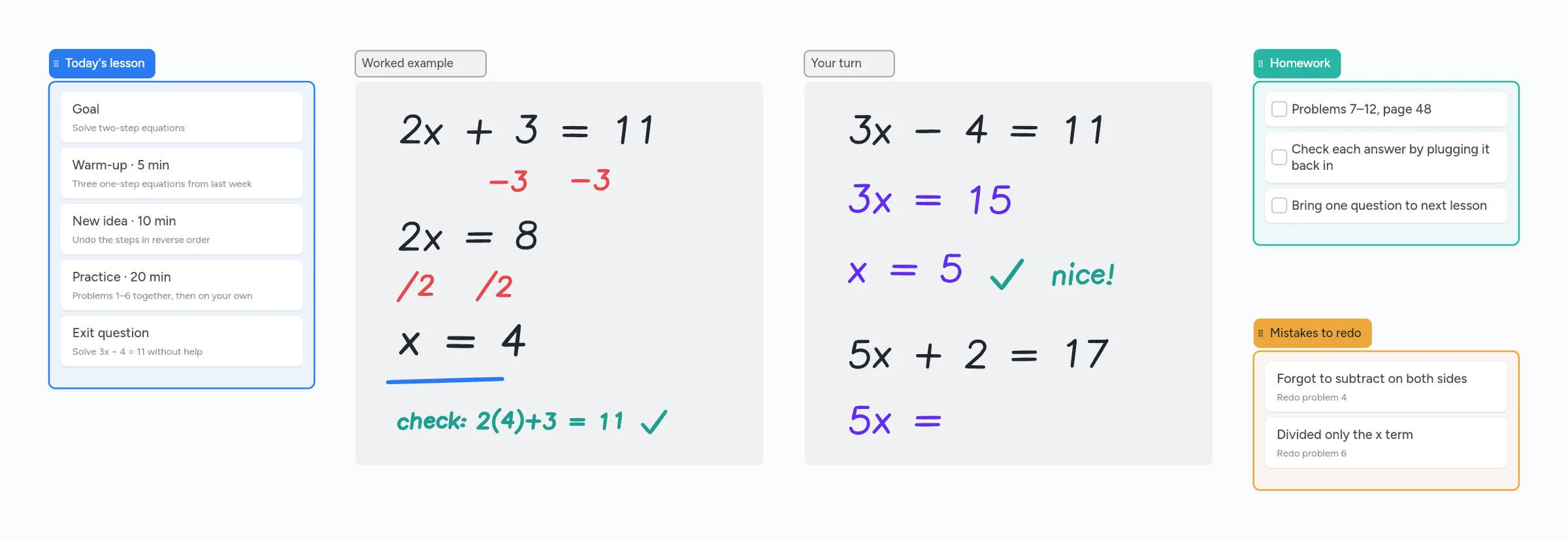
- Before the lesson. Open the lesson board, fill in the plan, and import the worksheet PDF if you have one.
- Share it. Send your student the link, a QR code or a 4-digit join code. They open it in any browser or the app.
- Teach. Work the example with your pen while they watch you write live. Use the laser pointer to show where to look, or have them follow your view.
- Their turn. Your student writes their answer on the same board, so you see their steps as they go.
- After. Tick off the homework and note the mistakes to redo. Your student keeps the link, so the notes stay with them. Next week, open the same board and pick up where you left off.
Built for math and science
- Pressure-sensitive pen and highlighter. Hold the pen still at the end of a stroke and it straightens into a line.
- Stylus mode. The pen draws and your finger scrolls, so your palm doesn't leave marks.
- Equation cards for typed formulas, and a Desmos graphing calculator right on the board.
- Grid or dot background for graphs and number lines.
- Countdown timer for timed practice.
- Images and screenshots. Paste a photo of your student's homework and mark it up.
The setup most online tutors use
Writing math with a mouse is slow and messy. Tutors on r/TutorsHelpingTutors usually settle on one of these:
- iPad + Apple Pencil as a second screen. Join the call on your laptop for the camera, and open the same board on your iPad to write. Instaboard boards sync live across both.
- A drawing tablet. A screenless tablet like a Wacom Intuos or Huion H1060P (around $40–$70) plugs into your laptop. Tutors recommend at least 6×8 inches.
- A pen laptop. Surface and other 2-in-1s work in the browser with the pen.
Your student doesn't need any of this
Students can type, use a mouse or trackpad, or snap a photo of their paper work and drop it on the board.
What to know before you start
- Your student needs a free sign-in to write. Anyone with the link can view; writing needs a free account with Google, Apple or email. It takes about 20 seconds the first time.
- Free covers 5 boards. Pen strokes don't count toward the 150-item limit, so drawing-heavy boards go a long way. With more than a handful of regular students, Pro is $5 a month billed yearly ($59.99 a year).
- Free video calls run up to 60 minutes. Pro calls have no limit, or keep using Zoom or Meet alongside the board.
- The eraser removes whole strokes. Undo is the quickest way to fix the last thing you wrote.
How it compares to other tutoring whiteboards
| Whiteboard | Free | Paid from | Video built in | PDF worksheets |
|---|---|---|---|---|
| Instaboard | 5 boards, unlimited collaborators, 60-min calls | $5/mo billed yearly, flat | Yes | Yes, as pages you write on |
| BitPaper | Join only | $15/mo | Yes | Yes |
| Bramble | 1–2 students | £7.50/mo (yearly) | Yes | Yes |
| Lessonspace | Trial | $9/mo for 10 hours, then $1.95/hour | Yes | Yes |
| Pencil Spaces | Voice + whiteboard | $0.40/hour ($4/mo minimum); recording from $1/hour | On paid plans | Yes |
| Ziteboard | 3 boards, first PDF page only | $9/mo | On Pro | Full PDFs on Pro |
| Miro | 3 editable boards | $8/mo | No | Yes |
| Zoom Whiteboard | 3 boards; free meetings stop at 40 minutes | Add-on from $2.07/mo | Through Zoom | Pages split into slides |
Swipe the table sideways to see every column.
Prices from each product's official pricing page, checked October 2026. At 20 hours a month, Lessonspace Basic comes to $28.50 and Pencil Spaces Expert to $20.
Start from the ready board
It opens in your browser in a few seconds, with nothing to install. Sign in for free when you want to save it and share it.
Questions
What is the best free online whiteboard for tutoring?
It depends on how you teach. If you write by hand, use worksheets and want the board to stay between lessons, Instaboard's free plan covers that, with a video call on the board. If you mostly talk through slides, Zoom or Google Meet with their built-in whiteboards may be enough.
Can I use Instaboard with Zoom or Google Meet?
Yes. Keep your call where it is and share the Instaboard link in the chat. You and your student both write on the board while you talk.
Does my student need an account?
Not to view the board. To write on it, they sign in for free with Google, Apple or email.
Can I upload a PDF worksheet?
Yes. Import a PDF and it opens as a board with its pages, so you and your student can write on every page. Drawing boards can also be exported as a PDF.
Does it work with an iPad and Apple Pencil?
Yes. Instaboard has an iPad app with pressure-sensitive Apple Pencil drawing. Many tutors join the call on their laptop and write on the iPad, and the board syncs live between them.
How much does it cost?
Free to start, with 5 boards and 150 cards and items across your account (pen strokes don't count). Pro is $5 a month billed yearly ($59.99 a year), or $7.99 monthly, with unlimited boards and unlimited call time.
Sources
Related
Microsoft Whiteboard alternatives: what to use now that the apps are gone
The standalone Microsoft Whiteboard apps stopped on October 16, 2026. What changed, how to save your boards, and free alternatives for pen users, tutors and teachers, with real free-plan limits.
Jamboard alternatives for teachers, and how to get your old Jams back
Google Jamboard shut down on December 31, 2024, and your Jams are now PDFs in Google Drive. How to find them, keep using them, and the best Jamboard alternatives for teachers, with real free-plan limits.