For the coworkers who got asked to plan the party
An office holiday party planning board: who owns what, in one place
This is for a small committee of coworkers planning the office holiday party: a list each for the budget, venue, food and drink, entertainment, gift swap rules, headcount, the evening and the clean-up, and an owner's name on every card. It is a planning board, not an event service. It doesn't collect RSVPs, send reminders, run polls or take votes. SignUpGenius, a venue site or a spreadsheet do those, and the next section says where. Use the board for the part around them: what has been decided, who is doing the next thing, and what is still waiting on an answer, in one place that every committee member can open from a link.
Updated
The short answer
- What it is: one board with a list for each part of the party (budget, venue, food and drink, entertainment, gift swap rules, invites and headcount, the evening, after the party, open questions) and a card for each thing to do. Every task card says "Owner:" and a first name, and DONE, WAIT or TODO starts its title. Open questions name an owner too.
- What it isn't: no RSVP form, no reminders, no polls or voting, no sign-up slots for dishes. SignUpGenius is the tool for sign-ups, and a spreadsheet adds up a budget for you. The budget list here is cards you add up yourself.
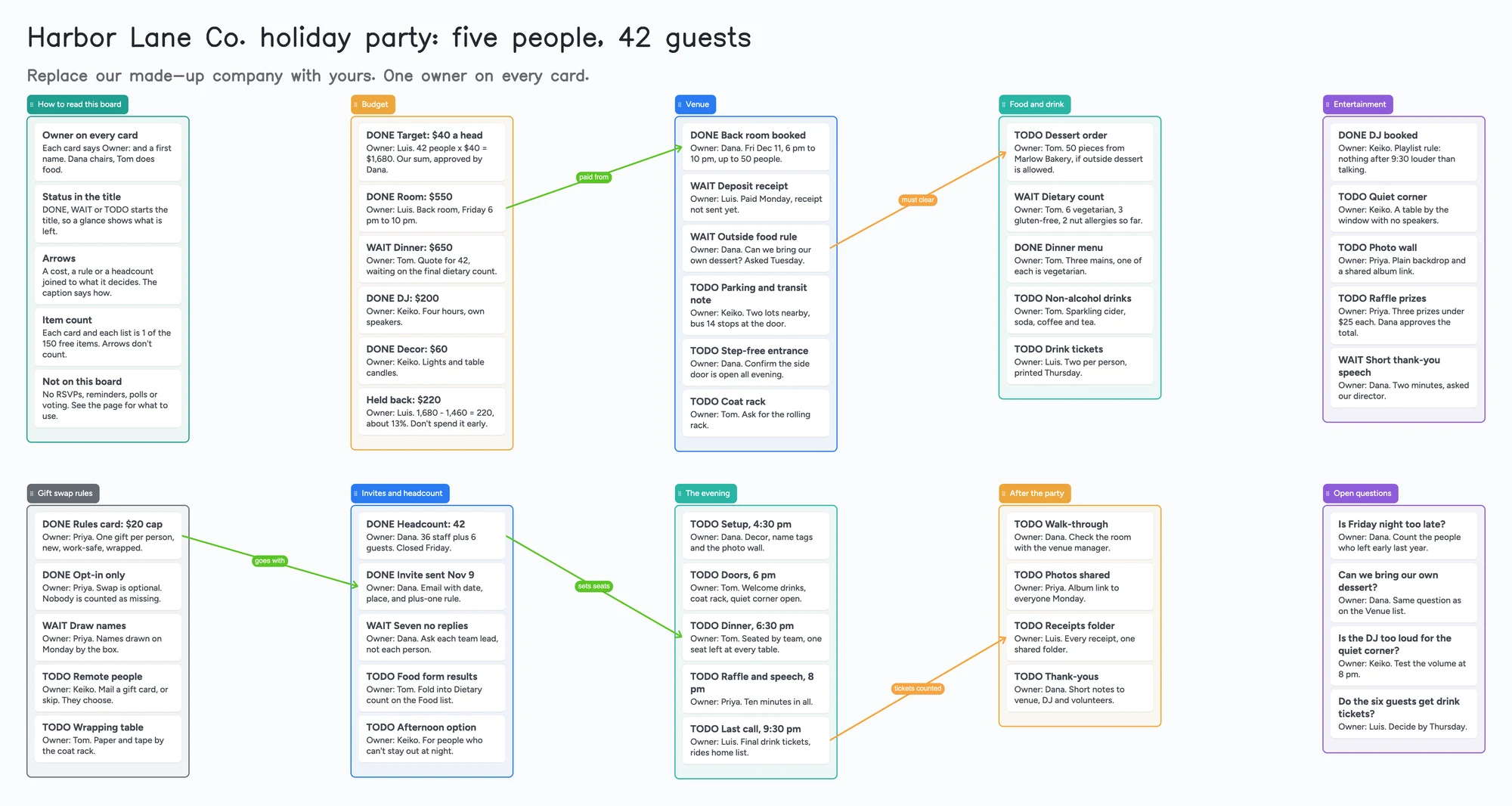
- Arrows: an arrow can join a card in one list to a card in another, takes a caption and its own colour, and stays attached when a card is reordered or a list moves. The example joins a room cost to the booking it pays for, and the final headcount to the dinner it sizes.
- Free plan: the example is 60 of your 150 free items (50 cards and 10 lists, our count). Arrows, sections and pen strokes don't count. A larger party with a card per guest passes 150 (Pro is $5/mo billed yearly).
What this board doesn't do, and where SignUpGenius, Cvent and a spreadsheet are better
Read on November 11, 2026 from each tool's own pages. SignUpGenius's guide to the office holiday party puts the planning in a committee: "two to four people who can split the work", each with one job. Its roles are a lead (budget, date, venue, updates to leadership), a food lead (caterer or potluck sign-up, dietary needs, drinks), an activities lead (games, gift exchange, playlist, prizes) and a remote lead. It says to form the committee, get the budget approved and pick the date about eight weeks out. Its pricing page lists a Free plan with unlimited sign-up pages and automatic confirmation and reminder emails, with paid plans above it.
Cvent's holiday party checklist, dated August 4, 2026, gets to the same budget point from the venue side: divide the total by the expected headcount to see what kind of party you can afford, protect a buffer of roughly 10 to 15 percent, and request quotes from at least three venues. It points to the Cvent Supplier Network to search venues, send requests for proposals and compare proposals side by side. SignUpGenius's guide gives the same 10 to 15 percent figure for money left unspent.
Where these tools win
If you need guests to claim dishes or shifts, use SignUpGenius. If you need to search venues and compare proposals, use a venue marketplace like Cvent's. If you need a budget that adds itself up, use a spreadsheet. Use this board first, or next to them, when a small committee needs one place that shows who owns each open item and what each answer is waiting on.
How to plan the party on the board
Commenters in two Reddit threads describe the same shape. One commenter in r/ExecutiveAssistants (December 2023) said they kept their parties simple: cocktails, dinner, music, nothing people were obligated to take part in. Another said that year they hired a day-of coordinator so they could enjoy the party. In r/humanresources (December 2021), a commenter told the person who had been handed the party: "Put together a committee. You do not have to take this on." Each of those is one person's view, not a rule. The board doesn't force a style. It gives every part of the party a list.
- Start with the budget list. One card per cost with the amount, and a first card for the per-head target. The example is a $40 target for 42 people, $1,680 in all, with $550 room, $650 dinner, $200 DJ and $60 decor planned. Those four add to $1,460 and leave $220 unspent, about 13 percent (our arithmetic).
- Name an owner on every card. Write "Owner:" and a first name on the first line. A card with no owner is the first thing to fix. Two people can still talk about a card; one of them has to be responsible for it.
- Start each title with DONE, WAIT or TODO. Change the word when the status changes. Nothing sorts by it, so you scan for it by eye: that is the trade for a board that takes a minute to learn.
- Put the answers a card is waiting on in their own cards. The example has a card for the venue's rule on outside food and another for the dessert order, joined by an arrow captioned "must clear". When the venue answers, the committee sees which order is unblocked.
- Write the gift swap rules on a card, not in a chat. The example uses a $20 cap, new and work-safe gifts, and an opt-in swap so nobody is counted as missing. They are the example's rules, not a recommendation. Copy the card, change the numbers, and the whole committee sees the same rule.
- Keep the evening on one list. Setup, doors, dinner, raffle and last call, each with a time and an owner, so the person at the door doesn't need to read the whole board.
- Share it. In the share menu set Share to "Anyone with the link can edit" (new boards start view-only). A committee member signs in free and writes live, and you each see the other's changes within seconds. If someone only needs to read the plan, the same link works signed out. The 4-digit join code expires after 2 hours of inactivity.
When the committee works from different desks
A party committee rarely meets more than once or twice. The board is the place it works in between: the person who owns food reads the venue list, the lead reads the budget list, and an open question goes in the last list instead of a message that scrolls away. Two people typing in the same card at the same time are merged keystroke by keystroke, with no lock, so give each person their own cards or list. Free calls on the board run up to 60 minutes per call, with a warning 10 minutes before the end. Calls need a free sign-in for everyone, aren't recorded, and Pro has no limit.
Planning other group events on one board? See the wedding vendor comparison board, the wedding guest list board and the short film pre-production board, which uses the same owner-on-every-card layout.
This board vs SignUpGenius vs Cvent vs a spreadsheet
| Tool | What we read (Nov 11, 2026) | Good at | Not what you get |
|---|---|---|---|
| Instaboard board | Free: 5 boards, 150 items. Pro $5/mo billed yearly | Who owns what, what an answer is waiting on, a committee on one link after a free sign-in | RSVPs, reminders, polls, sign-up slots, budget sums |
| SignUpGenius | Free plan: unlimited sign-up pages, automatic confirmation and reminder emails; paid plans above it | Dish and shift sign-ups, reminders to the people who signed up | A free-form board of cards and arrows |
| Cvent Supplier Network | Venue search, requests for proposals and side-by-side proposals, per Cvent's checklist | Finding and comparing venues in a city | A shared plan for the whole party |
| A spreadsheet | Not a vendor claim; our reading | Budget sums, sorting by cost | A card per task with an owner and arrows between them |
Swipe the table sideways to see every column.
From each tool's own pages, read November 11, 2026. A spreadsheet row is our own comparison, not a quote.
Limits of the free plan for a party
- Items. Each card and each list is 1 of your 150 free items, across all your boards. The example is 50 cards and 10 lists, 60 in all. Arrows, sections and pen strokes don't count.
- A card per guest passes 150. Our arithmetic: the example has no guest cards, and 42 guests as cards on top of its 60 items would be 102. A party of 100 with a card each, plus the plan, would not fit beside your other boards.
- Boards. The free plan includes 5 boards. A card that opens its own board uses one of them, so the example keeps everything on one board.
- Photos. 3 images per board. The example has none; the photo wall card holds a link to a shared album. On the web a link card's preview picture no longer counts toward the 3, but the iPhone, iPad and Android apps still count it until their next update.
- No reminders, no due-date alerts, no sorting by status. The board doesn't tell anyone that a deposit is late. Card colour is the border and text only.
- No RSVPs or polls. Guests can't answer on the board. Collect answers in an email or a form and write the count on a card.
- Writing needs a free sign-in. A coworker who joins by link or code can add cards and arrows, and the board counts as one of their 5.
Start from the ready board
It opens in your browser in a few seconds, with nothing to install. Sign in for free when you want to save it and share it.
Questions
Is there a free office holiday party planning template?
Yes. Open the board, replace the example company with yours and turn on "Anyone with the link can edit" if your committee needs to write on it. It is a board of cards, lists and arrows, not a budget spreadsheet or a sign-up sheet.
Can guests RSVP on the board?
No. It has no RSVP form, reminders, polls or voting. Use an email, a form or SignUpGenius to collect answers, then write the headcount on a card.
Can the whole committee work on it at once?
A person who opens the link and signs in free can write on it live; you each see the other's changes within seconds. The board counts as one of their 5 free boards, and the cards they add count toward their own 150 items. If two people type in one card at once their text merges, so give each person their own cards.
How many cards fit on the free plan?
Each card and each list is one item of the 150 across all your boards. The example party is 60. That is our arithmetic. Arrows are free.
Does it work for a team lunch or a remote celebration?
The lists work for any small team event, but the example and the wording are an evening party. Swap the venue list for your lunch order or your video call plan.
Sources
- SignUpGenius: How to plan an office holiday party (read November 11, 2026)
- SignUpGenius: pricing (read November 11, 2026)
- Cvent: Holiday Party Planning Checklist for Office Managers (August 4, 2026; read November 11, 2026)
- r/ExecutiveAssistants: who plans your company holiday party (December 2023, replies are single accounts)
- r/humanresources: office holiday party planning (December 2021, replies are single accounts)
Related
A short film pre-production board: who owns what, on one screen
Plan a short film with a director and a producer on one shared board: cast, crew, gear, permits, locations and shoot days. Free ready board, and where StudioBinder does more.
A wedding vendor comparison board you and your family can all see
Compare wedding venue and vendor quotes on one shared board: a list per vendor type, a card per quote, decide-by dates. A filled example to copy. Not a spreadsheet.
A wedding guest list board for your names and both sets of parents' names
Wedding guest list tracker on one shared board: your list and each parent's, A/B tiers, headcount vs venue. A Google Sheets template alternative.