For accounting tutors
How to teach accounting online on a whiteboard: debits and credits, step by step
Beginners meet accounting as a set of rules about which side of the page a number goes on. Online, the question is whether you and your student can write the same entries and check them together. This page walks through one lesson, four journal entries and a T-account for an invented shop, and says plainly what Instaboard does for accounting: entries and ledgers are hand-written ink, and there is no spreadsheet, no automatic totals and no accounting software.
Updated
The short answer
- Use the board as a journal and ledger page. Write the entry, check the accounting equation, post it to a T-account, then let your student do the next transaction on the same page.
- Entries and ledgers are hand-written ink on Instaboard. There is no spreadsheet, no automatic totals and no accounting software. Every sum is written by you or your student.
- Start from the rules, with an example the student knows. In a 2023 r/Accounting thread, an intro-accounting teacher asked how to make the subject approachable; replies suggested everyday transactions, such as asking students who spent money today and building the entries from that.
- Students can view with no account but need a free sign-in to write. Free calls run 60 minutes; Pro ($5 a month billed yearly) has no limit.
What a lesson on the board looks like
The call sits on top of the board, so you talk and write in the same place. You write the first entries, your student writes the next one in their own colour, and you check that both sides still match.
What an accounting tutor does on a whiteboard
Accounting is mostly written work in set layouts, which suits a shared page. In the same 2023 r/Accounting thread, replies caution against explaining debits and credits as balancing a checkbook, suggest real-life examples, and one teacher says to be open about what you do not know. In a 2022 r/AskAcademia thread of tutoring tips, one reply says to learn the exact methods the course uses, not to assume what the student already knows, not to skip steps, and to ask for a reasonable attempt first. In a 2026 r/Accounting thread, a controller says new hires with two to four years of experience cannot answer basic debit and credit questions, and replies blame coursework that teaches theory without applied practice. These are individual views, but they point to four jobs for the board:
- Write the entry in the standard layout, so the student sees the pattern before the words.
- Check it every time. Debits equal credits, and the accounting equation still balances.
- Post it to a T-account and total the two sides.
- Let the student do the next transaction in their own colour, without skipping a step.
A tablet or pen tablet makes handwriting faster than a mouse; see which pen tablet to buy and online tutoring setup. For the maths side of the same habit, see an online whiteboard for math.
A debits and credits lesson in five steps
OpenStax Principles of Accounting, Volume 1, section 3.2 expands the accounting equation: assets sit on the left, liabilities and equity on the right, and equity rises with common stock and revenue and falls with dividends and expenses. Section 3.5 gives the journal layout: a date, the debit accounts first and on the left, the credit accounts after them and indented, at least one of each, debits equal to credits, and a short description. It also says assets increase on the debit side and decrease on the credit side, and that a liability increases on the credit side and decreases on the debit side. The board follows that order with our own made-up numbers for a bike repair shop:
- Ask first: what does the shop own, and what does it owe? Let the student answer before you write anything.
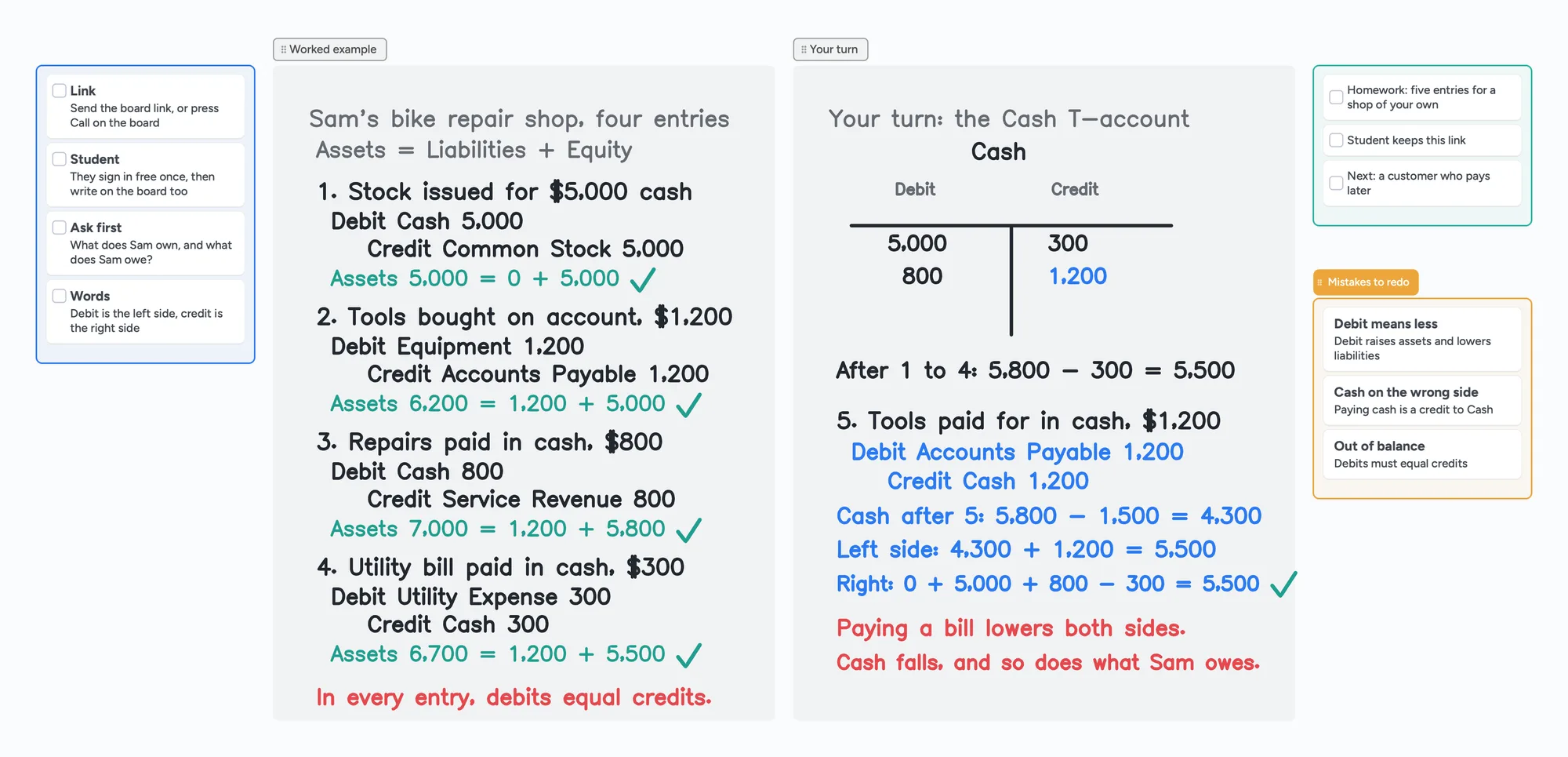
- Write entry 1 and check it: stock issued for $5,000 cash. Debit Cash 5,000, credit Common Stock 5,000. Assets 5,000 = 0 + 5,000.
- Write entries 2 to 4 the same way, checking the equation each time: tools bought on account for $1,200, repairs paid in cash for $800, a utility bill paid for $300.
- Post the Cash entries to a T-account: debits 5,000 and 800 on the left, the 300 credit on the right. The balance is the difference of the two sides, 5,800 minus 300, which is 5,500.
- Student's turn, entry 5: the $1,200 owed for the tools is paid in cash. Debit Accounts Payable 1,200, credit Cash 1,200. Cash falls to 4,300, so the left side is 4,300 + 1,200 = 5,500, and the right side is still 0 + 5,000 + 800 - 300 = 5,500.
| Entry | Debit | Credit | Assets = Liabilities + Equity |
|---|---|---|---|
| 1. Stock issued for $5,000 cash | Cash 5,000 | Common Stock 5,000 | 5,000 = 0 + 5,000 |
| 2. Tools on account, $1,200 | Equipment 1,200 | Accounts Payable 1,200 | 6,200 = 1,200 + 5,000 |
| 3. Repairs paid in cash, $800 | Cash 800 | Service Revenue 800 | 7,000 = 1,200 + 5,800 |
| 4. Utility bill paid, $300 | Utility Expense 300 | Cash 300 | 6,700 = 1,200 + 5,500 |
| 5. Student: tools paid in cash, $1,200 | Accounts Payable 1,200 | Cash 1,200 | 5,500 = 0 + 5,500 |
Swipe the table sideways to see every column.
The layout and the debit and credit rules follow OpenStax Principles of Accounting, Volume 1, sections 3.2 and 3.5 (read November 2, 2026). The shop and every amount are invented for this lesson, not real accounts.
The point worth saying out loud is the red note on the board: paying a bill lowers both sides. Cash falls on the left, and what the shop owes falls on the right. The usual slips are treating a debit as always meaning less, putting a cash payment on the debit side of Cash, and leaving the two sides out of balance.
Writing accounting on Instaboard
On Instaboard you write with the pen, like a whiteboard in a room. Here is what that means, so you can decide before the lesson:
- Hand-written entries and T-accounts. Journal lines, the T, the columns and the totals are pen strokes, as on the board above. The board does not check them or add them up.
- Hand-written sums. Every total is written by you or your student, which is the point of a first lesson, because the student sees where the number comes from.
- Cards and lists for the rest. Use a checklist beside the entries for steps, homework or the chart of accounts.
- The worksheet or textbook problem. Import the student's PDF and write on it. Each imported PDF uses one of the 5 free boards.
No spreadsheet, no accounting software
Instaboard has no spreadsheet, no formulas or automatic totals, no accounting software and no statement templates, and it cannot open an Excel file. If your student needs Excel or software practice, use those tools for that part and keep the board for the reasoning.
When another tool is the better choice
- Your student needs spreadsheet or software practice. In the 2026 r/Accounting thread, replies say coursework often lacks applied practice. A spreadsheet adds up for you and an accounting package shows a real ledger; Instaboard does neither.
- Your student only needs to watch. Screen-share annotation on your own platform is enough if you do not need them to write.
- Your platform already has a whiteboard you like. Keep it if it works for you.
- You want a recording of the lesson. Instaboard does not record.
- You teach a large class. Instaboard has no class mode.
OpenStax itself notes that T-accounts are only used for illustration in a textbook, classroom or business discussion, and that companies keep official ledgers instead. Instaboard fits when you teach the rules by writing, you want the student to do the next entry, and you want the call, the entries and the T-account on one link.
Use the lesson board in five steps
- Open the accounting board above and make it yours.
- Send your student the link, or press Call on the board so the lesson runs in one place. They sign in free once to write.
- Swap in your topic. Replace the shop with the company in your student's textbook problem, or with a business they know.
- Let the student do the next entry in their own colour and say which accounts rise and which fall.
- Leave the board open as the revision sheet and start the next lesson from it.
The same pattern works for other subjects: how to teach math online and how to teach economics online. To keep notes across lessons, see the tutoring session notes template.
What Instaboard doesn't do for accounting
- No spreadsheet, no formulas, no automatic totals. Every sum is hand-written.
- No accounting software and no statement templates. There is no ledger that posts for you and no balance sheet or income statement layout.
- No Excel import. You can import a PDF, not a spreadsheet.
- No handwriting reading. Handwritten numbers are not searchable or checked.
- Whole-stroke eraser only. You cannot rub out part of a line; erase the stroke and rewrite it.
- No recording of the lesson, no class mode, no scheduling.
- Students sign in to write. Anyone with the link can view; writing needs a free sign-in. Free calls run 60 minutes.
- Free covers 5 boards. Each imported PDF uses one of them. Pen strokes do not count toward the 150-item limit; cards and lists do.
- Free boards are shared by link, so use first names only.
Start from the ready board
It opens in your browser in a few seconds, with nothing to install. Sign in for free when you want to save it and share it.
Questions
How do I teach accounting on an online whiteboard?
Write the journal entry in the standard layout, check that debits equal credits and that the accounting equation still balances, post it to a T-account, then let the student do the next transaction on the same board. Import the student's worksheet as a PDF so you both write on the real problem.
Can I use Instaboard instead of Excel for accounting?
No. Instaboard has no spreadsheet, formulas or automatic totals, and it cannot open Excel files. Use it to teach the rules by writing, and use a spreadsheet for the part that needs one.
What are the debit and credit rules for assets?
OpenStax Principles of Accounting, Volume 1, section 3.5, says assets increase on the debit side and decrease on the credit side, and liabilities increase on the credit side and decrease on the debit side.
What is a T-account?
A graphic of one account with debits on the left and credits on the right. The balance is the difference between the two sides. OpenStax notes that T-accounts are used for illustration; companies keep official ledgers.
Do I need a tablet to teach accounting online?
No, but handwriting columns of numbers is slow with a mouse. A touchscreen laptop, an iPad or a pen tablet helps.
Is Instaboard free?
Yes. The free plan includes 5 boards, 150 cards and items across your account (pen strokes, arrows and sections don't count), 3 images and 1 file per board, unlimited collaborators and video calls up to an hour. Pro is $5 a month billed yearly ($59.99 a year), or $7.99 monthly, and the people you invite join free.
Sources
- OpenStax Principles of Accounting, Volume 1, 3.2 Define and Describe the Expanded Accounting Equation and Its Relationship to Analyzing Transactions
- OpenStax Principles of Accounting, Volume 1, 3.5 Use Journal Entries to Record Transactions and Post to T-Accounts
- r/Accounting: Intro accounting teacher asking how to make it approachable (May 9, 2023)
- r/AskAcademia: Tutoring tips (January 16, 2022)
- r/Accounting: A controller on new hires and basic debits and credits (September 20, 2026)
Related
How to teach math online: your first lesson, step by step
How to tutor math online as a beginner: what you need, how to run a first lesson on a board your student writes on too, with Zoom, Google Meet or no video app at all, and what to do without a whiteboard.
How to teach economics online on a whiteboard: a price elasticity lesson, step by step
How an economics tutor can teach on an online whiteboard: a price elasticity lesson step by step, hand-drawn demand graphs the student works on too, and when another tool is better. Ready lesson board included.
An online whiteboard for math: write, graph and let your student write too
What a math tutor needs from an online whiteboard: handwriting, typed equations, graphs and worksheets, and which tools have each. Free limits compared, plus a ready slope lesson board.
An online whiteboard for tutoring that works the way you teach
A free whiteboard for online tutoring: paste the worksheet, write with a pen, and your student answers on the same board. Call on it or beside Zoom.
A tutoring session notes template, filled in so you can see how it reads
What to write after each tutoring session: outcome, what went wrong, evidence, next task and a short parent note. A copy-and-use template and a filled board you can send as one link.
Online tutoring setup: what you need before your first lesson
What you need to start tutoring online: sound, light, camera, internet, a way to write, and a board your student writes on too. A plain checklist with a five-minute test call and a ready board to open.