For chemistry tutors
How to teach chemistry online on a whiteboard: a mole-ratio lesson, step by step
Tutors who are asked to teach chemistry on a whiteboard often wonder what the board is for. For most lessons it is a shared sheet where you work a problem line by line and your student does the next one. This page walks through one real lesson, mole ratios from a balanced equation, and says plainly what you can and cannot draw on Instaboard: formulas and numbers are written by hand, and there is no structure editor.
Updated
The short answer
- Use the board as a shared worked-solution sheet. Write the balanced equation, take the ratio from the coefficients, and let your student write the next line.
- Formulas and structures are hand-drawn ink on Instaboard. There is no chemical structure editor. For organic structures drawn from SMILES or a structure editor, Molbrett (built on Ketcher) is the better tool.
- Bring the worksheet in. Import it as a PDF and you both write on the real problem; each imported PDF uses one of the 5 free boards.
- Students can view with no account but need a free sign-in to write. Free calls run 60 minutes; Pro ($5 a month billed yearly) has no limit.
What a lesson on the board looks like
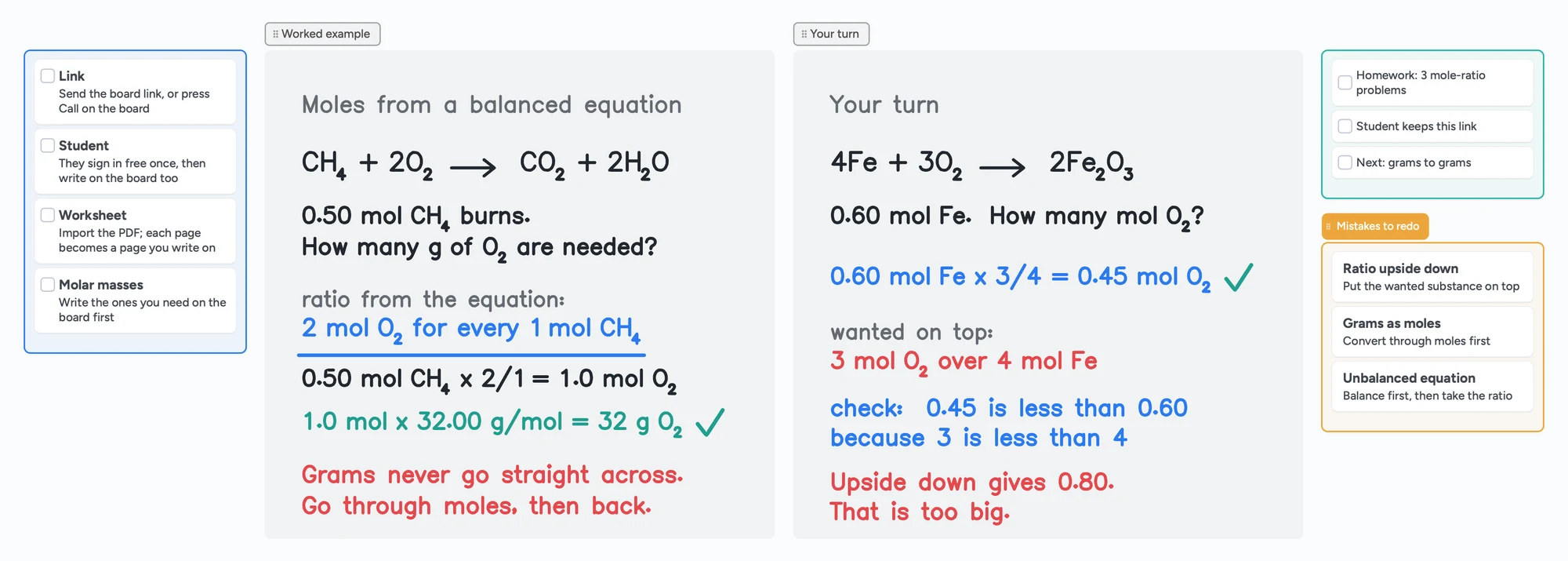
The call sits on top of the board, so you talk and write in the same place. You write the equation, your student writes the next line in their own colour, and you tick it.
What a chemistry tutor does on a whiteboard
A chemistry tutor on r/TutorsHelpingTutors (December 2025) taught privately with slides, drawing on them, and was then asked by agencies to teach on a whiteboard. The three replies describe the same few habits: one tutor writes on a tablet and shares the screen, another says whiteboards let you upload images and files and keep annotating them, and a third uses whiteboard tools where you upload files, work problems on a blank canvas, and the students can work the problems there too. Those habits turn into four jobs for the board:
- Show the worked example. Write the equation and each step of the working so the student sees the order.
- Let the student write the next one. Chemistry is learned by doing the second problem yourself.
- Mark up the real worksheet. Import the student's PDF and write on it instead of retyping the problem.
- Keep the lesson afterwards. The same link is the student's revision sheet.
A tablet or pen tablet makes writing subscripts and arrows faster; see which pen tablet to buy and online tutoring setup.
A mole-ratio lesson in five steps
OpenStax Chemistry 2e, section 4.3, teaches reaction stoichiometry the same way: the coefficients of a balanced equation give stoichiometric factors, and for masses you convert grams to moles, apply the factor, then convert back. The board above follows that order with our own numbers:
- Write the balanced equation: CH4 + 2O2 → CO2 + 2H2O. Balance it first; the ratio only works on a balanced equation.
- State the question and the given amount: 0.50 mol CH4 burns. How many grams of O2 are needed?
- Take the ratio from the coefficients, wanted substance on top: 2 mol O2 for every 1 mol CH4.
- Multiply: 0.50 mol CH4 × 2/1 = 1.0 mol O2.
- Convert to grams: 1.0 mol × 32.00 g/mol = 32 g O2. Grams never go straight across; go through moles and back.
Then it is the student's turn: 4Fe + 3O2 → 2Fe2O3, with 0.60 mol Fe. The ratio is 3 mol O2 over 4 mol Fe, so 0.60 × 3/4 = 0.45 mol O2. A quick check helps: the answer is smaller than 0.60 because 3 is smaller than 4, and turning the ratio upside down would give 0.80, which is too big.
| Step | On the board | Why it matters |
|---|---|---|
| Balance | CH4 + 2O2 → CO2 + 2H2O | The coefficients are the ratio. |
| Ratio | 2 mol O2 per 1 mol CH4 | Wanted substance on top, so the units cancel. |
| Moles | 0.50 × 2/1 = 1.0 mol O2 | The step students rush. |
| Grams | 1.0 mol × 32.00 g/mol = 32 g O2 | Back to the unit the question asked for. |
| Check | Is the size of the answer sensible? | Catches an upside-down ratio. |
Swipe the table sideways to see every column.
The method follows OpenStax Chemistry 2e, section 4.3 (read November 2, 2026). The numbers and the iron-oxygen exercise are our own, checked by hand.
Writing chemistry on Instaboard
On Instaboard you write formulas and numbers with the pen, like a whiteboard in a room. Subscripts, arrows and coefficients are drawn, not typed. Here is what that means, so you can decide before the lesson:
- Hand-drawn formulas, equations and working. This is what the board above uses. It reads like a tutor writing live.
- Hand-drawn structures. You can sketch a simple structure or a mechanism arrow with the pen, but it is a drawing, not a structure the board understands. It will not clean up bond angles or check valence.
- A picture of a structure. You can add an image, for example an export from a structure editor. Free boards allow 3 images per board.
- The worksheet. Import the PDF and write on it. Each imported PDF uses one of the 5 free boards.
No structure editor
Instaboard has no chemical structure editor, no SMILES input and no reaction templates. If your lessons are mostly drawing organic structures, use a tool built for that and bring it into the lesson as a picture.
When a chemistry whiteboard is the better choice
Chemistry drawing tools exist, and they do something Instaboard does not. Here is what their own pages say (read November 2, 2026):
| Tool | What it does | What it means for a tutor |
|---|---|---|
| Molbrett (Elsci) | A free chemistry whiteboard. Per its page, you sketch or paste chemical structures (SMILES, InChI, MOL/SDF) and double-click to edit them, and you can draw, annotate, highlight and share. A private version is available on request. | Better for organic structures and synthetic routes. Its page does not list free limits, so check them before relying on it. |
| Ketcher (EPAM, open source) | A web structure editor for small molecules, reactions and biomolecules. Supports stereochemistry, reaction details and many file formats, and exports PNG and SVG. | Draw a structure properly, export a PNG, add it to a lesson as a picture. |
| Instaboard | A shared board with a pen, cards, lists, PDF import and a built-in call. Formulas and structures are hand-drawn. | Better for working a calculation with a student, marking up their worksheet and keeping the lesson on one link. |
Swipe the table sideways to see every column.
Molbrett: molbrett.elsci.io and elsci.io/molbrett. Ketcher: lifescience.opensource.epam.com/ketcher. The r/chemistry post by Molbrett's authors (June 2025) says it is built on Excalidraw with the embedded Ketcher editor, and that a structure is inserted as a picture on the board.
A common split is to draw structures in a structure editor and do the calculation work on a shared board. For a second chemistry example on a board, the Lessonspace comparison comes with a balancing-equations lesson.
Use the lesson board in five steps
- Open the chemistry board above and make it yours.
- Send your student the link, or press Call on the board so the lesson runs in one place. They sign in free once to write.
- Swap in your topic. Replace the methane example with the reaction you are teaching, and write the molar masses you need on the board first.
- Let the student take the next problem and write it in their own colour.
- Leave the board open as the revision sheet and start the next lesson from it.
The same pattern works for other subjects: how to teach math online and an online whiteboard for math show it with a graph and a worked example.
What Instaboard doesn't do for chemistry
- No chemical structure editor, no SMILES or MOL input, no reaction templates. Structures are hand-drawn ink.
- No typed LaTeX editor. Equation cards typeset formulas, but formulas and subscripts on the board above are written by hand.
- No periodic table, molar-mass calculator or simulations. Write the molar masses you need, or share your screen for a simulation.
- Whole-stroke eraser only. You cannot rub out part of a line; erase the stroke and rewrite it.
- No recording of the lesson, no class mode, no scheduling.
- Students sign in to write. Anyone with the link can view; writing needs a free sign-in. Free calls run 60 minutes.
- Free covers 5 boards. Each imported PDF uses one of them. Pen strokes do not count toward the 150-item limit; cards and lists do.
Start from the ready board
It opens in your browser in a few seconds, with nothing to install. Sign in for free when you want to save it and share it.
Questions
How do I teach chemistry on an online whiteboard?
Write the balanced equation, take the ratio from the coefficients, work the example line by line, then let the student write the next problem on the same board. Import the student's worksheet as a PDF so you both write on the real problem.
Can I draw chemical structures on Instaboard?
Only by hand. There is no structure editor, so a structure is a pen drawing that the board does not understand. For clean organic structures, draw them in a structure editor such as Ketcher or Molbrett and add the picture to the board.
Do I need a tablet to teach chemistry online?
No, but writing subscripts, arrows and coefficients with a mouse is slow. A tablet, an iPad or a pen tablet makes it faster. The tutor in the r/TutorsHelpingTutors thread writes on a tablet and shares the screen.
Can my student write on the board too?
Yes. Students can view without an account and need a free sign-in to write. They write in their own colour on the same page.
Is Molbrett free?
Its page offers a free version for sketching and pasting structures and a private version on request. It does not list free limits, so check them on their site.
Is Instaboard free?
Yes. The free plan includes 5 boards, 150 cards and items across your account (pen strokes, arrows and sections don't count), 3 images and 1 file per board, unlimited collaborators and video calls up to an hour. Pro is $5 a month billed yearly ($59.99 a year), or $7.99 monthly, and the people you invite join free.
Sources
- r/TutorsHelpingTutors: Need Advice on Online Teaching Tools for Chemistry (December 28, 2025)
- r/chemistry: Online whiteboard for chemistry, Molbrett post (June 5, 2025)
- Molbrett, chemistry whiteboard (Elsci)
- Molbrett: draw molecules (Elsci)
- Ketcher, open-source chemical structure editor (EPAM)
- OpenStax Chemistry 2e, 4.3 Reaction Stoichiometry
Related
An online whiteboard for math: write, graph and let your student write too
What a math tutor needs from an online whiteboard: handwriting, typed equations, graphs and worksheets, and which tools have each. Free limits compared, plus a ready slope lesson board.
How to teach math online: your first lesson, step by step
How to tutor math online as a beginner: what you need, how to run a first lesson on a board your student writes on too, with Zoom, Google Meet or no video app at all, and what to do without a whiteboard.
An online whiteboard for tutoring that works the way you teach
A free whiteboard for online tutoring: paste the worksheet, write with a pen, and your student answers on the same board. Call on it or beside Zoom.
A Lessonspace alternative for tutors who don't want to pay by the hour
Lessonspace has no free plan, only a trial: $9 a month covers 10 hours, then $1.95 an hour. What 10, 20 and 30 hours cost, what Lessonspace does better, and a free board where your student writes too.
A pen tablet for online tutoring: what to buy and how to set it up
Which pen tablet to buy for online tutoring (Wacom, XP-Pen, Huion, about $40 to $60), how to set it up with pen pressure in the browser, and a whiteboard your student can write on too.
Online tutoring setup: what you need before your first lesson
What you need to start tutoring online: sound, light, camera, internet, a way to write, and a board your student writes on too. A plain checklist with a five-minute test call and a ready board to open.