For SAT math tutors
How to tutor SAT math online on a whiteboard: one SAT-style lesson, step by step
An SAT math lesson has two jobs: teach the method, and get the student to do the next problem themselves. A shared board is good at both. It is not a practice-test engine: this page shows one lesson on a board and says plainly what Instaboard does not do, no question bank, no timed tests and no score reports. For those, College Board's own Bluebook app is the official tool.
Updated
The short answer
- Use the board for method, not for volume. Work one problem line by line, check it by putting the answer back in, then let the student do the next one on the same page.
- Know what the test covers. The College Board says the Math section has four types of questions, Algebra, Advanced Math, Problem-Solving and Data Analysis, and Geometry and Trigonometry, in 44 questions over two 35-minute modules.
- Take timed practice in Bluebook. Instaboard has no question bank, no timer and no score reports. College Board's Bluebook app has timed, scored full-length practice tests and a Student Question Bank of official questions.
- Students can view with no account but need a free sign-in to write. Free calls run 60 minutes per call, with a warning 10 minutes before the end; Pro ($5 a month billed yearly) has no limit.
What a lesson on the board looks like
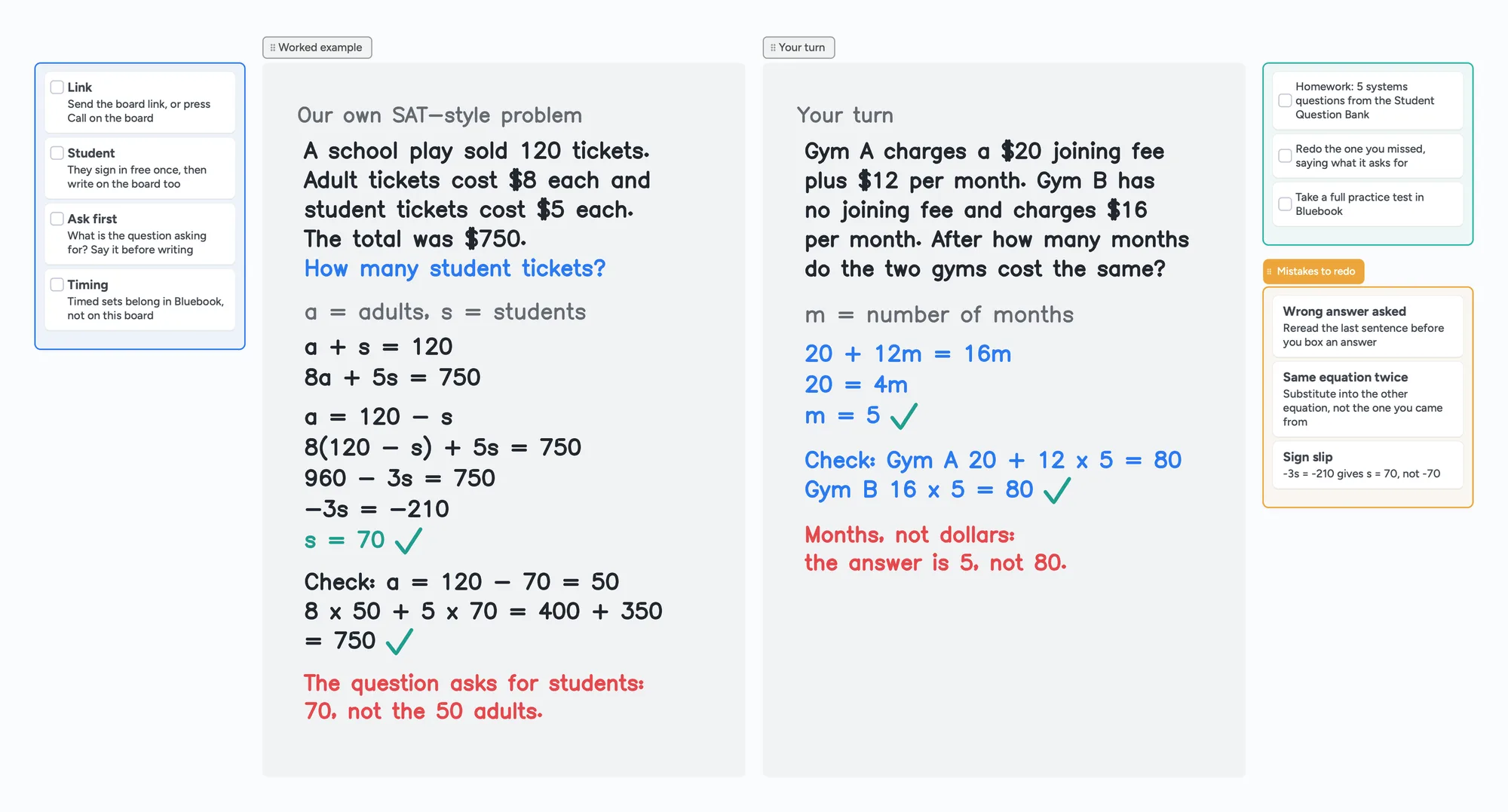
The call sits on top of the board, so you talk and write in the same place. You work the first problem, your student does the next one in their own colour, and you check it together.
What the SAT Math section tests
From College Board's own pages (read November 2, 2026): the Math section is split into two modules, answered as multiple-choice and student-produced response questions. Each module has 20 scored questions and 2 pretest questions, 44 in all, and each is timed at 35 minutes, 70 minutes in total. Questions run from easiest to hardest within a module, and about 30% are set in context, which College Board describes as science, social studies or real-world scenarios.
| Type of math | Share of questions (about) | Skill and knowledge testing points listed by College Board |
|---|---|---|
| Algebra | 35% | Linear equations in 1 variable; linear equations in 2 variables; linear functions; systems of 2 linear equations in 2 variables; linear inequalities in 1 or 2 variables |
| Advanced Math | 35% | Equivalent expressions; nonlinear equations in 1 variable and systems of equations in 2 variables; nonlinear functions |
| Problem-Solving and Data Analysis | 15% | Ratios, rates, proportional relationships and units; percentages; one-variable data; two-variable data; probability; inference from sample statistics; evaluating statistical claims |
| Geometry and Trigonometry | 15% | Area and volume; lines, angles and triangles; right triangles and trigonometry; circles |
Swipe the table sideways to see every column.
Shares and testing points are from College Board's Math Specifications page for the SAT; the section overview lists 13 to 15 questions for each of Algebra and Advanced Math and 5 to 7 for each of the other two. Both pages read November 2, 2026. Test formats can change, so check College Board's pages before you plan a course.
That is why the sample lesson on this page is a word problem solved as a system of two equations: Algebra is about a third of the section, and in-context questions are about 30%.
An SAT-style lesson in five steps
Both problems on the board are our own, written in the style of the Algebra type. They are not College Board questions and not from any practice test. Here is the worked one: a school play sells 120 tickets, adults pay $8, students pay $5, and the total is $750. How many student tickets were sold?
- Say what it asks for before writing anything. Here it is the number of student tickets, not adults. Have the student say it back.
- Name the unknowns and write the equations. a = adults and s = students, so a + s = 120 and 8a + 5s = 750.
- Solve step by step. a = 120 - s, so 8(120 - s) + 5s = 750, so 960 - 3s = 750, so -3s = -210 and s = 70.
- Check by putting it back in. a = 120 - 70 = 50, and 8 x 50 + 5 x 70 = 400 + 350 = 750.
- Student's turn. A gym charges a $20 joining fee plus $12 a month; a second gym has no joining fee and charges $16 a month. After how many months do they cost the same? 20 + 12m = 16m, so m = 5, and both cost $80.
The red notes on the board are the habit worth building: the answer is the quantity the question asks for (70 students, 5 months), not a number you happened to find on the way. The same board has a short list of common slips: answering for the wrong quantity, substituting back into the equation you came from, and sign mistakes.
Calculators: what College Board says
College Board's calculator policy page says students may use the Desmos calculator built into Bluebook, which has graphing and scientific options, or an approved handheld calculator. Only non-CAS calculators are allowed, calculators are not required, and the page adds that some questions are better done without one. For lessons, that means practising with the calculator the student will use on test day, and deciding with them when to put it down.
On Instaboard, a Desmos graph can sit on the board as a snapshot that opens the full Desmos calculator when you press Edit; it needs a connection. It is a teaching aid for the lesson, not the same thing as the test's built-in calculator.
Timed practice belongs in Bluebook
College Board's practice page says its full-length digital practice tests in Bluebook are timed like a real test and are scored. After a test the student can see scores, review questions, and get tailored practice. It also describes a Student Question Bank of official SAT Suite questions you can filter by section, domain, skill and difficulty. Those are the right places to get practice problems and timed sets. Instaboard does not replace them.
A workable split for a tutor: the student does timed work in Bluebook between lessons, and the lesson uses the board to go through the questions they missed, in the student's own handwriting, one at a time. Say aloud what each question asks, set it up, solve, check, and then let them do the next one. Copy a missed question's setup onto the board in your own words rather than pasting official questions.
Writing SAT math on Instaboard
You draw and write with the pen, as on a whiteboard in a room. A tablet or pen tablet makes equations quicker than a mouse; see which pen tablet to buy and online tutoring setup. For the general habits, see how to teach math online and an online whiteboard for math.
- Hand-written working. Equations and answers are written by hand, not typed, and the board does not check them.
- A student's missed question. Write it out on the board, or import their PDF and write on it. Each imported PDF uses one of the 5 free boards.
- Typed notes beside the working. Cards and lists hold a checklist, such as the steps you want them to say aloud.
No question bank, no timer, no score reports
Instaboard has no SAT question bank, no timed tests, no scoring and no score reports, and it does not track a student's progress. Use Bluebook for timed practice and its Student Question Bank for official questions, and use the board for the teaching.
When another tool is the better choice
- Timed, scored practice. Bluebook, the official app, has full-length tests that are timed like the real one and scored.
- Official practice questions. The Student Question Bank, filterable by domain, skill and difficulty, is College Board's own.
- Your student only needs to watch. Screen-share annotation on your own platform is enough if you do not need them to write.
- Your platform already has a whiteboard you like. Keep it if it works for you.
- You want a recording of the lesson. Instaboard does not record.
Instaboard fits when you teach by writing, you want the student to do the next problem in their own colour, and you want the call, the working and the homework list on one link.
Use the lesson board in five steps
- Open the SAT math board above and make it yours.
- Send your student the link, or press Call on the board so the lesson runs in one place. They sign in free once to write.
- Swap in your own problems. Replace the two examples with a type your student is missing, for instance a linear inequality or a quadratic.
- Let the student do the next one in their own colour and say what the question asks for before they start.
- Leave the board open as the revision sheet, and put the next Bluebook homework in the "After the lesson" list.
The same pattern works for other subjects: how to teach statistics online, how to teach physics online and how to teach chemistry online. To keep notes across lessons, see the tutoring session notes template.
What Instaboard doesn't do for SAT prep
- No question bank, no timed tests, no scoring, no score reports. Use Bluebook for those.
- No plotter or equation solver. Equation cards typeset a formula and a Desmos snapshot opens the full calculator, but the board does not solve or graph anything for you, and it is not the test's calculator.
- No handwriting reading. Handwritten working is not searchable or checked.
- Whole-stroke eraser only. You cannot rub out part of a line; erase the stroke and redraw it.
- No recording of the lesson, no class mode, no scheduling.
- Students sign in to write. Anyone with the link can view; writing needs a free sign-in. Free calls run 60 minutes per call, with a warning 10 minutes before the end.
- Free covers 5 boards. Each imported PDF uses one of them. Pen strokes do not count toward the 150-item limit; cards and lists do.
- Free boards are shared by link, so use first names only.
Start from the ready board
It opens in your browser in a few seconds, with nothing to install. Sign in for free when you want to save it and share it.
Questions
How do I tutor SAT math on an online whiteboard?
Work one problem line by line: say what it asks for, write the equations, solve, check by putting the answer back in, then let the student do the next problem in their own colour. Do timed practice in Bluebook and use the lesson to go through what they missed.
What does the SAT Math section cover?
College Board lists four types: Algebra, Advanced Math, Problem-Solving and Data Analysis, and Geometry and Trigonometry, with about 35%, 35%, 15% and 15% of the questions. There are 44 questions in two 35-minute modules, according to its Math Specifications page (read November 2, 2026). Check College Board's pages for any later change.
Can I use Instaboard for timed SAT practice tests?
No. Instaboard has no timed tests, question bank or score reports. College Board's Bluebook app has timed, scored full-length practice tests, and its Student Question Bank has official questions.
Is a calculator allowed on the SAT Math section?
According to College Board's calculator policy, students may use the Desmos calculator built into Bluebook or an approved handheld calculator, and calculators are not required. Calculators with CAS functionality are not allowed. Check the policy page before test day, since the guidelines can change.
Do I need a tablet to tutor math online?
No, but equations are slow to write with a mouse. A touchscreen laptop, an iPad or a pen tablet helps.
Is Instaboard free?
Yes. The free plan includes 5 boards, 150 cards and items across your account (pen strokes, arrows and sections don't count), 3 images and 1 file per board, unlimited collaborators and video calls up to an hour. Pro is $5 a month billed yearly ($59.99 a year), or $7.99 monthly, and the people you invite join free.
Sources
Related
How to teach math online: your first lesson, step by step
How to tutor math online as a beginner: what you need, how to run a first lesson on a board your student writes on too, with Zoom, Google Meet or no video app at all, and what to do without a whiteboard.
An online whiteboard for math: write, graph and let your student write too
What a math tutor needs from an online whiteboard: handwriting, typed equations, graphs and worksheets, and which tools have each. Free limits compared, plus a ready slope lesson board.
How to teach statistics online on a whiteboard: z-scores on a normal curve, step by step
How a statistics tutor can teach on an online whiteboard: a z-score lesson on a hand-drawn normal curve, step by step, with the student working the next case, and when statistical software is the better tool. Ready lesson board included.
An online whiteboard for tutoring that works the way you teach
A free whiteboard for online tutoring: paste the worksheet, write with a pen, and your student answers on the same board. Call on it or beside Zoom.
Online tutoring setup: what you need before your first lesson
What you need to start tutoring online: sound, light, camera, internet, a way to write, and a board your student writes on too. A plain checklist with a five-minute test call and a ready board to open.
A pen tablet for online tutoring: what to buy and how to set it up
Which pen tablet to buy for online tutoring (Wacom, XP-Pen, Huion, about $40 to $60), how to set it up with pen pressure in the browser, and a whiteboard your student can write on too.
A math mistake log template: one card per mistake, redone in ink, filled in so you can see how it reads
A math mistake log (error log) for a tutor and student: one card per mistake, the cause named first, redone in ink and moved from to-redo to secure. Filled example board, and when a spreadsheet is the better log.