For couples seating a wedding with family
A wedding seating chart you and your family can all edit
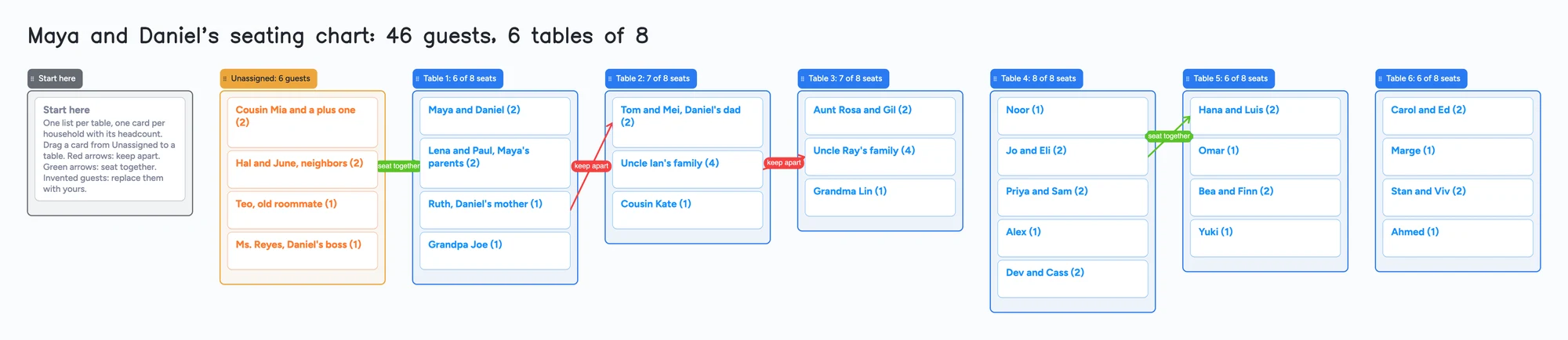
The hard part of a seating chart is rarely the table shapes. It is who sits with whom, and who has to hear about it. This page shows a board built for that part: one list per table, one card per household with its headcount, an Unassigned list, and arrows labelled "keep apart" and "seat together" that stay visible while everyone argues. Both of you, and the parents if you let them, can edit the same board by link. It is not a floor-plan tool. It doesn't draw the room, auto-seat guests, sync with a guest list or print place cards, and dedicated seating tools do all of that better (compared below). The example is an invented couple, Maya and Daniel, with 46 guests at six tables of eight.
Updated
The short answer
- What it is: a list per table, a card per household with its headcount in the title, an Unassigned list and captioned arrows for who stays apart and who sits together. You move a card from list to list as you decide.
- What it isn't: no floor plan, no auto-seating, no guest-list or RSVP sync, no place cards and no print layout. The seat counts in the list titles are typed by you; the app doesn't add them up.
- The example board uses 36 of your 150 free items: 28 cards and 8 lists (our arithmetic). Each card and each list counts; pen strokes, sections and arrows don't.
- A seating chart is where the free limit shows. One card per guest for 130 guests passes 150 on its own, and a second board counts against the same 150 (our arithmetic, below).
- Your partner or parent needs a free sign-in to write. They can open the link and read the board without one.
What this board can't do for a seating chart
- No floor plan. You can't draw tables, a dance floor or the room. The tables are lists, so the board shows who is at a table, not where the table is. A venue or planner usually wants the layout from a dedicated tool.
- No auto-seating and no seat count. Nothing balances the tables or warns you at nine people on an eight-seat table. The "6 of 8 seats" in each list title is typed by you, and so are the headcounts on the cards.
- No guest-list or RSVP sync. You type households in or copy them over. There are no meal choices, no RSVP status and no CSV import or export. Selected cards and lists can be copied as an image.
- No rule checking. A "keep apart" arrow is a reminder everyone can see. It doesn't stop you putting two cards in the same list.
- Check an arrow after you move its card. Arrows between cards in different lists stay attached when cards are reordered inside a list and when a whole list moves. We haven't tested what an arrow does when its card is dragged to another table, so look at it after you move one.
- 150 items on the free plan, across your account. Each card and each list is 1 of the 150. The example board is 28 cards and 8 lists, so 36. A card per guest for 130 guests, 13 tables of ten, an Unassigned list and a Start here list and card comes to 130 + 13 + 1 + 1 + 1 = 146 (our arithmetic), and any other board on your account counts too. A card per household is about half as many. Pro is $5 a month billed yearly ($59.99 a year) and removes the item limit.
- 5 boards and 3 images per board on the free plan. Keep one board for the seating chart. The example board has no images.
How to seat a wedding with both families on one board
Couples on r/weddingplanning describe the same fights every year. One person (March 2022), with divorced and remarried parents on both sides and 200+ guests, kept RSVPs in a colour-coded spreadsheet and asked what software exists. Another (September 2022) wrote that a future mother-in-law was upset that each set of parents sat at its own family's table. A third (March 2025) asked whether to mix both families at the tables. Those are single accounts, not a pattern we measured. What they share is that the chart is a negotiation, and a negotiation needs everyone looking at the same thing.
- One card per household. Put the headcount in the title, as the example does: "Uncle Ray's family (4)". Type the table's total in its list title, such as "Table 3: 7 of 8 seats", and update it when a card moves.
- Start in Unassigned. Everyone you have invited begins in the orange list. Nobody is "left out" until you decide, which keeps the argument about tables and not about who forgot whom.
- Fill the tables you are sure about first. Head table, parents, grandparents. Drag each household's card from Unassigned into a table list.
- Draw the hard rules as arrows. An arrow joins a card in one list to a card in another, and takes a caption and its own colour. On the example board two red "keep apart" arrows and two green "seat together" arrows are the only rules, so anyone opening the board sees them in a second.
- Settle the rest by moving cards. Drag a card to another table, change the two list titles' headcounts and look at your arrows. When Unassigned is empty and no table list is over its seats, the chart is done.
The board shows the argument and its answer in one place. It doesn't tell you how to settle it: whether divorced parents share a table, or whether a plus-one sits with the person they came with, is yours and your families' to decide.
Set up the board with your partner or your parents
- In the share menu, set "Anyone with the link can edit". New boards start view-only.
- Send the link, or the 4-digit join code. The code expires after 2 hours of inactivity, so send the link to anyone you'll need later.
- Each person signs in free (Google, Apple or email) to write. Someone who isn't signed in can open the link and read everything, but can't change anything. Once they're signed in, what they move or add shows up on your board within a few seconds, and you see theirs the same way.
- The board counts as one of their 5 free boards, and cards they add count toward their own 150. If they're already at 5 boards, they can still open the link and write; the board just isn't added to their boards.
- Ask people to edit one card at a time. If two of you type in the same card at once, the two edits merge letter by letter with no lock, so give each person their own cards and keep the headcount in the title.
Free calls on the board run up to 60 minutes per call, with a warning 10 minutes before the end; everyone signs in free, calls aren't recorded, and Pro has no limit. So you can talk through the red arrows with your parents on the board itself. If your guest list is the bigger job, the wedding guest list board is the same idea for who is invited.
Seating tools, side by side
Each row is from the tool's own pages, read on November 11, 2026. Features and prices change, so check the page before you choose.
| Tool | What its page says | Where it beats a shared board | Where a shared board fits |
|---|---|---|---|
| Instaboard | Free: 5 boards, 150 items; Pro $5 a month billed yearly | Nothing in this table: it has no floor plan, auto-seating, guest sync or print | One board your partner and parents all edit by link, with arrows for the hard rules |
| Wedding Studio | Free, "no guest limit or account requirement" for creating and downloading; seat-together and keep-apart rules; auto-seat; PNG, PDF and CSV downloads | Room layouts, auto-seating, rule checking, downloads for your venue and caterer | Its page says "Live shared editing is coming soon", so the chart is yours alone for now |
| WeddingWire | Free seating chart that syncs with its guest list; floor plan; print, email or export | Guest-list sync and a floor plan | Its page shares the chart by print, email or export and names no shared editing |
| SeatPlan.io | Free to design, "no signup required"; floor plans, CSV import, PDF and Excel export; its page says you pay "when you want to save or collaborate" (plan prices not read) | Floor plans, imports, venue exports, a find-your-table sign for guests | Editing together is on its paid plans; a shared board is free to edit together, within 150 items |
| Planning.Wedding | Free plan: seating chart up to 5 tables and 3 rows of chairs; Premium $29 one time per project for unlimited tables and export | Seating next to guest list, RSVPs, budget and a website | Beyond 5 tables the free tool stops; a board's tables are lists with no table cap, only the 150 items |
| Wedibox | A QR code guests scan to find their table; free to start | Guests look up their own seat on the day | Doesn't help you decide who sits where |
Swipe the table sideways to see every column.
Sources are listed at the bottom of the page, all read on November 11, 2026.
When another tool is the better choice
- Your venue or planner needs a floor plan. Use a dedicated tool such as Wedding Studio, WeddingWire or SeatPlan.io, and use this board for the family discussion beforehand if you like.
- You want the computer to seat people. Wedding Studio's page lists auto-seat and seat-together and keep-apart rules. This board only shows your rules.
- Your guest list and RSVPs already live in one app. WeddingWire's seating chart syncs with its own guest list, so you avoid typing households twice.
- You need printed signs, table cards or meal counts. The dedicated tools above export those. A board gives you a picture of selected lists and cards.
- You are happy with a spreadsheet. A sheet sorts and adds up headcounts for you, and this board does neither.
Start from the ready board
It opens in your browser in a few seconds, with nothing to install. Sign in for free when you want to save it and share it.
Questions
Can my partner and my parents edit the seating chart at the same time?
Yes. Set "Anyone with the link can edit" and send the link. Each person signs in free to write, and what they move shows up for the others within a few seconds. Ask people not to type in the same card at once: the edits merge with no lock.
Does the board seat guests for me?
No. It has no auto-seating, seat counts or floor plan. You drag households into table lists yourself, and the arrows are reminders, not rules the app enforces.
Can I mark guests who must not sit together?
Yes. Draw an arrow between the two cards, caption it "keep apart" and make it red. Do the same in green for people who should sit together. Look at an arrow after you move its card to another table.
How many guests fit on the free plan?
The free plan holds 150 items across your account, and each card and each list counts. A card per household uses far fewer than a card per guest; 130 guests as single cards at 13 tables comes to 146 items (our arithmetic). Pro removes the item limit.
Can I export or print the chart?
Selected cards and lists can be copied as an image. On Chrome you can also use Save as image; Safari and Firefox haven't been tested. There is no PDF, CSV or place-card export, so a dedicated seating tool is better for printing.
Is there a free seating chart tool with a floor plan?
Yes. Wedding Studio's page says creating and downloading is free with no guest limit, WeddingWire says its seating chart tool is free, and SeatPlan.io says no signup is required to design (saving and collaborating are paid). Check each page for what its free plan includes.
Sources
- r/weddingplanning: 200+ guests, divorced parents, which software? (Mar 2022, one person's account)
- r/weddingplanning: separate family tables and a parent's reaction (Sep 2022, one person's account)
- r/weddingplanning: mixing both families at tables? (Mar 2025, one person's question)
- Wedding Studio: free wedding seating chart maker (free, no guest limit or account; rules, auto-seat, exports; "Live shared editing is coming soon"; read Nov 11, 2026)
- WeddingWire: Wedding Seating Chart (free, syncs with Guest List, floor plan, print/email/export; read Nov 11, 2026)
- SeatPlan.io: seating chart maker (no signup to design; pay "when you want to save or collaborate"; floor plans, CSV import, PDF and Excel export; read Nov 11, 2026)
- Planning.Wedding: pricing (free seating chart up to 5 tables and 3 rows of chairs; Premium $29 per project; read Nov 11, 2026)
- Wedibox: QR code seating chart (guests search their name; free to start; read Nov 11, 2026)
Related
A wedding guest list board for your names and both sets of parents' names
Wedding guest list tracker on one shared board: your list and each parent's, A/B tiers, headcount vs venue. A Google Sheets template alternative.
A wedding planning board you and your partner can actually share
A free, ready-made wedding planning board: the basics, a month-by-month checklist, vendors with deposits and balances, and a day-of timeline. Plan together with your partner in real time.
A wedding vendor comparison board you and your family can all see
Compare wedding venue and vendor quotes on one shared board: a list per vendor type, a card per quote, decide-by dates. A filled example to copy. Not a spreadsheet.