For online tutors
A tutoring session notes template, filled in so you can see how it reads
Good session notes are short. They answer a few questions after each lesson so you know where to start next time and a parent can see what happened. Most templates give you empty boxes; this one comes filled in for an invented student, so you can see what a useful line looks like. Copy the fields below, or open the board, replace the example with your student, and send it as one link.
Updated
The short answer
- Write five things after every session: the outcome, what went wrong and why, the evidence, the next task, and a short parent note.
- Keep it to a few minutes. A note is not a diary. Write what changes the next lesson.
- Use one board per student. Add a dated note after each lesson, so the history sits in one place and you can send the link to a parent.
- Free boards open by link, so use first names only. Invite-only boards are on Pro. Pen notes don't count toward the 150-item free limit; cards do.
Before the lesson: a short plan on the same board
Searches for a "tutoring lesson plan template" want the opposite end of the lesson from a session note. The note records what happened. A plan decides what will happen, and it only needs to fit on the board you will teach from. The Stanford National Student Support Accelerator's example session structure (nssa.stanford.edu, read November 2, 2026) gives a pattern most plans follow, from a warm-up to a short check at the end:
| Part of the lesson | What Stanford's example says | A line on the board |
|---|---|---|
| Opening | Build the relationship: a check-in about the student's day or week. | Check-in question |
| Follow-up | Return to the previous session with an "entrance ticket" on a skill from before or one needed today. | Last time's next task, as one problem |
| Objective | State today's learning objective aloud and keep a written version on display. | Today's objective, written at the top |
| Model | Model the step-by-step process the student will use, with your thinking visible. | One worked example |
| Practice | Plenty of time for independent practice; if the student is stuck, ask guiding questions, don't give the answer. | The student's problems, with room to write |
| Check | A short formative assessment on what was modeled and practiced, such as an exit ticket. | A final question, then the next task |
Swipe the table sideways to see every column.
Left and middle columns summarise Stanford NSSA, "Example Tutoring Session Structure" (read November 2, 2026); the right column is our suggestion for putting each part on a board. Stanford's page is written for tutoring programs, so adapt it to one student.
Put the plan at the top of the student's board before the lesson, write the objective in one sentence, and fill in the last line only as the lesson ends. Then the plan and the note are the same board: the plan is above, the note is below, and next week's plan starts from the "next task" you wrote.
- Open last week's note and read the next task.
- Write today's objective at the top of the board, in one sentence the student could say back.
- Choose one worked example and two or three practice problems. Put them on the board or paste a photo of the worksheet.
- Write the closing question that checks the objective.
- After the lesson, fill in the five fields below and leave the plan where it is.
This is a plan for one student, not a lesson-plan generator and not a curriculum. Instaboard has no AI that writes lessons and no lesson library, so the content comes from you. For setting up the call, the pen and the worksheet, see online tutoring setup and how to teach math online.
The five things worth writing down
Tutoring guides that publish session-note templates agree on a short list. SubSchool's guide (July 2026) says a useful note answers five questions, and practice.org's tutor blog builds its notes around six, starting with the intended outcome. Our template keeps the five:
| Field | What to write | Why it helps |
|---|---|---|
| Outcome | What the student worked towards, as something they can do, not the pages you covered. | Ties the lesson to a purpose you can check next time. |
| What went wrong | The idea behind the mistake, not just the wrong answer. | Lets you fix the cause instead of reteaching everything. |
| Evidence | What they did on their own and where they needed help. | Separates what you saw from how you feel it went. |
| Next task | One small thing to do next time. | Gives the next lesson a start. |
| Parent note | Two or three plain sentences. | Shows the family what happened without a long report. |
Swipe the table sideways to see every column.
Fields from SubSchool, "Tutoring Session Notes Template: What to Record" (July 26, 2026) and practice.org's tutor blog on session notes; read November 2, 2026. The wording in the right-hand columns is ours.
What a filled note looks like
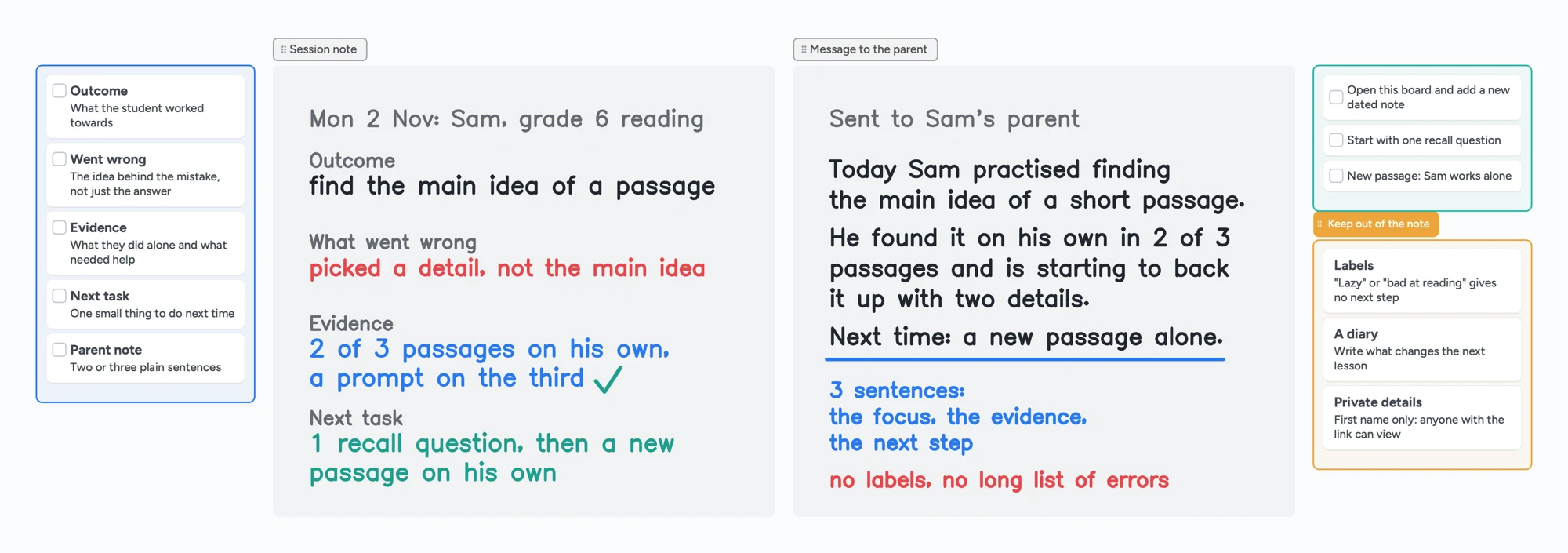
Here is the note on the board above, written out. Sam is invented: a grade 6 reading student working on the main idea of a passage.
| Field | Sam's note |
|---|---|
| Outcome | Find the main idea of a passage. |
| What went wrong | Picked a detail, not the main idea. |
| Evidence | Found it alone in 2 of 3 passages; needed a prompt on the third. |
| Next task | One recall question, then a new passage on his own. |
| Parent note | Today Sam practised finding the main idea of a short passage. He found it on his own in 2 of 3 passages and is starting to back it up with two details. Next time: a new passage alone. |
Two habits make this useful. The mistake line names the idea ("picked a detail"), not a verdict ("weak at reading"). The evidence line says how much help was needed, so next week you can see whether it dropped.
The note for a parent
A parent note is not the full note. SubSchool's guide suggests a brief update on the focus, what the learner showed and the next step, in plain words and without a list of errors. Three sentences do it:
- The focus: what you practised.
- The evidence: what the student showed, with a number if you have one.
- The next step: what happens next lesson.
You can paste those sentences into a message, or send the board link and let the parent read the note there. Anyone with the link can view the board without an account.
What to leave out of a note
- Labels such as "lazy" or "bad at reading". They give you no next step and can shape how you teach the student later.
- A minute-by-minute diary. Write what changes the next lesson.
- Private details. Use a first name only. Free boards are opened by a link, and anyone who has the link can view; invite-only boards are on Pro.
SubSchool's guide also tells tutors to collect only notes that serve teaching or a real business need and to handle student information carefully. How long you keep notes and what you may store depends on your country, school or agency, so check those rules yourself.
Use the board as your notes in five steps
- Open the notes board above and make it yours.
- Rename it for one student and replace Sam's note with a real one after your lesson. Use a first name only.
- Add each lesson as a new dated note below the last one, so the history stays in one place.
- Copy the parent note into a message, or send the board link.
- Open the same board at the next lesson and start from the next task you wrote.
If you already teach on a board, put the notes on the lesson board itself so the lesson and its note live together. A tutoring whiteboard guide and how to teach math online show how a lesson board is laid out. Once a month, a parent usually wants more than one lesson's note: see our tutoring progress report template for the monthly version.
Track what's covered across lessons
A session note records one lesson. Tutors also ask a second question: how do I remember what we have covered over months? When a tutor asked this on r/iTalki in July 2026, the replies showed several habits, and none was the same. These are individual tutors' and students' practices, not a standard.
- One document per student. One tutor keeps a Google Doc per student with notes, feedback, homework and a plan for next class, and starts a new one at about 100 pages. They say students rarely open it, but it is valuable when they do.
- A private notebook. Another tutor keeps a private OneNote with a couple of lines after each lesson: what they did, what the student struggled with, what is next. It is not shared.
- A new tab per lesson. One student described a tutor who uses a Google Doc with a tab for each lesson and a sub-tab for homework, which the student looks back at.
- A tracker plus a labelled whiteboard. One tutor keeps a class tracker spreadsheet and an ongoing whiteboard with each lesson labelled.
The same need showed up on r/Preply in July 2026, where a tutor asked for a private "plan for next lesson" field. Replies named spreadsheets, Google Docs or Sheets, Notion, Airtable and paper notebooks. One reply said the platform has a private notes section for tutors; another said the notes section inside the classroom was no use to them. We have not checked what either platform offers today.
On Instaboard, the last habit in the list is the one that fits. Keep one ongoing board per student and add a labelled block for each lesson:
- Label each block with the date and the topic, for example "Nov 2: main idea".
- Put the five fields inside the block, and the next task last.
- Add the next lesson to the right or below, so the board reads like a timeline of lessons.
- Before the lesson, read only the last block. Read earlier ones when you want to see a repeated mistake.
- Write the next task before the call ends, while the student is still there. One tutor in the r/iTalki thread posts a short "next time" hook in the lesson chat, such as "next time: asking for directions".
What a board does not do: you cannot search across students or across old lessons, there is no spreadsheet view or chart, and after many lessons the board is long to scroll. A free account has 5 boards, so one board per student suits a handful of students. Some tutors on those threads use a spreadsheet for the cross-student view and keep the lesson detail somewhere else; that is a sensible split.
When another format is the better choice
- You have many students and want to search or sort across them. A spreadsheet or tutoring log is better than one board per student. Instaboard's free plan has 5 boards.
- You want reports sent automatically. Tutoring management software such as Tutorbase describes templates and automated report delivery for tutoring centers. Instaboard sends nothing for you.
- You keep notes only for yourself. A plain document or a phone note is quicker to write.
- A school or funder requires a specific form or records system. Use theirs.
Instaboard fits when you already teach on a board, you have a handful of students, and you want one link with the lesson, the note and the next task.
What Instaboard doesn't do for notes
- No progress tracking. It won't chart scores or compare lessons. The note is manual.
- No reminders, scheduling or automatic parent emails.
- No recording of the lesson, and no AI summaries.
- Free covers 5 boards. One board per student fits five students; each imported PDF uses one of the five. Cards and lists count toward 150 items across your account, while pen strokes don't. Pro lifts the limits.
- Students and parents sign in only to write. Anyone with the link can view; writing needs a free sign-in.
- Free boards are shared by link. Invite-only boards are on Pro.
Start from the ready board
It opens in your browser in a few seconds, with nothing to install. Sign in for free when you want to save it and share it.
Questions
What should I include in tutoring session notes?
Five things: the outcome, what went wrong and why, the evidence of what the student did alone, the next task, and a short parent note. Skip labels and a minute-by-minute diary.
How long should a session note be?
A few lines. If it takes more than a few minutes to write, it has become a diary. Write only what changes the next lesson.
How do I write a note for a parent?
Use three sentences: what you practised, what the student showed (a number helps), and what happens next lesson. Leave out labels and a list of every error.
Can I share the notes with a parent as a link?
Yes. Anyone with the board link can view it without an account. Free boards are shared by link, so use a first name only; invite-only boards are on Pro.
Does Instaboard track student progress?
No. The note is written by hand on the board. There are no charts, scores or automatic reports. A spreadsheet or tutoring management software is better if you need those.
Is Instaboard free?
Yes. The free plan includes 5 boards, 150 cards and items across your account (pen strokes, arrows and sections don't count), 3 images and 1 file per board, unlimited collaborators and video calls up to an hour. Pro is $5 a month billed yearly ($59.99 a year), or $7.99 monthly, and the people you invite join free.
Sources
- SubSchool: Tutoring Session Notes Template: What to Record (July 26, 2026)
- practice.org: Tutoring Session Notes, the simple tool every tutor needs
- Tutorbase: Progress Report Template for Tutoring (December 27, 2025)
- Reddit r/iTalki: how do you track what has been covered across lessons? (July 5, 2026; read November 2, 2026)
- Reddit r/Preply: tutors asking for a private plan-for-next-lesson field (July 24, 2026; read November 2, 2026)
- Stanford National Student Support Accelerator: Example Tutoring Session Structure (read November 2, 2026)
Related
A tutoring progress report template for parents, filled in so you can see how it reads
A monthly tutoring progress report for a parent: sessions held, one number that moved, a win, what is still hard and next month's plan. A filled example board you can send as one link.
An online whiteboard for tutoring that works the way you teach
A free whiteboard for online tutoring: paste the worksheet, write with a pen, and your student answers on the same board. Call on it or beside Zoom.
How to teach math online: your first lesson, step by step
How to tutor math online as a beginner: what you need, how to run a first lesson on a board your student writes on too, with Zoom, Google Meet or no video app at all, and what to do without a whiteboard.
An online whiteboard for math: write, graph and let your student write too
What a math tutor needs from an online whiteboard: handwriting, typed equations, graphs and worksheets, and which tools have each. Free limits compared, plus a ready slope lesson board.
A Pencil Spaces alternative for tutors who want a flat price
Pencil Spaces moved to per-hour plans on September 1, 2026: $0.40, $1 or $5 an hour plus a monthly minimum. What each costs at 10, 20 and 40 hours, where Pencil Spaces is better, and a flat-price board.
How to teach chemistry online on a whiteboard: a mole-ratio lesson, step by step
How a chemistry tutor can teach on an online whiteboard: a mole-ratio lesson step by step, what to write by hand, and when a structure editor like Molbrett is the better tool. Ready lesson board included.
How to teach writing online on a whiteboard: a body-paragraph lesson, step by step
How a writing tutor can run an online lesson on a shared board: a body-paragraph lesson step by step, the student writing the next sentence, and when a shared document is the better tool. Ready lesson board included.
OneNote for online tutoring: how to share it with a student, and when a board is simpler
How tutors share a OneNote notebook with a student, what Microsoft says about links and permissions, where OneNote is the better tool, and a one-link alternative when the student needs to write on the same page.