For couples sharing a guest list with parents
A wedding guest list board for your names and both sets of parents' names
This is a guest list tracker for the argument, not for the paperwork: your list and each set of parents' list side by side, one card per household with a headcount and an A, B or C tier, and the venue's seat count next to the totals. It has no RSVPs, no address collection, no seating chart, no wedding website and no guest-list export. Zola and The Knot are free and do all of that, so use one of them for it.
Updated
The short answer
- What it is: one board with your list and each parent's list, one card per household (not per guest), each card showing a headcount and a tier.
- What it isn't: no RSVPs, addresses, meal choices, seating chart, website or guest-list export. Zola and The Knot are free and win on all of those.
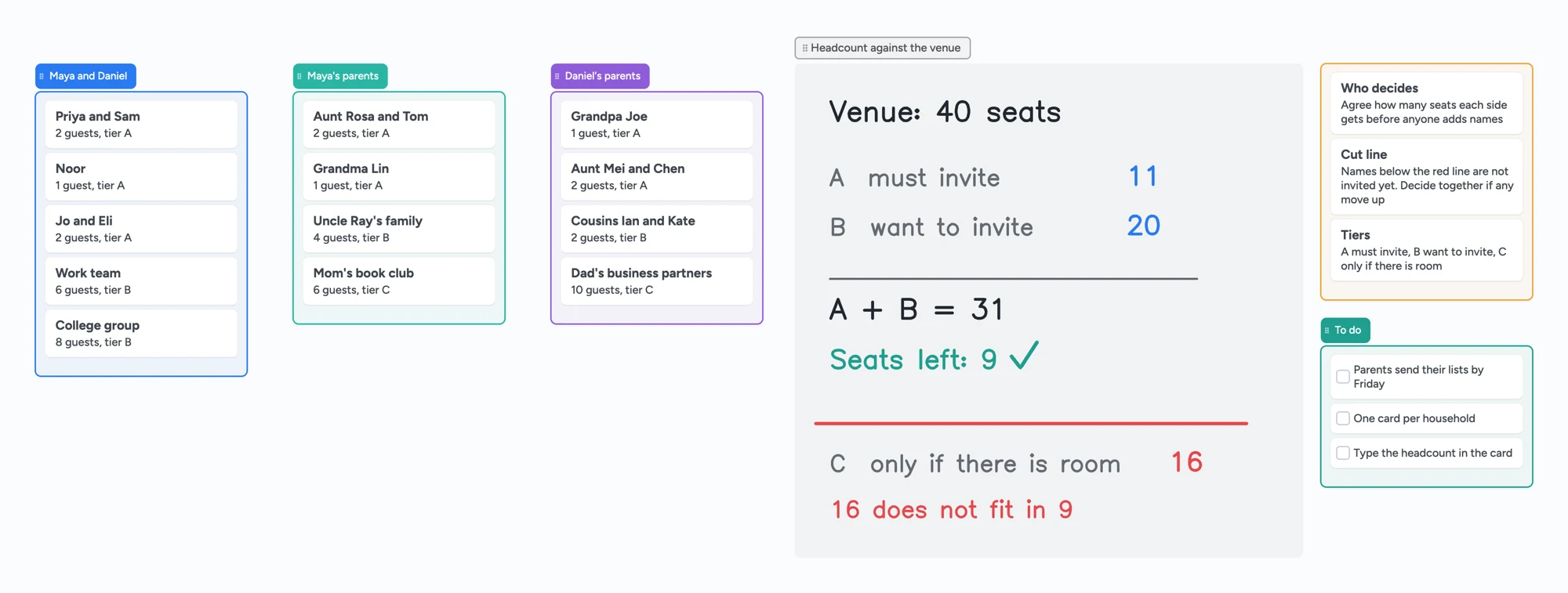
- Totals are typed by hand. The app doesn't add up the cards, so you write the A, B and C totals and the seats left yourself. On the example board that is 47 guests in 13 households (our arithmetic).
- Everyone who writes needs a free sign-in. Anyone with the link can view the board without one. The cards a parent adds count toward their own 150 free items, not yours.
What this guest list tracker doesn't do, and where Zola and The Knot win
Read on November 6, 2026 from each company's own page. Zola's guest list tool offers a Contact Collector for guest details, RSVP tracking with plus-ones and meal choices, free guest addressing, a seating chart builder and group messaging, and lets you download the invited guests as a spreadsheet. The Knot's guest list tool is free too, imports spreadsheet templates, collects addresses, tracks RSVPs and meal choices, exports guests' responses for your vendors and lets you message guests.
Instaboard does none of that. It's one shared board where you decide who is on the list and how many seats each side gets. When the list is settled, move it into Zola, The Knot or a spreadsheet and send the invitations from there.
Both options can be shared with parents
Zola lets you mark each guest as bride's or groom's side and filter by "Definitely" and "Maybe". The Knot's guest list page says you manage guest information in real time and export responses to send to vendors. A board covers the case where each set of parents wants to see and edit their own list next to yours.
A wedding guest list tracker both sets of parents can edit
- Set the rules first. Open the board and write the venue's seat count on the right. Agree how many seats each side gets before anyone adds names, and who makes the last call.
- Give each side its own list. Yours, one set of parents, the other set. Each person adds households to their own list.
- One card per household. "Aunt Mei and Chen", not two cards. Put the headcount and a tier in the card, like "2 guests, tier A".
- Type the totals. Add up the A cards, the B cards and the C cards yourselves, write them in the headcount panel, then subtract A plus B from the seats. Check the sum twice: the board won't.
- Draw the cut line. Names below the red line aren't invited yet. Move a card up only when you decide together.
- Share it. In the share menu set "Anyone with the link can edit" first, because new boards start view-only. Then send the link or the 4-digit join code. The code expires after 2 hours of inactivity, so send the link to anyone you'll need later.
Wedding guest list template or Google Sheets: how the options compare
A spreadsheet is the usual guest list tracker, and a good one wins on sorting and formulas. Bliss & Bone's free template (April 2026 on its page, read November 6, 2026) has 14 columns, a household column, a List column for A or B, an envelope name and event columns, with one row per person. It also advises that both sets of parents write their lists independently and then merge them.
| Tool | Cost | Each person's view | Best for |
|---|---|---|---|
| Instaboard board | Free; Pro $5/mo billed yearly | Everyone with the link sees the same cards; writing needs a free sign-in | Seeing three lists side by side and cutting to fit the seats |
| Google Sheets template (Bliss & Bone) | Free template | One sheet, one row per person | Sorting, filters, column per event, envelope names |
| Zola guest list | Free | Bride's and groom's side tags; "Definitely" and "Maybe" filters | RSVPs, addresses, meals, seating chart, messaging |
| The Knot guest list | Free | Manage guest information in real time (its own words) | RSVPs, address collection, vendor export, website RSVP |
Swipe the table sideways to see every column.
From each tool's own pages, read November 6, 2026. The headcounts on an Instaboard board are typed by hand; a spreadsheet adds them up for you.
A list and B list: two ways to show them on the board
People disagree about whether a B list is fine. In one r/weddingplanning thread (2024), one person's view was that an A and B list is normal and another's that it's rude; the board takes no side. Two ways to show it:
- Tiers on every card. Keep one list per side and write A, B or C in each card, as the example board does. The cut line sits under the last household that fits.
- Separate lists per tier. Make an A list and a B list and move cards between them. It's easier to see what is invited now and what is waiting.
If you do send invitations in two rounds, Bliss & Bone's advice is to send the A list first and leave a long enough gap that B-list guests don't learn they were the B list. Wedding planners quoted on its page estimate that 20 to 30 percent of invited guests decline, which is why some couples invite past their seat count. That's the planners' estimate, not ours, and your venue's rules come first.
When the parents' lists don't fit the venue
This is the problem the board is built around, and it's common. One person in r/weddingplanning (April 2026) described the fiancé's parents sending a list of about 75 names for a 100-person wedding. Another (2024) had 250 names against a capacity of 208. These are single reports, not statistics.
The top replies in the 2026 thread suggested giving each side a fixed number of seats, which is what the "who decides" card on the board is for: write the number down before the lists grow, then let each side cut its own list to fit. That's one person's advice; a venue deposit or a family tradition may point somewhere else.
On the example board, A plus B comes to 31 guests against 40 seats, leaving 9. The C tier adds 16, which doesn't fit in 9, so the red line shows those households as not invited yet. Change the seat count and the tiers to match your own numbers.
Limits of the free plan for a guest list
- Households, not guests. The example board has 13 household cards for 47 guests. Each card and each list is 1 of your 150 items (in our November 7, 2026 web test, a board of 5 lists and 21 cards showed 26); pen strokes, sections and arrows don't count. One card per guest would use them up far sooner. The cards a parent adds count toward their own 150, not yours.
- Boards. The free plan includes 5 boards, and each person who joins by link or 4-digit code and writes on it uses one of their own 5. Someone already at 5 boards can still open and write on your link; it just isn't added to their boards.
- Photos. The free plan allows 3 images per board. The guest list board has none: use names and numbers.
- Writing needs a free sign-in for parents, partners and anyone else who edits. They can open the link and look without one.
- Nothing adds up for you. No guest counter, no RSVP status, no seating chart.
Start from the ready board
It opens in your browser in a few seconds, with nothing to install. Sign in for free when you want to save it and share it.
Questions
Is there a free wedding guest list tracker I can share with my parents?
Yes. Open the board, change the example names to yours and share the link with "Anyone with the link can edit" turned on. Parents and your partner sign in free to write; anyone can look without signing in. If you need RSVPs, addresses or a seating chart, Zola and The Knot's guest lists are free and do that.
Is this a Google Sheets guest list template?
No. It's a board of cards, one per household, not a spreadsheet. A sheet is better for sorting, filters and adding up totals. The board is better for seeing your list and each parent's list side by side. The headcounts on the board are typed by hand.
Does the board count my guests for me?
No. Each card holds a headcount you type, and the totals on the board are numbers you write and check yourselves. The example board adds up to 47 guests across 13 households, which we checked by hand.
Can I use it to send invitations or collect RSVPs?
No. Instaboard has no RSVPs, address collection, meal choices, seating chart, website or guest-list export. Use Zola or The Knot for those and keep the board for deciding who is on the list.
Should I have an A list and a B list?
Couples disagree. The board shows tiers either way and takes no side. If you do invite in rounds, Bliss & Bone suggests sending the A list first and leaving a long gap before the B list. Check what your venue and family expect.
Sources
- Zola: wedding guest list tool (read November 6, 2026)
- The Knot: wedding guest list manager (read November 6, 2026)
- Bliss & Bone: wedding guest list template (April 2026, read November 6, 2026)
- r/weddingplanning: a fiancé's parents' list of about 75 for a 100-person wedding (April 2026, one person's account)
- r/weddingplanning: 250 names against 208 capacity and the A/B list debate (June 2024, one person's account)
Related
A wedding planning board you and your partner can actually share
A free, ready-made wedding planning board: the basics, a month-by-month checklist, vendors with deposits and balances, and a day-of timeline. Plan together with your partner in real time.
A Notion alternative for planning with other people
Notion is unlimited for one person, but a free workspace with 2 or more members gets 1,000 blocks in total. An honest comparison and a visual, shared alternative with drawing and calls.
A Trello alternative for families, classes and groups bigger than 10
Trello's free plan stops at 10 collaborators per Workspace, and boards go view-only past it. An honest comparison, plus a free alternative with unlimited collaborators, drawing and calls.