For a level designer and a builder planning the levels of a small game
A level design planner: beats per level, not a design document
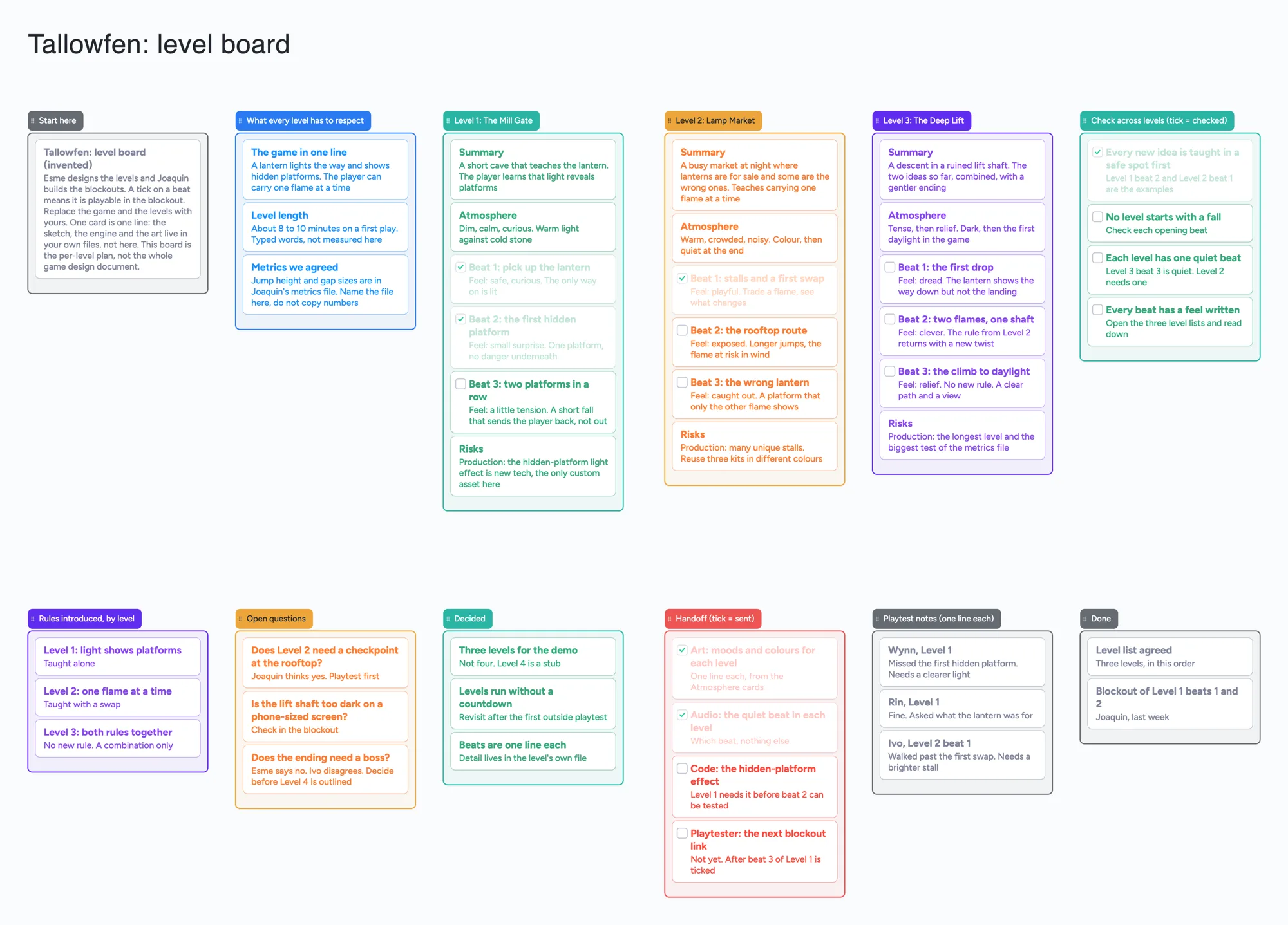
We make Instaboard, an online board. This one plans levels, one list per level: a summary, the atmosphere, three beats with the feeling each should give, and the production risks, with a tick box on each beat for "playable in the blockout". Around the levels sit what every level has to respect, a check across levels, the rule each level teaches, open questions, decisions, a handoff list and playtest notes. It is filled in for an invented puzzle-platformer, Tallowfen, planned by Esme with her builder Joaquin. It is not a level editor, holds no sketches, engine files or metrics, and does not replace a level design document when a team needs one; it is the page you can see all the levels on at once. A document, a slide deck or a notes app does more of the detail, and we say where below.
Opens in your browser. Anyone can view; a free sign-in lets you edit.
Updated
What this board does and doesn't do
- It plans levels in short lines, one list per level. Summary, atmosphere, beats and risks, each a card. Sketches, engine files and art live in your own files and the card names the file.
- It is not a level design document. A team that needs one, with a top-down layout and metrics, still writes it. The board is the overview of every level on one screen.
- No top-down map, no metrics, no engine. Free boards take 3 pictures each. Jump heights and gap sizes belong in a metrics file; the example board only names it.
- A tick means what you say it means. In the example a tick on a beat is "playable in the blockout". The board does not check that.
- Free plan limits: 5 boards, 150 items across your account and 3 pictures per board. A copy of this board takes 1 of your 5. Pro removes the 3-picture limit and the item limit.
- Everyone with edit access can tick or untick any card. Agree who ticks which.
When a level design document or a slide deck is the better pick
A level design document (an LDD) holds the layout, the intent and the details for building one level, and a board does not. In r/leveldesign, "Level design document" (u/Chosenvax, June 21, 2020), u/JacobWMills described an LDD as "A document that shows the plan for the level", including "rough top down maps but also descriptions of intended mood, key set pieces, unique gameplay, etc.", and added that LDDs "shouldn't be treated as a rigid, firm guidebook". u/MarsTW wrote that they prefer "presenting LDDs in a powerpoint style format for readability". If you need a top-down layout, a presentation to a team or a document that artists and coders can estimate from, write that. A Call of Duty modding wiki page (it carries a note signed February 22, 2011) links several full LDDs by one designer as downloads, which we did not open. Use a board next to them, not instead: one place where two people see every level's beats, what is playable and what is waiting.
Tallowfen, list by list
The game is invented: a puzzle-platformer where a lantern lights the way and shows hidden platforms, and the player can carry one flame at a time. Esme designs the levels; Joaquin builds the blockouts. The lists are our layout, not a rule.
| List | What goes in it | In Tallowfen |
|---|---|---|
| Start here (grey) | What the board is and isn't | One card |
| What every level has to respect (blue) | The game in one line, how long a level runs, the file with the metrics | 3 cards |
| Level 1, 2, 3 (green, orange, purple) | Summary, atmosphere, three beats with the feeling each, risks | 6 cards each; the 3 beats are tick boxes |
| Check across levels (green) | Questions to ask of the whole set | 4 tick-box cards, one ticked |
| Rules introduced, by level (purple) | Which idea each level teaches | 3 cards |
| Open questions (orange) | What isn't decided, and who is looking into it | 3 cards |
| Decided (green) | What is settled, so it isn't reopened | 3 cards |
| Handoff (red) | What art, audio, code and playtesters have been told | 4 tick-box cards, two ticked |
| Playtest notes (grey) | One line per tester and per level | 3 cards |
| Done (grey) | Finished jobs, moved out of the levels | 2 cards |
Swipe the table sideways to see every column.
The board's own wording. Times and counts are typed text; nothing sends a reminder or due-date alert.
Why each level list reads Summary, Atmosphere, Beats, Risks
The shape comes from one commenter's answer. In r/gamedesign, "Any level design document templates that might be worth taking a look?" (u/Corkinius, March 5, 2023), u/SalamanderOk6944 wrote "Make your own template. These things don't really exist, and anything you find will probably need to be updated to fit your theme," and gave a short layout: Summary ("1 or 2 lines that describes the level, the environment, the narrative, the emotional state, and any important beats for the player"), Beats ("What are the events?"), Top-Down ("Sketch of the layout and events") and Other ("Risks, highlights, images, etc."). It is one person's view. We kept Summary, Beats and Risks, added an Atmosphere card, and left out Top-Down, because a sketch is a picture and a board is not the place to keep it.
- Atmosphere and feel. u/mjens, in the same thread, wrote "It's good to establish what global emotion you want to achieve with the level and also what are the emotions beat by beat." That is the reason each beat card carries a "Feel:" line.
- Risks. The same commenter said "Risks" is "more about production risks, not player risks", such as too many custom assets for one level or a huge level size. The example cards say so: "Production: the hidden-platform light effect is new tech".
- Short on purpose. u/SalamanderOk6944 also wrote that the point of documents is "to get enough information down to ensure the idea has been thought about a bit and that all the bases are covered." One line a card keeps the board short enough to read in one look.
- Other sections people list. u/napstar_ named Overview, enemies and obstacles, audio, level layout, interactive items, objectives and narrative. A board holds the one-line version of any of these; the detail goes in a file.
One thing a board does well: the order rules are taught in
With every level on one screen, the order ideas appear in is easy to see. Tallowfen's "Rules introduced, by level" list has three cards: light shows platforms (Level 1, taught alone), one flame at a time (Level 2, taught with a swap), both rules together (Level 3, no new rule). Two of the four checks follow from it: every new idea is taught in a safe spot first, and no level starts with a fall.
- Write each level's new rule on the "Rules introduced" list as you plan the level.
- Put the safe first use in a beat. In Level 1, beat 2 is the first hidden platform, with "no danger underneath".
- Tick the "taught in a safe spot first" check only after you have looked at each new rule's first beat.
- If a level adds a second new rule, the board does not warn you. You see it as a card in the list; the call is yours.
The checks are questions for people, not tests. The board cannot tell you a beat is fun or a jump is fair.
Handoff and playtest notes: a line, not a report
Two lists connect the levels to other people. "Handoff" has one tick box per job: art gets the moods and colours (from the Atmosphere cards), audio gets which beat is quiet, code gets the hidden-platform effect that Level 1 needs before beat 2 can be tested, and a playtester gets the next blockout. "Playtest notes" holds one line per tester and per level, such as "Wynn, Level 1: missed the first hidden platform, needs a clearer light". Names are first names only.
- The board sends nothing. A tick on "sent" means someone sent it; the board tells no one.
- Playtests get recorded elsewhere. Video, heatmaps and logs belong in your tools; the board holds the one line you act on.
- Move a note into a beat. When a note changes a level, edit the beat or risk card and delete the note.
Where other tools do this better
Read November 24, 2026. Check each page before you rely on it, since prices and features move. We rank none of these; each suits a different kind of team. The second column is what a page or commenter says; the last two columns are our view. Nothing is from using the tool, and Instaboard isn't affiliated with any of them.
| Tool | What its page or commenter says | Our view: better than a board at | Our view: where a board fits |
|---|---|---|---|
| Notion template "Game Design Document: Level Design" by Beni | The page shows "Purchase template for $9.00" and "Last updated last year". We did not open the template | A database of levels with linked pages | A visual overview of every level with no setup; no database or linked pages |
| Level design documents as downloads | A Call of Duty modding wiki page (a note on it is signed February 22, 2011) lists example documents by one designer for download. We did not open them | Layouts, scripting flowcharts and long written intent | A one-screen summary of levels, beats and who is waiting |
| A slide deck | Named by u/MarsTW in the r/leveldesign thread read above | Presenting a level to a team and getting buy-in | Planning in the open with a co-designer, before it is a deck |
| A spreadsheet or a notes app | Not read for this page | Many rows, sorting, search | No columns to maintain |
| Your engine or level editor | Not read for this page | The level itself, metrics, tests | Writing down the plan and who is waiting |
Swipe the table sideways to see every column.
From the Notion Marketplace page, the wiki page and the threads named in Sources, as read November 24, 2026.
What a board can't do for level design
- Hold the level's geometry. A pen sketch is free ink with no snapping or measurements, and there is no blockout or metrics; keep the layout in your own files. Free boards take 3 pictures each.
- Check that a beat works. A tick is a person's word, not a test.
- Run or measure playtests. It holds your one line, not video, heatmaps or logs.
- Remind or alert. No reminders or due-date alerts, no notice when a card is ticked.
- Record who ticked a box, or when. Anyone with edit access can untick any card.
- Keep your game private. Anyone with the link can read the board. Pro has invite-only boards.
Free-plan numbers that matter for level planning
- Items. The 150 free items are spent on cards and lists, across all your boards at once. Tallowfen spends 57; arrows, sections and pen strokes cost nothing.
- Boards. Five on the free plan. A copy of this board is one of them, and a board you are invited to also counts.
- Pictures. Three on a board. Tallowfen carries none, so you can keep all three for a screenshot or two.
- Editing. A shared link lets anyone read. Your co-designer signs in free to add, move or tick a card.
- Unreleased work. Whoever holds the link can read everything on it, so leave out unreleased art, contracts and anything you would not hand a stranger.
Does it fit in 150 items?
Each card and each list is 1 of your 150 free items, across all your boards. The title text box counts too. Arrows, sections and pen strokes don't. Our arithmetic:
- As built: 12 lists + 44 cards + the title = 57.
- Each added level in the same layout is a list and six cards (7 items), plus one card on "Rules introduced": 8. Eleven more levels is 145, which is 14 levels in all; a twelfth passes 150.
- Playtest notes grow too. Each note is one card, so a long playtest cycle on a long game passes 150 sooner; delete notes once they are in a beat or risk.
- One board per game: a second game on its own board is another 57, so 114; a third is 171, which passes the limit.
- Other boards share the 150. A co-designer who adds cards counts them toward their own 150.
Pro ($5 a month billed yearly, $59.99 a year, or $7.99 monthly) removes the item limit.
Set up your own, in order
- Write the game in one line and the file where metrics live, on the shared-rules list.
- Make one list per level. Start each with Summary, Atmosphere, a few beats with a feel, and Risks.
- Write what each level teaches on "Rules introduced" and run the checks across levels.
- Agree what a tick means, and say it on the Start here card.
- Share the link. New boards start view-only; to let your co-designer write, tick "Anyone who joins can edit" in Share, and each person signs in free to write.
- Agree who ticks which boxes, since anyone with edit access can tick or untick any of them.
- Keep first names only, and nothing you would not want a stranger to read.
Start from the ready board
It opens in your browser in a few seconds, with nothing to install. Sign in for free when you want to save it and share it.
Questions
Is this a replacement for a level design document?
No. A level design document holds the layout and the detail for building one level. This board is the one-screen overview of every level: a summary, an atmosphere, short beats with a feel, and risks, plus checks and handoff.
Can I put a top-down map on it?
A rough pen sketch works, but it is free ink with no snapping or measurements, and the free plan holds 3 pictures per board. Keep the real layout in your own files and write the file name on the card.
What does a tick on a beat mean?
Whatever your team says it means. In the example it is "playable in the blockout". The board does not check it, and anyone with edit access can untick it.
How many levels fit on the free plan?
150 items across your account, where each card and each list is one item. The example is 57, and each added level in the same layout is 8, so a twelfth added level passes 150 by our arithmetic. Your other boards share the same 150.
Do the cards remind my team when a beat is waiting?
No. There are no reminders, due-date alerts or notifications. A card in the handoff list says who is waiting; telling them is a message you send yourself.
Is this game design advice?
No. The levels, beats and rules are invented to show the layout. The structure comes from two Reddit commenters named on this page, each one person's view.
Sources
- r/gamedesign: "Any level design document templates that might be worth taking a look?" by u/Corkinius (posted 2023-03-05; post and comments read November 24, 2026)
- r/leveldesign: "Level design document" by u/Chosenvax (posted 2020-06-21; post and comments read November 24, 2026)
- COD Modding & Mapping Wiki: Level Design: Level Design Document Example (a note on the page is signed 22 February 2011; links not opened; read November 24, 2026)
- Notion Marketplace: Game Design Document: Level Design by Beni (page shows "Last updated last year"; read November 24, 2026)